Author: way0utwest

  • Fragmented or Centralized Data

    I read a piece recently that talks about the hassles of copying data multiple times for different applications. In my experience, I haven’t seen this to be the main problem with data. It’s not often that we might replicate, in a general sense, data across different data stores to support different applications. Certainly lots of ETL jobs exist to copy data to new stores for different purposes, which perhaps is what the author is implying.

    The idea of protecting data is one that is becoming a greater concern for many organizations. In fact, I’d argue that a number of the recent high profile data breaches in the last couple years involve copying data from some RDBMS store to an ElasticSearch server that isn’t secure. Any movement of sensitive data, whether to warehouse or Power BI report, should be in a secure way.

    For years we’ve had minor issues with data security in Excel worksheets; a similar problem continues to exist with both data stores and reporting tools that might contain copies of data. In some sense, this is actually no different than the problems of losing paper reports in the distant past.

    The solution given in the article is to share data from a single store among more applications. That’s been the practice in many places I’ve worked, with the challenges of additional load and performance concerns on the data store. Modern distributed SQL Servers can use AGs or (after SQL Server 2017), Kubernetes, to scale out and potentially handle the loads, but those choices aren’t without their own resource costs and challenges.

    Ultimately, we aren’t going to get away from moving data around. Certainly we have needs to deal with dev/test environments even if we don’t have any other data movement. While I do think the future of large data workloads will involve less movement, we aren’t going to eliminate movement.  We may build more applications that connect to a single data store, which is likely as our platforms become more powerful and enable scale-out capabilities to meet workload growth.

    We also need to ensure that copies of data made for different purposes as well protected. Most businesses need to develop better skills and habits to limit sensitive data in dev and test environments, as well as proper access controls for data copies that are used in production environments.

    Steve Jones

    Listen to the podcast at Libsyn, Stitcher or iTunes.

  • Launching SQL Compare with Context

    Years ago Redgate Software started some work to link our tools together. I remember early efforts, about which I had dubious thoughts as to the value. I hadn’t looked at how the work had progressed until a little earlier this year, when I started examining in more detail some features I had missed.

    One of these is in SQL Source Control, as it relates to SQL Compare. I often don’t have SQL Compare running, but I will find places where I want to look at the quick differences between one database and another, or between the database I’m working on and source control. While I can easily launch SQL Compare, or find a project with that is set up, it’s slightly annoying to have to find a file or create a new project and load a context.

    Much easier to use SQL Source Control.

    The Product Menu

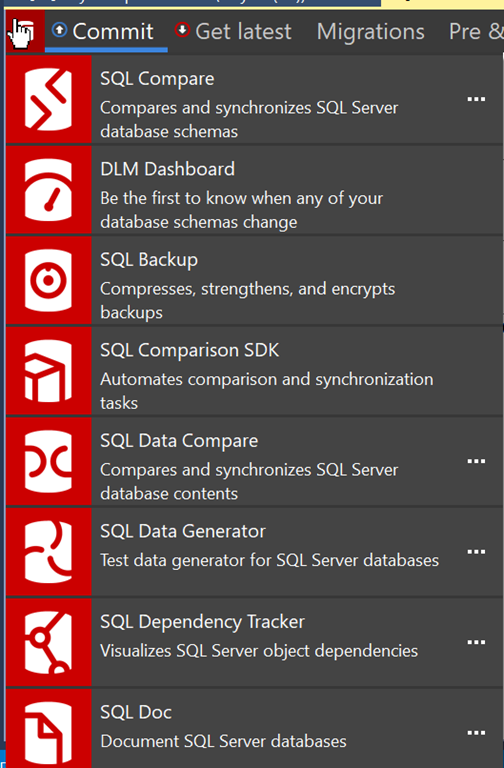
    In SQL Source Control, there is a Redgate icon in the upper left corner. When I’m working in SSMS, I can quickly switch over to the SQL Source Control (SOC) tab and click the icon.

    2019-09-04 17_50_14-SQL Source Control - Microsoft SQL Server Management Studio

    This will open a long menu, with a list of my Redgate tools. SQL Compare is at the top, and all other tools listed below.

    2019-09-04 17_50_21-

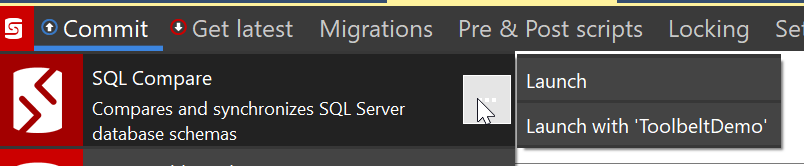
    If I click the ellipsis in the SQL Compare pane, I’ll get a couple of options.

    2019-09-04 17_50_32-SQL Source Control - Microsoft SQL Server Management Studio

    If you don’t see these options, then the database you’re working on isn’t linked to a VCS. That’s a separate problem.

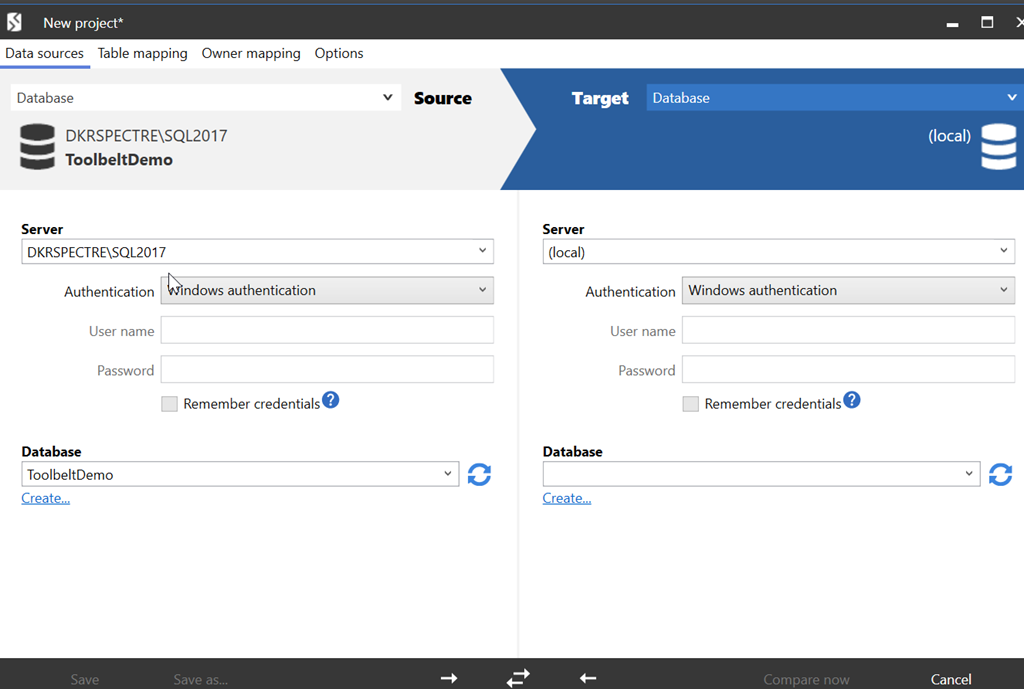
    This feature, however, is designed to fit into our DevOps solution, bringing the tools together for those people that are working inside of the Redgate process. In this process, I can quickly launch many of the tools with context. When I click the “Launch with ‘ToolbeltDemo’, I see this when Compare opens.

    2019-09-04 17_54_03-New project_

    My current database is listed on the left. I can then pick a database on the right, or a backup, project, etc., and run the comparison.

    A minor time saver, but a nice touch that eases my mental focus. If I continue to work, or check something while I wait for SQL Compare to launch, I know when I come back that half the work is done.

    You can launch other products as well, in a similar manner, making your workflow move along a little smoother.

  • Aging in Technology

    Every winter my wife flirts with the idea of returning to a corporate job and making more money. Winter is a slow time for horse training, and she gets bored and antsy. Horse training is physically hard, and as we talked about it last year, I said she should continue with horses for a few more years and then go back to a career later if she wanted.

    Her response was that it would be much harder at 60 than 50. Perhaps, but I think her success in the business world and a strong set of skills wouldn’t much matter, but I did get her point. I’ve had a few other people express similar concerns.

    I had a good friend that spent most of his career in IT. He left the military and found a job with a large telecommunications company in Denver. He worked there for decades, raising three kids similar in age to my own. We chatted often at Scouts about life, technology, and kids. He was laid off a few years back, and as someone trying to find a new job in technology over the age of 50, he struggled to even get interviews. He spent a couple years looking and then mostly gave up, moving to other types of work at a much lower pay.

    I wonder how many of you worry about employment as you get older. I know early in my career, it was the graybeards that were the most respected in the mainframe world. At some point, we started to look to the young hot shots working on PCs as the most respected technologists. I think we often look for younger, but not necessary young people when we hire. In fact, I spoke with someone recently that struggled to not discriminate against older people when they learned about ailments that a person might have.

    I read some great thoughts from Dr. Greg Low that got me thinking about this. After all, I’m getting older, and much closer to the end of my career than the beginning. I think that I’m more willing to learn than most. I preach this to many of you, the idea that we need to keep learning. I’m very lucky that I have a job that encourages and allows me to learn on a regular basis.

    I do think there is some ageism in the technology field. I also think there is a lot of pressure to reduce costs, so if you’re not providing a a lot of value as a worker, why not replace you with a cheaper individual that can do the same job? At least, plenty of management thinks that way. I also think lots of hiring people that are younger think that health and stamina are lower and older people (or women) and feel they can’t keep up.

    The cloud and automation are changing the way more and more us approach our jobs. We need to have strong soft skills, in addition to technological ones, and we need to prove we can solve problems, not perform tasks by rote. Those simple things are getting automated in more and more places. While I don’t think we’ll get to the point that we dramatically automate away most jobs, DBA or developer, but the bar for skill and talent is being raised, especially when you look for  a new job, so ensure you’re regularly raising your bar.

    Steve Jones

    Listen to the podcast at Libsyn, Stitcher or iTunes.
  • Put Your Data in a Box

    A few years ago I was attending a keynote talk from one of the scientists that works CERN’s Large HADRON Collider (LHC). The talk was about data and how they deal with a large volume of data from experiments run on the machine. If you’re wondering what large is, the scientist talked about peak experimental data being over 1PB/s. I don’t know how much data you capture, but that’s a lot.

    In fact, it’s so much, that if they tried to analyze all that data, they’d never get around to running experiments. Instead, they depend on some pre-processing of data in sensor hardware as well as some early aggregation to get the data to a manageable level. It’s a good idea, and they have spent a lot of time and effort learning how to do this and still capture meaningful data for their work.

    The capability to remotely process data before sending it on is coming to all of us in a pre-packaged container. The Azure Data Box Edge was announced this week from Microsoft. This is a data processing device that is cloud managed and has FPGAs that you can program. It can run on batteries and is ruggedized for the field. There are more docs at Microsoft on the specifics.

    I don’t know how many companies want this, but I suspect that some who have remote or portable operations might think about it. Certainly if this can gather some data and then upload when a connection is available, it might be a good fit for places that don’t have good network connections and need a device that can handle some adverse conditions. I know sourcing and putting together a system for field offices is a pain. Off the shelf systems don’t always have reliability, and can be finicky to manage remotely.

    Recently I hosted a webinar with Abel Wang, and he talked about AI and ML being technologies whose use will grow dramatically in the next ten years. Perhaps a prediction without merit, but it does seem more and more companies and vendors are putting efforts into finding ways to deploy and operate ML systems. The Data Box Edge has capabilities in that area, which could be useful if you want to locally, and quickly, process data.

    This doesn’t appear to run SQL Server, or it’s not mentioned, but it does seem useful. If you doubt this, I know this is exactly what I would have wanted over a decade ago. I had to install systems in a warehouse to visual inspect some products. We used crude AI-ish systems that were set up to watch evaluation by humans. Eventually, the computer took over part of the job, but with humans randomly verifying its results. Keeping that system running was a pain. A Data Box Edge would have been a much better choice, and I’m sure we would have purchased one.

    There are likely plenty of customers that might be able to use this. It will be interesting to see if Microsoft can find them and sell many of these devices.

    Steve Jones