Author: way0utwest

  • Waking Up to No Support

    When you wake up on July 10, SQL Server 2008 and 2008 R2 will be out of support. Microsoft has been talking about this for some time, there’s been a Migration Tour from PASS with live events in quite a few cities, webinars, and more to let you know that you might want to upgrade to a supported version.

    While I typically think that systems that run are fine and don’t necessarily need support, there are compliance and security concerns here. If you work in a regulated industry, you might need support to stay compliant. If that’s the case, you might want to ensure you have plans to move to SQL Server 2017 (or 2019) soon.

    The same goes in this era of attacks and potential security issues. While SQL Server has relatively few patches for security, you never know. I haven’t worried about this in the past, often with internal servers, but I do get more concerned over time as we seem to constantly find more complex bugs in hardware and software.

    SQL Server 2008 support is over, but you have options. Microsoft will continue to support you if you move your servers to Azure. That’s not a bad option if you need to move quickly, but don’t forget to really think through what this means for your applications. Moving to Azure isn’t necessarily as smooth or simple as you might think. Authentication and authorization need some attention to detail to get working well. It’s not hard, but it is work.

    When SQL Server 2005 went out of support, it didn’t seem there was as much emphasis on migrating. Certainly lots of people ran SQL Server 2000 instances for many years without support. You can do it, but the world feels more dangerous, and there are more implications with regard to regulation, security, insurance, and other complex topics that can impact your business.

    Think carefully about the implications of migrating and not migrating. You’ll have to make the decision, and it can be hard, but it’s something you should spend quality time thinking carefully about.

    Steve Jones

    Listen to the podcast at Libsyn, Stitcher or iTunes.
  • Containers make easy upgrades

    I’ve been working with containers and writing a bit about them for awhile. I find them to be fascinating and useful as a technology, and I’ve come to really believe these will change how we work with the SQL Server data platform.

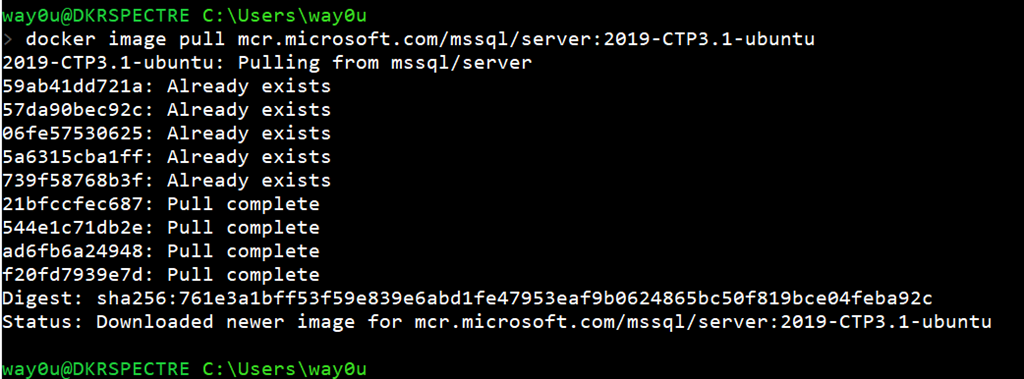
    In any case, I wanted to get the latest SQL Server 2019 version recently, so I decided to download the container image. I’ve had a few on my machine, and so upgrading to the latest was a question of running this:

    docker image pull mcr.microsoft.com/mssql/server:2019-CTP3.1-ubuntu

    The main SQL Server 2019 image exists in a few flavors on my machine, so as you can see, I don’t even download the entire image.

    2019-07-03 19_15_29-cmd

    There were only 4 layers I needed to pull since I already had the other 5 layers. This took about 10 minutes on my nice, but not great, 15MBps download speed. That’s much quicker than I could download an iso to install, plus I’d need to uninstall the previous CTP.

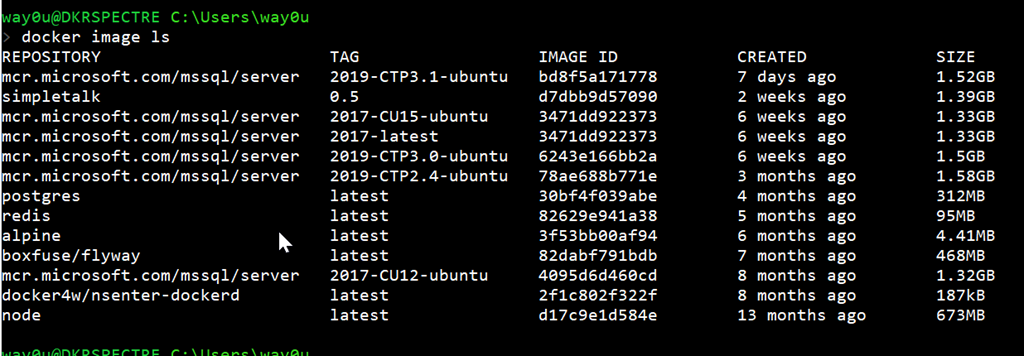
    With containers, I can just run any CTP by picking the image from my list.

    2019-07-03 19_18_01-cmd

    If you haven’t tried working with containers, I’d urge you to start learning a bit. This is amazing technology that your developers already use, or want to use, and I expect data professionals to follow suit in the next few years.

  • The Clear Cloudy Future of Databases

    One of the things I’ve advocated across the last few years is the need to learn more about the cloud and be aware of the database options. I have written many pieces, including asking the question of whether or not you should be thinking cloud first. More and more companies are thinking that way, as you can see in the revenue growth from Azure, AWS, and GCP. This is a trend that is continuing to grow and I doubt it will stop anytime soon. I see many management and technical people more interested in the cloud than worried about it, and the numbers of adopters continue to grow.

    Gartner is a source that many organizations use to try and plan for trends in the world. With much of our choices sometimes impacted by technology media, plenty of managers look at their reports. One of Gartner’s latest reports is worth reading the short blog summary: The future of database management systems is the cloud. In this blog, Donald Feinburg summarize their report that the cloud is first, it’s the future, and that only legacy requirements should keep you on-premises. I tend to think that as well, though I think your investment in an existing platform is reason enough to stick with it for now. I also think that very predictable workloads, without any large spikes, are likely worth keeping in house.

    One neat thing is the market share trends of various platforms from 2011-2019. Microsoft comes in at #3 to start, but comfortably in #2 for the last few years. If you look closely, you’ll see AWS has grown to take the third spot from IBM, and Google is growing rapidly for a platform with the fewest years of availability. Looking at some of the others, I see downward trends from a number of on-premise vendors.

    The cloud offers amazing flexibility in both cost and performance. If you’ve looked at any of the cloud database platform vendors, they offer great scaling options for those times when things run fast  or slow. We have a customer at Redgate that actually scaled up their Azure SQL Database for a few hours to meet a workload jump. Going from tens or hundreds of dollars per hour to thousands isn’t for the weak of heart, but if it’s just a few hours and you scale down, that’s the flexibility that isn’t available on premise. At the same time, scaling down when you were overly optimistic about a workload can save a lot of money.

    Whether you like the cloud or not, it’s permeating many organizations, and it’s a skill set you should spend time learning. After all, even if this employer isn’t interested, there’s a good chance that the next one will be.

    Steve Jones

    Listen to the podcast at Libsyn, Stitcher or iTunes.
  • T-SQL Tuesday #116–Always Linux

    tsqltuesdayThis month is an interesting invitation from Tracy Boggiano. It’s on Linux, which I like. I hadn’t thought about this in terms of T-SQL Tuesday, but I think it fits and more than that, I think Linux will be the future of the backend data platform from Microsoft. I’ve said it in a few presentations, and I think we’ll get there in 10 years.

    In any case, I wanted to write about how I use Linux and SQL Server.

    Containers for Work

    One of the technologies that I see gaining a foothold in many companies is containerization. More and more developers are using containers, and asking for their databases to work in containers. At Redgate, we’ve been investigating this and are looking to build solutions that will use containers.

    As a result, I’m experimenting with SQL Server in containers on my laptop ad giving some presentations that share the way in which they work. I’ve written a little at SQLServerCentral as well as on this blog.

    In setting up my laptop, I installed Docker and experimented a little with Windows and Linux containers. I’ve standardized on Linux containers, because they’re more mature for production (Windows containers are in preview now), and I think with Kubernetes and the growth of how the SQL Server 2019 Big Data Clusters will work, I expect more Linux for servers in the future.

    I’m also using this as an opportunity to brush up on some bash and Linux skills, connecting to my containers with the –it (interactive) switch, as well as using the Windows Subsystem for Linux.

    It’s slow learning, and it’s interesting trying to juggle things in bash and PowerShell at the same time, but I expect these skills will become more hand in the future.