Author: way0utwest

  • Practical Web Scraping–Getting Started

    As part of my learning goals for 2018, I wanted to work through various books. This is part of  my work with Python.

    After going through a few first chapters, I decided to start my February learning with Practice Web Scraping for Data Science, which looks at data acquisition using Python to pull data from the web. I found the book interesting and also this would be a nice setup for two of the other books (Power BI and natural language processing).

    Like many people, I find lots of data on the web, but I’m constantly struggling to get it into a database. I find myself going through gyrations at times to get data. Even with the cool features of Power BI, it hasn’t been as smooth as I’d like to get data, so I thought this would be a good book.

    Part 1

    The first few chapters of the book are about the basics of web scraping. We learn what this means, and get a little bit of a tutorial on who uses this technique, with some specific examples. We also get a basic python tutorial, which I skimmed. I know a bit about Python and this was a very basic, getting started.

    The next part of the early book deals with the basics of what http transport looks like and how some networking works. This is interesting to me, though not sure it matters for scraping. We’ll see. There is some discussion on GET and the http standard, so perhaps that’s helpful. It is good to at least know what codes might come back or what headers or parameters you need to use.

    The third chapter starts to get code working.  It opens with a discussion of HTML and how you can examine the structure of pages in your browser. This is a good reminder and basic tutorial of some of the web page developer tools that exist in your browser and that you might want to use when trying to build applications, especially those that scrape pages. There is also a basic CSS tutorial, which was good as I needed a little refresher. I rarely deal with CSS stuff, leaving that to others.

    The last part of the chapter starts with the BeautifulSoup library, which is built to parse out text, and specifically, makes working with HTML easier. The examples are with a Wikipedia Game of Thrones page, but I added some examples, trying to translate this to a sports page. It worked OK, and I learned a few things.

    The last part looks at Regular Expressions with BeautifulSoup and how you can search out elements and then start to copy data. It’s more complex and tedious, but then again, lots of programming is tedious. Once it’s working, it’s amazing.

    Experimenting

    I started to work with this in Azure Notebooks as a different way of tracking some work in Python. I’ll want to store things in a file at some point, but for now, this lets me start and stop learning and keep track of where I am without worrying about files and names.

    Not sure if anyone can access it (it’s marked public), but my project and notebooks are here: https://notebooks.azure.com/way0utwest/projects/web-scraping-with-python

    I ran some of the early scripts, which are just getting you used to working with Python and accessing web pages. I then copied some examples from my Calibre view of the book and executed them. I even tried to experiment a bit.

    One note: copying the code seems to leave some invalid character in there for Azure Notebooks, so I ended up editing the beginning of every line to remove the offensive character.

    This got me the basics of working with web scraping. Now to try and grab some data from another page and see what I’ve learned.
  • Learn about the State of Database DevOps Next Week

    It’s a week to my webinar with Donovan Brown (b t, y g), leader of the League of Extraordinary Cloud DevOps Advocates, Principal DevOps Manager at Microsoft, and the guy that wants to Rub DevOps on Everything. He’s a passionate, intelligent, exciting guy whose enthusiasm is infectious. I’ve been honored to present with him at Build and I’m looking forward to our chat next week.

    Join us next Thursday for our webinar on the 2019 State of Database DevOps report. You can register now and we’ll be live at 11am EST.

    The 2019 State of Database DevOps report is available now and you can download it today. We’ll be analyzing some of the findings and discussing what this means for many organizations.

    Register today and I’ll see you next week.

  • Someone Lost My Data

    It was bound to happen. I’m sure it’s happened before, but this event was interesting to me as it wasn’t a customer issue, but a cloud vendor problem. There was an outage in Azure on Jan 29, which happens, but in this case data was lost. There was problem internal code in the Azure cloud that dropped some customer databases using the Azure Key Vault with TDE encryption. That was slightly disconcerting for me as I was setting up and testing Azure Key Vault this week.

    There are frequent snapshots and Microsoft was able to restore the databases from one that was about five minutes old. Microsoft acknowledges that five minutes of data loss might be an issue and is asking customers that lost business or were affected by the drops to raise a support ticket. I have found Azure support to be pretty good about crediting my account when issues occur, and I hope they do the same here, though I wonder if they’ll compensate anything beyond the charges normally assessed to customers. They are offering credit for the restored and original databases for a few months as well.

    Plenty of people are upset, and with good reason. There should not be Azure management code that drops databases. Or should there be? Would this be any different on premises?

    I’ve had cleanup code that removed resources after some time. I don’t work at the scale of Azure, so I usually have things removed after a month or quarter. With the scale of Azure and potential costs, they might remove resources quicker, but I certainly have seen similar home grown, if-this-then-that code that does x when y occurs. In this case, I remove encryption keys, which might be not actually be removed for month or more. At that point, there is code that trigger a drop of databases. I’ve certainly seen users in various organizations drop, or restore over, the wrong database. In some cases they don’t realize it in five minutes, and often don’t have a way to restore from a five minute ago backup. Actually, relatively few people I know have RPOs under five minutes.

    This is bad, but it isn’t necessarily out of the ordinary for complex IT environments. If this happened in an organization, the IT staff would be worried and hoping for forgiveness. Some people would want others fired, but most of the time management would understand these things happen. Perhaps not if this isn’t the first time, but usually we accept some people make mistakes. Most of us don’t have complete control of all aspects of our environment. We depend on network staff, storage people, employees that manage hardware, and more. It’s possible that any one of these people could destroy data inadvertently.

    That happened here, though I don’t want to make excuses for Microsoft. They’re supposed to hire the best people and build processes that are better than what I’d expect inside an organization. Events will cascade into different areas, and there should be circuit breakers that prevent anything that could cause data loss in those events. Protect other people’s data with more care than you think you need. It’s your responsibility to do so.

    Steve Jones

    The Voice of the DBA Podcast

    Listen to the MP3 Audio ( 4.7MB) podcast or subscribe to the feed at iTunes and Libsyn.

  • Adding Objects to our SCA Project

    In my last post, I started out with a new SCA project, getting a connection to my database up and running. Now, let’s start the new project by adding some objects.

    Adding Objects

    I’m going to start with a couple objects to make this simple, but we’ll move on from there in other posts to describe the options and details.

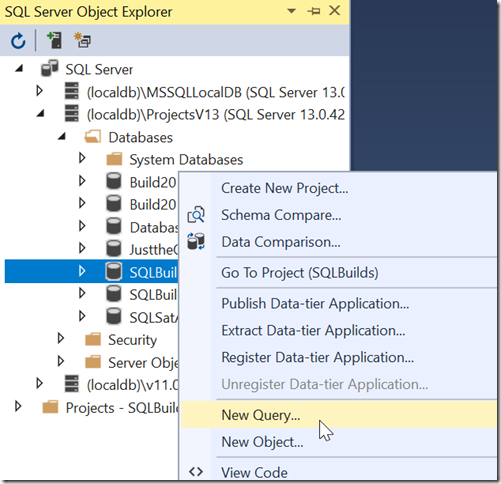
    Our database is not terribly useful without tables, so let’s create a table. I’ll start by using a query window to build a table. Right click the database and choose New Query.

    2018-09-19-00_48_40-_thumb1

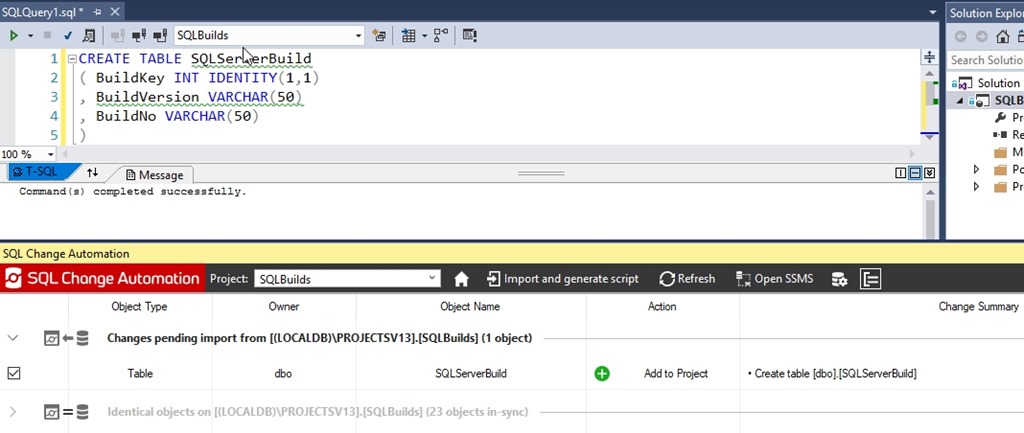
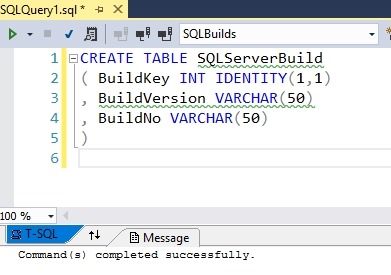
    Once this opens, let’s write a query. I’m comfortable building tables like this, so I’ll add the first table to hold my SQL Server builds.  I’ll write the code shown below and then execute this.

    2019-02-11 14_09_59-SQLBuilds - Microsoft Visual Studio

    At this point, the development database has a change, but it’s not in my project. I need to use the SCA pane to let VS know that I’m ready to import this change. Open the pane and click refresh. The following should appear when the process completes.

    2019-02-11 14_10_30-SQLBuilds - Microsoft Visual Studio

    In this dialog, we see a new table was found. The process compares the Shadow database, where no changes have occurred, with the development database, which has a new table. This gives me a “diff” in essence and I can add this to my project.

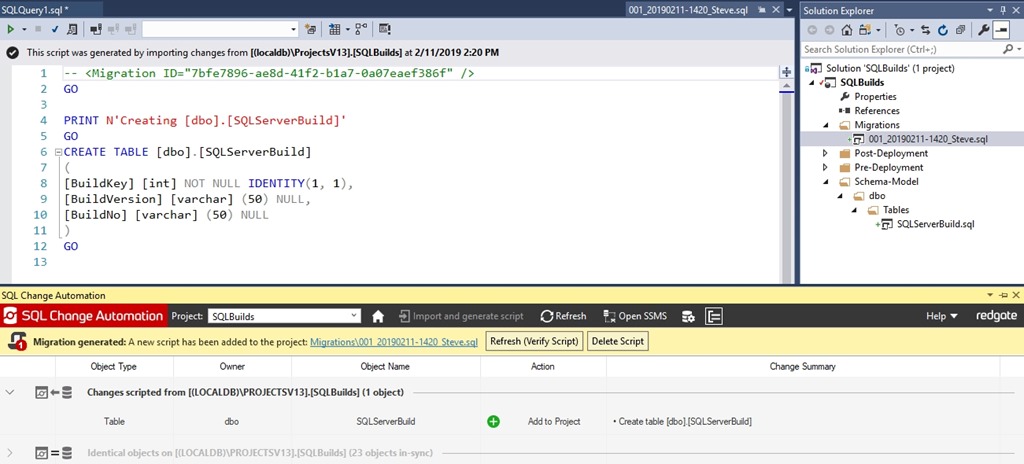
    The change is checked on the left, so I can click the Import and Generate Script button. I’ll do that and I see the image below. There’s a lot here, so let’s discuss this after the image.

    2019-02-11 14_20_43-SQLBuilds - Microsoft Visual Studio

    The first thing to look at is the script that’s active in the upper pane. If you notice, the tab name is on the right side of that upper left pane, highlighted in blue. This is my first migration script. You can see the migration ID at the top and then a PRINT statement, which is useful for logging during the build or deployment process, then the top of my code.

    On the right side, in the Solution Explorer, we see that my script has been added to the Migrations folder. The default name has been applied, but I can rename this if I want.

    In the SCA pane, we see a few things. First, the change is grayed out because the change was scripted.  Above that, we have a yellow bar that notes a migration was generated, and it gives us the path in the project. Finally, there is a “Refresh” button to verify the script. We want to click that. This will use our script with the Shadow database to verity the code is correct. Once I click that, I get a note that the project was verified.

    2019-02-11 14_21_52-SQLBuilds - Microsoft Visual Studio

    At this point, the Shadow and development databases are in sync.

    This tells me that my changes should work when I deploy them to another system. Hopefully that works, and we’ll tackle that next time.