Author: way0utwest

  • Restarting a Sequence–#SQLNewBlogger

    Another post for me that is simple and hopefully serves as an example for people trying to get blogging as #SQLNewBloggers.

    As part of my experiments with the sequence object, I wanted to see what allows me to restart a sequence at a new value. This is useful in a few situations, some of which I want to see in this post.

    Starting Over

    One common scenario might be where I create a sequence and test it a few times, but don’t want those values lost. For example, Suppose I create this sequence and test it a few times.

    CREATE SEQUENCE Counters.TopTen
    START WITH 1
    MAXVALUE 10
    CYCLE
    GO
    SELECT NEXT VALUE FOR Counters.TopTen
    GO
    SELECT NEXT VALUE FOR Counters.TopTen
    GO

    I don’t want the first two values to be removed from the sequence. Instead, I want to get the next number back to 1. I could run 8 more SELECTs to allow the sequence to cycle, but if you’re like me, you’ll end up executing this one too many times and then have to repeat the experience.

    Instead, I can use the ALTER command to fix this.

    ALTER SEQUENCE counters.TopTen RESTART WITH 1

    Of course, I’ll test this with a SELECT, but once I am confident this behaves as expected, I’ll re-run the ALTER again.

    Going Backwards

    One common situation might be a case where an application requests a number of sequence numbers for a situation, but they never get inserted. Suppose I set up an insert statement to load some data in a table, but a key error or some other problem prevents the inserts. I don’t want those values to be lost, so I want to restart numbering.

    As an example, I find that one of my sequences has the value, 41.

    2018-12-05 15_49_08-sequences.sql - dkrSpectre_SQL2017.sandbox (DKRSPECTRE_way0u (65))_ - Microsoft

    However, this is because a load of new products failed. The last number used in the table was 8.
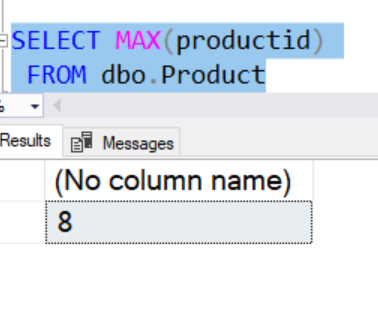
    2018-12-05 15_49_29-sequences.sql - dkrSpectre_SQL2017.sandbox (DKRSPECTRE_way0u (65))_ - Microsoft

    In this case, I want to reset the sequence object to 9, so let’s do that.

    ALTER SEQUENCE Counters.Products RESTART WITH 9

    Now I can proceed on loading products into this table, using the sequence object to get the next value.

    SQLNewBlogger

    This was a continuation of a series of posts on the sequence object. As I continued to experiments, I captured the code and some images to use in posts, writing this up as I had time.

    For this post, I took about 10 minutes of experimenting and then another 5-10 trying to sort out some of the experiments into an area. This writeup was about 10 more minutes.

  • Get Patched If Not Supported

    There are plenty of reasons not to upgrade your SQL Servers to a new version. Perhaps you know the system is working and don’t want to disrupt activity. Often we don’t want to take a chance that some change in functionality causes us issues. In many cases, the new functionality might not be used in your current system, and you don’t see the ROI for the cost of upgrades. Costs certainly are a concern as SQL Server has gotten more expensive across time. In all these cases, it makes sense to stay on your current version. Software Assurance might negate the upgrade cost in money, or even give you a reason to upgrade, but it doesn’t prevent any of the other time and resource costs.

    Patches don’t cost money, however, and they are included in your cost. While I am nervous about applying patches right away, I do want to apply them at some point. If for no other reason, I do want to ensure I’m going to get into a position where I have to apply a patch to fix something or get support in an emergency and not have done any testing. I am more nervous now after the recent Windows Fall Update issues, and definitely want to let others test patches for a month or two before I apply them. Thanks to those of you that patch early and report issues.

    The exceptions I make here about avoiding patches are for older versions of SQL Server. If I’ve got systems that are out of mainstream support, I want them patched. At that point, only security patches are coming and if I get those, I need to apply them, which means I need to be sure all other patches are in place.

    Apparently many of you think like me, but not enough of you. I ran across a post from Erik Darling looking at a cross section of their customers, who I’d like to think are slightly more on the ball than everyone else, but perhaps not. In any case, lots of SQL Server 2008 and SQL Server 2012 systems haven’t been patched, with R2 and 2014 not far behind. While I know some vendors make patching difficult for SQL Server DBAs, we ought to be pressuring them more and more, and even asking our management to do the same.

    We ought to be patching systems on a regular basis. That’s a part of the software life cycle and until we find ways to write bulletproof software, we’re going to be patching. Microsoft is in the same situation as most of us, which is why they deliver patches regularly for SQL Server. They need to patch their Azure databases and ensure they are prepared for security issues.

    Make a plan to test these patches on your systems and start implementing it. None of us wants to be caught in a situation where we have to apply a security patch to an older server next week and we have no plan for how to test the application. Perhaps even worse, none of us wants to have a data breach because we were afraid to apply a security patch *because* we didn’t have a test plan.

    Steve Jones

    The Voice of the DBA Podcast

    Listen to the MP3 Audio ( 3.9MB) podcast or subscribe to the feed at iTunes and Libsyn.

  • Azure at the Ranch

    From our webinar today, I mentioned I had a dog named “Azure”. Here she is.

    IMG_20181113_115510

    No, this isn’t an homage to Microsoft, and I didn’t name the dog. My daughter did, and she’s not a data platform person.

  • Trust But Verify

    Npm is the default package manager for the Node.js runtime. Most of us have heard of of Javascript, which is used extensively in writing applications. When developers write code using this framework, they often include code from other packages and developers, just referring to the functions they need. This allows applications to build on the work of others, without having to re-implement functionality that is commonly used.

    Many languages have libraries that are available for use, but most require that a developer download them, include them in their software and then publish the resulting software. In many node.js applications, the developer does some of this, but when they publish the application, the users pull down the versions of the packages that they need at that time. This allows developers to avoid including a lot of code in their applications, reducing file sizes, bandwidth, etc.

    Recently an issue arose with a popular package that is included in many applications. I first noticed this on Twitter, then saw it called out in a Visual Studio User Group meeting and then even more online. A programmer made some helpful changes to the package and was given rights to make more by the maintainer. This user when altered the package to include some malware that would attempt to steal bitcoins from users that ran an application using the package.

    This is much different than how our T-SQL code is structured, with all the code contained inside the database. There are some exceptions, but for the most part we can look at all the code that will be executed as a part of our batch. That doesn’t mean that we aren’t responsible for reviewing and checking out code.

    This might not be easy in the Javascript world, but it should be easy(ier) for us. I know the warnings about testing code exist, but I’m always somewhat surprised when users ask questions on the SQLServerCentral forums, and then can’t understand why simple code (select count(total) from mytable) doesn’t work on their system because they don’t have a mytable. That causes me to think that too few people actually look at code before they run it. If they don’t check a 10-30 line set of code, do they ever check something as complex as Ola’s script? Likely not.

    Part of our duty as professionals is to be careful with code that we get from others, run it in a sandbox, test it, make sure this is code that will work well for us. Not many of us can download code from the web and have it run on our SQL Server without modification, but if we’re asking questions on a forum, we might just do that. If the problem is complex and the code is large, we might not pay enough attention. As SQL Server expands to get code in R, Python, Java, and more, we may need to be more diligent in scanning code to look for problems such as data leakage.

    Can you imagine getting some Python code from the web that should break strings apart into works and find out that somewhere in the complex class structures this code also sends a copy of your data to some malicious website? I can, and it’s why I’d be very careful vetting code on the data platform.

    Steve Jones

    The Voice of the DBA Podcast

    Listen to the MP3 Audio ( 5.2MB) podcast or subscribe to the feed at iTunes and Libsyn.