Author: way0utwest

  • The GDPR Sky is Falling

    David Poole wrote a nice summary of the GDPR regulations that come into force this spring in Europe. He covers a number of the sections, trying to provide a simple explanation of the potential issues from the perspective of a data engineer. That’s likely the role most of us fill , and I think David does a good job of trying to note the items that he (and maybe you) need to be concerned about.

    If you want to read the full text, and you should, it’s here. To me, this is a more sensible, easier to understand type of regulation. It’s way better than SOX and most other regulations I’ve had to deal with, with a better view of balancing the idea that companies won’t have all the answers, and might not choose the best technology but do need to make an effort. I don’t think this will excuse just continuing to do business as you have, but it does read as though courts and authorities will have flexibility in their interpretation.

    One of the main things that should be pointed out is that the 10 million Euro fine is a max, not a minimum. The same things goes for the potential 2% of global turnover (revenue for the US folks). These are the highest potential penalties, though if you have made some effort to protect data and comply, I doubt you’d see fines at this level unless you’re negligent.

    The keys parts of this regulation are that companies should be paying more than lip service to data privacy and protection. They should be designing and building software and infrastructure that protects data, and also considers the point of view of the individual or organization that is the subject of the data. That’s a good move, in my opinion, having us actually think about the data and the ramifications of its use, sale, transfer, and release, rather than just focusing on our own goals. Most data professionals I know keep this in mind, so GDPR is a step in the right direction to push management to care.

    We’ve got information at the Redgate site, which will help guide you. We are building features into existing and new products, and we’d love to sell you software if you can use it, but we’re also learning and trying to share what we know. This goes along with the core values at Redgate of being a part of the community and giving back, through SQLServerCentral, Simple Talk, blogs, and more.

    Ultimately no one knows what GDPR will bring, and its application can present a risk to any of us that gather data from EU residents. I know Brent Ozar as already decided to stop EU business for the time being to avoid taking on this risk, and I’m sure other small companies may do the same thing. In one way that’s a shame, though a reasonable decision for a company. In another way, this opens opportunities for other businesses. People in Europe still need goods and services, and there are plenty of ways to comply with GDPR that I don’t think will be too hard, especially for those businesses based in Europe that won’t have a choice. There will be other companies that can fill any void left by companies that cease working in the EU.

    GDPR isn’t the end of the world. I think it’s a good move in the right direction to balancing data value and protections. I’d like to see a better framework in the US that also ensures individuals have rights to exercise some control over all the data being gathered about them, as well as something that forces companies to actually consider data protection in their systems. There may be some bad results from GDPR, but most of us will adapt and continue to do business as we have in the past, albeit with better data controls.

    Steve Jones

    The Voice of the DBA Podcast

    Listen to the MP3 Audio ( 5.4MB) podcast or subscribe to the feed at iTunes and Libsyn.

  • SSMS Line Numbers

    I typically don’t turn on line numbers if SSMS, but while working with someone on a bit of code, they were referencing line numbers in a large script. By default SSMS shows you the line, column, and character at the bottom (as well as insert/overwrite status) in the status bar. See the image below, where my cursor is on line 597.

    2018-01-16 13_30_26-Semicolons.sql - [ReadOnly](local)_SQL2016.RLS (PLATO_Steve (64))_ - Microsoft

    However, it’s visually harder to see lines here if those are the way you’re getting oriented with a script. It’s actually easier to have the line numbers on the left side.

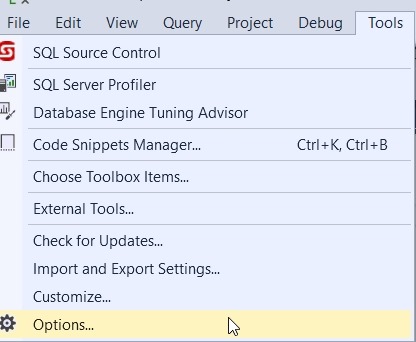
    This is easy to turn no in SSMS. First, click the Tools menu and choose options (as shown here).

    2018-01-16 12_28_26-

    Next, go down to the Text Editor section on the left, expand that and then expand the Transact-SQL area. Click General, and you’ll see a checkbox for Line numbers on the right. Click that.

    2018-01-16 12_28_38-Options

    And line numbers appear.

    2018-01-16 12_28_45-Semicolons.sql - [ReadOnly](local)_SQL2016.RLS (PLATO_Steve (64))_ - Microsoft

    I do find these distracting most of the time, but there are situations where the line numbers are handy, especially when collaborating with others.

  • Finding the Titles in R

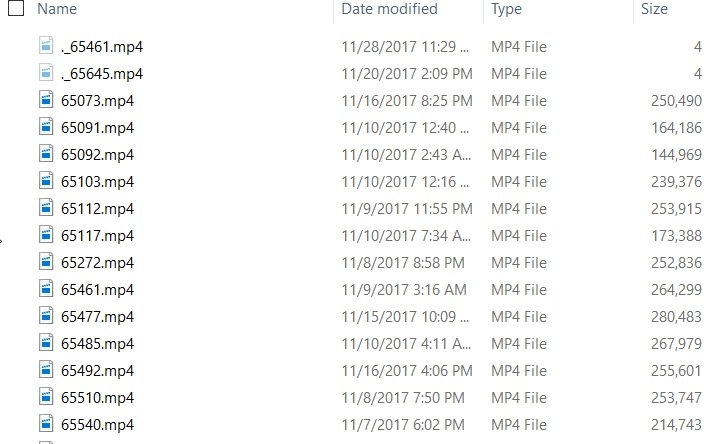
    PASS has released the videos to members from this past Summit. I say TJay Belt today ask about relating a video name to a session. I have the USB drive, so I looked on there. Here are the videos:

    2018-01-10 13_25_47-Video

    Not terribly helpful. If you run the HTML file from the stick, you see this:

    2018-01-10 13_26_23-PASS Summit 2017

    If I hover over a title, I see the link as a specific video file. For example, the first one is 65545.mp4. With that, I looked around and found a javascript file with information in it.

    The structure was like this:

    //SID
    Col0[0] = "65073";
    Col0[1] = "65091";
    
    …
    
    //Speaker Name
    Col2[0] = "Steve Stedman";
    Col2[1] = "Kellyn Pot'Vin-Gorman";
    
    …
    
    //Session Name
    Col4[0] = "Your Backup and Recovery Strategy";
    Col4[1] = "DevOps Tool Combinations for Winning Agility";

    All the data is in one file, but the index in each array matches. So Col0[0] is the SID for video 65073, which has Col2[0] as the speaker and col4[0] as the title.

    Now I want to get these in some sort of order. First, let me copy this data into separate files. That will make importing easier. I’ll copy the SID array into one file, the speaker array into a second file and the title array into a third.

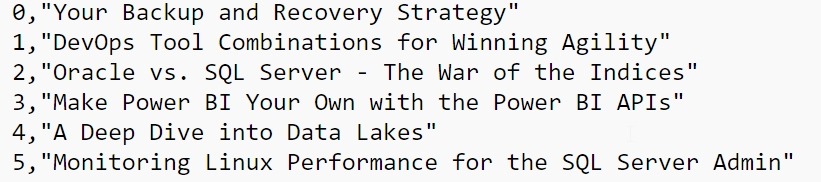
    This gives me data like the list above, but I need to clean that. This is easiest in Sublime, with a few replacements. I did

    • “COL[“ –> “”
    • “] = “ –> “,”
    • “;” –> “”

    This gives me a clean file that looks like this:

    2018-01-10 13_29_18-e__Documents_R_titles.txt - Sublime Text

    Working in R

    I almost started to move this into T-SQL and a table, but since I’ve been playing with R, I decided to see what I could do there. First, I know I need to load data, so I the first file into a data frame.

    session.index = read.csv("e:\\Documents\\R\\videosid.txt", sep=",")

    The column names aren’t great, so we’ll fix those:

     colnames(session.index) <- c("Index", "SessionSID")

    Now
    let’s get the other data.

    session.speaker = read.csv("e:\\Documents\\R\\passspeaker.txt", sep=",")
    > session.title = read.csv("e:\\Documents\\R\\titles.txt", sep=",") 
    > colnames(session.speaker) <- c("Index", "Speaker")
    > colnames(session.title) <- c("Index", "Title")
    

    I have three data frames. I want to combine them. Let’s do that. I’ll use the merge() function to do this. Since I’ve got common column names, I’ll use those.

    > pass.videos <- merge(session.index, session.title, by="Index")
    
    > pass.videos <- merge(pass.videos, session.speaker, by="Index")

    This gives me a data frame with the index, title, and speaker. Now I’ve got the data merged, let’s produce a file..

     write.table(pass.videos, file="e:\\Documents\\R\\passvideos.txt",sep=",")

    With that done, I can see I have a list of video numbers, titles, and speakers.

    "Index","SessionSID","Session","Speaker"
     "1",1,65091,"DevOps Tool Combinations for Winning Agility","Kellyn Pot'Vin-Gorman"
     "2",2,65092,"Oracle vs. SQL Server - The War of the Indices","Kellyn Pot'Vin-Gorman"
     "3",3,65112,"Make Power BI Your Own with the Power BI APIs","Steve Wake"

    I did something in R. Smile

  • Customize Software or Process

    Many of us work with software and often wish that we something was designed differently. I’m sure many of us feel the same way about our database schemas, which is usually even harder to change. In any case, we often want to mold software to fit our thought process. We’re often asked to alter software to meet the expectations of our customers as well, trying to alter visuals or workflows to match some method of working that our customer desires.

    We often try to do this with COTS (Commercial off the shelf) software, notably ERP systems. SAP and Oracle applications, and similar software packages, have made many consultants rich and required millions (maybe billions) of dollars of investment by companies that look to ensure their logos, their workflow, the specific process is implemented in software. Even many of us that purchase some infrastructure software, or even get open source applications, may spend lots of resources on getting the software to fit our organization.

    The thought that most people have had is that it’s cheaper to make the software fit the system, or the people, than vice versa. However, is that the best way to proceed? Do we want to customize software to work in a way different from the way in which is was designed? Or should we learn to alter some of our processes to better fit with how the tools work? Do we think that we really have some special secret in our process that makes us more efficient? Or are we resistant to change?

    For some software, like SAP, the system is designed to morph and fit an organization. Certainly when there are hundreds, or thousands of users, it might be worth the cost of customizing the software to fit the users. However when we have more specific software, such as that used to monitor infrastructure or deploy software or track features, with dozens of users, do we want to spend a lot of time changing the way things work? I sometimes wonder if we should instead focus on getting our people to learn a new way of working that flows with the software. After all, upgrades, patches, and other minor changes are less disruptive.

    I don’t think there’s just one answer here, and certainly there are valid reasons to spend time and money on changing a system. I just think it’s worth some thought to be sure that changing software is a better decision that adapting our process to work with the application.

    Steve Jones

    The Voice of the DBA Podcast

    Listen to the MP3 Audio ( 3.9MB) podcast or subscribe to the feed at iTunes and Libsyn.