Category: Blog

  • Proving Minimal Charge Loss for the Tesla

    This is part of a series that covers my experience with a Tesla Model Y.

    One of the reasons I have some data capture taking place on my own systems is in case some vendor I use has a DR event. That might cause me to lose some data, since I’d be depending on them to keep the data around. If I lose my system, I can always (hopefully) go get their copy again.

    Maybe.

    Who knows.

    In any case, my wife and I spent the weekend in LA, coming back Monday. We got home from the airport and my wife said the Tesla was really low. The charge level was at 22%. She thought sitting parked at the airport from Fri-Mon drained a lot of charge. I countered that it hadn’t lost much of anything.

    I had actually left home Tues morning and returned late Thur, so I hadn’t driven the car (or plugged it in) since Monday. My wife said she hadn’t driven much, so there should be more charge.

    To settle the situation and understand, I turned to my Teslamate data logger. It’s been running in a container on my machine (Actually a few) and keeps the data backed up.

    If you look at the charge level, you’ll see that I got up to the 76% level (the max setting for us) on Monday.

    2022-08-17 13_39_55-Charge Level - Grafana — Mozilla Firefox

    I was in Seattle at 12:50p Tuesday when someone started driving it around. The normal driving that day took the charge down to 59%. I’m guessing a few errands throughout the day.

    2022-08-17 13_40_05-Charge Level - Grafana — Mozilla Firefox

    Then this remained the state until Friday morning just before 9a. That’s when I left for yoga, and you can see I drained down some charge.
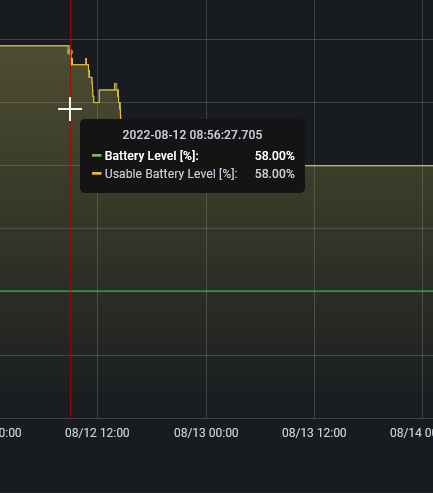
    2022-08-17 13_41_40-Charge Level - Grafana — Mozilla Firefox

    I got home and plugged it in, but because I have this set for overnight charging, nothing happened at first. I finally remembered to click “start charge”, but only added 2″%.
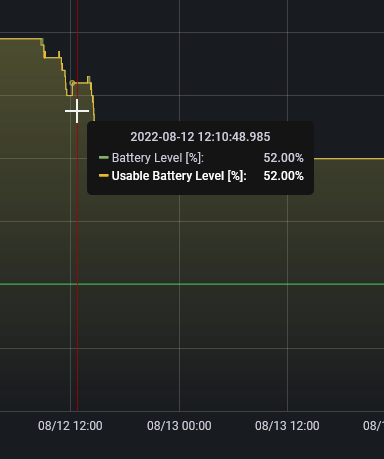
    2022-08-17 13_42_15-Charge Level - Grafana — Mozilla Firefox

    That’s what we took to the airport. The drive up drained the batter down to 41%, and I’m guessing another % went down with cabin overheat running. This runs for a bit of time after the car is locked (it was hot in DEN). The charge remained at 40 through the weekend until Monday morning.

    2022-08-17 13_43_24-Charge Level - Grafana — Mozilla Firefox

    Driving home was the dip down to the 22% where we ended up in the right side of the graph above.

    Not that I wanted to win an argument, but more verify that what I told my wife was correct. We have sentry off and we should lose minimal charge from the car being parked.


  • Daily Coping 19 Aug 2022

    I started to add a daily coping tip to the SQLServerCentral newsletter and to the Community Circle, which is helping me deal with the issues in the world. I’m adding my responses for each day here. All my coping tips are under this tag.

    Today’s tip is to no plans day – Be kind to yourself and others.

    Unlikely today. Yoga scheduled, and perhaps a high school volleyball game. I also have to get the database weekly editorial done, so this is on the list.

    However, I had this day last weekend. I spoke at SQL Saturday Los Angeles 2022 and since I was already traveling, I asked my wife to come with me. She enjoyed a day at Venice on Saturday while I was speaking.

    Sunday we had no plans. We woke up and had a late breakfast before driving downtown to the “Wake Me When I’m Free” exhibition of Tupac Shakur’s life and music. Loved it, especially this quote. I think this is how I view the world.

    20220814_122549

    We then drove up to Oxnard, enjoying the view along the coast. We had an early dinner and then came back for a bike ride from Venice to Santa Monica and back. A quick drink by the water before calling it a day.

    20220814_191534

    Nothing planned, just deciding at each moment what to do, and a great, relaxing time for us.

  • Daily Coping 18 Aug 2022

    I started to add a daily coping tip to the SQLServerCentral newsletter and to the Community Circle, which is helping me deal with the issues in the world. I’m adding my responses for each day here. All my coping tips are under this tag.

    Today’s tip is to share an encouraging news story to inspire others.

    The drought is receding a bit in Colorado. I personally am concerned because we have land and fire is always a danger. Plus more drought means less hay, which means more $$$ for the hay we buy. It’s already near an all time high, so hoping more rain eases the situation a bit for the third cutting.

    Also, COVID is declining. No matter how you view the pandemic, having less cases and hospitalizations means that we open more things and more people get back to their normal, 2019-era, lives.

  • Creating TAIL on Windows for Text Files

    UPDATE: Article changed based on the comment from Mr. Sewell.

    I wrote recently about making a HEAD utility to find the top few lines from a text file. I used Powershell and scripting to make this work from any Windows command line on my machine.

    Someone asked about TAIL, which is easy, so I did this as well and set up a tail utility.

    Get-Content in Powershell will do this, so I took my head.cmd and did a save as in VS Code.

    2022-08-15 15_02_49-Save As

    Then I changed the “first” in the code to “last”, as shown here.

    UPDATE: Based on a comment from Mr. Sewell, I updated the code.

    There is a tail parameter for Get-Content, so let’s use that.

    powershell "get-content %1 -tail 10 | select-object"

    This gets me the end of a file. As an example this is below. Here’s a text file I have with various values. As you can see below, the bottom values are zeros.

    2022-08-15 15_19_39-D__Downloads_Chart Export 08_15_2022 21_19.csv - Sublime Text (LICENSE UPGRADE R

    Here’s my tail utility working:

    2022-08-15 15_23_49-D__Downloads

    UPDATE: I left the original piece below in italics, but with the tail parameter, this takes a few seconds.

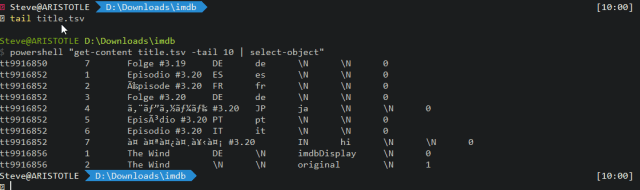
    If I run this on a larger, 1.5GB file, it takes a few seconds.

    tail parameter change and quick execution

    In case you’re wondering how this works on larger files, it can be slow. This took 3 minutes on my machine to get the last ten lines of a 1.5GB file.

    2022-08-15 15_28_58-D__Downloads_imdb