Category: Blog

  • Using Aggregates in Calculations with Other Columns Functions–#SQLNewBlogger

    Another post for me that is simple and hopefully serves as an example for people trying to get blogging as #SQLNewBloggers.

    In the last post on Window functions, I looked at ROW_NUMBER, and how I can use this to order rows. In this one, I want to look at one of the advantages of Window functions in trying to combine data and aggregates together.

    A Scenario

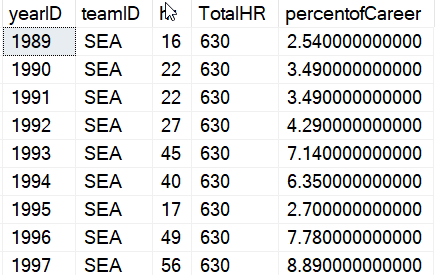
    In the last post, I examined the career of Ken Griffey, Jr., showing his home runs with some ordering. That wasn’t a very realistic case of using data, so let’s look at another one. Suppose I want to know the percentage of his career home runs he hit during each one of his seasons. That’s an interesting question, showing some idea of how much he improved or declined. If I try a to start combining a “normal” aggregate with other data, I can’t do it without a GROUP BY.

    2021-07-19 15_27_35-window_queries.sql - ARISTOTLE.BaseballData (ARISTOTLE_Steve (57))_ - Microsoft

    Not a huge big deal, as I can put the sum in a CTE and use it later. Here’s the code:

    WITH cteHR (PlayerID, TotalHR)
    AS (   SELECT
                     b.playerID
                   , SUM (hr)
            FROM     dbo.batting AS b
            WHERE    b.playerID = 'griffke02'
            GROUP BY b.playerID)
    SELECT
                    b.yearID
                  , b.teamID
                  , hr
                  , TotalHR
                  , ROUND((hr * 1.0) / TotalHR * 100, 2) AS percentofCareer
    FROM
                    dbo.batting AS b
         INNER JOIN cteHR
             ON cteHR.PlayerID = b.playerID
    WHERE          b.playerID = 'griffke02'
    ORDER BY       b.yearID;

    And the results.
    2021-07-19 15_30_52-window_queries.sql - ARISTOTLE.BaseballData (ARISTOTLE_Steve (57))_ - Microsoft

    That’s OK, but the code is complex, and if I wanted to break the home runs by team or some other group, it would get more complex quickly.

    Window Functions Simplify Things

    Here’s a simpler query. I’ve just added the SUM with an OVER() clause, without any order. I just want all rows summed. I added this to the query to see the value.

    SELECT
              b.yearID
            , TeamID
            , HR
            , SUM (b.hr) OVER (ORDER BY (SELECT NULL)) AS TotalHR
            , ROUND ((b.HR * 1.0) / SUM (b.hr) OVER (ORDER BY (SELECT NULL))  * 100, 2) AS TeamPercentofCareer
    FROM     dbo.batting AS b
    WHERE    b.playerID = 'griffke02'
    ORDER BY b.yearID;

    The results are the same as the other query, but it’s easy to see.

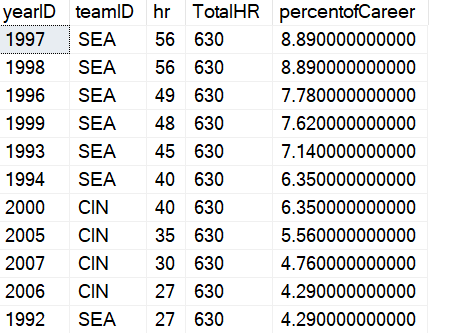
    What if I wanted to change this and order this by the highest percentage years of his career. In other words, when was he the most productive. I can easily add an ORDER BY to both queries to see this, but I lose some context.

    Look at these results. How do I know if 1997 was closed to the beginning or end of his career?
    2021-07-19 15_35_33-window_queries.sql - ARISTOTLE.BaseballData (ARISTOTLE_Steve (57))_ - Microsoft

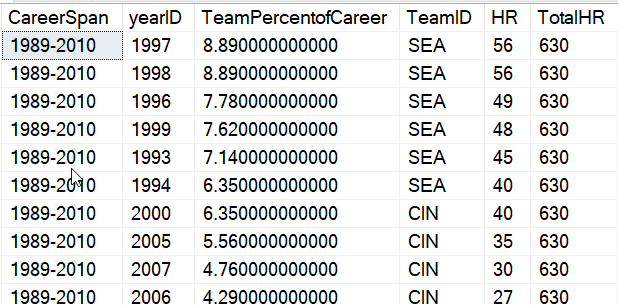
    I want to add some context with the span of his career. I can do that easily with a few more Window functions. Here’s the result I want, with the years showing his career first. I moved some of the other data to the end.
    2021-07-19 15_38_57-window_queries.sql - ARISTOTLE.BaseballData (ARISTOTLE_Steve (57))_ - Microsoft

    Without window functions, this would be complex, as the MIN() and MAX() would be from different columns, so I’d need another CTE. Here, I can use this code:

    SELECT
            CAST(MIN (b.yearID) OVER (ORDER BY (SELECT NULL)) AS CHAR(4)) 
            + '-'
            + CAST(MAX (b.yearID) OVER (ORDER BY (SELECT NULL)) AS CHAR(4)) AS CareerSpan
            , b.yearID
            , ROUND ((b.HR * 1.0) / SUM (b.hr) OVER (ORDER BY (SELECT NULL))  * 100, 2) AS TeamPercentofCareer
            , TeamID
            , HR
            , SUM (b.hr) OVER (ORDER BY (SELECT NULL)) AS TotalHR
    FROM     dbo.batting AS b
    WHERE    b.playerID = 'griffke02'
    ORDER BY TeamPercentofCareer desc;

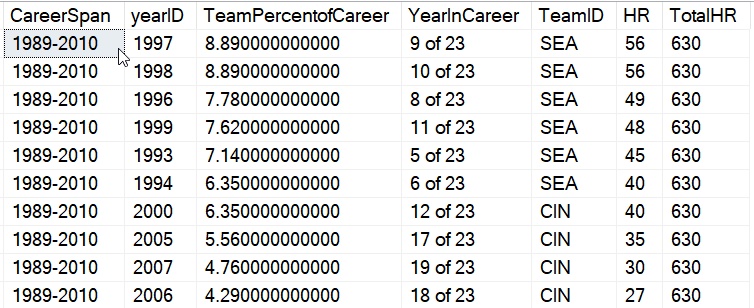
    If I wanted to add some math, like how many years into his career was he, I could easily do that. Here I’ve added the year number to his career, which comes from ROW_NUMBER().
    2021-07-19 15_42_31-window_queries.sql - ARISTOTLE.BaseballData (ARISTOTLE_Steve (57))_ - Microsoft

    The code? I just add the aggregates I need, which in this case are ones containing the entire set. I mix MIN(), MAX(), COUNT() and ROW_NUMBER(), and use a partition of the entire data set.

    SELECT
            CAST(MIN (b.yearID) OVER (ORDER BY (SELECT NULL)) AS CHAR(4)) 
            + '-'
            + CAST(MAX (b.yearID) OVER (ORDER BY (SELECT NULL)) AS CHAR(4)) AS CareerSpan
            , b.yearID
            , ROUND ((b.HR * 1.0) / SUM (b.hr) OVER (ORDER BY (SELECT NULL))  * 100, 2) AS TeamPercentofCareer
            , RTRIM(CAST(ROW_NUMBER() OVER(ORDER BY (SELECT NULL)) AS CHAR(2)) )
            + ' of ' 
            + CAST( COUNT(yearid) OVER(ORDER BY (SELECT NULL)) AS CHAR(2))
            AS YearInCareer
            , TeamID
            , HR
            , SUM (b.hr) OVER (ORDER BY (SELECT NULL)) AS TotalHR
    FROM     dbo.batting AS b
    WHERE    b.playerID = 'griffke02'
    ORDER BY TeamPercentofCareer desc;

    Try doing that without window functions. It’s a nightmare to write in T-SQL.

    SQLNewBlogger

    This was pretty easy to write. The hard part was thinking of the questions I might ask of this data set and setting up the queries. Duplicating this without window functions was fun, and took more time. But it was good practice for me, and helped me to better understand why I like window functions.

    This took me about 30 minutes, and it’s a good showcase of learning a new technique and applying it. You should do this if writing reports and aggregates is part of your job and you might want to showcase this to your next potential employer.


  • Daily Coping 21 Jul 2021

    I started to add a daily coping tip to the SQLServerCentral newsletter and to the Community Circle, which is helping me deal with the issues in the world. I’m adding my responses for each day here. All my coping tips are under this tag. 

    Today’s tip is to pick one of your strengths and use it this week.

    The easy joke is that I used my pectorals and did some weightlifting. However, this week I picked a different strength. This week I used: people pleasing and support.

    My wife had a dressage competition this week. We ended up driving to a show and living in a camper for a few days, during some of which I worked. A show is stressful, both for her and the horse, and they have a schedule they’re trying to stick to. It was also hot, and limited amenities around.

    Instead of trying to maintain my schedule, find time to work out, etc., I decided to be completely supportive and help my wife with her schedule. I didn’t worry about my workouts, I moved my work around her competition times, and I was ready to jump in and tackle tasks she asked for or needed, subordinating what I wanted to thought I could get done.

    That’s a little stressful, as I try to still work, but I let many things go, relaxed where I could, and made the show the priority.

    It worked out well, and now I’m back into a normal schedule for me, hitting the gym and worrying about my own chores. She’s happy, too. She qualified for a season ending show, and felt the trip was a success.

  • Daily Coping 20 Jul 2021

    I started to add a daily coping tip to the SQLServerCentral newsletter and to the Community Circle, which is helping me deal with the issues in the world. I’m adding my responses for each day here. All my coping tips are under this tag. 

    Today’s tip is to pick an achievable goal for the week and make progress.

    I actually did this last week. I have had a lot of things on my list of things to do this year, and sometimes I get a little paralyzed by the length of the list. There are also some larger projects that I find myself putting off because I keep thinking “I’ll take a day” or “Take a weekend” to do this.

    The reality is that I never will likely get a large block of uninterrupted time, when I feel ready to tackle things.

    I got up, had some breakfast, and then went outside recently. There were a few other things I could do, but I started with a chainsaw and chopping down some juniper bushes in our front yard. My wife has been asking to do this, and I keep delaying rather than getting started.

    20210703_122540

    I got one out, taking a few breaks as I tried to cut down the tangled limbs and drag them to a nearby gully. My breaks were on the lawnmower, mostly because I needed to get that done as well.

    The next day I went out and tackled a second one. I managed to get down to two stumps.

    20210704_144805

    I took a few days off, but then spent about an hour one night working on the third one. I didn’t get it out, but I made more progress.

    20210711_202929

    Baby steps were helpful to me moving forward.

  • Exporting Lists in SQL Multi Script

    SQL Multi Script is a lesser known tool from Redgate Software that is designed to easily allow you to run scripts against many server instances with one click of a button. It’s similar to a Central Management Server, but it returns results a little cleaner, and has a few extra features that make things run better. I have a number of customers using this to deploy to many instances, both for database changes and instance config updates.

    Recently a customer wanted to share their distribution list with another person on their team. They asked how to do this, and it turns out to be very simple.

    We’ve built import and export into the tool. I’ll look at how you can do this.

    First, open SQL Multi Script and then pick the tools menu. Here you will see the export and import items, as shown below.

    2021-07-13 11_13_32-SQL Multi Script - New Project_

    If I pick export, I get a dialog that shows the distribution lists I’ve created.

    2021-07-13 11_13_25-Export Distribution Lists

    I can pick all, one, or a group of them. Note that all of these are exported into a single file, which is useful if I can want to share all my lists with a colleague.

    Once I click “Export” I have to choose a file name and location from a standard Windows Explorer dialog. I always think about how I’d sort these in a large list, so I like to pick something that will make sense in a month. In this case, the app and then the list..

    2021-07-13 11_14_09-Save As

    Once I click OK, the file is created, and I can see it in the file system. Here I’ll open it in Sublime Text to see what it looks like.

    2021-07-13 11_14_28-Documents

    The file is XML, which isn’t ideal, but it it easy to read. I have my XML file below, with all instances using Windows Authentication. If I had used SQL Auth somewhere, this would end up with an encrypted password, which I assume SQL Multi Script can import and decrypt. Here is my file:

    <?xml version="1.0" encoding="utf-16" standalone="yes"?>
    <!--
    SQL Multi Script
    SQL Multi Script
    Version:1.5.4.1390-->
    <databaseListsFile version="1" type="databaseListsFile">
       <databaseLists type="List_databaseList" version="1">
         <value version="2" type="databaseList">
           <name>MixedAuthList</name>
           <databases type="BindingList_database" version="1">
             <value version="6" type="database">
               <name>AdventofCode</name>
               <server>(local)</server>
               <integratedSecurity>True</integratedSecurity>
               <connectionTimeout>15</connectionTimeout>
               <protocol>-1</protocol>
               <packetSize>4096</packetSize>
               <encrypted>False</encrypted>
               <selected>True</selected>
               <cserver>ARISTOTLE</cserver>
               <readonly>False</readonly>
             </value>
             <value version="6" type="database">
               <name>dlm_3_qa</name>
               <server>LOCALHOST</server>
               <integratedSecurity>False</integratedSecurity>
               <username>Joe_Admin</username>
               <savePassword>True</savePassword>
               <password encrypted="1">25eJUgEGChcaG13SEpATBg==</password>
               <connectionTimeout>15</connectionTimeout>
               <protocol>-1</protocol>
               <packetSize>4096</packetSize>
               <encrypted>False</encrypted>
               <selected>True</selected>
               <cserver>ARISTOTLE</cserver>
               <readonly>False</readonly>
             </value>
             <value version="6" type="database">
               <name>dlm_2_integration</name>
               <server>LOCALHOST</server>
               <integratedSecurity>False</integratedSecurity>
               <username>Joe_Admin</username>
               <savePassword>True</savePassword>
               <password encrypted="1">25eJUgEGChcaG13SEpATBg==</password>
               <connectionTimeout>15</connectionTimeout>
               <protocol>-1</protocol>
               <packetSize>4096</packetSize>
               <encrypted>False</encrypted>
               <selected>True</selected>
               <cserver>ARISTOTLE</cserver>
               <readonly>False</readonly>
             </value>
           </databases>
           <guid>4e255407-343c-4b88-a54a-4e981ad2beac</guid>
         </value>
       </databaseLists>
    </databaseListsFile>

    This is a useful feature for sharing lists in a team. It’s a little clunky, but it works well.

    If you’ve never given this a try, download SQL Multi Script today, or get the Toolbelt and give it an eval. You might find it’s quite handy.