Another post for me that is simple and hopefully serves as an example for people trying to get blogging as #SQLNewBloggers.
In a recent post, I started looking at some basics for window functions. This post continues with a look at one of the most commonly used ones: row_number().
Rows in a table aren’t in any particular order. They can be physically stored in order by the clustered index, but in a SELECT, there is no guarantee of any particular order unless you have an ORDER BY clause. However, even when you get a set or rows, there isn’t any number for the rows that is given.
Many of us would like to have some number that allows us to know this is row 1, row 2, etc.
We can do that with ROW_NUMBER(), which is a window function that assigns sequential numbers to rows. In the previous post, I used some baseball data, so I’ll continue with that today, but I’ll use another amazing batter, Ken Griffey Jr.
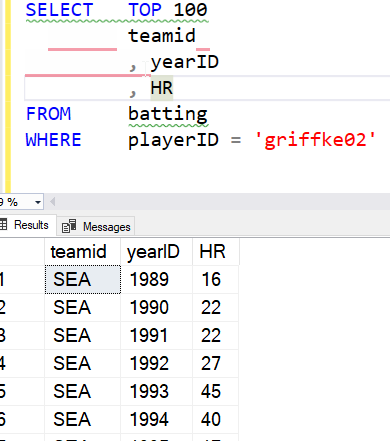
If I just get the list of batting records for Ken, I see this results (abbreviated) below. Note that there is no ordering I can count on here. The row number to the right is added by SSMS, but isn’t in the result set:
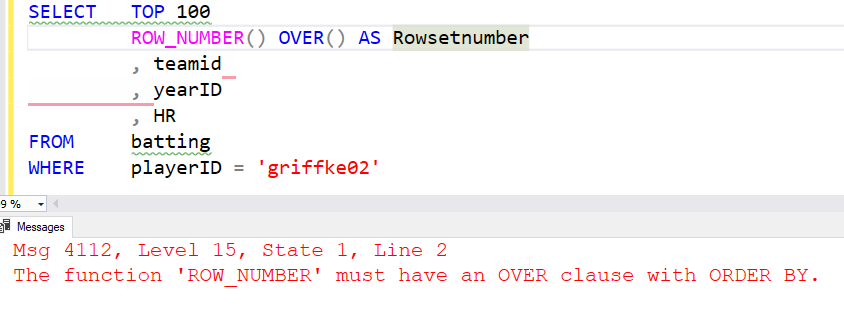
If I want to ensure every client has a row number, I can use that function with an OVER() clause. Note that I need to include something in the OVER() clause.
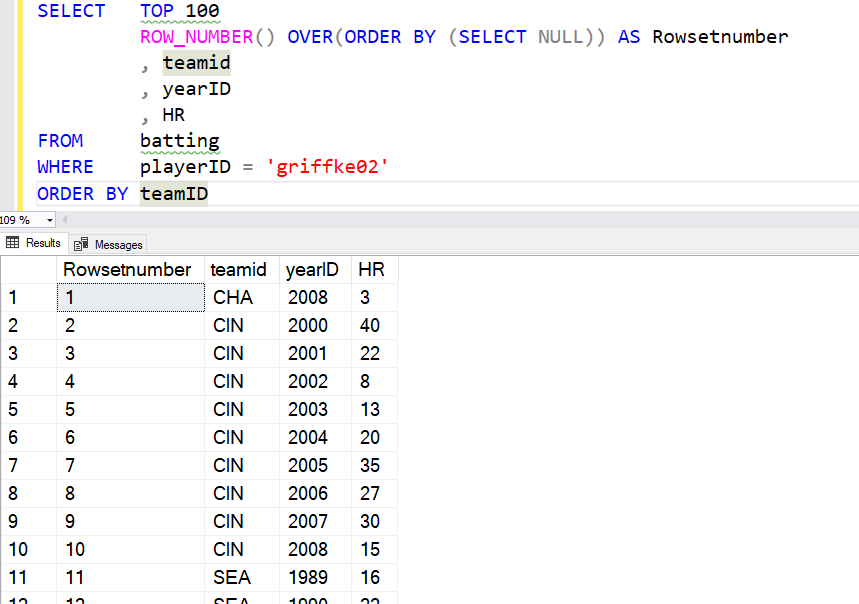
Let’s fix that. I’ll order by year and then ensure I show the SSMS number added by the GUI. I see the numbers seem to correspond to the years. What if I order the entire query by team?
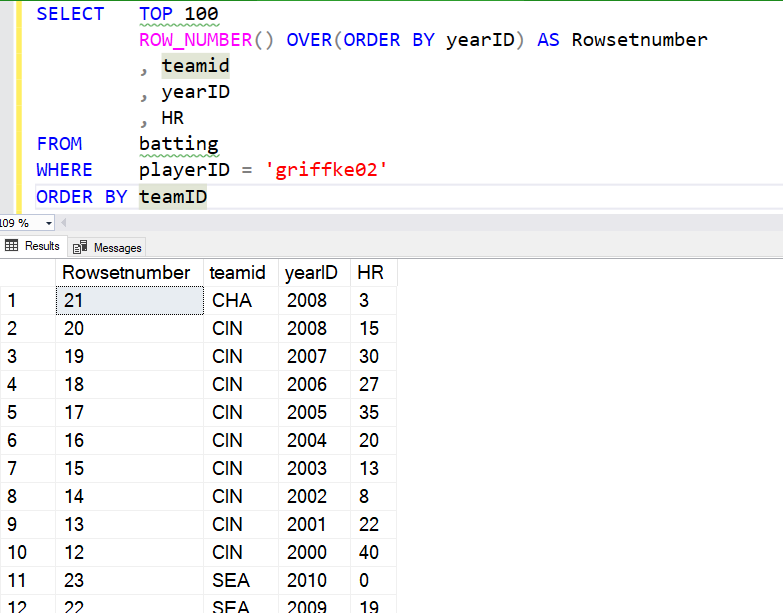
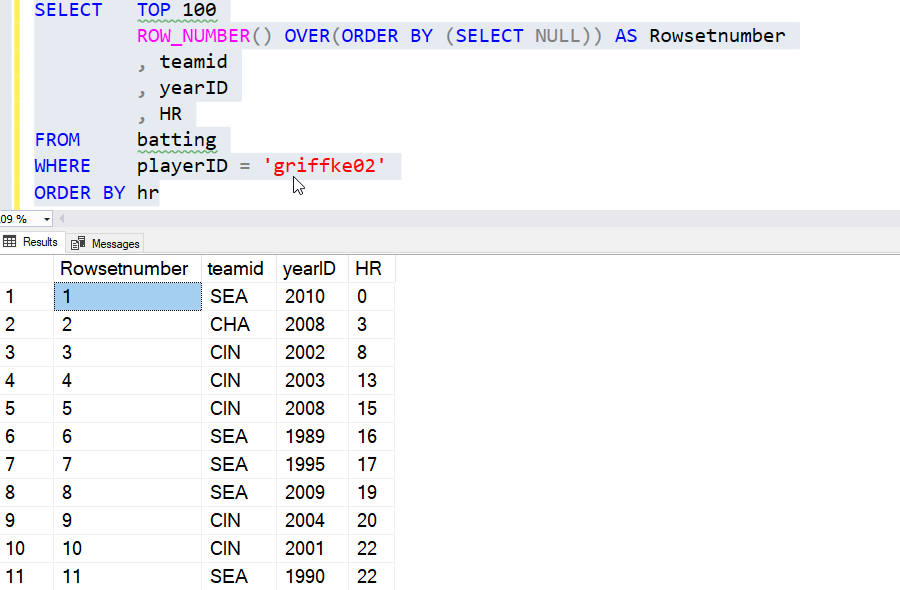
This appear to have reversed the numbers. However, note that rows 11 and 12 are the 22 and 23. The window function applied the numbers based on the ordering of years for the entire set, then the rows were re-ordered for the query based on the ORDER BY. We see this more clearly with an ORDER BY using the HR column.
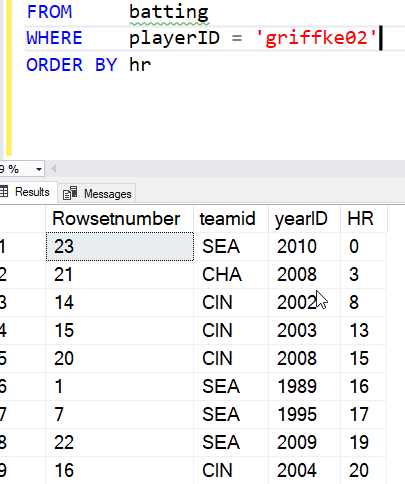
What about just an ordering for the results? I do need an ORDER BY I can use this trick.
SELECT   TOP 100
          ROW_NUMBER() OVER(ORDER BY (SELECT NULL)) AS Rowsetnumber
          , teamid
          , yearID
          , HR

FROM     batting

WHERE    playerID = 'griffke02'

ORDER BY hr
This allows me to just apply the ROW_NUMBER to whatever the query is doing. Here’s the result, ordered by HR.
If I go back to my ordering by team, I see this:
I can also add a PARTITION BY, and get numbering inside the partition or group. Here I’ll partition by team. I’ll go back to ordering by year, since that makes sense. I’ll use this query.
SELECT   TOP 100
          ROW_NUMBER() OVER(PARTITION BY teamID ORDER BY (SELECT NULL)) AS Rowsetnumber
          , teamid
          , yearID
          , HR

FROM     batting

WHERE    playerID = 'griffke02'

ORDER BY yearID
The results are then shown with the numbering restarting with each team.
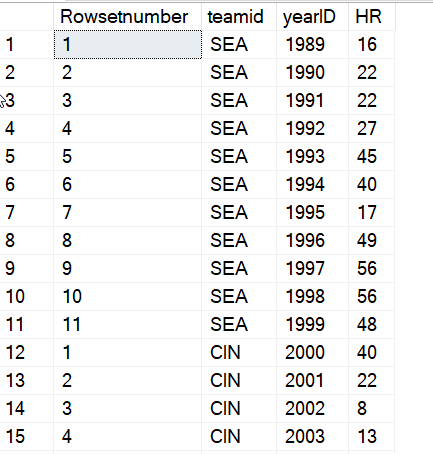
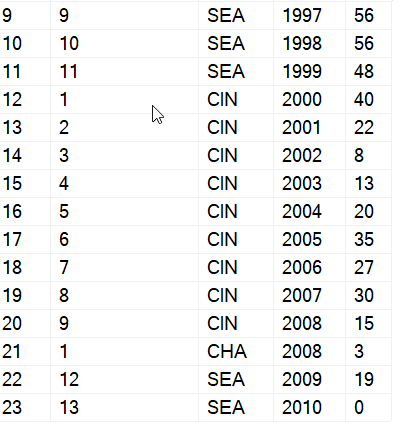
The one strange thing to note here is that since Ken went back to Seattle late in his career, the numbering for his final two years show a continuation of the numbers from earlier with SEA.
The ROW_NUMBER() function is very powerful and useful when you need some ranking and ordering to show to the client for the rows. As with all data, you need to ensure you understand the data set and be aware of how your partition (grouping) and ordering in the OVER() clause apply to the data, but the final results are dependent on the query’s ORDER BY. This can cause some confusion, so be sure you understand the difference and inform your clients.
SQLNewBlogger
This was a quick 10 minute post. I’ve done a lot of work with Window functions and presented on them, so this was a portion of a presentation I’d given, where I took part if a demo and wrote it up.
However, you can experiment in 15-20 minutes and then spend 10-15 minutes structuring a post on this topic. How have you used ROW_NUMBER(), or if you’ve just learned it, what does it mean to you. Come up with some examples, ensure you understand them, and then explain them back. Might be an easy interview question to answer at some point if they find it on your blog.