Category: Blog

  • First Wave of Sessions for PASSSummit Now Available

    The first wave of sessions for the #PASSSummit have been released. You can see the list at: http://www.pass.org/summit/2018/Learn/ConferenceSessions.aspx

    I am honored to have a session on the list. This year, I’ll be doing a session called Minimizing the Impact of Data Breaches in Dev and Test Databases. This is a partner session, and I’ll talk about some of the issues with data security in your development area and show some ways that you can mitigate the problems.

    There are some other really interesting sessions on the schedule, such as Ola’s  Analyzing Performance Problems Using XEvents, DMVs & Query Store and Faster SSIS from Andy Leonard.  Check out the complete list and start to find those sessions that will help you in your job. Use that information to help build a case for you to come to the Summit.

    I expect we’ll see releases of more sessions across the next few weeks or months. Keep an eye out for new sessions so you can update your schedule.

  • Relaxing on the Tab Management Terraces with #SQLPrompt

    I enjoy themes, and when I ran across the SQL Prompt Treasure Island, I had to take a few minutes and go through it. I’ve written about a few of the other items on the map:

    Tabs, Tabs, Tabs

    If you’re like me, you have a lot of tabs open in SSMS all the time. In fact, sometimes I think I have far too many open at one time. Likely that’s a sign of some distraction and too little focus, but it’s a habit that goes back through decades of SQL work for me.

    I used to love isql/w, as a very stable editor for my work. When Enterprise Manager came, I still often used isqlw. SSMS came along, I wasn’t thrilled at all, as it was a big, heavyweight tool. I’ve grown to like it and I feel comfortable, but I still have crashes at times.

    That’s where tab management comes in. SQL Prompt reopens my tabs, which I greatly appreciate, especially as I don’t always remember to save some random code I’m testing. Usually lots of development stuff is in a database, but having the tabs open automatically is a life saver.

    I don’t often use the Tab History item, but it is handy. I ought to use it more, because it is a good way to look back through work I’ve been doing and sometimes find a piece of code that I’m searching for.

    The coloring is great, especially as I work on a lot of different databases. Many times the color fades into the background, so it doesn’t necessarily help me with not working on the right instance/database, but when I wonder if I’m on a dev or test system, coloring is really helpful. Plus it looks great in demos and keeps the audience focused.

    SQL Prompt has lots of great features, many of which I’ve written about. After formatting and intellisense, this is the thing that I use most often.

    Give SQL Prompt a try. You’ll love the way it helps you write code.

  • T-SQL Tuesday #102–Getting Started

    It’s time for another blog party, on the second Tuesday of the month. For this month’s T-SQL Tuesday, Riley Major has a couple of invites. One is on giving back, which is good, but doesn’t fit me. 

    The second option is to explain how and why we got started, so here goes.

    Giving Talks

    I started SQLServerCentral with Andy Warren, Brian Knight, and a few others. The site had unexpected success, and running this in addition to all of working full time jobs was tough. However, we built the site as a place where we could share knowledge and help others. In the first year, I’m not sure if I enjoyed writing articles or answering questions more, but both kept me busy.

    At some point, the Boulder SQL Server User Group invited me to give a talk. I’d been to the Denver group a few times, but hadn’t really thought about speaking. Bill Wunder was the person that convinced me to share some knowledge live and I went. I’m not sure I did a great job prepping and delivering information, but it must have been fine because I got invited back.

    At first I didn’t love the experience. It’s a lot of work and in this case a few people were critically listening to and questioning me on whatever topics I chose.

    A couple years later, we talked about doing a session at the PASS Summit. I hadn’t spoken there, but Brian convinced me we should do a debate on a topic and try out a new type of presentation. Looking back, this was really basic, but it was helpful and useful to do a few things.

    1. Have someone on stage with me to carry the load and divert some attention away from me.
    2. Pick a topic that I felt I knew something about
    3. Use the format of a debate, since we argued regularly, I knew we could pull this off.

    It went OK, though looking back, this was a rudimentary and unpolished session. Still, people seemed to enjoy it.

    Fast forward a few more years. Andy and I had been talking about SQL Saturday and kicked it off. At first I wasn’t sure this would work, and I missed SQL Saturday #1 in Orlando. However, with a few events in other locations, I decided to fly down for SQL Saturday #8.

    I can still remember sitting on an airplane, looking out the window as we descended to Orlando being amazed that I was traveling outside my local area to speak. I hadn’t delivered a talk at any conference at this point, so I was a little in awe of the experience.

    I had an afternoon talk, so I had the chance to watch others, but was a bit nervous. My room filled up, with all 20-30 seats taken and almost an equal number of people on the floor. Fortunately no fire marshal or administrative people were around to thin the crowd. The talk went well, and I felt confident walking away that I could share things.

    More importantly, I couldn’t answer every question, and had some “I don’t know”s or “I’ll check and get back to you” moments. In spite of those, I got great reviews and comments, so I continued on.

    From there, I submitted to more events, and different events over time. I’ve been accepted at most, rejected a few, and cancelled rarely. Life does get in the way, and I’ve learned to try and not over-extend myself. I’ve also learned I can say no. I do that more than I’d like, but I’m at peace with my decisions.

    I’ve even gotten over rejections. Plenty of large conferences have declined my submissions and even small ones do at times. SQL Saturday #735 – Finland just declined to choose me, and that’s fine. It’s their event, and they should pick the speakers they want, especially if they are local to the area.

    The one thing I’ll leave here is that I was terrified to present to groups in high school. I’d be nervous, avoid making eye contact, and try to say as little as I could. Over time I learned I needed to talk to other people in various jobs. Often 1 or 2, but sometimes a group of 5, 6, 10 or so. That’s really a presentation, albeit an off-the-cuff one. I learned that explaining a technique to another sysadmin isn’t far off from talking to an audience. It’s different, but not a lot.

    I still worry about new presentations, and I do try to practice them not only walking in circles around the office, but often with a smaller group. I would encourage you to try presenting, usually at work, because these are skills that are useful. If you’ve solved a problem, or fixed something, you can share. Give a 15 minute talk at your user group. You might not like it, and that’s fine.

    If you do, however, I’d love to see you start speaking at a SQL Saturday or other conference. I’m more than happy to give up a speaking opportunity if it gets more people to share their knowledge.

    Heck, I’ll even co-present with you if I’m at the event. Just ask and I’ll stand in front of an audience with you.
  • Randomizing Names with Data Masker

    Data Masker for SQL Server is pretty cool. It can reduce your attack surface area and exposure under the GDPR or any other regulation. There are plenty or rules and templates to help you anonymize data, in ways you might not have expected. Data Masker is a part of SQL Provision and the SQL Data Privacy Suite.

    In this post, I want to show you a common technique that can be used to anonymize names. That’s a fairly common requirement for many datasets, and Data Masker makes it easy.

    Last Names

    Since Redgate is a UK company, we call last names, surnames. These might also be family names in your culture, but these are the common names shared by everyone in a family.

    In any case, there is a series of datasets for last names/surnames. If I look through the list, I see these:

    • Names, Surname Suffixes
    • Names, Surname Titles
    • Names, Surname Titles (Short List)
    • Names, Surnames, Random (DE)
    • Names, Surnames, Random (PT)
    • Names, Surnames, Random (ES)
    • Names, Surnames, Random (FR)
    • Names, Surnames, Random (Large List)
    • Names, Surnames, Random (NL)
    • Names, Surnames, Random (Short List)

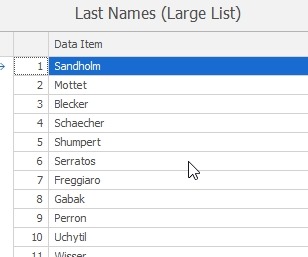
    Each of these is a file with a list of names. The encoding is binary, but if you choose one, you can click the “Sample” button to see some of the entries. For example, here are the Last Names (Large List) sample:

    2018-05-04 11_07_30-Example Values from Names, Surnames, Random (Large List)

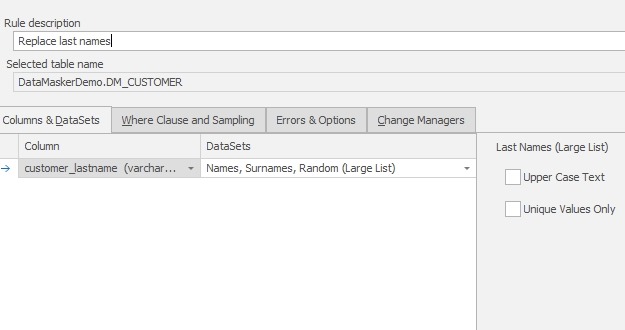
    There are country oriented sets and then a large and small list of English names. In this case, I’ll map the large list to my customer_lastname column. I could make these all upper case or choose unique values if I choose. I won’t here.

    2018-05-04 11_32_54-New Substitution Rule

    I could also use the WHERE Clause and Sampling tab to limit the replacements. The default it to replace rows where the value is NOT NULL or empty.  I won’t bother and I’ll just create this rule.

    First Names

    Replacing first names is a two stage process, or it can be if you care. Gender can matter with first names, so the process can be one of two methods:

    1. replace gender = ‘F’ with female names
    2. replace gender=’M’ with male names.

    This is slower as it requires checking in both passes. A better solution might be:

    1. replace all rows with female names
    2. replace gender=’M’ with male names.

    In this case only one set of checks is made in the second step. I’ll do this.

    First, I’ll modify the existing substitution rule to add customer_firstname to the list of replacements. In this case, I’ll choose the Names, First Names, Female as the data set.

    2018-05-04 11_52_57-Edit Substitution Rule 

    I’ll leave the WHERE clause alone and save this rule.

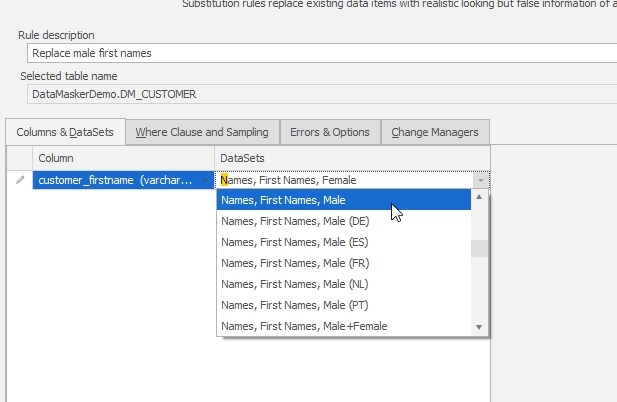
    Once this is done, I’ll create a new substitution rule. For the dataset, I’ll choose male first names.

    2018-05-04 11_54_14-New Substitution Rule

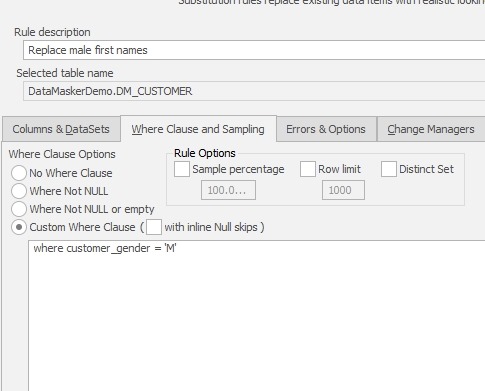
    Once this is done, I want to limit replacements, so I’ll go to the WHERE clause tab and enter a valid T-SQL clause:

    2018-05-04 11_54_40-New Substitution Rule

    I’ll save this rule and then I see this:

    2018-05-04 11_55_59-Data Masker for SQL Server

    Both rules are listed in order, but there is no linkage. My data masking can potentially run these two rules in parallel. I don’t want that. The second rule depends on the first one having run.

    I can add a dependency by dragging the lower rule onto the type of the upper rule. The object behavior is a little funny here, so experiment with “grabbing” the lower rule by clicking on it and holding, them moving it up. You should end up with an indent, signifying dependency.

    2018-05-04 11_56_08-Data Masker for SQL Server

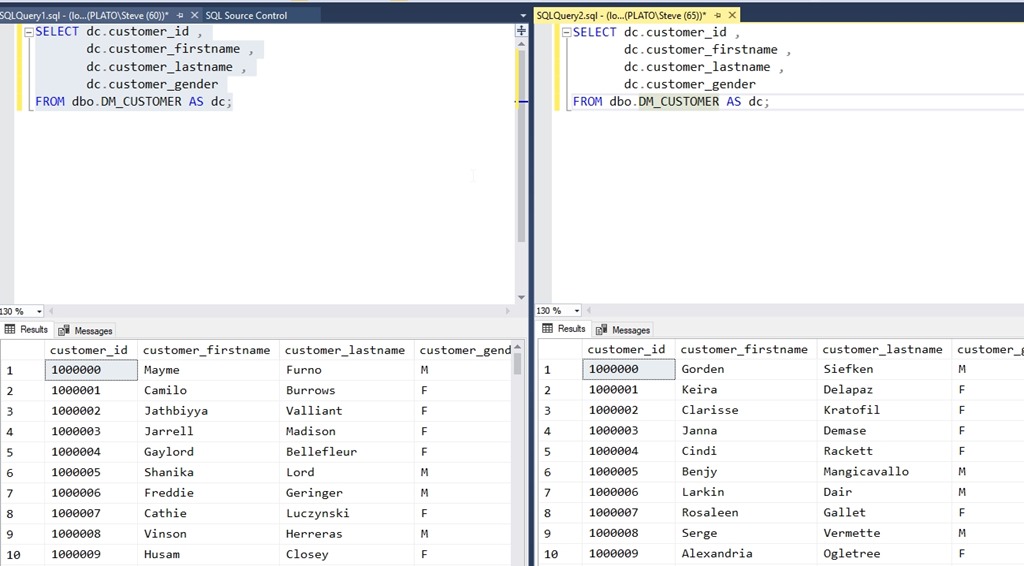
    Now I’ll run the masking set, after querying the table in a window. Once the masking is run, I’ll open a second window in a vertical tab and re-run the same query. You can see the before and after below:

    2018-05-04 11_59_40-SQLQuery2.sql - (local)_SQL2016.DataMaskerDemo (PLATO_Steve (65))_ - Microsoft S

    This is a basic look at a multi-stage process to anonymize data in a way that makes sense to your application. Using this technique, I can get production like data in lower environments, without using production data.

    Data Masker does some really interesting things as far as cleaning and masking data, so I’d suggest you give this a try as a way to process your lower environments.

    If you have questions or want to see other masks, let me know. I also have other articles on Data Masker if you’re interested.