Here was my speaking schedule, a page I updated Wed night.
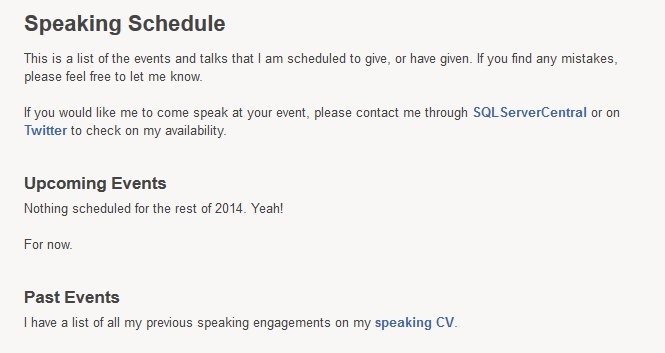
Late yesterday I got emails notifying me of acceptance to a new event. Two whole days without something scheduled.
Here was my speaking schedule, a page I updated Wed night.
Late yesterday I got emails notifying me of acceptance to a new event. Two whole days without something scheduled.
At my Filestream/Filetable talk yesterday at SQL Intersection, someone asked me about programmatically adding a file to a Filetable. Easy enough, I thought, since I’d seen someone do this in .NET and was thinking this has to be simple. Turns out it’s not quite so simple.
I was assuming that I could use the GetDescendent method of the hierarchy ID for the path_locator field to get the path you needed and insert that. It turns out that’s not correct.
I searched around when that didn’t work and found this post from Bob Beauchemin and a question on StackOverflow. If the two, Bob’s post explains things better. He actually dug into the Filetable, looking at the constraints and defaults in the schema. If you do that, you can find this constraint on the path_locator field:
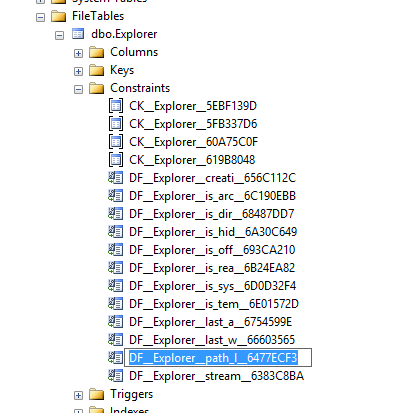
The code in this constraint looks like this, which matches with what Bob and SO show as the way to calculate the path.
ALTER TABLE [dbo].[Explorer] ADD  CONSTRAINT [DF__Explorer__path_l__6477ECF3]
DEFAULT (CONVERT(HIERARCHYID, '/' +     CONVERT(VARCHAR(20), CONVERT(BIGINT, SUBSTRING(CONVERT(BINARY(16), NEWID()), 1, 6))) + '.' +
     CONVERT(VARCHAR(20), CONVERT(BIGINT, SUBSTRING(CONVERT(BINARY(16), NEWID()), 7, 6))) + '.' +
     CONVERT(VARCHAR(20), CONVERT(BIGINT, SUBSTRING(CONVERT(BINARY(16), NEWID()), 13, 4))) + '/')) FOR [path_locator]
GO
This means that your insert statement needs to perform this calculation. For me, I decided to insert a jpg of a circle into the table, under the folder “books”. The folder looks like this:

Since I have the binary values for a circle image, I’ll use those, and then the code below. The first part of this code calculates the new path that’s needed, basing this on the path_locator value for the “Books” folder, and then building a NewID(). From there, it’s a simple insert.
DECLARE @path HIERARCHYID
DECLARE @new_path VARCHAR(675)

SELECT  @path = path_locator
FROM    dbo.Explorer
WHERE   name = 'Books'

SELECT  @new_path = @path.ToString()
        + CONVERT(VARCHAR(20), CONVERT(BIGINT, SUBSTRING(CONVERT(BINARY(16), NEWID()),
                                                         1, 6))) + '.'
        + CONVERT(VARCHAR(20), CONVERT(BIGINT, SUBSTRING(CONVERT(BINARY(16), NEWID()),
                                                         7, 6))) + '.'
        + CONVERT(VARCHAR(20), CONVERT(BIGINT, SUBSTRING(CONVERT(BINARY(16), NEWID()),
                                                         13, 4))) + '/'
INSERT INTO dbo.Explorer
        ( stream_id
        , file_stream
        , name
        , path_locator
        )
VALUES  ( NEWID()
        , 0xFFD8FFE000104A46494600010101006000600000FFE100684578696600004D4D002A000000080004011A0005000000010000003E011B0005000000010000004601280003000000010002000001310002000000120000004E00000000000000600000000100000060000000015061696E742E4E45542076332E352E313000FFDB0043000201010201010202020202020202030503030303030604040305070607070706070708090B0908080A0807070A0D0A0A0B0C0C0C0C07090E0F0D0C0E0B0C0C0CFFDB004301020202030303060303060C0807080C0C0C0C0C0C0C0C0C0C0C0C0C0C0C0C0C0C0C0C0C0C0C0C0C0C0C0C0C0C0C0C0C0C0C0C0C0C0C0C0C0C0C0C0C0C0C0C0C0CFFC0001108000A000D03012200021101031101FFC4001F0000010501010101010100000000000000000102030405060708090A0BFFC400B5100002010303020403050504040000017D01020300041105122131410613516107227114328191A1082342B1C11552D1F02433627282090A161718191A25262728292A3435363738393A434445464748494A535455565758595A636465666768696A737475767778797A838485868788898A92939495969798999AA2A3A4A5A6A7A8A9AAB2B3B4B5B6B7B8B9BAC2C3C4C5C6C7C8C9CAD2D3D4D5D6D7D8D9DAE1E2E3E4E5E6E7E8E9EAF1F2F3F4F5F6F7F8F9FAFFC4001F0100030101010101010101010000000000000102030405060708090A0BFFC400B51100020102040403040705040400010277000102031104052131061241510761711322328108144291A1B1C109233352F0156272D10A162434E125F11718191A262728292A35363738393A434445464748494A535455565758595A636465666768696A737475767778797A82838485868788898A92939495969798999AA2A3A4A5A6A7A8A9AAB2B3B4B5B6B7B8B9BAC2C3C4C5C6C7C8C9CAD2D3D4D5D6D7D8D9DAE2E3E4E5E6E7E8E9EAF2F3F4F5F6F7F8F9FAFFDA000C03010002110311003F00E97FE0E87FF82CA7ED35FB04FED85E09F03FC2BD6A5F87BE1097408B5C4D523D2ADAF1BC41746795248CBDC4722F970848C18940399373E43478FD75FF00827CFC68F177ED17FB0FFC2AF1D78F3461A078C7C59E19B2D4F57B110B42B14F244199846DF346AFC384392A1C024E335E95E2EF87BE1FF880968BAF687A3EB6B612F9F6C2FECA3B916F27F7D3783B5BDC60D6C5007FFFD9
        , 'Circle.jpg'
        , @new_path
      );
go
If I now look at the folder, I see this:

An insert into the folder of a file.
I could easily adapt this to stream in the binary values from a .NET application, or OPENROWSET, but this works well enough.
As of right now, my United account has no flights booked. My Hilton Honors account has no hotel rooms reserved. My National account has no car rentals to pick up.
And I have nothing scheduled for the rest of 2014.
For now. I suspect things will change soon, but it’s a good feeling for now.
It is becoming more and more important to protect your data from anyone that should not access it, including the DBA. Learn how you can use column level encryption as well as TDE to protect your data files, with minimal performance impact to your SQL Server instance.
This session will look at securing data
We do this with
Slides:
Code:

