I wrote about computed columns recently, but I didn’t realize that a logical expression could be used here, such as a case statement, and misspoke in this thread on SSC. Fortunately someone corrected me and I decided to blog and test this a bit.
Why an expression?
Suppose you had a table like this:
CREATE TABLE OrderDetail
( OrderID INT
, ProductID INT
, Qty INT
, OrderDate DATETIME
, ShipDate DATETIME
, STATUS INT
)
I record orders, but I don’t necessarily have a ship date when the order is placed. There are many cases where a user enters an order and some back end system later calculates a shipdate based on the supply situation, or even waits to update this field when the order ships. It’s entirely possible I have data in this table like this:
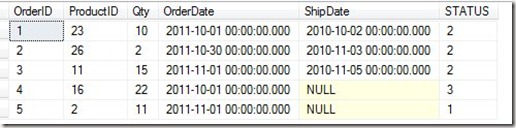
Suppose I then have a status table with these values:
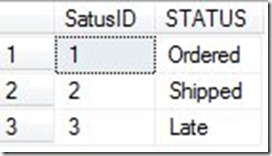
Here is my logic. If the shipdate is null, then the order has not shipped and is in the status of ordered. If the shipdate is filled in, the order is shipped. If the shipdate is null, and the order date is more than 2 weeks old, the order is late. In our example, if the date is 11/5/2011, then the order #4 is late.
We can easily join to the Status table to display this for the client, but we are depending on some process running every day to check for late orders. Otherwise how does row 4 get marked as late? When the order is entered, it’s not late, and we certainly don’t want to wait until the client checks on their order status to mark it as late.
If we had a computed column, we could easily handle this, and display late orders for a report, or even for a other queries. I could change the definition of the status column to be this:
CREATE TABLE OrderDetail
( OrderID INT
, ProductID INT
, Qty INT
, OrderDate DATETIME
, ShipDate DATETIME
, STATUS AS CASE
       WHEN shipdate is NULL AND orderdate < DATEADD( dd, -7, GETDATE()) THEN 3
       WHEN shipdate is NOT NULL THEN 2
       ELSE 1
   end
 )
GO
Now the status I get is based on the other values in the row and is correct, regardless of my application logic.
NOTE: This is a contrived example, and I don’t like this since I am assuming the status logic doesn’t change. In a real system, I would probably prefer to use the actual status in the column if I did this, as shown here:
CREATE TABLE OrderDetail
( OrderID INT
, ProductID INT
, Qty INT
, OrderDate DATETIME
, ShipDate DATETIME
, STATUS AS CASE
       WHEN shipdate is NULL AND orderdate < DATEADD( dd, -7, GETDATE()) THEN 'Late'
       WHEN shipdate is NOT NULL THEN 'Shipped'
       ELSE 'Ordered'
   end
 )
A Better Example
A better example of where this might be used would be in the case where I might have a variable calculation. For example, in many Internet businesses in the US, you do not collect sales tax if your product is not being sold inside the state in which your company is located.
If I sold horse products from my ranch, located in CO, I would have to collect sales tax for sales shipped to CO, but not those shipped elsewhere. So perhaps I’d have a table like this:
CREATE TABLE OrderDetail
( OrderID INT
, ProductID INT
, Qty INT
, Price NUMERIC( 10, 2)
, St CHAR(2)
, TaxRate NUMERIC( 12, 4)
, LineTotal AS CASE
       WHEN st = 'CO' THEN (Qty * price) + (Qty * price * TaxRate)
       ELSE (Qty * price)
   end
 )
GO
INSERT dbo.OrderDetail
        ( OrderID ,
          ProductID ,
          Qty ,
          Price ,
          St ,
          TaxRate
        )
VALUES  ( 1 , -- OrderID - int
          1 , -- ProductID - int
          10 , -- Qty - int
          10 , -- Price - numeric
          'AZ' , -- St - char(2)
          .1  -- TaxRate - numeric
        )
INSERT dbo.OrderDetail
        ( OrderID ,
          ProductID ,
          Qty ,
          Price ,
          St ,
          TaxRate
        )
VALUES  ( 1 , -- OrderID - int
          1 , -- ProductID - int
          10 , -- Qty - int
          10 , -- Price - numeric
          'CO' , -- St - char(2)
          .1  -- TaxRate - numeric
        )


SELECT OrderID, qty, Price, St, TaxRate, LineTotal
 FROM dbo.OrderDetail
Useful?
I’m not sure if computed columns are terribly useful. To me they strike of hard coding logic into a schema that I’m not sure belongs, but if you find them useful, you do have the option of doing so, and including logical expressions with CASE.


