This is the text and images from my keynote talk at SQL Saturday #90 in Oklahoma City on August 27, 2011.
This is my boss, Neil Davidson. He runs Red Gate Software as one of the two join CEOs for the company.

About a year and a half ago he wanted to learn to draw better. He has this desire to improve himself, learn new things, and try new ideas which seems to be a trait of some very successful people I know. Many people have a bucket list of sorts,

which is often a collection of things you’d like to do before you die, but it seems that there are some very successful people that make a constant effort to challenge themselves in different ways to improve their lives as they go through them, not just visiting some place or experiencing some event. They work to actively get better.

Perhaps most well known personal challenge recently is from Mark Zuckerberg of Facebook, who sets himself a new challenge each year. Last year he learned Chinese for an hour a day, and this year he is determined to only eat meat that he’s killed. Why he chose this, I’m not sure. This idea of challenging oneself seems to lead to self improvement and often more success, even when your personal challenge isn’t related to your career or business. I’m not sure what Zuckerberg is learning this year, but that’s what he’s chosen.

At an event in Seattle, my boss saw a drawing challenge, and decided to take it. You can see that when he took the challenge, he had a lot of room for improvement. Compared to what I’d draw as self portrait, however, it’s pretty good. Here’s a more recent attempt.

You can see his skill has improved quite a bit. This isn’t a bad likeness, but I’m guessing that my boss was going for something a little more like this:
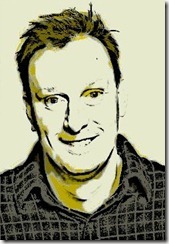
Over time, he has improved his skills. He continues to practice and as you can see with this drawing, he’s gotten much better.

It’s one of the ones from this past summer, a drawing of someone he knows. That’s not bad, and I’m looking forward to seeing how this challenge works out for him over time and how his skills improve. He wanted to draw a picture every day in 2010 and was successful and is still going strong. he has a blog where he posts all manner of sketches and drawings of people and places, and some of them are very good.
However, when he started drawing, I’m sure that what he saw in the mirror, or in a picture, or as his subject wasn’t what he ended up putting down on paper. He had this goal of taking something he saw and reproducing it accurately on paper. There was a plan of drawing the head first, or the hands, or the body, or some part of his subject accurately and then moving on to the next part.
What you put on paper isn’t necessarily an accurate representation, especially when you have limited talent. You have to adjust your expectations, or your goal, in order to accomplish something and as you gain skill and improve your abilities, you stretch you goals further and perhaps begin to reach your original target.
Or maybe you set a new target. In art you might change from trying to produce a photorealistic drawing to one that is a more of a courtroom sketch or a caricature or something other type of art that suits your style and ability.
At each state of my boss’s journey, as he’s gained some skill, the images that he sees probably still aren’t those that he ends up posting online. The image in his mind and the final product grow closer together over time, but I am guessing it is both the image he expects to draw, as well as the drawing he makes, that have changed from his original expectations. The journey that Mr. Davidson is on to improve his skills in this area is constantly changing, and probably unlike the one he had originally planned.
I’m not even sure that you could plan this type of journey in detail at the start. You could take some type of formal classroom training, progressing in specific ways towards your goal of becoming a better artist. Even then I suspect that your progress in a class would be different than any other people in the class and would still lead you in new directions as you learned more.
What Neil did add was a set schedule that allowed for regular effort, regular practice, hopefully improvement in skill, and modification to his goals where he felt it was warranted, in essence revealing the next step on the journey as he progressed along it.
The journey along the path to improving skill is constantly changing. it’s a winding road, one that you can’t see very far down, but one on which you continue to move down if you make the effort.
Let me tell you another story. This one is a bit of my journey. Like many of you, I had dreams as a kid of playing sports,
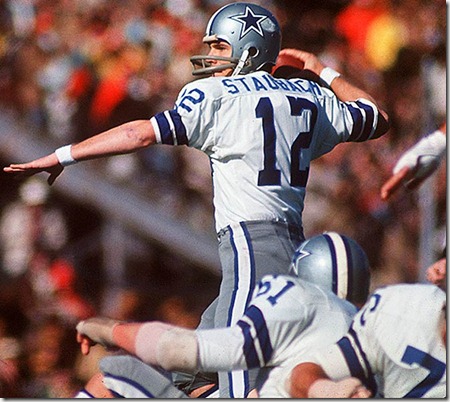
or being a rock star,

or being some kind of James Bond, FBI agent, or other hero in the world.

At different times in my life, I had different dreams, and slowly over time many of those dreams died. That is a little sad, but it is also part of life. In my case it was a part of growing up and learning about myself, what I liked, and what I could do.
I learned about my limitations. That kid in little league who had success at a young age realized that he wasn’t naturally gifted as a an athlete, at least not gifted to the level that would earn him a living in professional sports.

The budding rock star realized that he wasn’t super talented, couldn’t sing in key, and wasn’t willing to toil in obscurity, playing in bars, living on the road, and hoping that he would be rewarded with some type of record contract.

And the young man realized that the life of a spy, or FBI agent, or any type of law enforcement career isn’t nearly as glamorous as so many movies make it out to be.

In all of those cases, it wasn’t so much that the dream died, but that I learned more about the dream i was pursuing as well as more about myself. I didn’t always realize that I was learning something about myself. Most of the time I thought I was making a choice.

Most of the time I thought I was making the decision to go one way instead of another at The metaphorical fork in the road. That is what I was doing, but I didn’t always realize that I was learning more about myself at the same time.
As my life progressed, I found new dreams. I started working with computers in high school.

I learned to program and enjoyed it so much that I went to college to study computer science. I was sure that I’d make a living with computers somehow, and perhaps even make a lot of money. This was the time of the "Star Wars" defense budgets, and my plan was to go to work as a highly paid programmer at a defense contractor.

However it was also the mid-80s, the time of mergers and acquisitions, the time when banks were being deregulated and fortunes were being made on Wall Street. I had started college at Syracuse University but left to return to my native Virginia. It was a lot less expensive, and a lot warmer. At Virginia I studied economics and finance.

I found myself drawn into the dream of working in New York at some type of investment bank. For two years I learned a lot about money, finance, and accounting. I prepared myself to interview with investment banks during my senior year. I was sure I’d work 100 hours a week for a bank for a couple years and make a lot of money. I would then go back to school, earn an MBA, and then make even more money as an executive at some large corporation.
However early in my senior year, my life changed.

I’d started playing rugby at Virginia and in late September, we were having a practice. I was the scrum half and my job was to pick the ball out of the scrum and start the play by throwing it to the players on the wing.
I didn’t do that. When you play rugby, the scrum half has the option to fake a throw, drawing the defenders toward the wing and then duck inside them, running with the ball. Theoretically a quick scrum half can gain quite a bit of yardage that way. I was pretty quick, but not quick enough. The opposing scrum half was a little quicker, following me around the pile and tackling me with the help of a few of his friends.

I ended up getting tackled on my left shoulder, separating it and spending the next 12 weeks in a sling. No surgery, but no rugby, no writing as I was left handed, and I ended up taking quite a few oral exams that semester.
That also changed my life.

I decided that I didn’t want to work in an office 100 hours a week. I didn’t want to be so focused on money that I forgot about my health. I decided to go back to my native Virginia Beach, spend a year tending bar and enjoying life. Just before I graduated college , I had finally rehabbed my shoulder to the point where I could do a pain free push up, which was a milestone for me and made me realize I had made a good decision. After I spent the summer tending bar, I became bored and realized that it wasn’t the life for me.
I started graduate school, going back to study computer engineering. I decided to go back to work in the technology field, which I had loved, and seemed to have better hours. It was a simpler world back then. I ended up with an internship at the local power company.

I learned a lot and got promoted, but hated the commute. I wandered into SQL Server at this point and realized I really liked databases. I met the company’s SQL Server DBA who made a lot of money, and I moved in that direction. I went on to a small company, running their IT operation and building SQL Server applications. I enjoyed that job, but wanted to have a chance to be a part of the Internet boom that was happening in the mid 90s.

I moved to Colorado. I worked for a couple small companies, and one big one, always looking for a better situation. Along the way I had gotten married and had three kids, and my priorities changed. The startup companies were exciting, but being away from my small children wasn’t ideal. My first job in Denver resulted in me sleeping in my office about once a month to work on some issue, thanks to SQL Server 6.5 and some poor VB developers for that one. How many of you have ever kept a blanket and pillow in your office? I did, and didn’t enjoy it. At that company I also traveled quite a bit, including flying to New York one morning for a meeting and then flying back to Denver that night. I think that explained my reluctance to travel for quite a few years.

Eventually I realized that while I didn’t mind working hard, I really wanted a stable job, at a company that wasn’t struggling to find it’s identity and trying new ideas to create business every other month. I ended up at JD Edwards, as an Operations DBA and I enjoyed it. However the transition to People soft didn’t sit will with me and that was the trigger that sent me to my current job.

At all of the jobs, during all the dreams from childhood through college, the one thing I never thought I’d be was a writer. I hated writing all through high school and college, avoiding classes that required essays and hating the classes that I couldn’t avoid. I wasn’t a great documentation person as a developer, but I was forced to do it at a few jobs and I learned the value of it.
I learned early on that there was a wealth of information on the Internet and in magazines that could help me with my job. I also learned that a lot of that information wasn’t beyond me. In many cases, it wasn’t code that was a lot more complex than code I’d written. When I came to Denver, I came alone, leaving my wife and two kids in Virginia to sell our house. I had a lot of spare time, worked a lot, and wasn’t a party person, so when I saw an offer to write an article, I jumped at it. I think I got paid $110 for that first article, but it might as well have been a $1mm to me. Having someone pay me to write something was amazing.
I published articles for a few places and eventually went to found SQLServerCentral with a few partners. We grew and reached the a point where we needed to sell the company or have someone work fulltime for the company. Of the three of us, my wife was the only spouse that worked and provided benefits, so I got the chance to try it. I started writing those daily editorials shortly thereafter, which have become one of the things about my job I like the most.
I couldn’t have predicted the choices that led me to the place I am now when I was in high school, college, or even as recently as a decade ago. At each fork in the road, I chose the path that seemed to make the most sense to me.

* However over the years I think I’ve come to think that it wasn’t a fork that I often came to. It has happened in my life, but not often.

Most of the time it was the choice to continue along the way I are going, or take an exit. Most of our choices are between continuing on the way we are going, or taking a chance on a different road.

I called this talk the Winding Road, which is a bit of a metaphor for living one’s life. There are any number of proverbs that talk about following a road or a path. There’s the journey of a thousand steps beginning with the first one.

There’s the single set of footprints on life’s journey

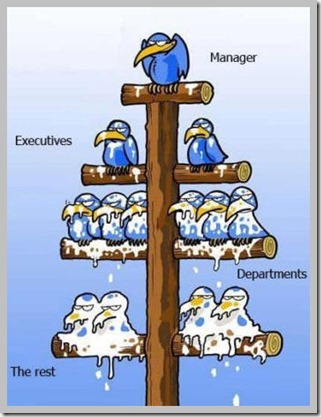
* Then there’s the career path. Climbing the corporate ladder:
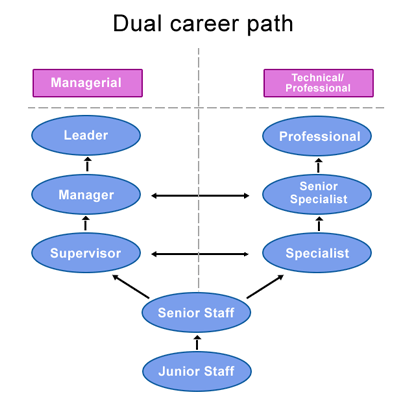
Or even the classic path that we should follow as we progress in our careers.
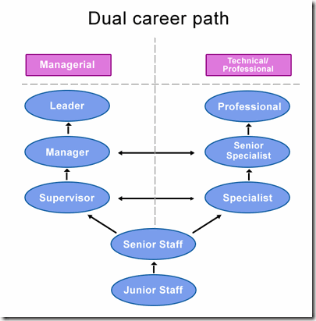
In all of these cases, there is a progression along a journey. Over time you move towards some goal. It may or not be specified, and it may or may not be known at the beginning of the journey, but it is the movement along a path of sorts. We might see most of the path, but often I think we see only a short section of the road we are on in our lives and don’t know where we will end up until we progress further along.
Unfortunately I think that most of us don’t have a clear career path in mind when we start, a path that goes from step 1 to step 2 to step 2. Many of us may not even have a clear path now.

Most likely we have a complex series of choices to make, leading us down a more complex series of roads. It might lead us in ways that are unexpected.
It may have dead ends or seem like we don’t have any good choices.
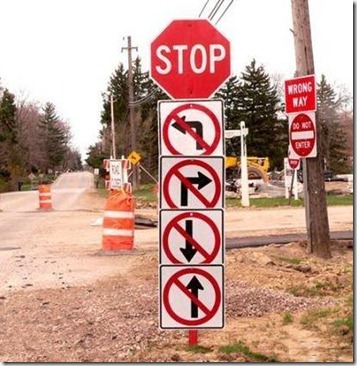
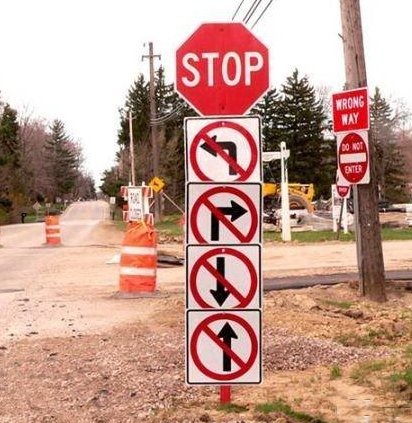
Or it may just be confusing

In any case, it’s a journey we have to work through. We have to learn about ourselves, learn what we like, and more importantly, what we don’t like. This is our life, and this is our career. It is up to each of you to choose the journey that fits your life, your goals, and your desires.
That’s hard to do, and it only comes with some maturity and self-awareness when we are honest with ourselves. We have to really think about what we love at each point in our life when we can make a decision. It’s easy to let money cloud our decisions in this area. Money is important, it provides for our families and allows us to enjoy some things in life, but it’s not the most important thing. I’ve never met anyone that was happy by always choosing their next job by the raise it offered them. Not to say that you can’t, or shouldn’t, want to make money, but it ought to be a by product of the career you choose.
There rally is so much more to life than money, and as I get older, I believe that more and more. I learned in my 30s that it was better to choose the best overall job for me. I valued the people I worked with, the environment, and the location more than the money. I learned that sacrificing some of those things had a real cost, one that can’t often be replaced by money. I learned to place a price on those things that impacted my life. I’ve sacrificed fifteen thousand dollars of salary to avoiding commuting to the other side of town. I wouldn’t take a job now with people I disliked because it would wear on my every day, like a rock in my shoe. I realize that I spend a lot of my life at work and money can’t replace the enjoyment and happiness that come from spending time doing something you enjoy. That’s a lesson I hope most of you have learned.
I know it’s not that simple, and in the short term we all have responsibilities to meet, bills to pay, and we might need a certain level of income. However think about what that really costs you in your enjoyment of life, and think about whether it’s worth the trade. With a few years of effort, I’d hope that all of you could find the job that you want, and learn to live with the level of income it provides.

The last thing I want to talk about is Drive. This is a great book by Daniel Pink. It talks about the things that motivate us, and it’s a very interesting read. It taught me a few things about myself and what’s important to me. I think it’s a book I’d give to all my future managers in the hope that they might run their department or company in a better way. My bosses have read it and love it.
The book talks about three things that are important to motivating people. The things are mastery, autonomy, and purpose. I would encourage you to read the book and see if you learn which things might motivate you along your path in life.
Mastery
Mastery is the desire to be good at something, and I think everyone wants to be good at their work. The quality of work is more important to some people than others, but everyone wants to do a good work that they can take pride in. There have been numerous studies that show when people are challenged and like their work, they often enjoy the job and produce good work. When they don’t, they leave. If you don’t like your job, think about whether it’s the company, or the job. If it’s the latter, think about changing careers. If it’s the former, think about finding a better company.
Mastery isn’t about being the superstar. It isn’t about being one of the best in your field. Aim for that if you want, but mastery is really about regular improvement in your skills. It’s about getting better at your craft. Today you should find one thing, learn one thing that you can use in your career over the next few months. Find something that you can use to expand or improve the way you do your job.
Autonomy
Autonomy means the ability to do the work in your own way. Making some decisions about how to accomplish tasks, and the ability to set your own schedule. That can be hard in some jobs, and I think a lack of autonomy creates friction and stress in many companies. This section alone might be worth sending to your manager, but remember that you should earn privilege of some autonomy as well. Learn to be better at your job, and gain the trust that you can make good decisions. Whether that’s a design decision in a schema or managing your own hours to ensure work is done. Prove you can handle the responsibility and then push to get assigned the responsibility.
Purpose
The last item is purpose. At first I thought this was a little silly, after all, is work the place to find some purpose? I’ve come to think it is. This isn’t a higher purpose like a calling to serve in your religion or help humanity. Instead it’s a simpler version of seeing your work having value. That the accomplishments you have every week or month are put to some use in the company. They are appreciated by someone else. Without that, our lives have an emptiness that makes it hard to go to work each day.
Life is a journey for all of us, and while I hope it’s one that lasts many years for each of us, it’s also very short. We want to make the most of our time on that journey. Just as we want to be efficient at our jobs, getting the work done as quick as we can, we want to try and move our careers forward.
We don’t always know which direction we want to go, or which direction will improve our career, but that shouldn’t stop us from moving forward. Choose an area that interests you and make a plan. Learn more on your own, look for projects at work in that area, or even build a sample implementation on your own. Move forward, without being afraid to modify your plan as you learn more about yourself.
Take advantage of SQL Saturday today to start your own journey down the road that will be the rest of your career.
Thanks for coming.