Tag: AIExperiments

  • Using Prompt AI for a Travel Data Analysis

    I was looking back at my year and decided to see if SQL Prompt could help me with some analysis. I was pleasantly surprised by how this went. This post looks at my experience using this to help me write a few queries.

    This is part of a series of experiments with AI systems.

    New York City

    This year was a big one for me and New York City. By my count, I went there five times. I wanted to see if that was right.

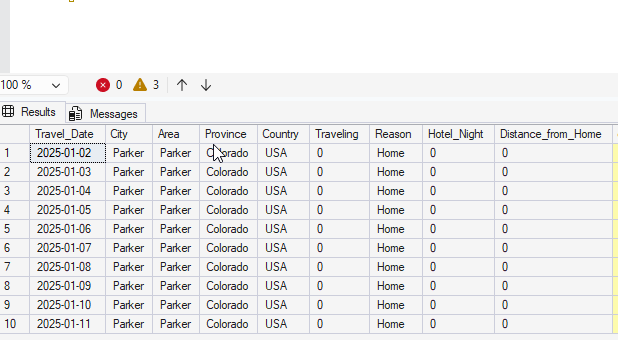
    I started by loading up a bunch of travel data I keep into a database. I do this to keep an eye on where/when I’m going places, so that I have a few of how busy I’ll be. In this case, I loaded data into a table. Here’s a short sample of data.
    2025-12_0217

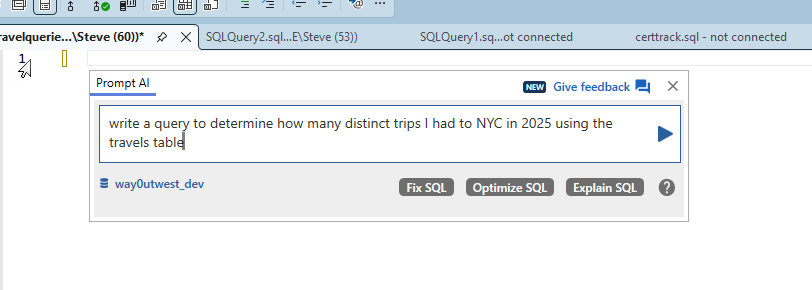
    I started by asking Prompt AI to write me a query. Here’s the prompt:
    2025-12_0212

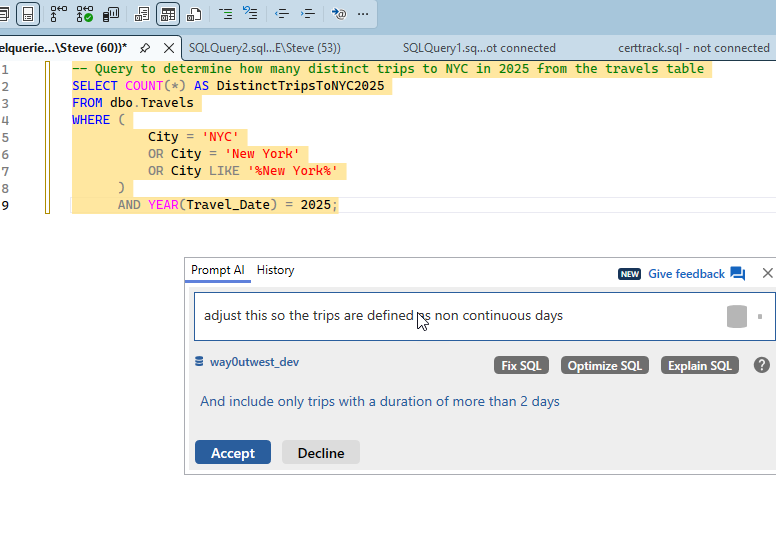
    Simple enough. I could have written what it gave me, so I asked for more. Since I’m not tracking trips, but where I am on days, I needed something better. My prompt is what I might express to someone else, non-continuous trips.
    2025-12_0213

    2025-12_0214

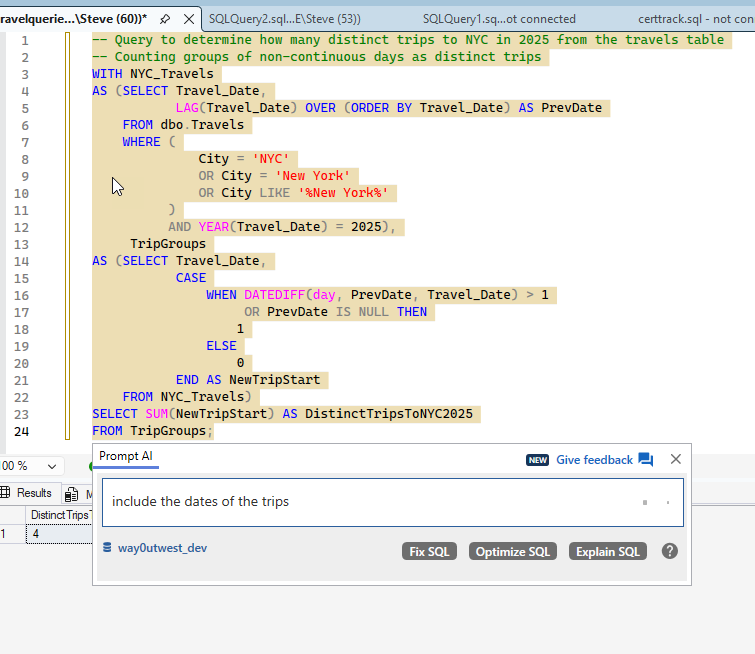
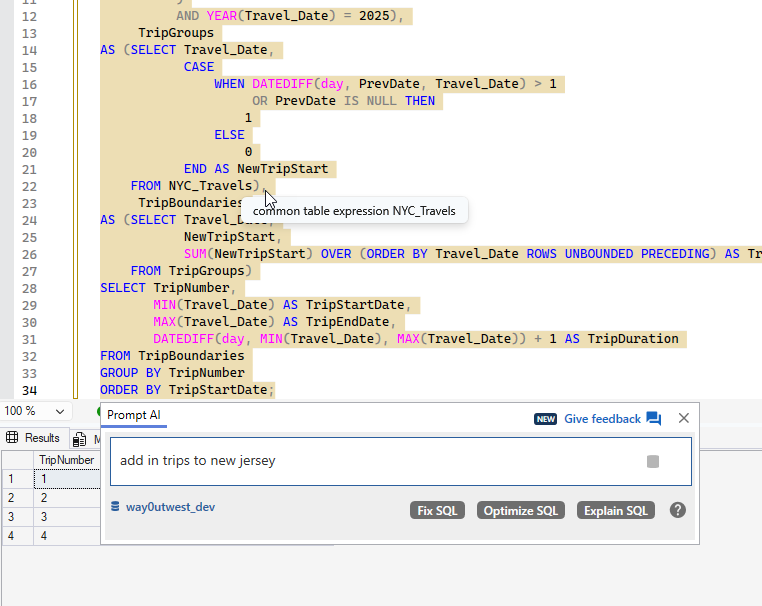
    I got a 4 back from more complex code, which is looking for entries with the city being NYC or a variant. It then adds a LAG(), which is what I was thinking before I decided to let Prompt do this. Notice above I was already asking for dates.
    2025-12_0215

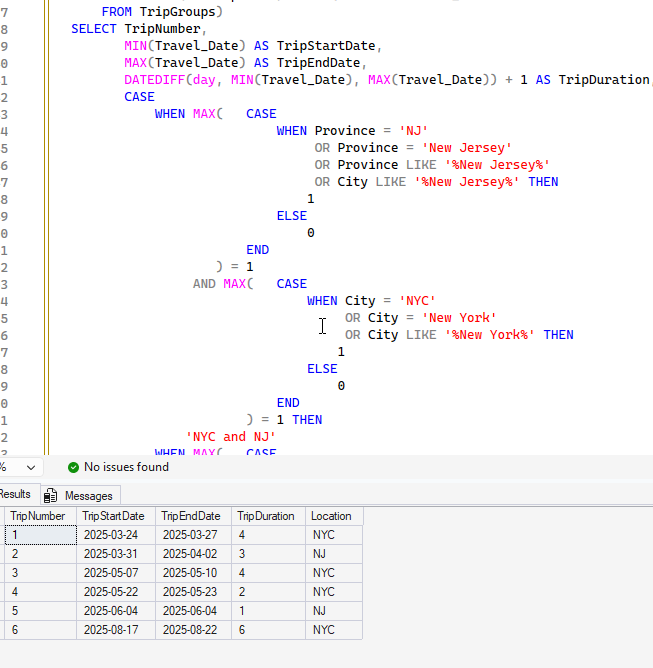
    I got my dates, but still 4 trips. I know I flew to the NYC area more times. In looking at the dates, I realized that one of the trips, Mar 31-Apr 2, was only to Jersey City. So I had asked for that above.

    You can see more more complex code, which adds in New Jersey. The results were interesting. This has 6 trips, because on one another trip, I went to New Jersey for a day. I had forgotten that one.
    2025-12_0216

    Checking Countries

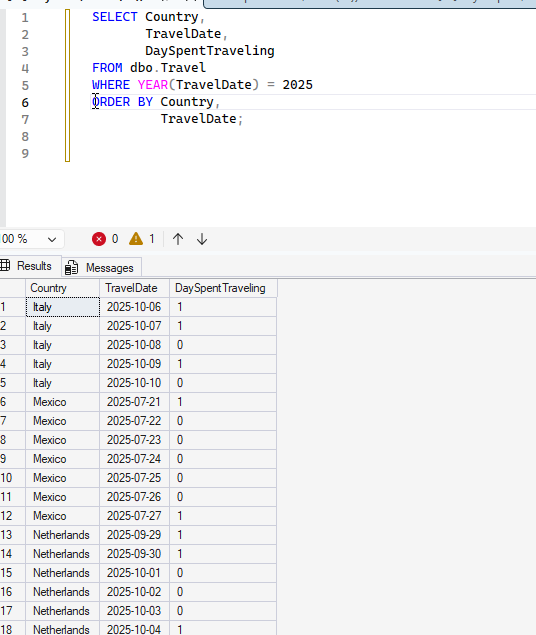
    I wanted to do some country analysis. I knew there was a bunch of country data from 2025 in there, so I wrote a simple query. That gets me some data, but it’s a bit of a mess. I really want to know when I visited countries.
    2025-12_0227

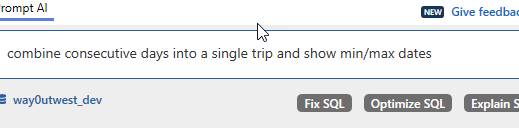
    I used PromptAI with a simple request.
    2025-12_0228

    I got some results back, which were good, but included the USA. I then asked to remove this and you see the result.

    2025-12_0229

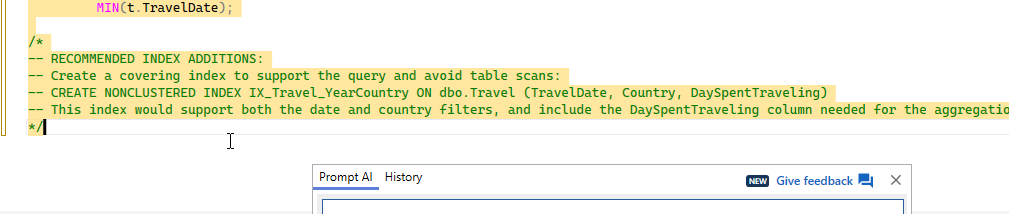
    This was a good query, overall, so I clicked the “Optimize SQL” button. I got these items added as comments.
    2025-12_0230

    There isn’t a lot to do here, but I created the index. The “optimize” had also added a FORCESEEK, which I didn’t realize at first, so I removed it.

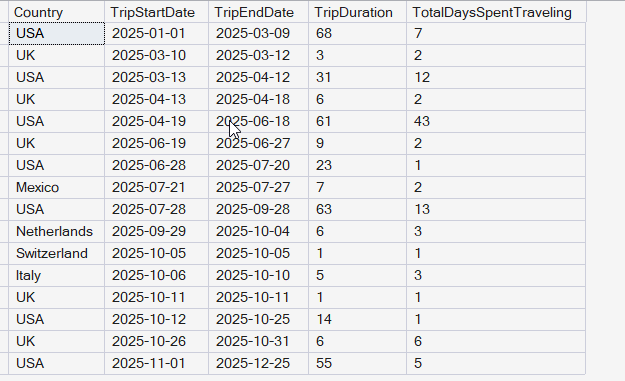
    Eventually I added back the USA, partially as this improves performance, but also, with the results, I got a good look at travel patterns. In this case, I can see when I’m in the USA and when I’m not. I liked that I had asked for the trip duration, but the GenAI also added days traveling on the trips, which was fascinating.
    2025-12_0233

    The final query is here:

    ;WITH TravelCTE
    AS (SELECT Country,
                TravelDate,
                DaySpentTraveling,
                ROW_NUMBER() OVER (PARTITION BY Country ORDER BY TravelDate) AS RowNum
         FROM dbo.Travel WITH (INDEX = IX_Travel_YearCountry) -- Use existing index to improve performance
         WHERE TravelDate >= '20250101' -- Using efficient date literal format
    )
    SELECT t.Country,
            t.TripStartDate,
            t.TripEndDate,
            t.TripDuration,
            t.TotalDaysSpentTraveling
    FROM
    (
         SELECT Country,
                MIN(TravelDate) AS TripStartDate,
                MAX(TravelDate) AS TripEndDate,
                DATEDIFF(DAY, MIN(TravelDate), MAX(TravelDate)) + 1 AS TripDuration,
                SUM(DaySpentTraveling) AS TotalDaysSpentTraveling,
                DATEADD(DAY, -RowNum, TravelDate) AS GroupingKey
         FROM TravelCTE
         GROUP BY Country,
                  DATEADD(DAY, -RowNum, TravelDate)
    ) AS t
    ORDER BY t.TripStartDate;

    Summary

    This was an interesting experiment in having an AI help me do some data analysis. I could have written these queries, but it would definitely have taken me as long as it took to ask the AI and write this post to do so. I’d be messing with data, double checking myself, and trying to decide what I wanted.

    I also found it interesting to have the AI write the code and I could think more about the data being returned. I found a few data anomalies that I corrected along the way.

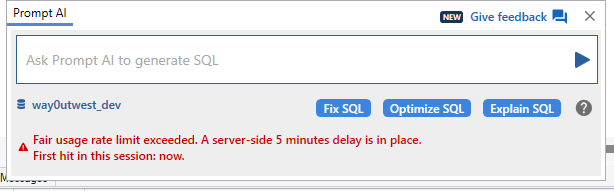
    Prompt AI is proving useful, though when I was going back and forth a lot, I got this message.
    2025-12_0223

    There are limits to how much and how often you can query.

    Video Walkthough

    I’ve tried to duplicate this in video below.

  • Vibe Coding a Login Tracking System

    A customer was asking about tracking logins and logouts in Redgate Monitor. We don’t do this natively, as this really needs an XEvent session. I decided to see if an AI could help me get a solution setup that might let me build a custom metric to track this.

    I could do this myself, but it’s some looking syntax and capabilities, futzing with different code items, and trying to think about options. The goal here is can an AI help and save time. Not do the work for me, but assist.

    So maybe not Vibe coding per se, but felt like I did little.

    Video Walkthrough at the bottom.

    This is part of a series of experiments with AI systems.

    Note: This isn’t something I necessarily worry about. The rate might tell me if I’m under attack, but I’d hope applications would detect this first (and be able to block things)

    The Problem

    The customer just asked if they could track logins and logouts. I mentioned the Server Properties (shown below), to see what they’d done. They hadn’t used this, but also, it’s not very flexible or reportable as it puts info in the error log.

    2025-12_0171

    Tracking this info really requires an XE (Extended Events) session. That’s a lightweight way to capture this information. If I want to capture some info about the client logging in, or failing to log in, that’s the way.

    A separate request was could we also get logouts. The only way to do this is with an XE session and the sqlserver.logout event.

    With that in mind, let’s see how my assistant can help.

    Using Claude

    I opened Claude and asked this: “in sql server can I track login counts and logout counts from t-sql?” and actually spelled everything correctly. No savings here.

    The base answer I got started like this, giving me a few options.

    2025-12_0172

    The ending asked me if I’d like to get the Extended Event option. It had provided only the login trigger option. I need an assistant, so I said yes.

    2025-12_0173

    That first answer was maybe 20-30 sec, but I started reading things, so this felt like a discussion with another DBA. Once this started, I let it go and it started to write out and work on code on the right, and then fill in the results on the left.  This was a few minutes, so I flipped over to answer a few emails while I saw this on another monitor.

    The results started with a table to store data and then an XE session. The whole page looks like this, which is a lot.

    2025-12_0175

    Here’s the full left side. Notice that it asks me for a next step. I’ve met a lot of junior DBAs, or even Senior-DBAs-with-1-year-of-experience-10-times that didn’t do this.

    2025-12_0177

    The actual code doesn’t matter yet, since I realized this isn’t getting failed logins. I asked another question and got a response. A polite Claude complements me and then rewrites code. This took another few minutes, and it was neat to see it rewriting its code on the right, adding in a new field in the table and adjusting the session.

    I watched a bit, but got distracted with a Slack message. One nice thing is I can move on to another task while my assistant keeps working.

    2025-12_0178

    At the bottom, I liked the summary of how it works.

    2025-12_0179

    My Slack message was from an AE, asking a question about the server property stuff (from the customer). I could have typed a bunch, but when I looked back, Claude was finished, so I asked it.

    2025-12_0180

    I copy/pasted this to the AE, as it’s a good summary for the customer. This assistant is making my job easier.

    Testing the Solution

    I didn’t just send this. Instead I decided to test this on a few local systems. I keep a DBA database on each instance, so I ran the code in there to create the table and session. As a precaution, since this isn’t my code, I ran each item separately.

    2025-12_0181

    The table worked here. I had another window for the session, which I looked over, but didn’t extensively check. I’m not an XE expert, and I’d likely fumble this code worse than an AI at first, so I checked the events and actions. I decided to just run this since it looked good.

    When it came to the procedure, I got an error. I copied and pasted this into Claude. It recognized an issue and fixed it. This took a few minutes, but this is faster than I could have corrected my own amateurly written query against XE.

    2025-12_0182

    Now I had a procedure. One thing I edited in both the session and proc is that I removed the hard coded c:\SQLData path. I wanted this captured with my other instance stuff in the \logs folder, so I left just the name of the XE session.

    Adding Archival

    One of the things that Redgate Monitor does really well is manage older data. I’ve seen so many people, including myself, set up something like this and then a year later realize they’ve captured GB of data.

    I asked Claude to just fix this for me.

    2025-12_0183

    I grabbed the second command for my Agent Job and changed 180 to 90.

    SQL Agent Job

    Claude again asked me above about jobs, but jobs are simple and easy, and I wanted to think about it for a minute. I right clicked and created a new job. I thought about the name and description I wanted. Then I made two steps, pasting in two exec proc commands for the procs my assistant had written.

    The last thing was some testing. I ran my job to be sure it was working. It completed, which was good.

    I made a few logins and logouts, including a few failed logins. Then I queried my table. I didn’t remember the name, but my assistant tends to pick plain/boring names. So I used SQL Prompt to find it with a ssf <tab> l and got this:

    2025-12_0184

    When I got a query and checked, I see logs of my logins and logouts.

    2025-12_0185

    Redgate Monitor Custom Metric

    My AE and customer wanted to see this in Redgate Monitor, so I decided to ask Claude. It was happy to help.

    2025-12_0186

    I could repeat that for the other items (failed logins and logouts). I didn’t, but this gets me ready to add this to Redgate Monitor.

    Summary

    This shows how an AI assistant can help me set up some auditing for security purposes. There is nothing complex here, and I’ve set up a bunch of this myself in the past. I even have a blog on this.

    However, the code is cumbersome and slow to write for me. Or most humans unless you end up working with XE every day. Even if you use SSMS and the GUI to generate the script, it can be slow. I know I’d certainly have to look things up. In less than 15 minutes, I had a fairly well working solution, with archiving (deleting) old data and I didn’t need to focus tightly the entire time or type a lot. I did some other work, and I could focus on just testing.

    Claude was a great AI assistant to this problem, which is similar to a lot of DBA-type work I’ve done in the past.

    These were the tools I used:

    And, of course, Management Studio 22.

    Addendum

    I tried Google Gemini and ChatGPT. A quick summary of those, which didn’t work as well. At least not to me.

    Note that I use the free versions for all of these tools right now.

    Gemini

    The first prompt got me just a table and trigger, with a followup if I wanted more. I asked about XE and got a basic session, not as easy to read as Claude and embedded inside the response. It also had fewer actions.

    2025-12_0188

    I got to the same place, but it was more prompts and I had to keep guiding it along, like micro, or at least mini, managing another DBA. On the plus side, this was faster.

    ChatGPT

    ChatGPT suggested a trigger, but noted this wasn’t great. It did suggest extended events, and a complete solution. I could have just entered “yes”, but I didn’t. I’m still working on muscle memory at times.

    2025-12_0189

    I got each part of the solution separate, but this has me scrolling through explanation and code. Again, I prefer the Claude side-by-side approach, but this works. And it’s fast.

    2025-12_0190

    This also kept leading me along the process, which I liked. It certainly likes the checkboxes and Xs in its results.

    Both tools helped me with custom metrics.

    Video Walkthrough

    Here is a a retry, and then showing the first solution. I think Claude learned a bit the second time.

  • SQL Server 2025 RegEx and AI

    One of the language changes in SQL Server 2025 that I’ve seen a lot of people mention is the addition of RegEx functions to T-SQL. I decided to take a few minutes and try to examine how this feature works, and how I might use it. And more importantly, can AI help?

    This is part of a series of experiments with AI systems.

    Data with a Bit of a Pattern

    One of the common things people use Regex for is validating email addresses.

    I created a basic table in a database that looks like this:

    CREATE TABLE customer
    (
         customerid INT NOT NULL
             CONSTRAINT CustomerPK PRIMARY KEY,
         customeremail VARCHAR(200),
         validated TINYINT
    )
    GO

    I then asked PromptAI to get me some test data like this:

    2025-11_line0142

    I wasn’t connected to a database, but I still got code generated with insert statements. The AI also noted I had a “validated” column, and it populated that appropriately: 1 for good email, 0 for bad ones.

    2025-11_line0143 

    Once I run the inserts, I have data.

    2025-11_line0145

    Now, can I check that the AI did this correctly?

    REGEXP_LIKE

    In SQL Server 2025, there are a number of regular expression functions, and REGEXP_LIKE is one of these. This function is designed to return a boolean if the string_expression matches the pattern_expression, where the latter is the regular expression.

    2025-11_line0146

    Prompt sees this as a valid function for SQL Server 2025, which is great. I want to use the customeremail from the table as my string to check. For the regex, I need to create a regular expression, something I am not good at doing. I learned to do this at a very rudimentary level when writing Perl, but I’ve lost whatever little skill I used to have.

    I saw an expression on StackOverflow for validating email. Let’s check if an AI can help.

    2025-11_line0149

    In a few seconds, even on airport wi-fi (SFO as I write this), I get a response.

    2025-11_line0150

    This looks like the expression from the SO answer, though much shorter. If you read SO, you know that the format isn’t as set and stable as we’d like. In any case, let’s see what this shows.

    This is interesting. I get an error.

    2025-11_line0152

    If I look at the docs, this says it returns a true/false, which I’d assume would convert to a 1/0, but let’s try an explicit case. When I do this, it works.

    2025-11_line0153

    I can also do this in the WHERE clause, where the true/false thing just works. Let me move the function to the WHERE clause. If I do that, I have this code:

    SELECT customerid,
            customeremail,
            validated
    FROM dbo.customer
    WHERE REGEXP_LIKE(customeremail, '^[A-Za-z0-9._%-]+@[A-Za-z0-9.-]+\.[A-Za-z]{2,}$')

    When I run this, I see what I expect:

    2025-11_0136

    Not a bad enhancement to the T-SQL language.

    Summary

    There’s a lot written on RegEx, so this post isn’t intended to delve deeply into what RegEx expressions you choose. Rather, I wanted to show the basics of this REGEXP_LIKE() function, and showcase one of the weird things I found when including this in the column list. I also haven’t looked at performance yet, though that certainly is something to be concerned about with larger datasets

    There are other changes in SQL Server 2025, and I’ll try to examine some in the coming weeks.

  • Finding and Killing Blockers with Redgate AI Tech

    Redgate has a research arm, called the Foundry, that has been experimenting with AIs and DBA tasks. This post shows how GenAI tech can be helpful to DBAs in finding blocking and removing the offending client.

    This is part of a series of experiments with AI systems.

    Redgate Runbooks

    One of the experiments the Foundry is running is with something we’ve called Runbooks. Here’s the main screen, where I have a welcome and a chat window. This is like what I see in Claude.ai.

    2025-10_line0120

    I have connected this to two instances in the settings, and given the tool permissions to run queries, but not execute commands. The first server is the Local 2022 Default and the second is the 2910-41433.

    2025-10_line0122

    A Blocking Problem

    I’m going to set up a blocking session with this code. Notice it opens a transaction and then performs an update.

    2025-10_line0110

    In a second session, I’ll run this code. Notice this select is blocked and I have no results. The bottom shows this as “executing”.

    2025-10_line0123

    Now I’ll go to the Runbooks and enter a question. In this case, I ask it what is wrong with my 2022 server, as if someone called me and said there was an issue. Imagine the “Select” query owner wondering why things aren’t returning right away.

    The Redgate Runbook responds by saying it needs to run something. The first time, it asks me to approve this, which I did. Then it runs it and shows executed.

    2025-10_line0112

    Below this I get some results of what’s returned. This isn’t different than SP_who2, but if you’ve used that tool, you often get a lot of system stuff. I Could use sp_whoisactive, but again, more results than I want without knowing anything. Here the Runbook as limited results to what I care about.

    2025-10_line0114

    What’s more, the Runbook then tells me something about what it analyzes. This isn’t perfect, but it’s been better than what a lot of help desk/first line support people have told me.

    2025-10_line0115

    If I know who 56 is, certainly I can ask them to close their tran. This isn’t perfect, but I can ask the Runbook to do this, as I do at the bottom of the image above.

    It again asks me to run something, and when it does, I see the executed note.

    2025-10_line0116

    If I go back to SSMS, I see the query completed.

    2025-10_line0124

    I typically might not kill the session without more research. I could have asked for what this is, which I’ll do now for the 57 (blocked) session. What was running here? (since 56 was killed)

    2025-10_line0117

    Again, I approve this and get results.

    2025-10_line0118

    To me, that’s pretty cool. Using AI to help me get things done as a lever, rather than a replacement is useful. I could have set the AI checking while I finished another task, or used Slack/Teams to check with others as a troubleshoot. I could certainly let the AI run, but I want approvals. I could copy/paste the code to a tool to run it, but the AI let’s this run separately, while I could be multi-tasking with a phone call to the user, or to the help desk, or anything else. More importantly, if I had this AI working from a mobile phone (jump box, etc.) I could be doing minimal typing and have the tech working for me.

    This isn’t a product, and unlikely to be one in its own right, but this is the type of thinking we do at Redgate. Harness AI, in a safe way, that’s useful.

    And ingeniously simple.

    Tom Hodgson runs the group that worked on this, and he have me a fun, unforgettable interview. You can watch here: https://www.red-gate.com/simple-talk/podcasts/coffee-chat-with-tom-hodgson/

    Video Walkthrough

    Watch this live