Tag: AIExperiments

  • Using AI for Git Hooks

    Recently I had someone internally ask about whether SQL Source Control supports Git Hooks. Since it was after UK work hours, I decided to run a quick test. One problem, I haven’t setup a Git hook in a few years.

    Could AI help me? See what I did.

    This is part of a series of experiments with AI systems.

    Asking for Help

    Claude is my go-to AI. I don’t have a good reason why I don’t lean on Copilot or ChatGPT or anything else, but I’ve become more comfortable with how Claude works and responds to me. When I have something that doesn’t have any PII or other sensitive requests, I tend to start with the free Claude site.

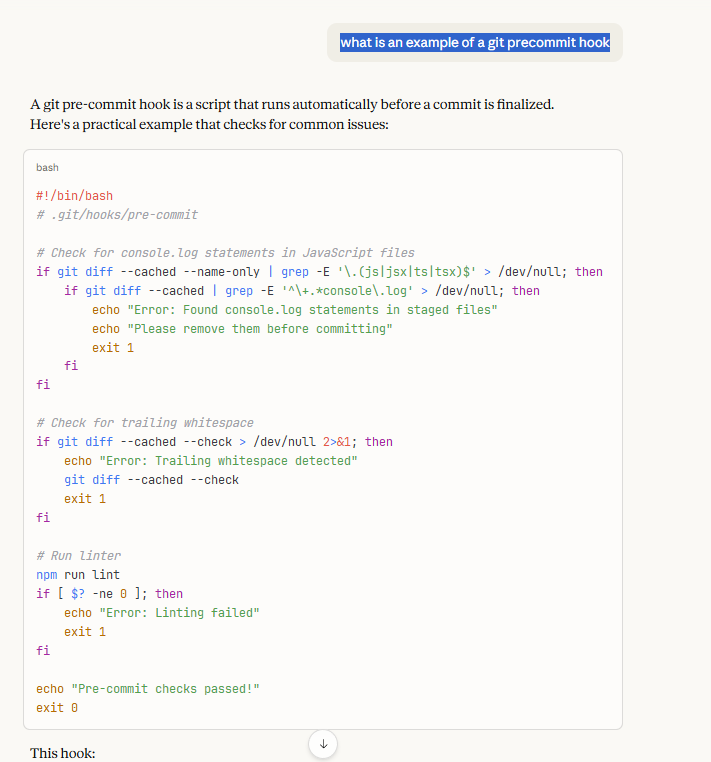
    Here was my prompt: what is an example of a git precommit hook

    Simple, easy, no punctuation or big setup. I just needed something. I got some code:
    2026-01_0150

    and an explanation. Here’s the’s the text of the explanation (italics from me):

    This hook:

    1. Prevents commits with console.log statements

    2. Catches trailing whitespace

    3. Runs your linter

    To set it up, save this as .git/hooks/pre-commit and make it executable with chmod +x .git/hooks/pre-commit.

    If the hook exits with a non-zero status (like exit 1), the commit is aborted. You can bypass hooks temporarily with git commit --no-verify if needed.

    Many teams use tools like Husky to manage hooks in a project, making them easier to share across the team since .git/hooks isn’t version-controlled by default.

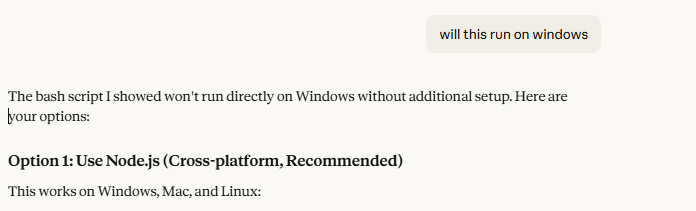
    This shows some bash, which I don’t think runs natively in Windows. That makes sense as a lot of coders are likely using Linux/MacOS for complex stuff and the default training for Claude likely assumes that. I asked about Windows and got two options: Node.js and Husky. Since I don’t like to install things, I went with Node. Here’s the next question I asked.
    2026-01_0151

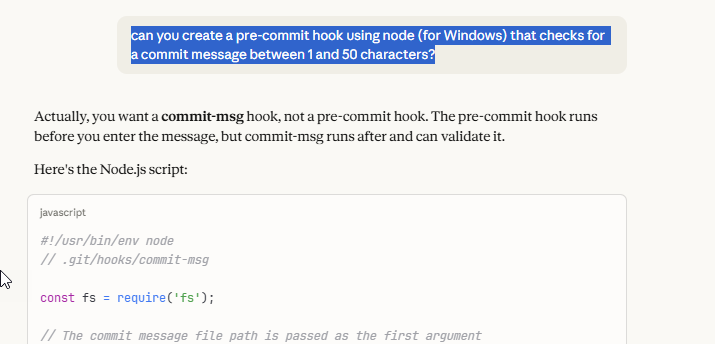
    I didn’t want to lint or worry about whitespace, since I’m depending on SQL Source Control to create the files, so I asked a different question: can you create a pre-commit hook using node (for Windows) that checks for a commit message between 1 and 50 characters?

    The response is good. I didn’t want this, and reading this, I realize Claude is right. I wasn’t quite thinking through the process here. I also didn’t want the code for a commit-msg hook, so I ignored the code.
    2026-01_0152

    I could see that I was getting generic hooks, mostly for other code, so I rephrased a prompt: I want a sample pre-commit hook for .sql files to test something, what is a good example

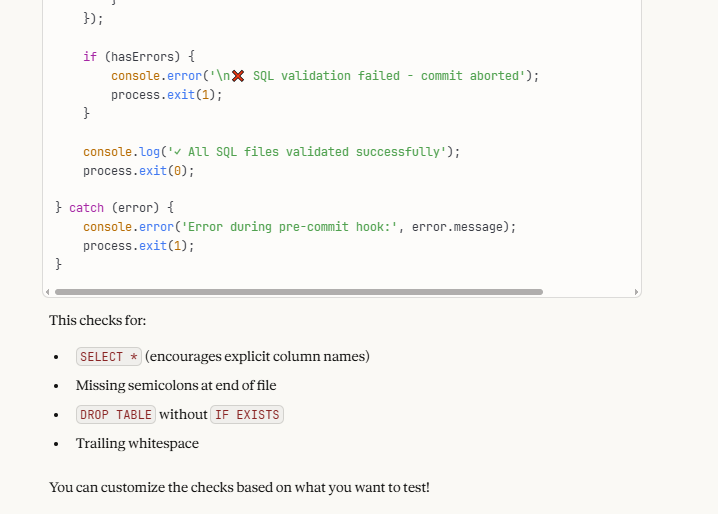
    The response was a practical hook for SQL files. The code had a couple of messages printing our errors when I failed things, and the code here isn’t important, but here was the explanation. The bottom of the code is shown, and then the list of things that are checked.
    2026-01_0153

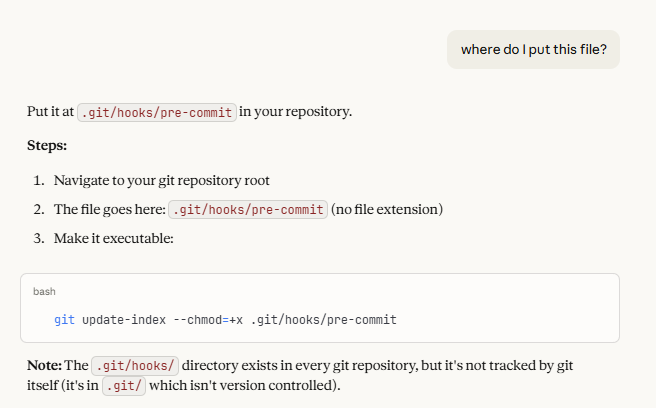
    At the top there is a comment about the hook, and since I’d done this a few years ago, I thought I know what to do, but I asked. I mean, why not ask the AI for more help? I liked that it noted not only do I need to add this to my .git folder, but I need to track this if I want to share it. That’s important. I do want other team member, or in this case, me on another machine, to have this hook.
    2026-01_0154

    Testing the Hook

    I then went to SQL Source Control and made a change. In this case, I added a file that I knew would fail the check. Here’s my code:

    ALTER PROCEDURE dbo.GetAllCustomers
    AS
    SELECT * FROM dbo.customer

    I could see this code change in the SQL Source Control GUI, but no error. I thought this might be staged, and I somewhat assumed the hook would fire on staging, so I asked.

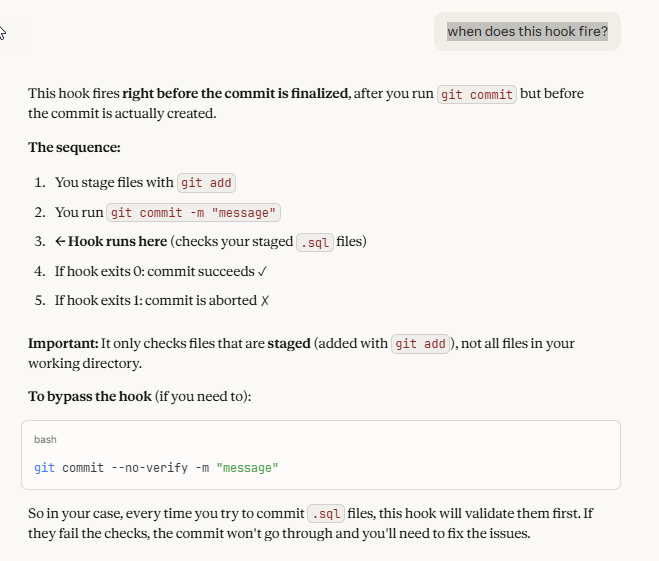
    My new prompt: when does this hook fire?

    The response let me know that I had to commit this to get the hook to fire. It runs on the commit command, as before the commit succeeds. That’s good to know. Thanks, Claude, for helping me learn something.
    2026-01_0157

    In checking from the CLI, I realized that SQL Source Control at this point hasn’t staged the file. It also hasn’t written the file, so there’s nothing to stage. One of the downsides (one fo the few) of SQL Source Control is very limited git configuration. The write, stage, and commit happen at once.

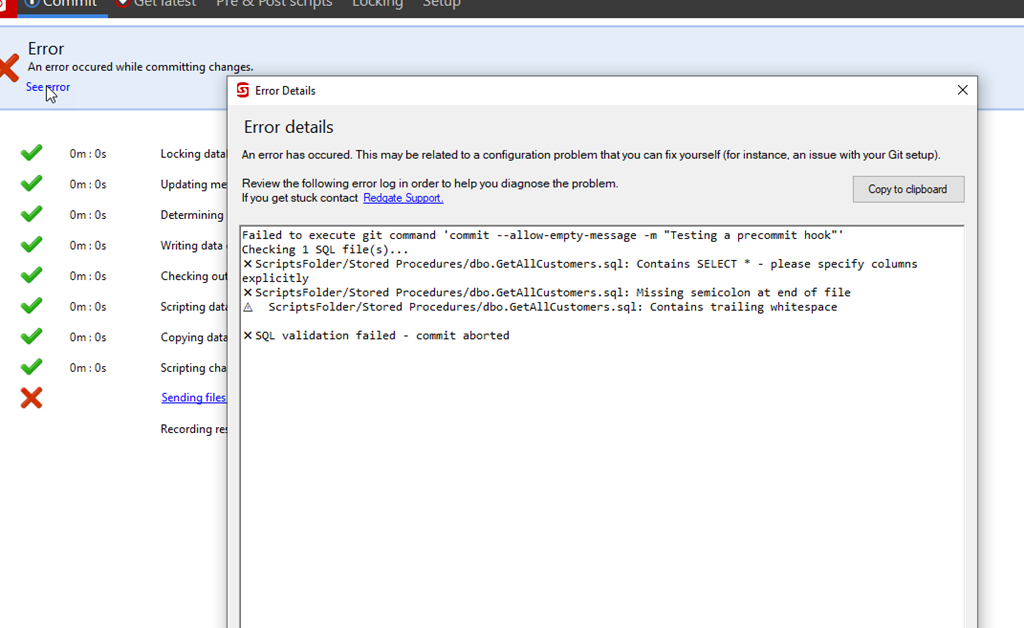
    I tested this and sure enough, I got a failure when I tried to commit. The hook fired and saw my SELECT *, and my lack of a semi-colon.
    2026-01_0146

    I tested this further by fixing these elements individually, and I could correct the SELECT *, but I couldn’t fix the semi-colon. I realized with testing that when SQL Source Control writes the file, it always includes a “GO” at the end. So my hook doesn’t work.

    Asking for Modification

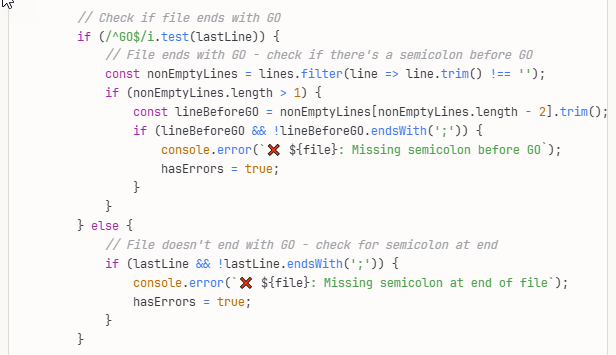
    I decided to see if Claude would fix this, as I wasn’t sure what to change myself. I’m not a Node nor RegEx person, and I’d be googling a bunch to figure this out (or find someone else’s code). Instead I tried this: can you adjust this hook to ignore the missing semi-colon if the file ends with a GO, or check for a semi-colon before the GO

    The response was interesting. The explanation said this:

    Now it handles both cases:

    • File ends with GO: Checks that the line before GO has a semicolon

    • File doesn’t end with GO: Checks that the last line has a semicolon

    The relevant code is here:
    2026-01_0158

    I can read this and it makes some sense, but I would have struggled a bit to get this done in a reasonable time. Instead, it was seconds for Claude to produce this.

    When I re-tested, this passed the SQL Source Control GUI and I had a working git hook looking for a couple of simple silly mistakes I might code.

    Summary

    This is an area that I have a little experience, but not a lot. I’m a junior dev when it comes to Git, and Claude is definitely more skilled. However, I have to know what to ask to get a result and I thought the answers and explanations were good in helping me setup this test in a few minutes rather than the better part of an hour (or longer) if I were searching and trying to assemble code.

    This is one of those areas where AI was very useful to me. It built a fairly trivial coding item I needed, it helped explain things when I had questions, and it was helpful in adjusting code quickly when I realized I needed something else.

    Imagine asking a colleague this, realizing you’d asked the wrong thing, and then asking them again for new code. How slow, and annoying, would this be for both of you? AI is a game changer here, for things that are too simple to work with a colleague on, yet complex enough that you’d waste a decent chunk of time googling.

    That time savings went into me testing the code and testing SQL Source Control. I verified that SQL Source Control can work with git hooks in minutes.
  • Who’s the Winningest Coach (with AI Help)

    I was listening to the radio the other day and the hosts were discussing the NFL playoffs in 2026. Someone mentioned the winningest coach was Nick Sirianni of the Philadelphia Eagles and no one wanted to face the Eagles. I was wondering if the first part of that was true. I used Claude and SQL Prompt AI to help.

    Note, I enjoyed watching the Eagles lose in the first round to the 48ers. As a lifelong Cowboys fan, that was great. However, I am impressed with Jalen Hurts and was glad to see him win last year.

    This is part of a series of posts on SQL Prompt. You can see all my posts on SQL Prompt under that tag. This is part of a series of experiments with AI systems.

    Getting the Data

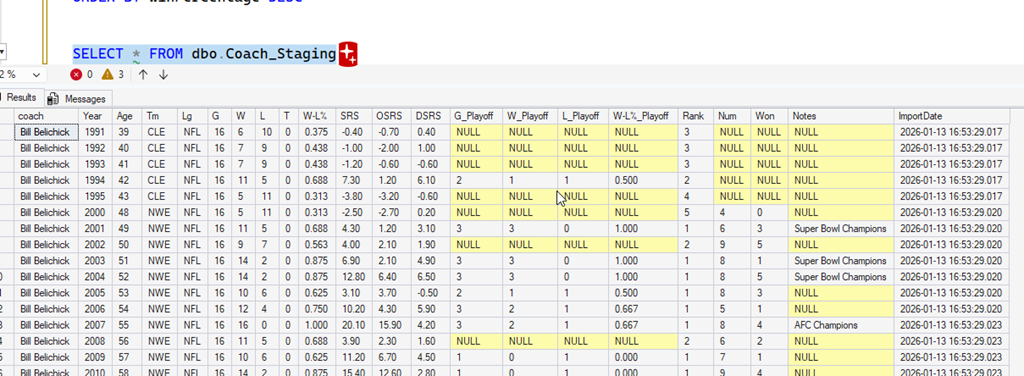
    First I had to find data. I did find this page of coaching history at Pro Football Reference, which lists coaches, however, I wanted to compare the first few years of their careers, not their totals.

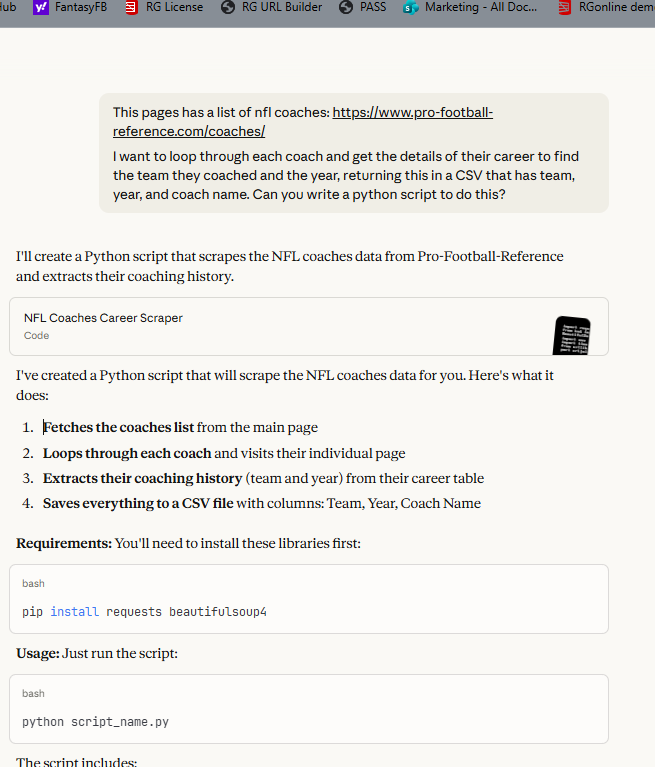
    I decided to see if Claude could help get some data. I started with a query: This pages has a list of nfl coaches: https://www.pro-football-reference.com/coaches/

    I want to loop through each coach and get the details of their career to find the team they coached and the year, returning this in a CSV that has team, year, and coach name. Can you write a python script to do this?

    This kind of worked. I got a script, and it ran, but there were some errors. PFR doesn’t like scrapers and they want to protect their data. I get it.

    2026-01_0117

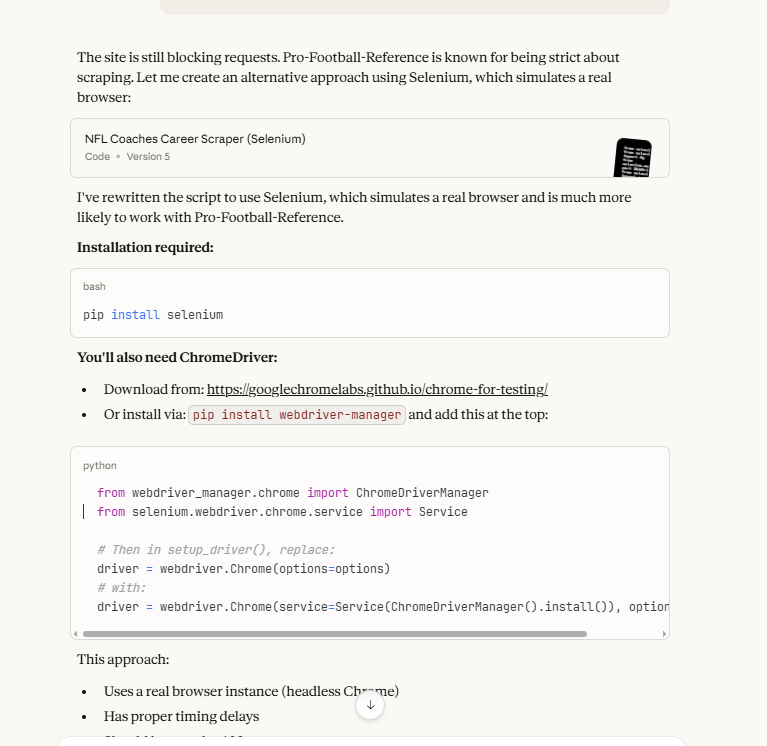
    I told the AI there was an error and it helped me get the Chrome driver and Selenium module to drive a real browser from automation. I commented out the “headless” part so that I could see it working (a bit).

    2026-01_0118

    This kind of worked, but not really. I got the coaching list and I could see the browser going through each coaches page, as well as the CLI output, but lots of errors. PFR does a good job of blocking this.

    2026-01_0119

    What was amazing is that the script in my repo is something that would have been hours of me messing with different modules and trying to debug the issues. This was literally about 30 minutes of multiple tries before I gave up for the night.

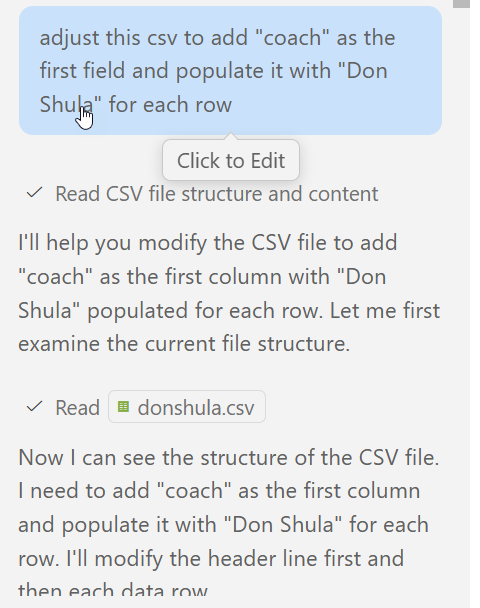
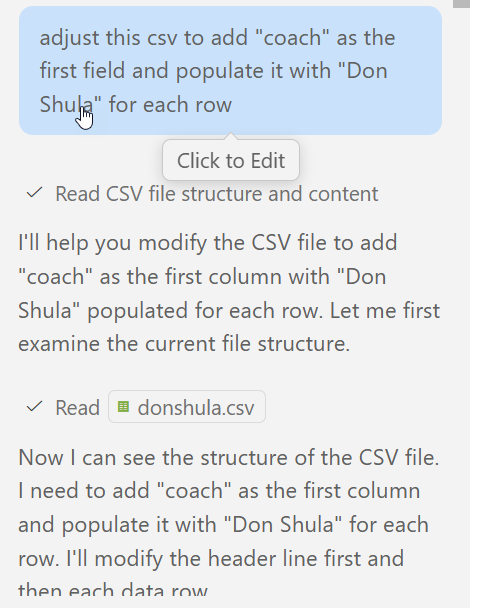
    The next day I decided to give in and just grab data from some coaches that I know have won Super Bowls and had success early in their careers (sorry, Andy Reid). I went to each page and clicked the “CSV export” item and then copy/pasted the data into a file. I then asked the Copilot AI for help. Each set of data was nice, and the file was named for the coach, but the coach’s name wasn’t in there. So I let Copilot edit it.

    2026-01_0196

    Admittedly this wasn’t automated, but by the time I’d created a new file for a new coach, CP had cleaned up my old one. With this in mind, I had 6 coaches of data stored in CSV.

    Back to Claude. No reason not to use Copilot, but I like Claude. I asked it to give me an import script.

    2026-01_0196

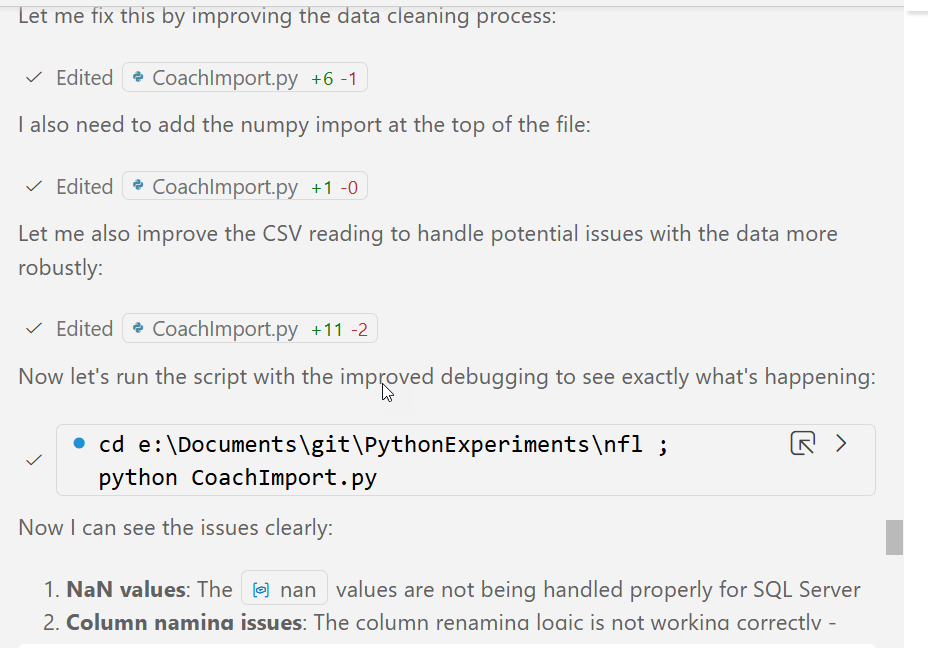
    It did, and I saved it (coachimport.py). I ran this, but it errored out. Since this was a file in my repo, I moved back to Copilot, which has access to the files. I asked it to fix the errors. This was the prompt (everything after the colon was pasted in) : I am getting this error in the script: Error importing rawdata\NickSirianni.csv: (‘42000’, ‘[42000] [Microsoft][ODBC Driver 17 for SQL Server][SQL Server]The incoming tabular data stream (TDS) remote procedure call (RPC) protocol stream is incorrect. Parameter 24 (“”): The supplied value is not a valid instance of data type float. Check the source data for invalid values. An example of an invalid value is data of numeric type with scale greater than precision. (8023) (SQLExecDirectW)’)

    It started to examine the files.

    2026-01_0200

    Then it found a problem and started fixing things. Since this is an import and I’ll stage the data, I can let it run and check the results.

    2026-01_0201

    While this was running, I also used SSMS and the Flat File Import to pull in one file from the subfolder to see how well it worked. I basically, next, next, next on this, which was good enough.

    In the time it took me to import 1 file, Copilot had finished and imported all the data. I could query the staging data and see all my rows. I quick check of the different files showed me all rows imported.

    2026-01_0203

    This was with the free Claude web tier and paid corporate Copilot account.

    Now, what do we learn?

    The Analysis

    Since I had the data in a table, I could use SQL Prompt AI to help analyze the data. I started with a simple query:

    SELECT coach, SUM(w) OVER (PARTITION BY coach)
    FROM dbo.Coach_Staging

    I could do more, but I’m playing with AI tech, so I then added a prompt: help me analyze this data by comparing each coaches first 5 years with wins, losses and ties and win percentage.

    I got this code:

    SELECT coach,
    SUM(W) AS TotalWins,
    SUM(L) AS TotalLosses,
    SUM(T) AS TotalTies,
    CAST(SUM(W) AS FLOAT) / NULLIF(SUM(W) + SUM(L) + SUM(T), 0) AS WinPercentage,
    AVG(CAST(Rank AS FLOAT)) AS AverageRank
    FROM
    (
    SELECT coach,
    Year,
               W,
               L,
               T,
    Rank,
    ROW_NUMBER() OVER (PARTITION BY coach ORDER BY Year) AS YearNum
    FROM dbo.Coach_Staging
    ) AS CoachYears
    WHERE YearNum <= 5
    GROUP BY coach

    That’s about what I would have written. I was about to start adding the row_number when I thought Prompt could help me. I additionally asked for an order by and an average rank, and ended up with a query that made sense.

    The takeaway for me was that I could have written the code, but in a few seconds, SQL Prompt gave me a query I could use. This was way faster than I could have written the query, even with SQL Prompt Intellisense.

    The Results

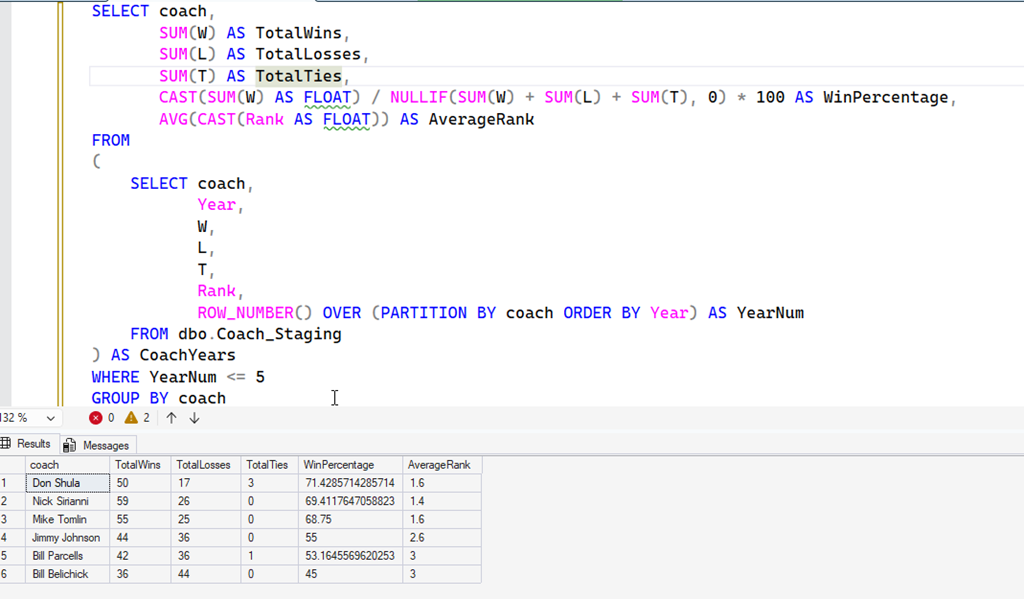
    Well, is Sirianni the winningest coach in his five years. Here’s what I see.

    2026-01_0210

    By win percentage, Don Shula is better, but there were less games, so Nick Sirianni has more wins and losses, and a slightly lower percentage, but a higher rank. I think it’s fair to say he tops the list, though it depends whether you look at wins or percentage.

    It was also surprising to see Mike Tomlin, who recently left the Pittsburgh Steelers, coming in third.

    An interesting analysis that went way quicker than a few I’ve done in the past. AI is incredibly helpful here, and as I think about all the similar types of queries people have asked for help with over the years, I can see how AI will be very helpful over time.

    Of course, with larger data sets, you’ll want to verify the queries are working with other checks of the data, and you’ll likely want some automated tests on small sets to verify any changes to algorithms still return the correct results.

    If you haven’t tried SQL Prompt, download the eval and give it a try. I think you’ll find this is one of the best tools to increase your productivity writing SQL.

  • Stupid Things I Did With AI: ASCII Art

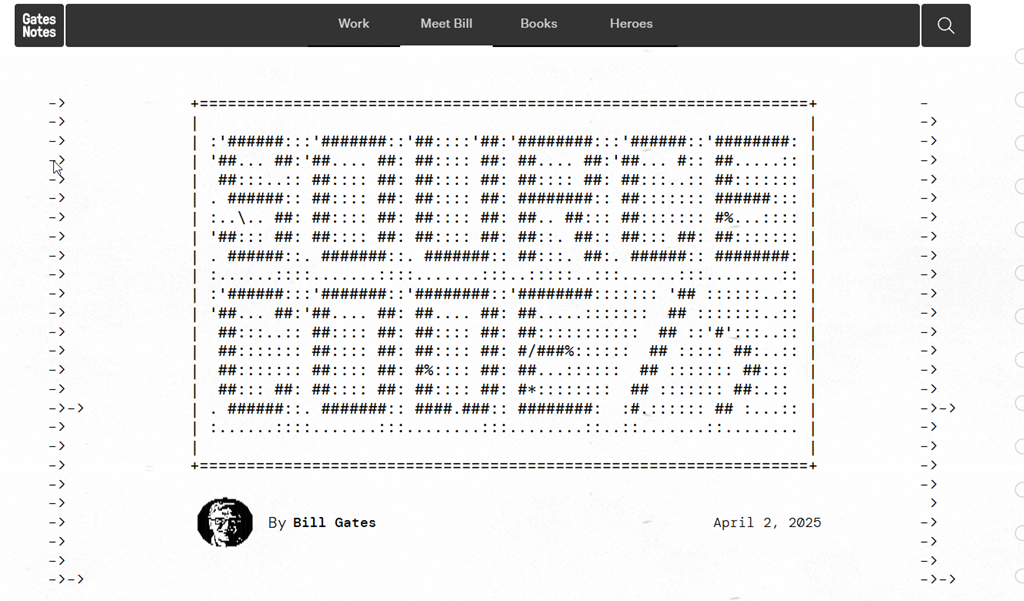
    I ran across this article recently (https://www.gatesnotes.com/meet-bill/source-code/reader/microsoft-original-source-code) and it has a great opening piece of ASCII Art. I have a screenshot here:

    2026-01_0243

    For some reason, I thought, “I should do this in SQL”.” Then I thought, can the AIs help?

    Let’s see.

    This is part of a series of experiments with AI systems.

    SQL Prompt AI

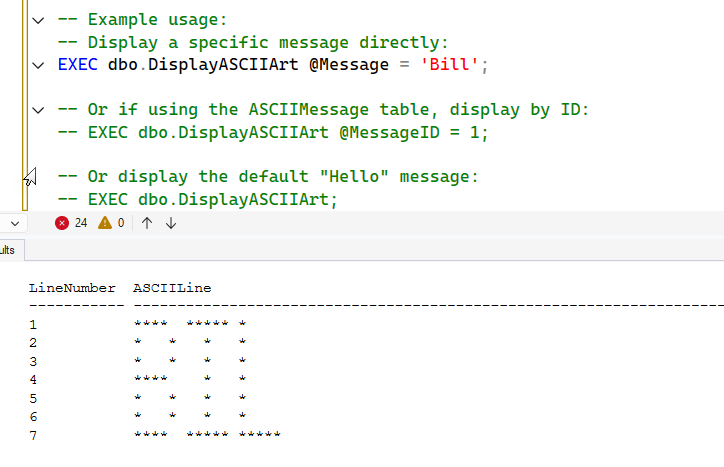
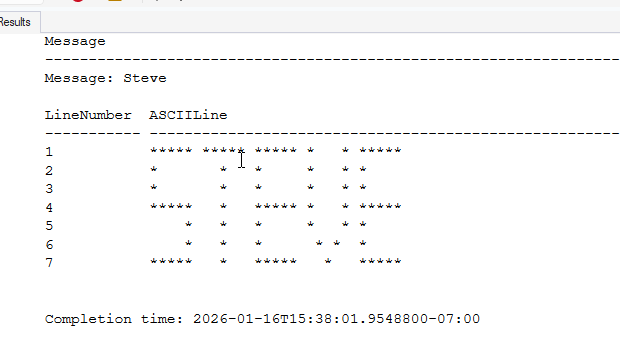
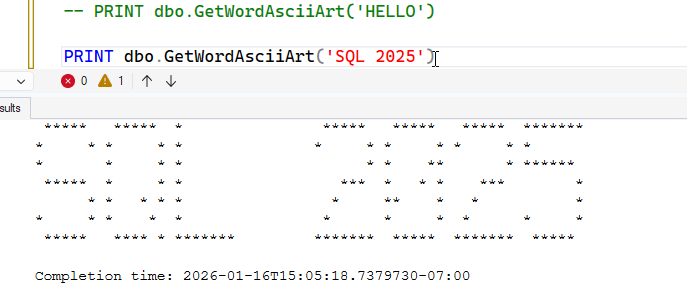
    My first instinct is to use Claude first, but here I decided to ask SQL Prompt AI for help. I generically asked for a function that would take a word as a parameter and then produce ASCII Art. I ended up with a function and a procedure. I won’t show all the code, but I ended up with this result.

    2026-01_0238

    I thought this might be cutting off the message, but “Hello” produced “Helo”. So I asked SQL Prompt AI to alter the function to fix this. It tried, but it put a CTE in a subquery, which isn’t valid.

    2026-01_0241

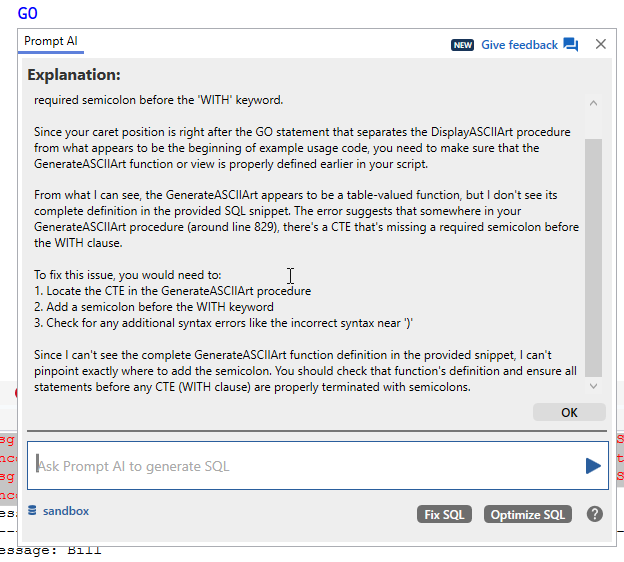
    I pasted in the error message, but it returned me advice, not new code.

    2026-01_0239

    I suspected this might be because I had a few batches in this query window, so I copied just the function to another window, then pasted in the error and things got fixed.

    2026-01_0242

    Claude

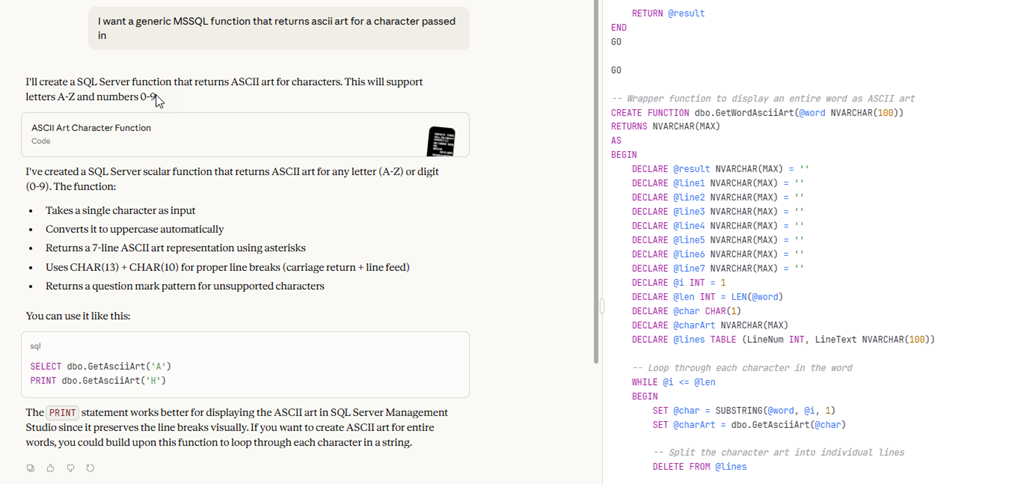
    While SQL Prompt was working, I opened a tab for Claude and asked a question: I want a generic MSSQL function that returns ascii art for a character passed in

    I got the results, which were good, but only for one letter. Good, but I realized I had done a poor job of specifying my intention.

    2026-01_0244

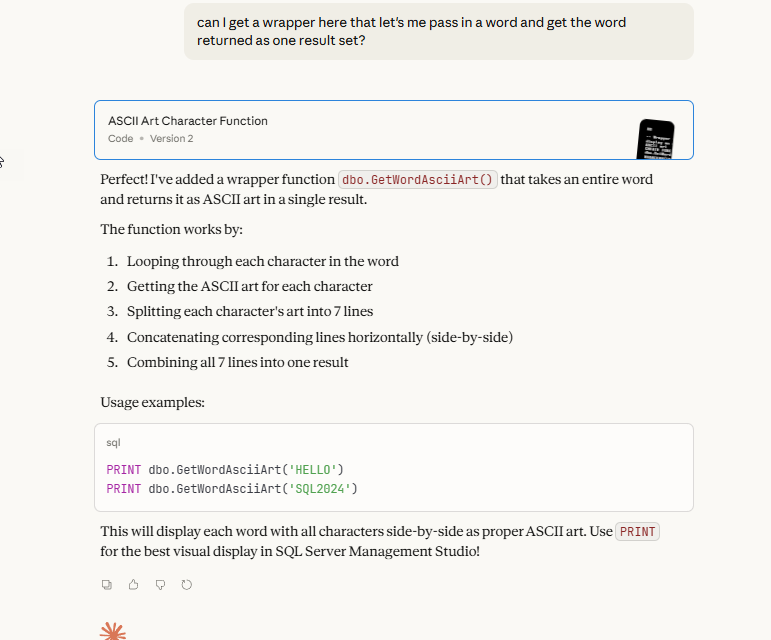
    I then added another prompt to this chat: can I get a wrapper here that let’s me pass in a word and get the word returned as one result set?

    This returned me a wrapper function with an explanation. The code is in my repo (linked below).

    2026-01_0245

    When I tested this a bit, it worked well, including with spaces.

    2026-01_0237

    Summary

    I added this to my AIExperiments repo under the ASCII Art folder. You can check out the code and play if you want, or ask your own AI to do this.

    This is a big waste of LLM compute, and really SQL Server core compute, but it’s fun. It was something I could have written, but how tedious is it to produce a function to do this? Even if I were to try and write an algorithm to produce letters from art, I could, but it’s not really worth the effort other than as an exercise to solve the problem.

    This is also something I would guess many programming students work through. I haven’t had this, but I had to shuffle a deck of cards and other types of simulation exercises to help me learn to think in algorithms.

    I do think working through algorithms is a good use of your time. It helps you think and learn and doing this will absolutely help you better judge the quality of other code, including that written by AIs.

    However, I have done some of this work, and it’s not a good use of my time. Or likely the LLMs, but it was fun. I’ll likely use this in some Question of the Days in the future somehow.

  • Using Prompt AI to Help Setup Data Analysis

    I used Claude to build an application that loaded data for me. However, there were a few others things I needed done to help me get the data ready for analysis. I could have used Claude (or another human), but this was a place I’d need to do a lot of directing.

    I did, however, use Prompt AI to help me get this moving quicker and start some analysis. This post covers the way I got assistance inside SSMS from Prompt AI.

    This is part of a series of posts on SQL Prompt. You can see all my posts on SQL Prompt under that tag. This is part of a series of experiments with AI systems.

    Adding New Structures

    As a part of my data analysis, I needed to tag sessions with topics. This wasn’t really done as a part of most SQL Saturday events. While there might be tracks, often the sessions aren’t categorized with tags. It’s a pain, most organizers and most speakers don’t want to bother.

    Plus, search works well on a website. For data analysis, not so much.

    I decided to use Prompt AI to help a bit at this point, since I was low on credits.
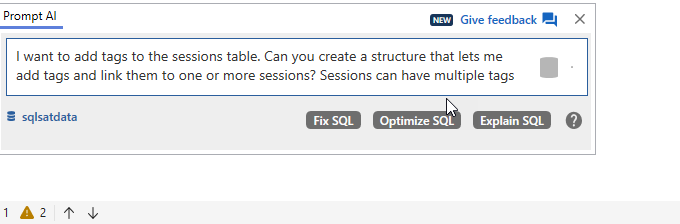
    I asked it to add a structure. Possibly I could have written the code in not much more time than it took for this prompt, but here I get to let an assistant take a stab and then critique the work. Here’s my prompt to SQL Prompt AI:

    2025-12_0118

    Here are the results. This has the PKs, FKs, and indexes, some of which I might have forgotten. I don’t love names like “description”, but that’s fine. I could easily fix that.

    -- Create a table to store tags
    CREATE TABLE dbo.Tags
    (
        TagID INT IDENTITY(1, 1) PRIMARY KEY,
        TagName NVARCHAR(100) NOT NULL,
        Description NVARCHAR(500) NULL,
        CreatedDate DATETIME
            DEFAULT GETDATE()
    );
    
    -- Create a junction table to link sessions with tags (many-to-many relationship)
    CREATE TABLE dbo.SessionTags
    (
        SessionID INT NOT NULL,
        TagID INT NOT NULL,
        PRIMARY KEY (
                        SessionID,
                        TagID
                    ),
        CONSTRAINT FK_SessionTags_Sessions
            FOREIGN KEY (SessionID)
            REFERENCES dbo.Sessions (SessionID),
        CONSTRAINT FK_SessionTags_Tags
            FOREIGN KEY (TagID)
            REFERENCES dbo.Tags (TagID)
    );
    
    -- Create index to improve query performance
    CREATE INDEX IX_SessionTags_TagID ON dbo.SessionTags (TagID);
    CREATE INDEX IX_SessionTags_SessionID ON dbo.SessionTags (SessionID);
    

    Now, I need to analyze the data.

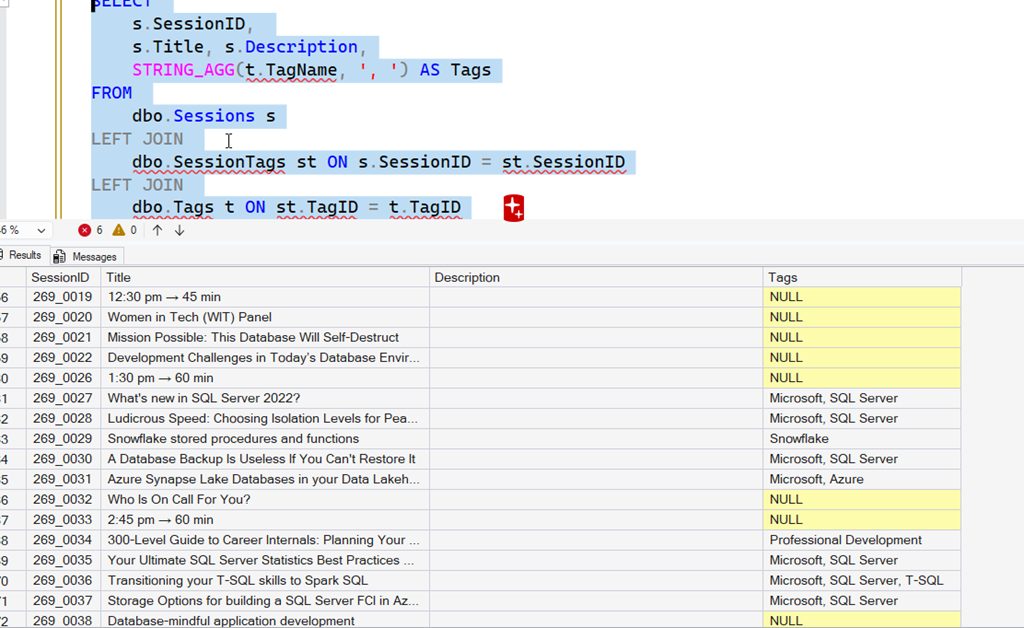
    Fortunately, Prompt AI helped me. Below this DDL, was a snippet to test my tags. I had this code listed:

    SELECT 
         s.SessionID, 
         s.Title, 
         STRING_AGG(t.TagName, ', ') AS Tags
    FROM 
         dbo.Sessions s
    LEFT JOIN 
         dbo.SessionTags st ON s.SessionID = st.SessionID
    LEFT JOIN 
         dbo.Tags t ON st.TagID = t.TagID
    --WHERE Title LIKE '%n rds%'
    GROUP BY 
         s.SessionID, s.Title;

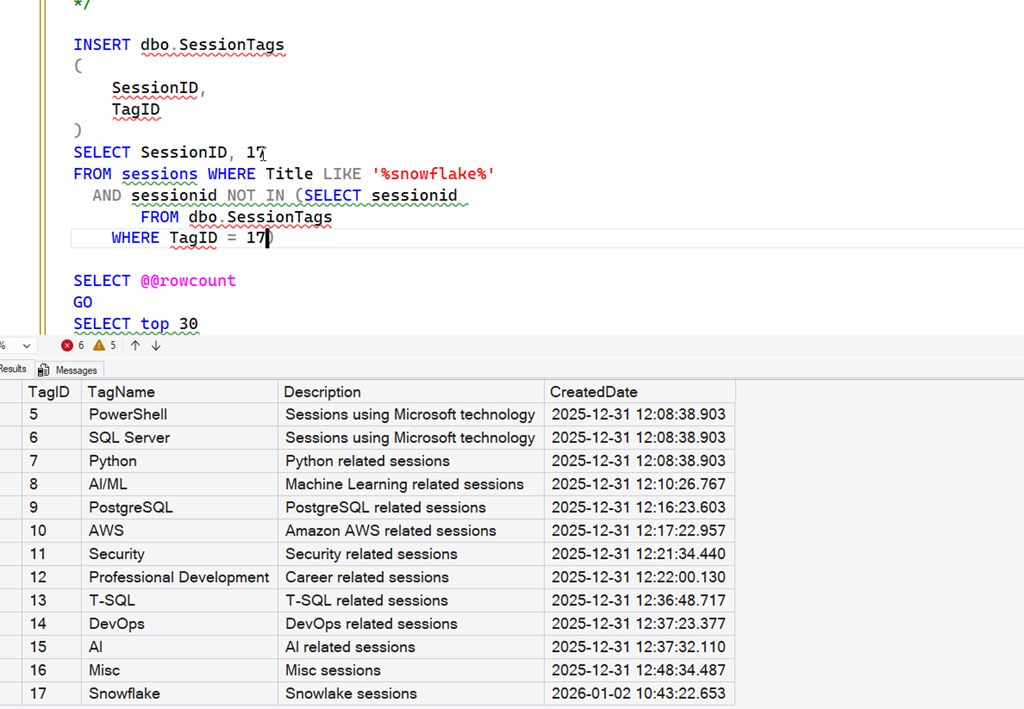
    I used this to check my tags, which were non existent at this point, so I had all NULL values in the Tags column. Fortunately, I know how to write some code, so in another window I wrote this code, which inserts data, but doesn’t create dups since I might have dups based on my LIKE clause catching the same session twice.

    I also get the list of current tags, so I could change the number used in the insert as needed. There are more elegant ways to do this, but I wanted to get something done.

    INSERT dbo.SessionTags
    (
         SessionID,
         TagID
    )
    SELECT SessionID, 10
    FROM sessions WHERE Title LIKE '%n rds%'
       AND sessionid NOT IN (SELECT sessionid 
            FROM dbo.SessionTags 
         WHERE TagID = 10)

    SELECT @@rowcount
    GO
    SELECT top 30
    *
    FROM dbo.Tags


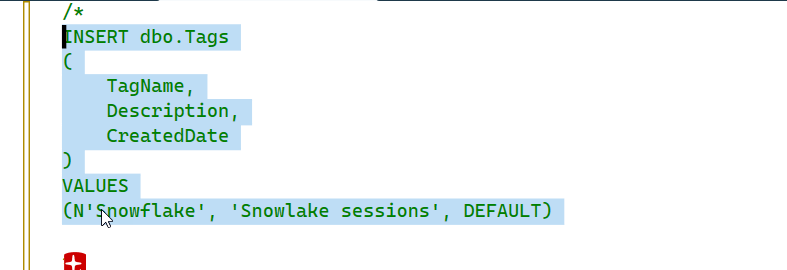
    There was a sample INSERT statement for tags as well, so I modified it to use tags I cared about. Then I started running my test query to look for NULL values and start filling them in.

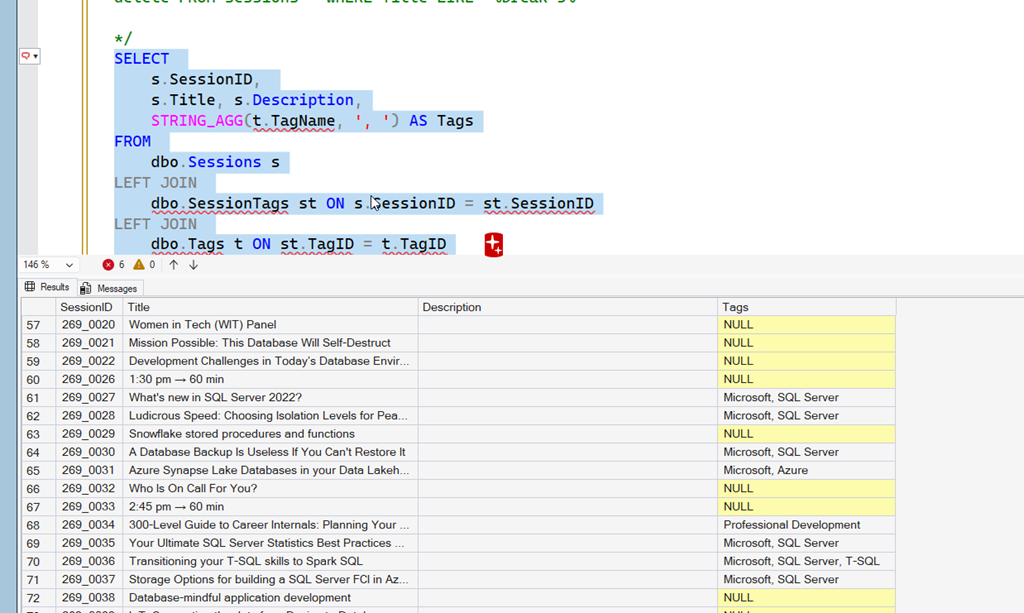
    Here’s a look at a run. I’ve added some tags, but there are some nulls. There are also multiple tags for some sessions. I added the description field as well, but for most of the data, this doesn’t exist, so I don’t have it. Yet. That’s another project.

    2026-01_0130

    Line 63 is for Snowflake, which isn’t a tag. So I edit my commented out code to include Snowflake and then execute it. This is commented, so as I hit execute it doesn’t run automatically.

    2026-01_0131

    Now I get a list of tags and use that to edit my numbers in the SessionTags insert statement. In this case, Snowflake is number 17, so I change the insert to that, and edit the LIKE statement. This will add that tag to all sessions with Snowflake in the title.

    2026-01_0132

    I repeated this for a number of sessions. Below, I’ve re-run my tag query and now we see Snowflake is added.

    2026-01_0133

    Why I Didn’t Use an AI for This

    I built an application that loaded this data with Claude Code. I could have asked Claude to add the tags as well, but I didn’t have any data to put in there. I wasn’t even sure what I would do, especially as a lot of these sessions aren’t really sessions. Notice the timings above, the breaks, the panels, etc. There are also lunch breaks and other items that aren’t really sessions.

    Claude could have cleaned this data. However, I want to be sure of what I’m removing. Having Claude write the delete (or run a select first) and then ask me what to do doesn’t seem to be a good use of its cost or my time.

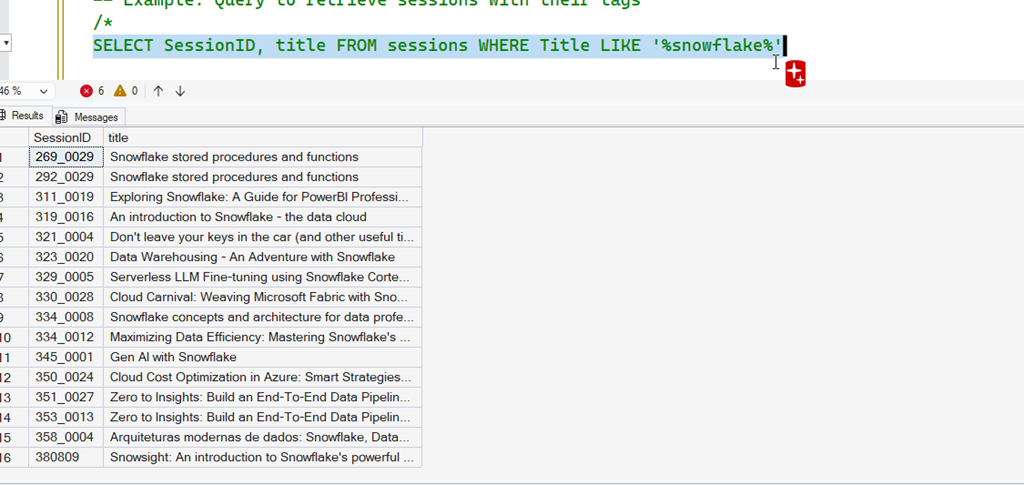
    I still need to be the human in the loop. There were some times I ran a select for certain words and then check the list before adding the tags. For example, here was what I did for Snowflake.

    2026-01_0134

    All those are good, but when I ran a search for Agent, I found mostly AI based results, but a few were SQL Agent sessions. Tagging those as AI wouldn’t make sense, so I had to find a better way to update the data I needed updating.

    Summary

    SQL Prompt didn’t do a lot here, but it did quickly get me moving on the task I was focused on rather than the details to support it. I could have written the DDL, but it would have taken focus away from me in thinking about tags. This did as good a job as I could do, or more importantly, as good a job as I needed.

    It also gave me a query and insert statement to get moving, again, reducing my mental load. I could have written that query, but I would have spent a few minutes doing it rather than thinking about how to assign tags.

    Ultimately I think this was a good use of AI, saving my time and energy, allowing me to focus on the task I was trying to accomplish without distraction.