Tag: administration

  • Placeholders for Emergencies

    A long time ago I worked in a large corporation where we managed lots of servers, each of which performed a variety of different functions. Some were Exchange, some SQL, some file servers, etc. and they would come and go at a frightening pace.

    We had monitoring in place, but we’d also have plenty of situations where a runaway process would use up a lot of disk space at a rate that exceeded the ability of the monitoring software to alert us before the user encountered a problem. To help us more effectively monitor things, we started adding placeholders do our server build process.

    Placeholders

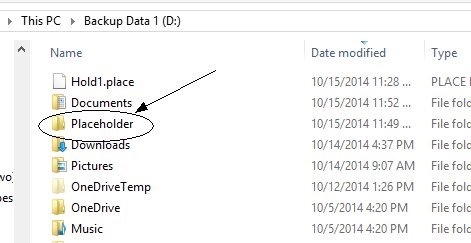
    What’s a placeholder? It’s a large file that just takes up space on a disk. For example, I’ve created a few on my system:

    placeholders2

    These can be text files, movies, images, whatever you want. The idea is that you just save a particular amount of space. In this case, I have 3 1GB files that are taking up space.

    That’s it.

    If I run out of disk space, I just delete one of these, and voila, instant 1GB space available.

    These have become really, really handy for me. I actually have a few on my laptop. When I run low on space, which will often happen at THE WORST possible time, like the morning of a talk, I can remove a file and free up space.

    Of course, I’ve just deferred the issue, but at least then I can work at that moment and then clean up old files as I have a moment.

    Placeholders are a great way to save yourself in emergencies.

  • How Often Does Production Drift?

    One of the new products that Red Gate Software is working on is SQL Lighthouse, which is designed to track and alert you on “database drift“, which are the changes in your schema. I hadn’t really heard the concept in the past, though I’ve found there are a few people using the term to describe the changes being made to production that aren’t inline with the development project that created (and updates) the database.

    Vendors that sell products backed by a SQL Server database, like Microsoft Dynamics, often consider database drift to be a violation of their EULA. When a customer changes the database, even by just adding indexes, it causes them support costs, though arguably those costs are lower than if no indexes were ever added by enterprising DBAs.

    However this also happens in databases built by companies. It seems there’s no shortage of “quick fixes” in production, in addition to the “improvements” that DBAs and others seem to make to their live databases in order to solve some short term issue. I know there’s a need for this, and even seen recommendations to ensure production differs from development schemas. However I haven’t had many issues with this in the past and I’ve tried to prevent any drift.

    Maybe because I’m a controlling DBA, or maybe because I’ve been lucky. In either case, while I’ve had to implement hot fixes and changes in production, it’s been rare. Most of the time I’ve been able to backfill these changes in development (and test) environments, or delay the fix until it could be tested.

    However I’m sure there’s a need for a way to manage drift, and detect it as the number of databases you manage grows, so I’m excited by SQL Lighthouse and hope it helps DBAs avoid those late night phone calls by being aware of what’s changing in their systems.

    Steve Jones

    The Voice of the DBA Podcast

    Listen to the MP3 Audio ( 2.2MB) podcast or subscribe to the feed at iTunes and LibSyn.
  • Prepping for Winter

    Living on a ranch in Colorado means that we have to prepare for winter in a way that we don’t worry about other seasons. Taking care of livestock when the weather gets cold (and snowy) presents challenges, and since it can be a matter of survival, we have to think about potential issues in advance and work to mitigate them before they occur. My return from the PASS Summit last weekend had me outside working on shed with my daughter to prep for this week’s winter storms.
    When working with computers, we don’t usually need to make special preparations for seasons, but we do need to be ready for difficult times. I was reminded of this with a post this week about 12 Things to Check to Prepare for Winter. These aren’t necessarily things you need to check as the temperatures drop, but they are things you might want to examine periodically in your environment.
    In many businesses, we are aware of the time periods when our systems get stressed, and great DBAs plan for those times. In one large organization I worked for, we knew that the end of quarter and end of year periods were very stressful and busy for many people in the company. As a result, any maintenance or preparation needed to occur at least a month early to ensure systems were at peak performance. In another job, at a power plant, the refueling process that occurred on a semi regular basis was the busiest time of year and we needed to ensure we were aware of when it was coming and double check everything before it was too late to do so.
    Good preparation is one of the keys to avoiding any of a DBA’s worst days. After all, if things go wrong for you at work, it’s unlikely The DBA Team will be available to save the day.
    Steve Jones
  • Avoiding a DBA’s Worst Days with Monitoring

    SQL in the City Abstract: When things go wrong with a database, it can be the start of the worst day of a DBA’s life. Join Steve Jones as he examines the problems uncovered by The DBA Team and how you can prevent them with proactive monitoring and in-depth knowledge of SQL Server.

    General Abstract: A DBA usually has a bad day because they are unprepared for issues that commonly occur or unaware of situations that can cause problems. Learn about the five things Steve Jones finds to be most important for DBAs and how you can be ready to handle issues in these areas:

    • Backups
    • Space
    • Security
    • Resources
    • Deployment

    This session does include Red Gate tools but explains how issues can be avoided with your own utilities.

    Slides: DBAsWorstDays.pptx

    Placeholder resources:

    Custom Metrics used in the demo: