Tag: Backup/Recovery

  • Backup Preparations

    I’m sure that many data professionals recognize the importance of having backups in the event of some issue. Many of you will schedule these as soon as you create a database, and then not think much of the process, ignoring it as long as the backup job continues to run.

    As you gain experience, you may even set up backups on new instances and versions without much thought, assuming you know how the process works. That’s probably true of SQL Server, as the backup system and structure hasn’t changed for years. However, do you think backups work the same on other platforms, such as Oracle, PostgreSQL, or MySQL? What about MongoDB or Neo4j? Don’t we just run the backup command to a file and the restore from file sequence if there is an issue?

    Backups aren’t the same on all platforms, and they may function differently enough that you can find you aren’t prepared for a disaster situation. I was considering this over the last week as I read about the challenges of restoring from Azure SQL Database and Amazon RDS. With the popularity of both cloud computing and SQL Server, we have a few different flavors of platforms between on-premises installs, AWS, Azure, and likely other hosted solutions.

    Whenever you work on a new platform, even if it’s a variant of one you have experience working with, there is a chance that the techniques and commands you run to manage backup or restore will change. Since a restore situation is often a stressful event, with the pressure of an RTO upon you, this isn’t the time to learn that your backup preparations are inadequate.

    As much as I might joke about ensuring your resume is up to date in case of a restore problem, I would emphasize that your resume isn’t going to be as helpful if you are negligent and unprepared because you haven’t done everything you could to be ready for a disaster. While your employer might not allocate enough disk space or other resources to ensure their RTO and RPO can be met, you can certainly ensure that your skills, knowledge, and recommendations aren’t the reason that data is lost.

    I periodically practice restores, I’ll take a tail log backup, I’ll ensure that I understand how to export a BACPAC, all to be sure that my skills are up to date. I don’t want to encounter a situation where I need a filegroup, point in time, or striped backup restore and not know what I’m doing. You might want to do the same, taking time every month to ensure that you perform some different restore technique. Just in case disaster strikes next week.

    Steve Jones

  • Backup Plans for Data Loss

    The British Airways computer failure has been on my mind for a few weeks. It seems like such an epic failure in 2017 from a high public company that many, many people depend on. I still struggle to believe the power explanation, and really, I’m not sure there’s any explanation that I would accept. At this point in our industry, there’s no good reason for any large, global company to not be able to restart services inside of a couple hours in a DR site. In fact, it really shouldn’t even take that long.

    However, for many of us, we will have a failure or disaster at some point. It might not even be a hardware failure or system crash. It’s much more likely that a user will cause an issue. As our systems grow larger, perhaps even more loaded with transactions, we might not always be able to easily separate out good data from bad, and I would expect we’ll experience a restore.

    For many of us this will mean we will lose some data from the system. Even with frequent log backups, we might end up with a short period where we can’t recover data. Most of us should have conversations with business stakeholders on what the acceptable level of data loss is, and plan to meet those requirements. We should also have plans around how to rebuild data. I wouldn’t recommend a full test on a system, but it might be worth a few conversations with those that deal with transactional data and discuss how the latest data might be recreated.

    No one wants to lose data, and in many cases, there are ways to rebuild or recover the data with manual efforts. Perhaps your company has paper records, or maybe there’s an audit trail that could be used to reconstruct actions. Maybe you rely on memory or even customers to provide information again. Today I’m wondering if you’ve thought about how you might recover data in a non-technical way and what methods you’d use.

    Steve Jones

    The Voice of the DBA Podcast

    Listen to the MP3 Audio ( 3.6MB) podcast or subscribe to the feed at iTunes and Libsyn.

  • Restore a BACPAC–#SQLNewBlogger

    Another post for me that is simple and hopefully serves as an example for people trying to get blogging as #SQLNewBloggers.

    I needed to get the WideWorldImporters sample database for a project and noticed that there was a BACPAC available. I downloaded it and needed to restore this as a database. At least, that’s what many people would think.

    However, if you go to the restore dialog, and select Device and then pick your location, there’s no filter for a .bacpac. In fact, if you choose one, it won’t restore. You’ll get the “no backupset selected” error.

    2017-05-30 08_51_40-Locate Backup File - PLATO_SQL2016

    How do you restore a .bacpac? Well, you import it. If you right click the databases folder in SSMS, you’ll see this:

    2017-05-30 08_54_40-SQLQuery16.sql - (local)_SQL2016.model (PLATO_Steve (60))_ - Microsoft SQL Serve

    The BACPAC is a DACPAC with data, in other words, a data-tier application with the data included. Once we click this, we get a wizard. Of course, there’s a introduction screen.

    2017-05-30 08_57_17-Import Data-tier Application

    Then we get to choose the file, or import one from Windows Azure storage. I’ll limit the image here to the relevant parts. You can see below I’ve selected the file I downloaded.

    2017-05-30 08_57_33-Import Data-tier Application

    Once I do that, the next screen allows me to set the database name and the paths. I shot this screen, and then changed the name, but forgot to reshoot. However, this is where you’d set the paths for files and change the name of the database.

    2017-05-30 08_58_30-Import Data-tier Application

    You get to verify your settings. I know many people blow by this screen, but make sure you double check this is what you want. Notice I moved the data, but not the log. I went back and fixed things, again, forgetting to reshoot the image.

    2017-05-30 08_59_25-Import Data-tier Application

    Once you click Finish, the import begins. This can take time, depending on the system you use.

    2017-05-30 08_59_31-Import Data-tier Application

    However, you get detailed progress. As you can see, I get a lot of details on what happened. There’s plenty more below this.

    2017-05-30 09_06_28-Import Data-tier Application

    But it worked, and I have my data.

    2017-05-30 09_07_28-SQLQuery1.sql - (local)_SQL2016.WideWorldImporters (PLATO_Steve (59))_ - Microso

    You should practice this. It’s simple, but know how to import a BACPAC. You never know when you might get one and someone is at your desk. Having to google to import a simple database is a little embarrassing.

    SQLNewBlogger

    This is a simple post, one that took longer to write than setup and perform, but a good skill to showcase. If you’re looking for something to blog, create a bacpac on another instance and import it into your local SQL Server.

  • Restore to a point in time–#SQLNewBlogger

    Another post for me that is simple and hopefully serves as an example for people trying to get blogging as #SQLNewBloggers. This is also a part of a basic series on git and how to use it.

    One of the things I had to show recently was a restore to a point in time, and I needed to actually lookup syntax. That’s a good excuse for a #SQLNewBlogger post, so here we go.

    When you restore, the default is to restore to the end of the backup file, whether full, diff, or log. In the latter, you have the option to stop early, and only restore part of the log. In doing this, you have two choices:

    • restore to a time
    • restore to a marked transaction

    Relatively few of us use marked transactions, but they can be useful. However, this post looks at time.

    Let’s do a few things and show how this works.

    Setup

    The first thing I need to do is get a database, with some data. I’ll create a database, add a table with a row, and then back up the database.

    CREATE DATABASE RestoreTime;
    GO
    USE RestoreTime
    GO
    CREATE TABLE BackupLog
    ( logdate DATETIME2 DEFAULT SYSDATETIME()
    , logmessage VARCHAR(200)
    )
    -- add a message
    INSERT dbo.BackupLog
            ( logdate, logmessage )
        VALUES ( SYSDATETIME(), '1st Log, before a backup' )
    GO
    BACKUP DATABASE RestoreTime TO disk = 'RestoreTime.bak'
    GO

    Next we want to add some data to the table and get some log records. In this case, I’ll use a simple loop to add a new row to the table every second. This gives me some points in time to look for and use to show I  am restoring to a point in time.

    DECLARE @seconds INT = 10,
            @starttime DATETIME2 = SYSDATETIME();
    
    WHILE (SYSDATETIME() < DATEADD( SECOND, @seconds, @starttime))
     BEGIN
      INSERT dbo.BackupLog
            ( logdate, logmessage )
        VALUES ( SYSDATETIME(), 'Log record entered at ' + CAST(SYSDATETIME() AS VARCHAR(30)) )
      WAITFOR DELAY '00:00:01'
     END
    
    GO
    BACKUP LOG RestoreTime TO DISK = 'RestoreTime.trn'
    GO

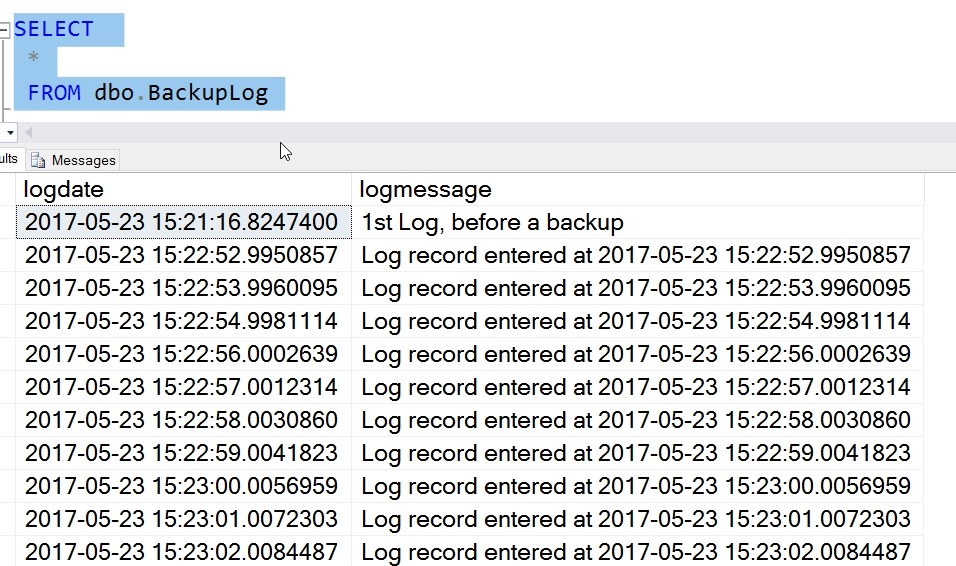
    I’ve added data, and my table looks like this:

    2017-05-23 15_23_12-SQLQuery8.sql - (local)_SQL2016.RestoreTime (PLATO_Steve (57))_ - Microsoft SQL

    My log backup contains all these records. If I restore the full backup and log now, by default I’ll end up in this state, with all these rows in my table. However, what if I want to only get the first 5?

    I can use the STOPAT syntax in my restore. I start by restoring the full with NORECOVERY and then the log. However, in the log, I’ll choose a time that is after row 5, but before 6. In this case, that’s 2017-05-23T15:22:57. Here’s the code:

    USE master
    GO
    RESTORE DATABASE RestoreTime FROM DISK = 'RestoreTime.bak' WITH NORECOVERY, replace
    GO
    RESTORE LOG RestoreTime FROM DISK = 'RestoreTime.trn' WITH RECOVERY, STOPAT = '2017-05-23T15:22:57'
    GO
    USE RestoreTime
    GO
    SELECT 
     *
     FROM dbo.BackupLog

    I have my results below

    2017-05-23 15_31_10-SQLQuery8.sql - (local)_SQL2016.RestoreTime (PLATO_Steve (57))_ - Microsoft SQL

    Only the log activity before this time is restored.

    SQLNewBlogger

    After I’d looked up the syntax, I spent only about 10 minutes setting up the demo and getting this ready. Practice skills and write about it. Show your next employer you are always learning and working.