Tag: Backup/Recovery

  • Create a BACPAC–#SQLNewBlogger

    Another post for me that is simple and hopefully serves as an example for people trying to get blogging as #SQLNewBloggers.

    One of the things that you might encounter at some point is the need to create a BACPAC. This is essentially a DACPAC with data included. There are times you might find a BACPAC more convenient than a full backup, especially if you work with Azure.

    This post shows how you can create a BACPPAC file (with the extension .bacpac) from SSMS.

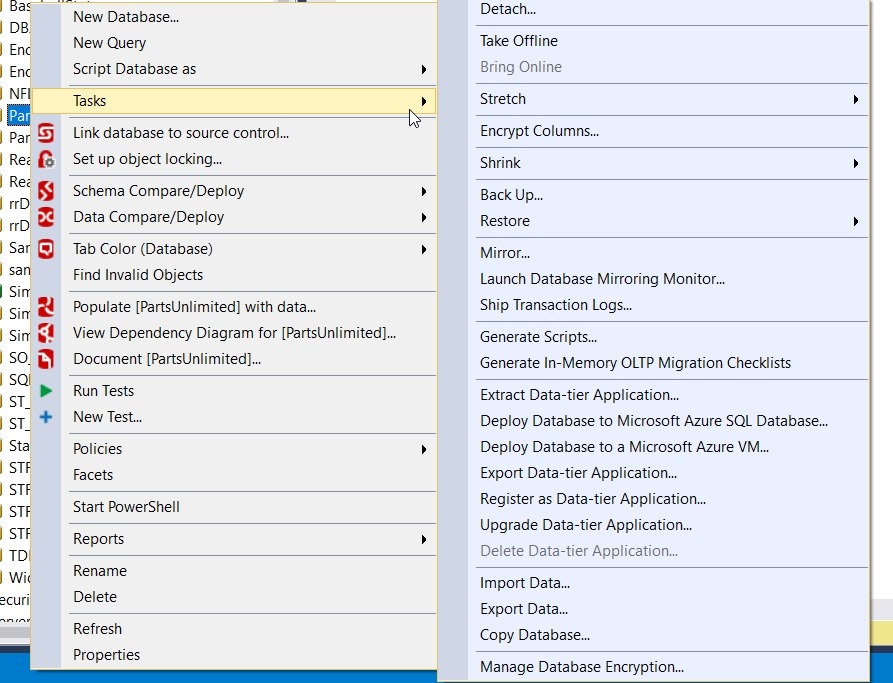
    I have a small database, the PartsUnlimited database, from the Microsoft PartsUnlimited demo application. I want to create a BACPAC from this, however, when I right click and select Tasks, there is no “Create BACPAC” option.

    2017-02-21 14_08_41-SQLQuery1.sql - dkranchlabdemo.database.windows.net.master (sjones (113)) - Micr

    That’s fine, because the “Data Tier Application” is the DAC, and an export includes the data, which creates the BAC part of the process. Let’s choose “Export Data-tier Application”. Once we do that, we get the expected summary wizard screen to start.

    2017-02-21 14_10_05-Export Data-tier Application 'PartsUnlimited'

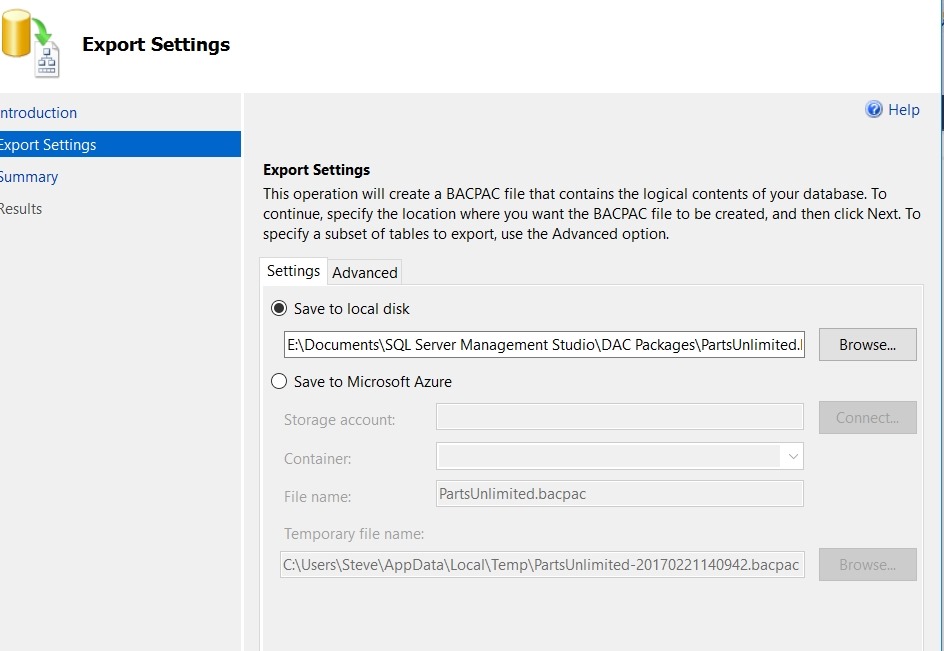
    I click next and immediately get prompted for a location in which to save the file. The will include all your data, so choose a location that has sufficient disk space. You have the option to also store this in Azure if needed.

    2017-02-21 14_10_43-SQLQuery1.sql - dkranchlabdemo.database.windows.net.master (sjones (113)) - Micr

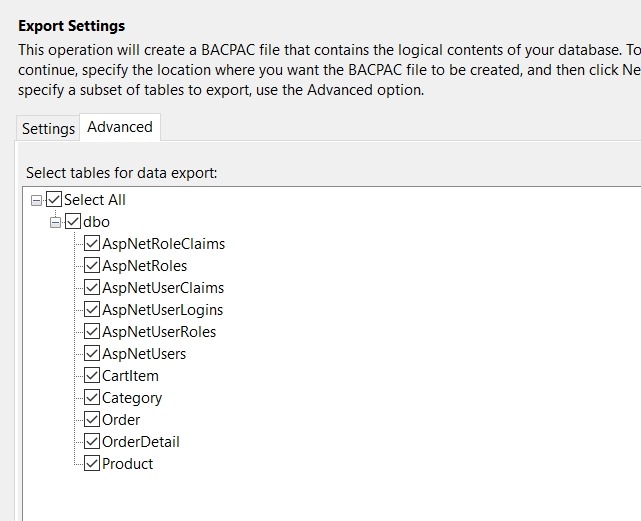
    Note the filename above is already filled out by default, but you can change this in the edit box. If you click the “Advanced” tab, you’ll get the chance to select only certain tables if that is required. You can see this dialog below.

    2017-02-21 14_10_50-Export Data-tier Application 'PartsUnlimited'

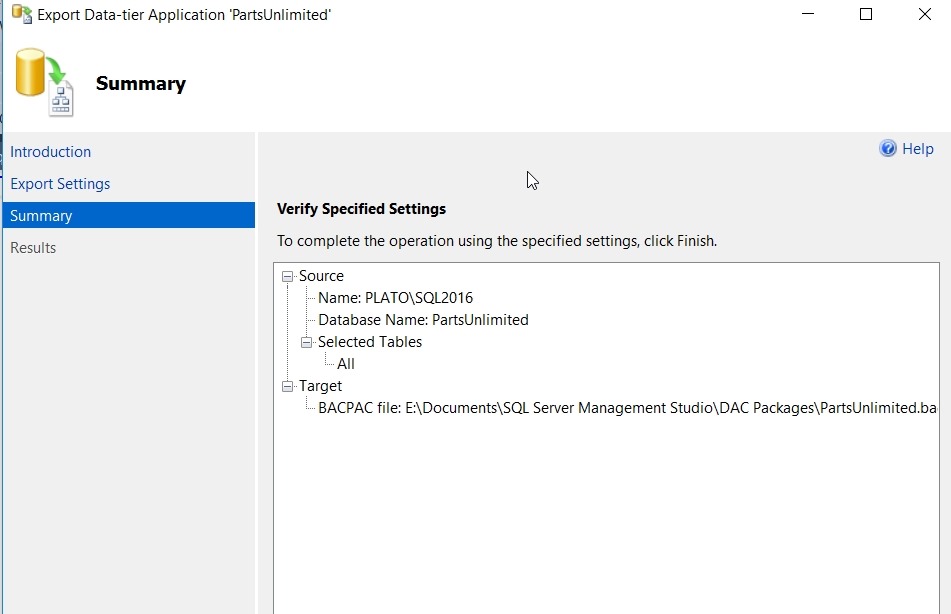
    Once you’ve chosen a location, you click next and get a summary page.

    2017-02-21 14_13_31-Export Data-tier Application 'PartsUnlimited'

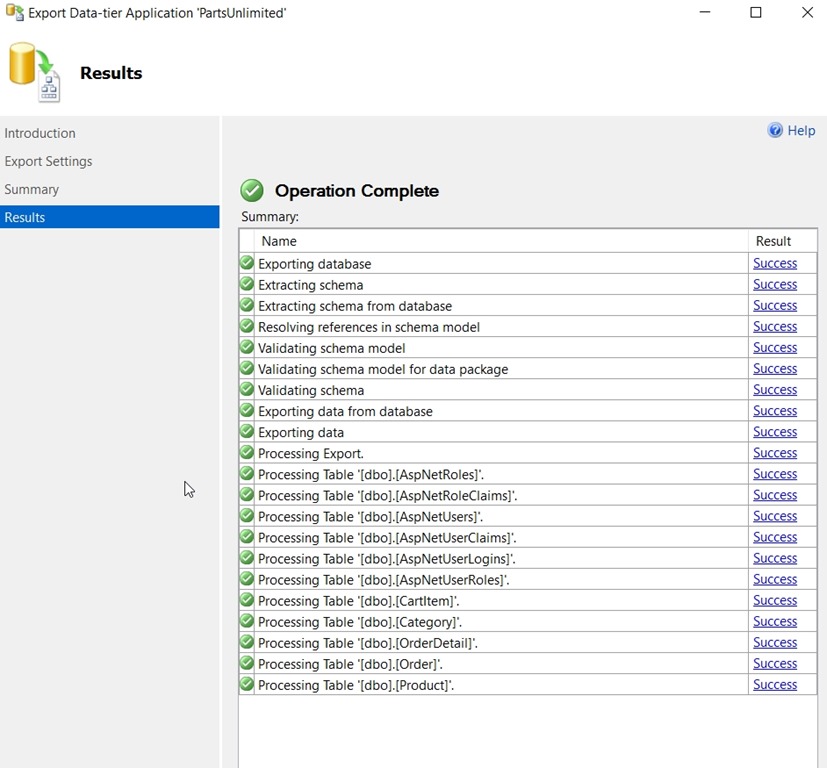
    Click finish, and the process starts. This runs very quickly, extracting the schema and then all the data, noting the results of each object.

    2017-02-21 14_13_38-Export Data-tier Application 'PartsUnlimited'

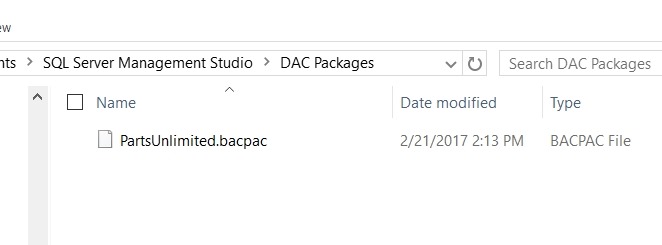
    That’s it. If I look in the location, I’ll see my BACPAC file.

    2017-02-21 14_15_11-DAC Packages

    I can copy this to another machine and import it to recreate a database. We’ll do that in another post.

    SQLNewBlogger

    A short, quick post. I’ve done this before, but I had to do this for a quick process and took 5 extra minutes to take screen shots, spending 5 minutes later writing this up.

  • Problems With Database Problems

    Gitlab had a database problem recently. I’m sure you read about it. There have been commentaries from many people, including Brent Ozar and Mike Walsh. There are many ways to look at this outage and data loss (the extent of which is not known), but I’d like to stop and focus on a couple items that I think stand out: competence and care. I don’t know how we prevent problems, but I certainly think these items are worth pondering.

    First, there is the question of competence. I have no idea what the skills or experience are for the GitLab staff that responded to the event. They certainly seem to understand something about replication or backup, but are they skilled enough to understand deeply about the mechanics of PostgreSQL (or their scripting) to determine where things were broken? I have no idea, and without more information I don’t question competence. The thing to be aware of, whether for this incident or your own, are the people working the problem well enough trained to deal with the issues. Perhaps most important, do they realize when they have reached the limit of their expertise? Do they know when (and are they willing to) to call in someone else or contact a support resource?

    I saw a note from Brent Ozar that the GitLab job description for a database specialist doesn’t mention backups. It does say a solid understanding of the parts of the database, which should include backups. I’d hope that anyone hiring a database specialist would inquire how someone deals with backups, especially in a distributed environment. It’s great that you give database staff a chance to work on the application, tune code, build interesting solutions to help the company, but their core responsibility and focus needs to be on the database being stable, which includes DR situations.

    The second item that I worry about is the care someone takes when performing a task. In this case, any of us might have been tired at 9pm. Especially if we’d spent the day working on a replication setup, which can be frustrating. Responding to a page, especially for a security incident can be stressful. Solving an issue like that, and then having performance problems crop up is disturbing. Anyone might question their actions, wondering if they had made a mistake and caused the issue. I know when multiple problems appear in a short time, many of us would struggle to decide if two issues are coincidental or correlated. I’m glad that after the mistakes, the individual responsible handed off control to others. As with any job, once you’ve made a serious mistake, you may not perform at the same level you normally do, and it’s good to step back. Kudos, once again.

    The ultimate mistake, and one that many of us have made, is to run a command on the wrong server. Whether you use a GUI or command line, it’s easy to mistake db1 for db2. I’ve tried color coding for connections, separate accounts for production, even trying to get in the habit or looking at the connection string before running a command, but in the heat of the moment, nothing really works. People will make mistakes, which is why it becomes dangerous to allow any one person to respond in a production crisis. As a manager, I’ve wanted employees to take care, and use a partner to double check code before you actually execute anything.

    And above all, log your actions. I have to say I’m very impressed with GitLab’s handling of the incident and their live disclosure. This is what I like to see during a war room. Lots of notes, open disclosure, and an timeline that allows us to re-examine the incident later and learn from the response. This is an area that too few companies want to spend resources on, but learning from good and bad choices helps distribute knowledge and prepare more people for the future. I’d like to see more disclosure of post-incident review from many companies, especially cloud vendors. I can understand not disclosing too much information while the crisis is underway, as I’d worry some security related information might be released, but afterwards, I think customers deserve to know just how well their vendor deals with issues.

    Steve Jones

    The Voice of the DBA Podcast

    Listen to the MP3 Audio ( 6.1MB) podcast or subscribe to the feed at iTunes and Libsyn.
  • T-SQL Tuesday #85–Cross Version Restores

    tsqltuesdayIt’s T-SQL Tuesday time, and this month Ken Fisher hosts. His topic is backups, and while I’m sure there will be plenty of views on backups, I wanted to touch base on a relatively simple item.

    This is the monthly blog party started by Adam Machanic. Whether you want to write today or at some point in the future, this is a good chance to showcase your knowledge and test yourself on a topic.

    Cross Version Restores

    I would hope that most people know that a SQL Server database backup has a version. This version corresponds to a version of SQL Server, and for the most part, we can’t restore a database backup to an earlier version of SQL Server. Some exceptions might be a similar CU version there the database format hasn’t changed, but certainly not to any prior Service Pack.

    However, can you restore to a later version? Can I take a SQL Server 2012 database backup and restore it to a SQL Server 2016 instance? Sure I can. In fact, lots of people upgrade their systems this way. Install a new SQL Server instance, take a backup on the old version and bring it forward. In fact, you can restore (or attach) a SQL Server 2005 database backup on SQL Server 2016.

    There is a caveat, however. You cannot restore a backup of master, model, or msdb on a newer version. This is called out in the RESTORE command ( https://msdn.microsoft.com/en-us/library/ms186858.aspx).

    That’s interesting, and it means a few things. First, if you really need to upgrade msdb, then you need to upgrade the instance. Does this mean you can’t do a side by side upgrade? No, because you could do this (for 2012 to 2016):

    • Install a new SQL Server 2012 instance.
    • Restore master and msdb.
    • Upgrade to SQL Server 2016.
    • Now attach or restore your SQL Server 2012 databases.

    I wasn’t aware of this fact until browsing BOL. I had assumed I would be able to move msdb and model, though perhaps not master, to a new version.

    That’s a handy piece of information to keep around, and it means that you should always be aware of those objects outside of user databases when you upgrade. Keep scripts handy in a VCS in case you need to create them on a newer version.

  • A New Recovery Tool for Your Toolbelt

    Those of us that administer databases and are responsible for ensuring the integrity and availability of data know that being able to restore systems is a core skill. In the SQL Server world, this should mean more than just being able to run a RESTORE DATABASE Sales FROM DISK = ‘Sales.bak’. Many of us would easily recognize that we should be able to use the WITH MOVE option. We should also understand when to use (and not use) NORECOVERY and STANDBY. Perhaps more importantly, we need to know the default option is RECOVERY.

    If we delve further, perhaps we could debate and discuss when a tail log backup is needed. Many might mention how to programmatically use FILELISTONLY and HEADERONLY to generate scripts.  A few of you would note that restoring databases means restoring logs as well and an understanding of the STOPAT option is important. Perhaps learning the ins and outs of restoring a filegroup is important in your environment. There are many nuances and options with restoring a database that a system administrator could learn.

    Apart from performing a restore, a careful DBA might think that we should try to avoid restoring databases if possible. Perhaps a DR system using Log Shipping can be used to recover data quicker than a database restore. Maybe periodic snapshots are valuable in recovering from those “whoops” mistakes. As our data sizes grow larger, we may need to develop more creative ways of recovering from user mistakes.

    Recently I saw the SQLCAT team had written a post on using Temporal Tables to recover from an “oops” mistake. If you haven’t looked at these structures, they are new in SQL Server 2016. Temporal tables, or system versioned tables, allow a user to view a row as of a certain timestamp, which can be especially useful for DML mistakes. Have you ever updated every row of a table to the same value because of a poorly written query? I have. A temporal table would have been handy in this case. Perhaps even more useful are the cases where a table is receiving regular inserts and updates, which can be very difficult to recover from with backup files.

    Certainly the majority of us don’t yet have temporal tables, and we might not even set up the option on many tables even if we were running SQL Server 2016. Over time, however, some of us will use these system-versioned objects, and perhaps we will run into a situation where recovery using temporal queries is more efficient than restoring an entire database. If that were to happen, wouldn’t you want to have some skills in this area?

    As SQL Server continues to evolve, many of the techniques and skills we’ve built across time will continue to work. There will be new ways of accomplishing work, based on features and enhancements that we ought to consider, especially when they might be more efficient than our past techniques. As you work with SQL Server, I hope you keep learning about the “new” ways that you might accomplish the tasks for which you’ve developed solutions in the past. Sometimes the old way might prove to be a better choice, but you won’t know that unless you learn, practice, and measure the effects of a new method.

    Steve Jones

    The Voice of the DBA Podcast

    Listen to the MP3 Audio ( 4.0MB) podcast or subscribe to the feed at iTunes and Libsyn.