Another post for me that is simple and hopefully serves as an example for people trying to get blogging as #SQLNewBloggers. Here are some hints to get started.
I wrote a SQL New Blogger post recently on running totals and used some images to show data. A reader sent me a note to say it would be nice to see the code that helps put the post together. I thought that was a good suggestion, so that’s this post.
How can you add code and data to your post?
Publishing Code
There are a number of ways to add code to a blog post. Some of the platforms have specific plugins to handle different types of code. There are also some plugins in Open Live Writer, which I use, for code.
I’ve stopped using those.
It’s simpler to me to just use the PRE tag, for selecting preformatting for a set of code. I use WordPress here, and when I added the code used in this post, I highlighted the code and then selected the Preformatted style. This is shown below.
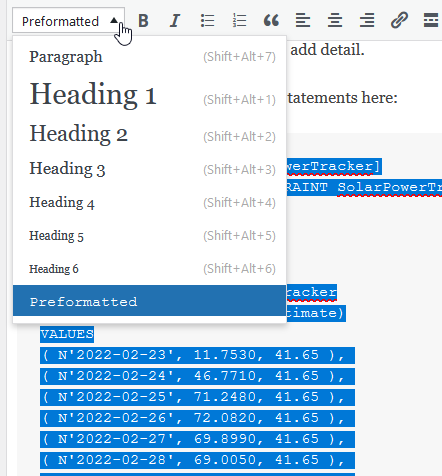
The PRE tag works well for me and it’s simple. If you want to spend the time configuring code for colors specific to your language, feel free, but I am less concerned about that.
Generating CREATE Statements
For most demo set ups, I create a new table and I copy the code over. For example, I was doing some DDM testing and I made this table.

To add that to this post, I’d CTRL+A to select all the code and then copy it. I can paste it below and then format with the PRE tag.
CREATE TABLE [dbo].[DDMEmailTest](
     [MyID] [int] IDENTITY(1,1) NOT NULL  CONSTRAINT [DDMEmailTestPK] PRIMARY KEY ,
     [MyName] [varchar](100) NULL,
     [Email] [varchar](100) MASKED WITH (FUNCTION = 'email()') NULL,
     [Salary] [int] NULL,
GO
In LiveWriter there isn’t a PRE tag, so I just quickly edit the source and add a “re” to the paragraph tags. You can see where I’ve added PRE below, highlighted by the arrow:

The other option is to script the table to the Clipboard. I can do this in SSMS easily.

I then paste the code into Live Writer.
Note, I usually edit out the USE and SET statements.
Adding INSERT Statements
After the DDL for tables is around, the next important thing for readers is data. If you have the INSERT statements from your testing, then use those. As above, paste those in here.
If not, there are a few options. I have SQL Prompt, so I can select from the table, highlight the results, and then “script as insert”.

The other option is to “build” an insert statement like this:
SELECT TOP 10
        '(''' + CAST(spt.ProductionDate AS VARCHAR(10)) + ''', ' +
       + CAST(spt.Actual AS VARCHAR(10)) + ', '
       + CAST(spt.Estimate AS VARCHAR(10)) + ')'
FROM dbo.SolarPowerTracker AS spt;
I can wrap the INSERT tablename VALUES in front of this and then paste this into the post.
SQL New Blogger
Not really a technical post, but this does show a little technical skill. Writing about how you solve problems or build on other posts is a good way to show you have some varied skills that an employer might like.
This post took me about 15 minutes to write.

