Tag: containers

  • Learning more Kubernetes

    I’ve been slowly working my way through the 50 days of Kubernetes (K8s). As you might have guessed if you remember my first post, this has been more than 30 days. Life and work get in the way, but I’m working through the series of posts and videos.

    A couple of interesting things I’ve watched lately:

    Serverless Kubernetes and Serverless on Kubernetes – I worry about the idea of containers needing to spin up to meet serverless workloads, but maybe not. It’s a few ms for these containers to spin up, especially for small functional environments like Python or .NET. I suppose if there are issues, you can schedule more pods to be available or more replica sets to spread the load. This makes sense to me, and containers are often a perfect use for this on Kubernetes since you want to have lots of small items, but one large endpoint for people to hit things. I suspect this is how the FaaS implementations work on Azure and AWS.

    This video also talks about the need for a virtual kublet to allow the API to get things ready, without having underlying VMs, a prerequisite for scheduling items on the cloud. This is the serverless kubernetes concept. I’m not sure I completely understand this, but I get the idea here. We don’t have hardware provisioned, we’re running Kubernetes, and we want to push some of our load into the cloud. Since we don’t have a node assigned to us, we want to schedule on a virtual node that the cloud provider will actually spin up when we hit it.

    Fascinating and not something I’d have thought of before I saw this video.

    How the Kubernetes Scheduler Works –  This is interesting. Scheduling workloads and pods in different places is important. Flexibility while meeting demands matters. The idea of hard (required) and soft (optional or preferences) constraints for choosing where to run pods is fascinating. Another video by Brendon Burns. Most of us might care about these items since we may want some spreading assurances for instances or minimum resource requirements for our instances.

    For example, we might have a hard constraint that our pod (container) needs 128GB of RAM. This might limit the nodes that we want to run this pod on, and the scheduler takes this hard constraint into its decision making process.

    For soft constraints, we might prefer that a reporting instance not run on the same node as a OLTP instance, but if there are no nodes available, perhaps we’d live with this. That’s a soft constraint, and the scheduler tries to honor these, but it isn’t bound to prevent scheduling on those nodes.
  • Containers make easy upgrades

    I’ve been working with containers and writing a bit about them for awhile. I find them to be fascinating and useful as a technology, and I’ve come to really believe these will change how we work with the SQL Server data platform.

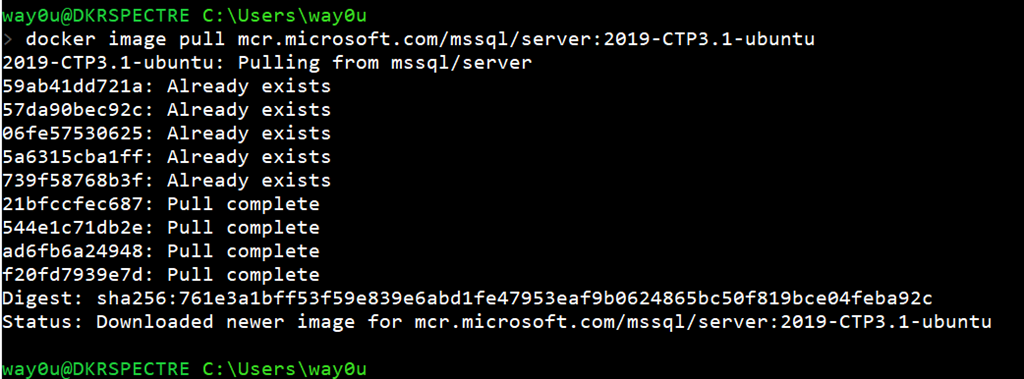
    In any case, I wanted to get the latest SQL Server 2019 version recently, so I decided to download the container image. I’ve had a few on my machine, and so upgrading to the latest was a question of running this:

    docker image pull mcr.microsoft.com/mssql/server:2019-CTP3.1-ubuntu

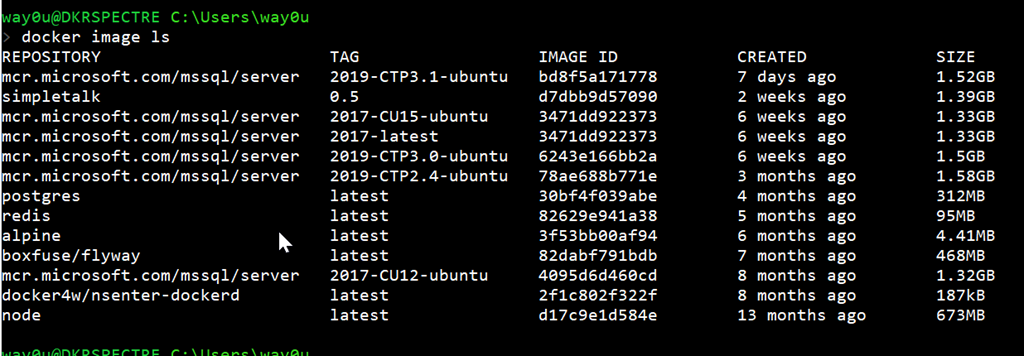
    The main SQL Server 2019 image exists in a few flavors on my machine, so as you can see, I don’t even download the entire image.

    2019-07-03 19_15_29-cmd

    There were only 4 layers I needed to pull since I already had the other 5 layers. This took about 10 minutes on my nice, but not great, 15MBps download speed. That’s much quicker than I could download an iso to install, plus I’d need to uninstall the previous CTP.

    With containers, I can just run any CTP by picking the image from my list.

    2019-07-03 19_18_01-cmd

    If you haven’t tried working with containers, I’d urge you to start learning a bit. This is amazing technology that your developers already use, or want to use, and I expect data professionals to follow suit in the next few years.

  • Learning More about Kubernetes (K8s)

    I know a bit about this, but I’m always looking for more. I had the chance to see Brendon Burns recently and I was impressed. That is one seriously smart dude. In any case, I saw a link from Microsoft: 50 days from zero to hero with Kubernetes. It’s at this link: aka.ms/learnkubernetes

    I decided to dig in a bit, because it’s a complex subject in some sense and going through some resources can help solidify how this works.

    Day 1

    It’s a children’s story of a visit to a zoo, with an attempt to explain what pods, replica sets and other items. The first few items made sense to me since I’d worked with K8s slightly before.

    However, as the story delved into more complex subjects, like Ingresses and Daemon Sets, I had a vague idea of what ese were, but not really. I’m not sure I could explain back what some of these do. I hope future days will help me understand.

    Day 2

    Day 2 is a video on Containers from Brendon Burns. He talks about the history of VMs and then lightly on what a container is and how this fits together. Since I’ve watched some of Nigel Poulton’s courses at Pluralsight, this makes sense and reinforces what I know. It also gives me another way to explain things.

    However, for others, I wonder if this makes sense to them. It’s a very high level, but fast view of containers. Worth watching if you want to know more.

    I’ll continue on with the series as I get time, likely a very sporadic look at this technology.

  • No More SQL Server Installs

    This occurred to me recently, and I’m wondering what some of you think of as the answer to this question: when will you expect to no longer install SQL Server?

    It’s not that I think many of you are retiring from SQL Server work. It’s not that your organization won’t use SQL Server. It’s that I wonder if we’ll stop installing SQL Server on the host OS. We’ll make use of SQL Server in new ways, which won’t require an installation.

    Lately I’ve seen a lot of tweets, post, and more about SQL Server in containers or Kubernetes. Anthony Nocentino and Andrew Pruski are doing lots of work here, and I’m moving my work to containers for demos. With a container, you don’t really install SQL Server. Instead you install the Docker engine and then “start” a pre-installed SQL Server image inside a container. You might modify this before starting it, but you aren’t installing a version and upgrades are pulling a new image and then restarting the new image. With the better support for containers on Linux, this means I’m also starting to think Linux first.

    Plenty of you are also looking to do more work in Azure, AWS, or some other cloud service where you likewise don’t need to install SQL Server. In those cases, you’re really working with a service that implements a database, not an instance. There are some variations, such as the Azure Managed Instance, but you still don’t need to install SQL Server. You apply your database code, point your application, and off you go.

    SQL Server 2019 is starting to feel like the first version where I’ll be looking to ignore the SQL Server instance and think in terms of containers most of the time. I’ll probably still install it, as I need to test and check things, plus, I’m still learning how to work containers into my workload, but I’m guessing that with SQL Server 2020, or 2021, I’ll just stop installing SQL Server.

    Unless I need to document the installation for some of you, but in that case, I’ll try to get you to stop installing the binaries and just use a container.

    Steve Jones

    The Voice of the DBA Podcast

    Listen to the MP3 Audio ( 3.4MB) podcast or subscribe to the feed at iTunes and Libsyn.