Tag: DAB

  • Accessing the Data API Builder MCP Server from VS Code

    I recently started playing with the MCP Server for SQL Server, which is a part of the Data API Builder (DAB). I’m not sure why there wasn’t a separate piece of technology used, but I do think the DAB server is very useful, and I wish more people used it. Adding MCP to it makes some sense, as the REST and GRAPHQL endpoints can be disabled.

    This post will look at a few things I did to get the MCP server working.

    A Default for New Projects

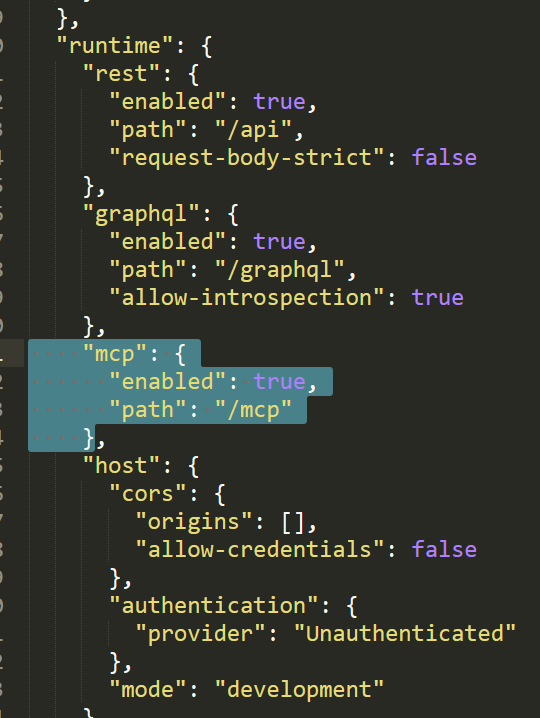
    By default, if you have v2.xx of the Data API Builder, when you create a new project (with dab init), you get this section in your json config file with the mcp entry.:

    "mcp": {
       "enabled": true,
       "path": "/mcp"
    }
    

    This is the enabling of the MCP server. In my files, this was added below the “rest” and “graphql” sections under the “runtime” key. You can see this in a larger view of the file.
    2026-08_0180

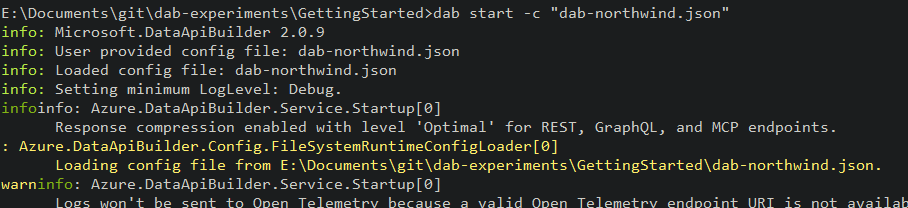
    Once you add this, the MCP server should start up with DAB. The only indication I see in the logs is this message that the endpoints are enabled.
    2026-08_0181

    Adding an MCP Server to VS Code

    My first experiment here was adding a server to VS Code. This isn’t a clear thing in the docs, to me, so I’ll tell you what worked for me. I already have some MCP servers in VS Code, so I really went through this process.

    First, this is an http MCP server, and the URL is the DAB URL  (for me: http://localhost:5000/mcp) that I’ll use to connect. I used the instructions in this VS Code article rather than the quickstart in the DAB docs.

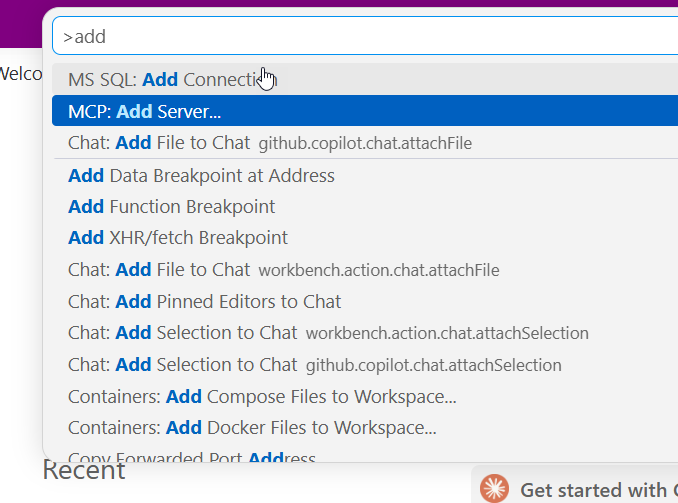
    In the VSCode command palette, I looked for the “MCP: Add Server” entry, as shown.
    2026-08_0182

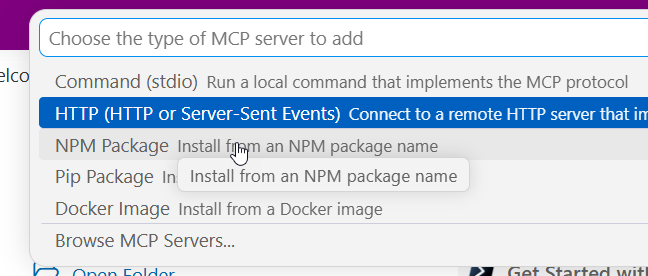
    I then picked the http option:

    2026-08_0183

    Next, I enter the UL. I’ve pasted mine in here.

    2026-08_0184

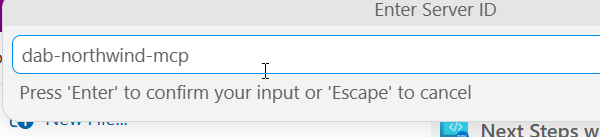
    Give this a name. This isn’t clear in docs, but this is the name that you’ll use when starting this MCP server. I chose dab-northwind-mcp, which lets me know this corresponds to my config file and it’s a dab server.
    2026-08_0185

    Next we decide where this is available. I usually choose workspace, but the setting depends on what you doing with this server. I tend to aim to keep things more tightly configured, so that if I need it elsewhere, I can learn how to adjust that, or add this as an item for another workspace.
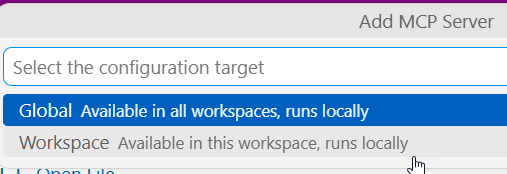
    2026-08_0186

    I then get my mcp.json file, which is the config file for the MCP servers in VS Code. These servers are a part of the “servers” key, as an sub-document below that. Each of these is a separate entry in JSOn. I essentially have two of the same here, the sql-northwind and dab-northwind-mcp point to the same server.
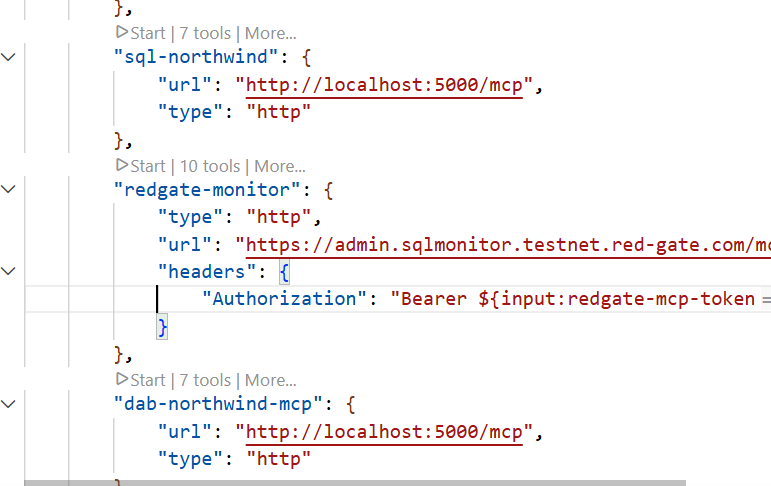
    2026-08_0187

    Starting the MCP Server

    If you look at the image above, there’s a “start” link that VS Code adds as an annotation to the entry. You can click that. For me, I usually go back to the command palette and get to the “MCP: List Servers” entry.
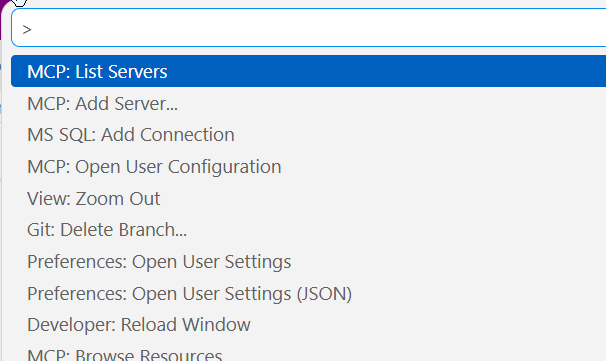
    2026-08_0188

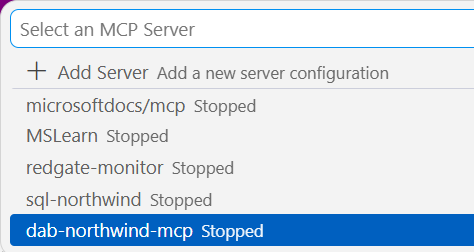
    Then I see a list of servers and I’ll select the one I want. In this case, that’s the dab-northwind-mcp one.
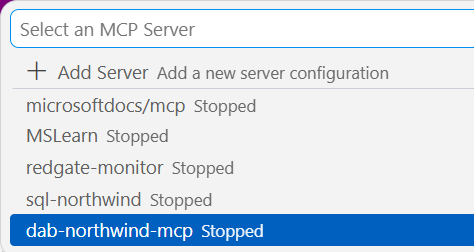
    2026-08_0189

    I see a few items. The configuration will open the mcp.json. It brings up output by default. I’ll pick “Start Server”
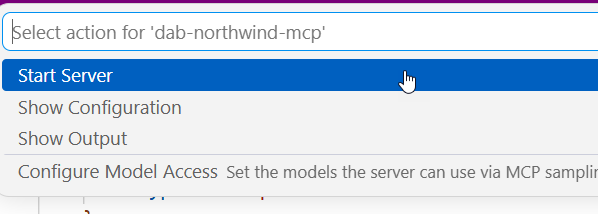
    2026-08_0190

    I can see in the output it starts. notice I have some errors, this is because the DAB server wasn’t running. I started it, and then went through the process above to get it restarted. You can see tools were discovered.
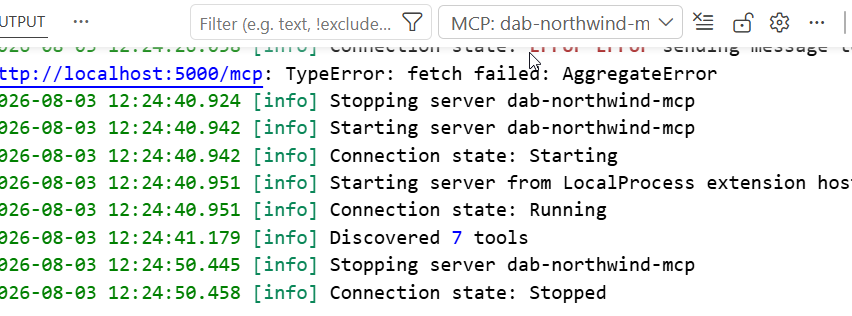
    2026-08_0191

    That’s it. The MCP server is active and running. I’ll do another post on how I can use this.


  • Adding an HTTP MCP Server to VSCode

    I wrote earlier this week about the SQL MCP Server using the Data API Builder. In that post I showed how to query the MCP server from VSCode, but I didn’t explain the setup. This post shows how I did that.

    First, you need to ensure you have access enabled for MCP access. There is a doc on this, though  I found it slightly confusing. I think the doc is trying to make this easier as there are public MCP servers available and a bit of a VSCode marketplace. However, that’s not what I wanted.

    I wanted a local server, using the http URL as that’s what DAB exposes. The command palatte makes this easy, so I open this (CTRL+Shift+P) and type MCP. I see the “Add Server” entry. Pick that.

    2026-07_0317

    This gives you a choice of a few different items. I’ll use http.

    2026-07_0318

    Once I select that, it asks me to enter the URL. Below I typed this, but the actual URL needs to http. I should have typed “http://localhost:5000/mcp”

    2026-07_0319

    Once I do that it asks for a name. I’ll give it one:

    2026-07_0320

    This is it and I’m done. The user config opens and I see my item entered with my other MCP servers (I’ve experimented a bit here).

    2026-07_0321

    Accessing the MCP Server

    I don’t have these running by default. I can start them by using the command palette. There is an MCP: List servers item.

    2026-07_0330

    This gives me a list of servers. I can select my sql-northwind server.

    2026-07_0331

    Once I select it, I have options. I’ll choose start.

    2026-07_0332

    In the terminal output, I see the server connects. Note, DAB has to be running.

    2026-07_0325

    Accessing the Server

    I can open an Agent session and then add this server to it. If I click the “+” in the lower left, I can see a list of things. I want tools.

    2026-07_0326

    Note, I need to be in Agent mode (not plan or ask).

    From here, I can search for my server, since there are a lot of tools. I could add specific tools, but for most of the time I’m using MCP, I want all tools.

    2026-07_0327

    Now I type. Note that once I have a query, the MCP server is listed as an active tool. I get asked for permissions as we don’t want agents to do whatever. Each access asks for permissions or I can give the agent permissions for the session.

    2026-07_0328

    It runs a few queries and gets the answer.

    2026-07_0329

    MCP server in action.

    Summary

    An MCP server is a resource. Just like I might access the DAB GRAPHQL endpoint and run a query, knowing I can also GET/POST/SELECT/MUTATE things, for an MCP server, this gives the LLM certain things it can do. In this case, there are 7 tools, as noted in my previous post.

    This post just shows how to add http servers, but other protocol types are similar. VSCode makes a lot of things easy, though I think the agent is very wordy. I prefer Claude, which works as well.

    2026-07_0334

    If you’re having issues, you want to ensure chat is enabled. The User settings have some MCP settings. I’ve searched for MCP in the settings below. The big one is the chat access.

    2026-07_0316

  • Getting the SQL Server MCP Server Running

    If you’ve wanted a SQL Server MCP server for your databases, it’s available. The SQL MCP Server is a part of the Data API Builder (DAB). DAB is a wrapper that allows you to run a service over your databases that exposes REST, GRAPHQL, and now, MCP, in a way that lets you control it.

    I’ve written a bit about this here and at SQL Server Central, and this post looks at adding MCP access to your DAB setup.

    This is part of a series on the Data API Builder.

    Adding the MCP Endpoint

    I have a DAB setup already that runs well. I have a REST endpoint (here’s the REST view of Northwind.dbo.Customers).

    2026-07_0304

    And here is the GRAPHQL endpoint.

    2026-07_0306

    If I look at my configuration file that drives the service, I see this:

    2026-07_0307

    What about MCP? It’s easy to add.

    The MCP Service

    The MCP capability was added in v1.7 of DAB, but the current version if over 2.0 (2.0.9 as of Jun 30, 2026). There have been bug fixes and capabilities, so I’d recommend upgrading.

    Second, this is enabled by default for new DAB configs, but if you have an existing config, you need to add a JSON key/value in your file. This is the runtime configuration, but by default all the tools are available. Here is my new config file (which I regenerated from my old VCS items). You can see the new MCP section between the graphql and the host keys.

    2026-07_0308

    In the docs, you can add a dml-tools key and enable or disable individual tools. The DML tools available are:

    • describe_entities – Discovers available entities and operations
    • create_record – Inserts new rows
    • read_records – Queries tables and views
    • update_record – Modifies existing rows
    • delete_record – Removes rows
    • execute_entity – Runs stored procedures
    • aggregate_records – Performs aggregation queries (new in v2.0)

    Since this entry is in my configuration, I’ll start the DAB server and query it.

    Querying the MCP Server

    I need an agent to do this. The easiest one for me is the Copilot Agent in VS Code. I configured the MCP server (another post coming on this) and then sent a query. You can see the agent accessing the server and looking for the tools. Seven were found.

    2026-07_0309

    Here is the rest of the entry, with the descriptions of the tools.

    2026-07_0310

    The power in the MCP server is I can ask my agent to use the tools to do work. I don’t need to be that specific. In the query below, I’ll just ask for data. In this case, the customers with the most orders:

    2026-07_0311

    At each of the “ran” stages, the agent asked for permission. I granted it, allowing the agent to run code. It went through metadata in the db and then returned the data. Below the image above, I had the results returned. You can see that here.

    2026-07_0312

    This matches what I get from SQL if I run a query. Below is the query I ran directly.

    2026-07_0313

    If I look at the DAB log, I see the mcp server being accessed.

    2026-07_0314

    This is a very quick look at the MCP server working in SQL Server. It’s another great reason to use DAB. That already makes building CRUD applications easier, and now you get MCP access as well.

  • AI Experiments: Claude Solved a DAB Issue

    I’m sure many of you are using AI regularly, perhaps chatting, perhaps using some sort of agent. I’m doing the same, but in this case, I had it tackle an issue that’s been inconsistent for me with the Data API Builder and it solved it. Something I’ve struggled to do with docs and Google.

    This is part of a series of experiments with AI systems.

    The Scenario

    I’ve been doing some work with the Data API Builder, letting it provide me access to data through REST and GraphQL. Lately, it added MCP as well, and I’ve been updating a talk as well as experimenting with this.

    However, I’ve struggled to get Stored Procedures to work. They have sometimes worked, sometimes not, and I’ve not quite figured out why. Now that I know, I feel a bit silly, but recently I decided to let Claude help me solve this.

    I typically use Northwind, and the DAB docs have been a little light. They have exmaples, and I’ve gotten these to work, but when I’ve moved to more standard Northwind things, this hasn’t always worked.

    I should have seen a pattern, but it’s a lot of data, docs, and different places I’ve seen searches. This felt like a place an LLM might see something I didn’t see. It’s also a way to speed up work when I’m busy and not focused on this problem for hours at a time.

    Using Claude for Help

    This felt like a “chat” thing, so I picked the chat item in Claude desktop and gave it context: my dab call the error, the fact the proc executes in the correct security context. I got this back. Claude response in Italics.

    Ugh. Me see problem. Flag wrong. No shaman flag call “–parameters.name” exist. Fake flag. DAB no understand.

    Real flag call –source.params. Fix like this:

    Note: I’ve set Claude to talk like a caveman for now, which reduces output.

    I pasted in the doc page, and then got this:

    2026-07_0275

    The more interesting part of the response was Claude noting that sp_describe_first_result_set is called and needs a good response. I hadn’t thought about this, so I decided to run it. I have the response to claude and it evaluated this as correct.

    It next suggested adding dev mode (already on, it didn’t have my whole config) and turning the log level up. That’s a good idea. It also asked me for the section of the config file to be sure the proc was in there correctly.

    I did all those things. It verified my config blocked was correct.

    2026-07_0277

    Claude then asked me to try both the REST and GRAPHQL APIs and gave me the code for those. I pasted the error in and it suggested that I might have an issue with the URL code I used in Bruno. Maybe, but worth a try. It gave me the CURL command.

    2026-07_0278

    The Solution

    It was at this point that I started to realize the issue. The proc that wasn’t working used an NCHAR() as a parameter. The DAB call expects string. It gave me this response and an example of the code for my config file.

    CustOrderHist proc expect nchar(5) param, but DAB parameter type system only know few kind: string, number, boolean, etc — no raw “char” concept. Missing "type" field make DAB fall back some default guess (maybe try char/byte path), boom, exception.

    Add "type": "string", restart engine (dab start again — config file, not hot reload), fire query/POST again. String type push CustomerID as varchar/nvarchar-like, proc side (nchar) accept fine via implicit convert.

    I changed things and tried it, but it wasn’t working. We upped the debug level and I pasted in results, which are annoying to go through. DAB doesn’t include a timestamp (I opened an issue) so I had to sort through the output to find the log items.

    I pasted in the logs and then Claude found the issue. It explained things, which I don’t care about since this is an API thing. However, it gave me a couple of choices for fixes. I changed the parameter in the proc, which isn’t a tiny change, but it’s also not a big change.

    2026-07_0279

    It didn’t work at first, but when I pasted in my query, it recognized that BRUNO might be an issue.  The response explains this and says to try CURL. I did, but I also realized that my GraphQL command was a GET, not a POST.

    2026-07_0280

    This worked, and I tried a few more stored procedures to verify I had an idea of what to do.

    Summary

    There wasn’t anything amazing that Claude did here, but I approached this as if I were struggling with a problem and asked a colleague. I was a little shorter than I might be in Slack messaging or email, but I was really dumping some results on a co-worker and letting them sift through things.

    What was most amazing was that I had a few other things happening at this moment and I’d focus on this for an experiment and then let Claude examine logs while I went to try something else, edited my GraphQL queries or even answered an email. I solved the problem with help, but wasn’t spending a lot of focused time because I had an assistant.

    This is something I do more and more. Let me assistant do something and come back. I’ve struggled with this problem for months since I didn’t have a lot of continuous hours to spend digging through logs and docs. Not sure I’ve even seen this particular solution come up in my Google searches, but certainly Claude made it easier than it has been previously.