Tag: DevOps

  • The Need for DevSecOps

    One of the things that happens with many companies that start adopting DevOps is that they release new features constantly. They publish their lists of changes, and they try to attract customers and grow their businesses. They may make some mistakes, but they fix those quickly and keep pushing forward. That’s the idea, and it works well.

    However, many of the developers (and most managers), don’t think about the security side of their changes. This piece looks at the way hackers and criminals view DevOps, often using release notes and feature changes as a target to focus their efforts. In this way, they exploit holes and vulnerabilities in software to attack data storage. The examples include S3 buckets of storage and Elasticsearch, which is notoriously poorly secured by many people.

    I’m sure there are hacks that also expose relational data stores and NoSQL stores, but those are often more secure and harder to directly attack. Certainly, hackers do get credentials and can query data, it’s more often I hear about data breaches from other sources than direct relational database access. SQL Injection is definitely still an issue, and I hope that more and more developers are learning patterns that avoid these vulnerabilities.

    DevOps works. I think it’s great. However, it’s not enough to trust developers to build features without including static code analysis, pen testing, and other security evaluations before you release code. Often developers can build features just as fast with good patterns as bad. Use automation to catch bad patterns and force developers to learn new ones.

    Also, avoid letting developers implement data stores out of convenience and speed. Ensure that strong security practices, long passwords, service accounts, secrets, and more are implemented from the start. It’s easy to shortcut these, but it’s also harder to explain to customers and investors why we didn’t do better.

    If you’re a developer, the main thing to keep in mind is that you will often be the scapegoat for these issues. Upper management might not support you and pressure you to move faster, but when there are issues, they’ll also be quick to blame you and let you go first. Push back and ensure that you have the tools and the process to evaluate if you are building problematic code. Always use long passwords, and document what you do for others to follow.

    And if your boss insists on cutting corners, get that in writing. It might not save your job, but that documentation has served me well in the past when issues come to light.

    Steve Jones

    Listen to the podcast at Libsyn, Spotify, or iTunes.

  • Creating an Empty Repo in GitHub–#SQLNewBlogger

    I saw someone struggling with getting started with a Visual Studio project and Azure DevOps. They got a conflict, which I’ll show and then get you started with an empty repo.

    Another post for me that is simple and hopefully serves as an example for people trying to get blogging as #SQLNewBloggers.

    The Problem with Initialized Repos

    I wrote about this recently with Azure DevOps and empty repos.. If I initialize a repo in GitHub, or any online provider, and try to push up a local repo, it returns an error that I have conflicts.

    I’ve learned that when I want to start a new project, either I create the repo locally and then make an empty one online, or I create it online, clone it, and then start working.

    I try to do the second (create online first), but I don’t always remember.

    Creating an Empty Repo

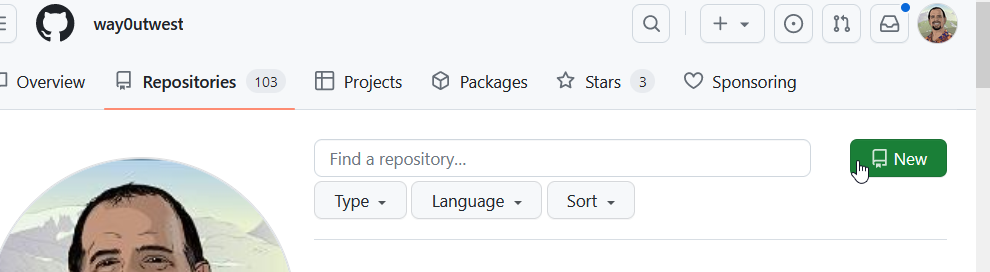
    In GitHub, if you go to your repositories page, you can see a “New” button on the right.

    2023-08-25 16_56_06-Your Repositories — Mozilla Firefox

    Click this and enter a name, as I’ve done below. BTW, I love the suggested name.

    2023-08-25 16_56_30-New repository — Mozilla Firefox

    If you look at the image above, near the bottom, you can see my mouse pointer.

    DO NOT check this box if you want an empty repo. Don’t add a .gitignore either. You’ll be adding code from your own project, which likely has a gitignore file and might have a repo. If not, just create a readme.md file in your local git repo.

    Don’t add a license file either.

    Pushing My Project

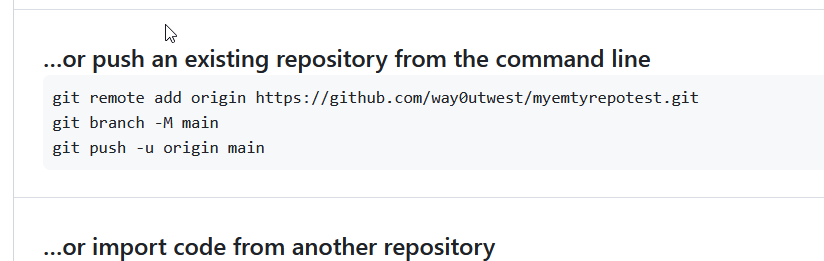
    Now when you create this, you get the details of how to push your repository. If you have never used git, just open a command prompt and paste these lines in one by one and run them.

    2023-08-25 17_00_57-way0utwest_myemtyrepotest — Mozilla Firefox

    That’s it and now you can work and commit in either repo and deal with merges.

    SQLNewBlogger

    This post was easy for me, but I’ve been in the situation where I’ve made this mistake. In this case, I’d written the other post, so I knew what to do here. I spent another 10 minutes getting GitHub set, taking images, and writing this.

    Easy to do, 2 posts from one idea, and showcasing knowledge on another platform. I could do another one with BitBucket or somewhere else, and maybe I will. I have customers that use other platforms.

    Maybe you should do this and showcase your versatility to the next person that wants to interview you. If you want to work with software and Git, show them you know the basics. Or even more.

  • Friday Flyway Tips–Commit and Push

    Flyway Desktop includes version control features with Git. One thing that was added in v6.5+ was the ability to commit and push.

    I’ve been working with Flyway Desktop for work more and more as we transition from older SSMS plugins to the standalone tool. This series looks at some tips I’ve gotten along the way.

    All in One Press

    This isn’t a big change, but it is one that customers have asked for. On the version control tab, when you have changes, they are listed with a commit button in the lower right.

    2023-08-25 16_06_35-Flyway Desktop

    We’ve added a drop down to this.

    2023-08-25 16_07_13-Flyway Desktop

    If you click this, you now have commit or commit and push options.

    2023-08-25 16_07_17-Flyway Desktop

    Pick the lower one, and you’ll get things committed and pushed up.

    2023-08-25 16_17_42-Flyway Desktop

    The choice isn’t saved, which I think isn’t a great design choice, but for now, you do have the option with each commit.

    Try it out today. If you haven’t worked with Flyway Desktop, download it today. There is a free version that organizes migrations and paid versions with many more features.

    Video Walkthrough

    I made a quick video showing this as well. You can watch it below, or check out all the Flyway videos I’ve added:

    https://youtu.be/QsWVcYxFdnM

  • Creating Empty Repos in Azure DevOps–#SQLNewBlogger

    I saw someone struggling with getting started with a Visual Studio project and Azure DevOps. They got a conflict, which I’ll show and then get you started with an empty repo.

    Another post for me that is simple and hopefully serves as an example for people trying to get blogging as #SQLNewBloggers.

    The Problem with Initialized Repos

    First, I’ll open VS 2019 and create a new database project. I won’ t walk through that, but once I do, then I can add my project to source control. In the lower right corner, this is an option:

    2023-08-09 12_58_07-Zoomit Zoom Window

    I’ll choose a local repository here. I see plenty of people do this if they don’t want to use GitHub.

    2023-08-09 12_58_34-

    Now, I go to Azure DevOps and create a project. I initialize that project with a Readme, which seems like a good idea. You can see my online repo below:

    2023-08-09 12_56_01-VS DB Project Test - Repos

    When I create this, I get the options to link an existing repo or push up.

    2023-08-09 12_59_54-Database2 - Microsoft Visual Studio

    However, if I try to link my existing local repo, I get an error.

    2023-08-09 13_00_19-Database2 - Microsoft Visual Studio

    Why? I have a commit in the report (initialized with a readme) and commits locally. That’s a conflict.

    Creating an Empty Repo

    The way to avoid this is make an empty repo in Azure DevOps without anything in it. When you see this screen, un check the “add a README”. No matter how much you want to have one, don’t do this.

    2023-08-25 16_35_11-VS DB Project Test - Repos

    Now, you have an empty repo for the remote. You should see this online, with the first line noting this is empty. From here, you can use the second box to push your repo from the command line.

    2023-08-25 16_36_17-Files - Repos

    SQLNewBlogger

    This post was easy for me, but I’ve been in the situation where I’ve made this mistake. It’s annoying, but it’s also confusing as you should be able to make changes in both repos. That’s why we use git.

    You can, but not when both are initialized. You need to clone one from the other.

    This post took me about 15 minutes to create, with a good portion of time spent creating the scenario twice (two repos) and the db project in VS, which is slow. You could do this same thing and show how (and why) you set up a project linked to source control. If you use a couple systems (one at work and one at home) make two posts!