Tag: DevOps

  • Friday Flyway Tips–Commit and Push

    Flyway Desktop includes version control features with Git. One thing that was added in v6.5+ was the ability to commit and push.

    I’ve been working with Flyway Desktop for work more and more as we transition from older SSMS plugins to the standalone tool. This series looks at some tips I’ve gotten along the way.

    All in One Press

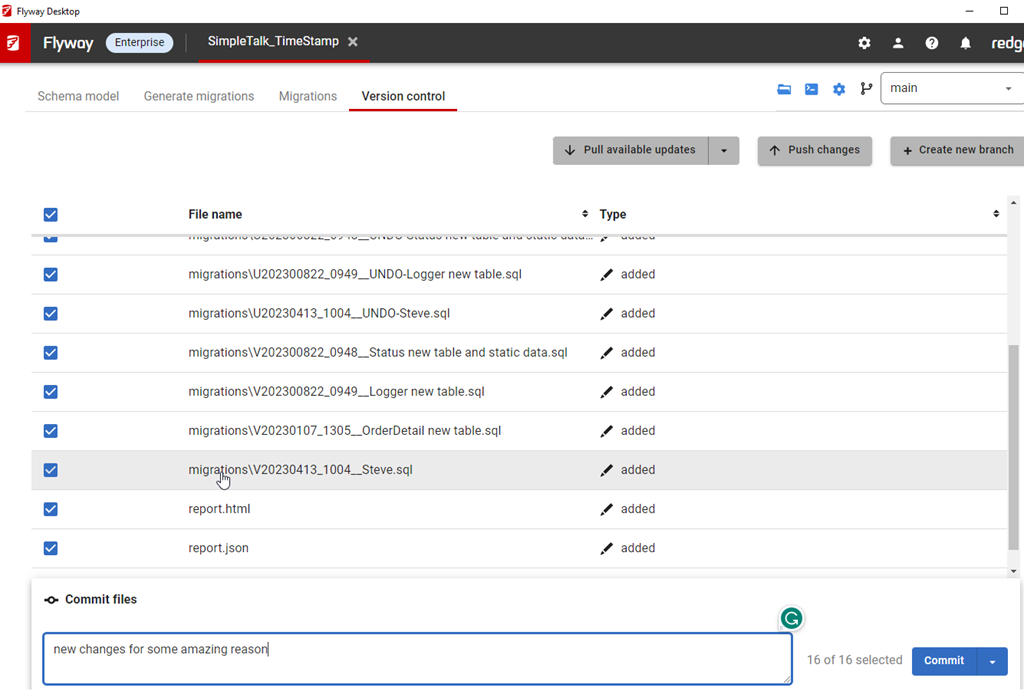
    This isn’t a big change, but it is one that customers have asked for. On the version control tab, when you have changes, they are listed with a commit button in the lower right.

    2023-08-25 16_06_35-Flyway Desktop

    We’ve added a drop down to this.

    2023-08-25 16_07_13-Flyway Desktop

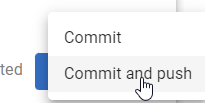
    If you click this, you now have commit or commit and push options.

    2023-08-25 16_07_17-Flyway Desktop

    Pick the lower one, and you’ll get things committed and pushed up.

    2023-08-25 16_17_42-Flyway Desktop

    The choice isn’t saved, which I think isn’t a great design choice, but for now, you do have the option with each commit.

    Try it out today. If you haven’t worked with Flyway Desktop, download it today. There is a free version that organizes migrations and paid versions with many more features.

    Video Walkthrough

    I made a quick video showing this as well. You can watch it below, or check out all the Flyway videos I’ve added:

    https://youtu.be/QsWVcYxFdnM

  • Creating Empty Repos in Azure DevOps–#SQLNewBlogger

    I saw someone struggling with getting started with a Visual Studio project and Azure DevOps. They got a conflict, which I’ll show and then get you started with an empty repo.

    Another post for me that is simple and hopefully serves as an example for people trying to get blogging as #SQLNewBloggers.

    The Problem with Initialized Repos

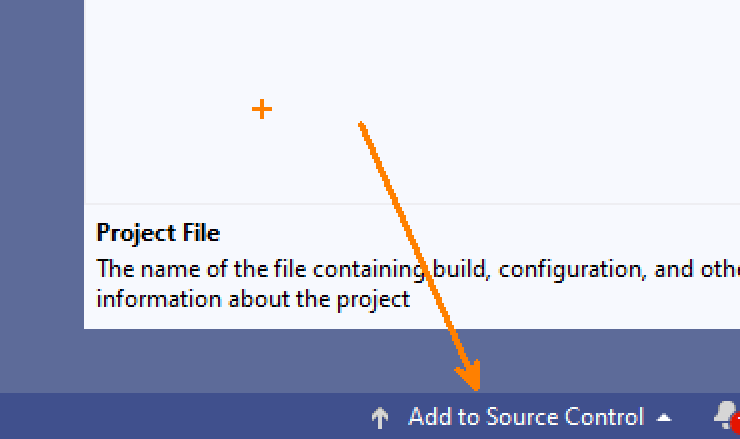
    First, I’ll open VS 2019 and create a new database project. I won’ t walk through that, but once I do, then I can add my project to source control. In the lower right corner, this is an option:

    2023-08-09 12_58_07-Zoomit Zoom Window

    I’ll choose a local repository here. I see plenty of people do this if they don’t want to use GitHub.

    2023-08-09 12_58_34-

    Now, I go to Azure DevOps and create a project. I initialize that project with a Readme, which seems like a good idea. You can see my online repo below:

    2023-08-09 12_56_01-VS DB Project Test - Repos

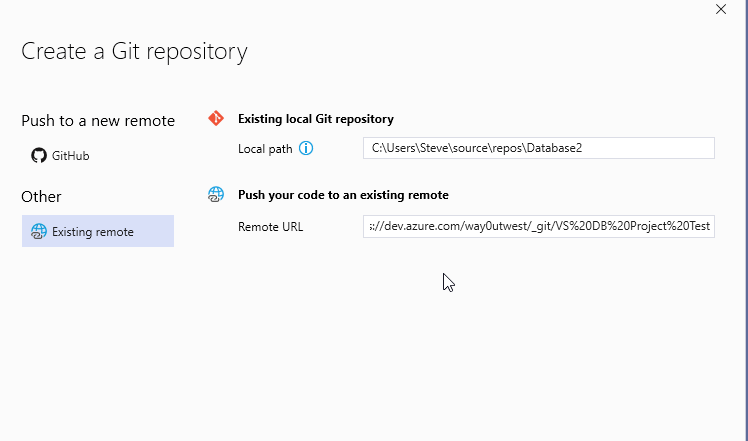
    When I create this, I get the options to link an existing repo or push up.

    2023-08-09 12_59_54-Database2 - Microsoft Visual Studio

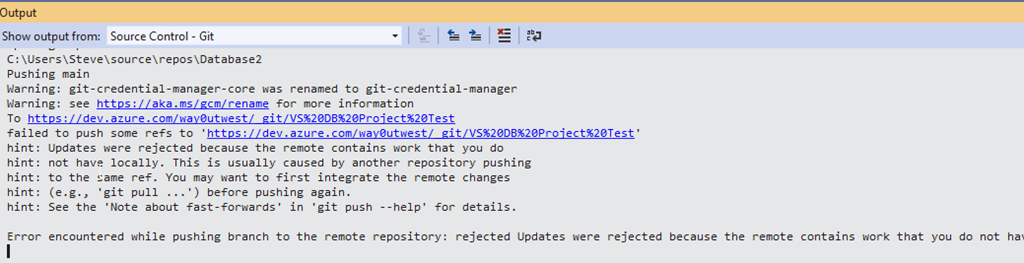
    However, if I try to link my existing local repo, I get an error.

    2023-08-09 13_00_19-Database2 - Microsoft Visual Studio

    Why? I have a commit in the report (initialized with a readme) and commits locally. That’s a conflict.

    Creating an Empty Repo

    The way to avoid this is make an empty repo in Azure DevOps without anything in it. When you see this screen, un check the “add a README”. No matter how much you want to have one, don’t do this.

    2023-08-25 16_35_11-VS DB Project Test - Repos

    Now, you have an empty repo for the remote. You should see this online, with the first line noting this is empty. From here, you can use the second box to push your repo from the command line.

    2023-08-25 16_36_17-Files - Repos

    SQLNewBlogger

    This post was easy for me, but I’ve been in the situation where I’ve made this mistake. It’s annoying, but it’s also confusing as you should be able to make changes in both repos. That’s why we use git.

    You can, but not when both are initialized. You need to clone one from the other.

    This post took me about 15 minutes to create, with a good portion of time spent creating the scenario twice (two repos) and the db project in VS, which is slow. You could do this same thing and show how (and why) you set up a project linked to source control. If you use a couple systems (one at work and one at home) make two posts!

  • Rogue Colleagues

    The economy might be good or bad for you right now. Some of that depends on where you live, what your employment situation is like, what your habits dictate about how you live life, and more. No matter what your situation, likely there are people around you that complain about the world and others who think things are fine. There are likely more of the former than the latter, but that’s because humans tend to complain out loud more than they praise.

    When people think there is an economic downtown for themselves, they may be more likely to engage in malicious activities. While I don’t think most data professionals will start to hack other systems, or even their own employer’s systems, there is evidence to support the idea that some might be susceptible to recruitment by bad actors. This piece references some research and warns security groups to be wary.

    There is no shortage of books, or television and movie scripts that might show creative ways to access information, but how can you tell if a colleague makes a simple mistake or they are a bad actor? Clicking on a phishing email could be either one. Not removing anonymous access to an S3 bucket could be either. Losing their credentials through social engineering is something that happens every day. Who’s to say that this happened purposefully?

    I don’t want to second guess the people I work with making mistakes, but I also think these possibilities are why we want to use our computer systems with strong auditing and multiple groups reviewing logs. We might not necessarily stop all activity, but we can often detect it quickly and mitigate the issues. It’s also why DevOps and automated deployments with logging are a good idea. They can limit the problems from both accidents and malicious actors.

    My employer has started to do more education around security and how individuals can avoid accidentally causing issues. We use a lot of automation, and more all the time, that ensures once we know how we ought to patch and update systems, we can do it regularly and confidently. Repeatable, reliable deployments of changes are what we aim for.

    We know they’ll be some mistakes, but we also know that we can quickly identify issues (MTTD) and fix them (MTTR). Even if we get a bad patch from a vendor, we can quickly deploy a “fix” if we get one, or even reinstall and re-patch to lower levels, if needed.

    DevOps, GitOps, and other xxOps aren’t just about getting new features out quickly. They also include the ability to fix problems when the need arises. They don’t prevent rogue actors from causing issues, but they should help you detect and recover quicker than you might expect.

    Steve Jones

    Listen to the podcast at Libsyn, Stitcher, Spotify, or iTunes.
  • Shift Right

    Earlier this year I was watching someone present on DevOps and IaaC (Infrastructure as Code). The speaker was showing how they had worked with clients to implement tests and checks that evaluated whether their systems were deployed and the code was working as expected. They did this as the CI/QA environments weren’t maintained, but rather spun up as needed when code was committed or tested.

    What I found fascinating was the part in the talk where the speaker said they were “shifting right.”

    That had me sitting up and paying closer attention. After all, for ten years I’ve been working in DevOps where we try to shift everything left. Shift testing to the developers, shift infrastructure into the repository, shift pen testing into some automated CI stage. We want to know about issues sooner. What is this shift right stuff?

    It turns out that the speaker was using this as a way of smoke testing. They didn’t completely trust that CI/QA were configured the same as production. They were performing many of the same tests in production after a deployment. In a few instances, they’d spin up a copy of production, deploy changes, and then run tests against that. They wanted to get a real-life view of how the system worked.

    For some parts of the infrastructure, this seemed like overkill. After all, if I’m updating an app and perhaps adding a web server to check, verifying this was the same size as a previously deployed web server seems silly. However, they included other checks like security. Was the new, or even old, server configured with the same security that was required by the org? They had policies around various authentication and authorization items and these were constantly rechecked. Someone alter a file share or enable anonymous access? If this was against policy, someone was notified when the next deployment caught this.

    What was interesting about this methodology was that deployments weren’t often failed. Instead, when something failed, there was a report sent to a group and the incident was logged, but the deployment still occurred. That’s an approach that I actually like. Don’t stop things, but make sure someone follows up. Of course, like many nagging problems, if this happens constantly or it can’t get fixed, then this isn’t helpful information.

    I haven’t thought much about the idea of shifting things right, but I have advocated for the same ideas. Create smoke tests that evaluate if things still work after deployment. Get feedback to people right away. Much like a unit test, I’d want to know if simple things are broken. I’d also approach these tests the same way. Don’t write a lot to start, but every time there is an issue, add a unit test and a smoke test to prevent regressions.

    And be careful of which frameworks you use. Some database unit testing frameworks alter tables, which can’t happen in production.

    Steve Jones

    Listen to the podcast at Libsyn, Stitcher, Spotify, or iTunes.