Tag: DevOps

  • Comparing Two Scripts with kdiff3

    I had a customer recently ask if SQL Compare could show them the differences in two scripts they’ve written. They weren’t using version control (tsk, tsk, shame), but saw SQL Compare and the “Scripts folder” option. This isn’t used for random scripts, but I do have a better solution: KDiff3.

    KDiff is an old project that is used to analyze multiple files and merge the differences. There is an archived SoundForge location, but the more modern version is here. That’s the current code location, and you can see the readme for details. To get started, download and install it.

    Using KDiff3

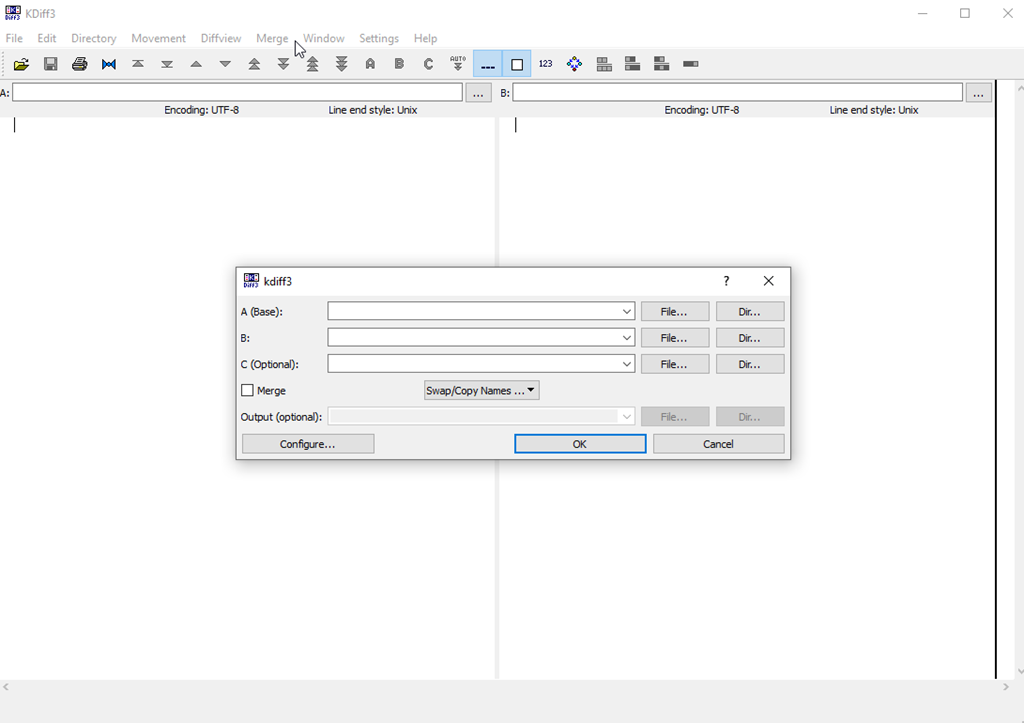
    I’ve used this in a few VCS tools in the past, and it can be very handy. However, I’ve rarely run it on it’s own. When I start it, I see the A, B, and (optional) C files to pick.

    2023-11-20 14_06_25-KDiff3

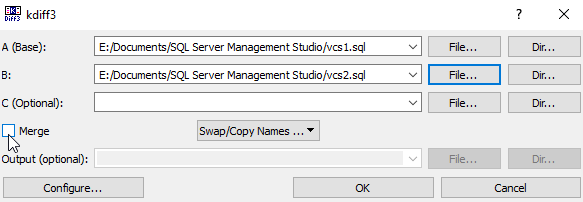
    If I click the “File” selector next to A or B, I can pick files. In my case, I’ll pick two files I’ve used to demonstrate where a VCS is helpful. You can see below I’ve selected files. I didn’t select the merge button, but I could. In this case, I just want to see the differences.

    2023-11-20 14_08_00-kdiff3

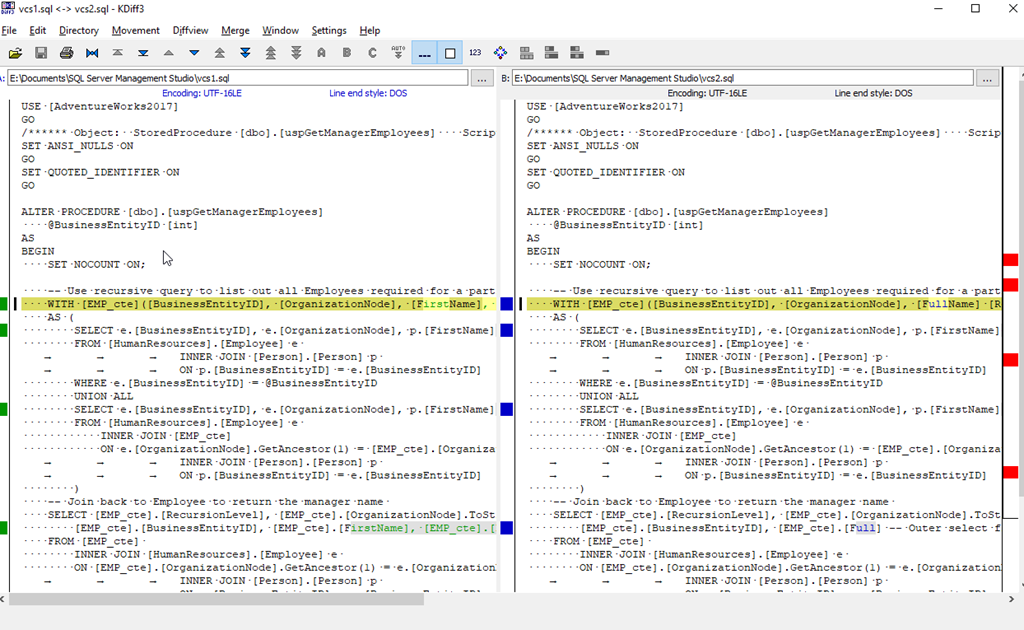
    Wen I click OK, both files are opened, and I see a VCS-like difference listing of the files. You can see there are a few differences highlighted with the lines marked and then the changes highlighted.

    2023-11-20 14_09_12-vcs1.sql _-_ vcs2.sql - KDiff3

    I can now see what’s changed. In a proper VCS environment, I would then choose which changes I need to pull from each file to reconcile the differences.

    If I pick two disparate files, KDiff3 tries to match them up as easily as possible. In my case, I had a few different demo files that happen to share some code. A pretty good analysis of the files shows me what’s different

    2023-11-20 14_11_27-sequence_a.sql _-_ sequence_3.sql - KDiff3

    There are navigation items in the toolbar that let you jump among the various differences in files if you want to. This is primarily a tool for reconciling files, not just finding differences, but it can be useful to see what’s changed.

    If you’ve never tried it, give it a go and see if it’s helpful.

  • Does Management Care About the Database?

    Many of the services that businesses use are taken for granted. In an office, management expects electricity, water, and heat just work. If they don’t, then often a crisis is declared and funds are spent to rectify the situation. I’ve been in businesses where any of those systems fail and usually, it’s very disruptive. I think these days a computer network is often seen as the same type of utility service where we take it for granted, but if it doesn’t work, it’s a crisis.

    Is the database seen as a service or is it more important than that? I think many software applications are different, and often seen as critical to business success, but I sometimes see both developers and management treating the database as a utility service. They just expect it to work, view it as a filing cabinet, and want to ignore it whenever possible.

    I think this is one reason that developers are often searching out new platforms, either cloud or NoSQL, because they want to keep the storage aspect of data simple and not spend time or effort managing data. Or they want to experiment with something they think is easier to use. Many developers like the idea of a schema-on-read, and sometimes use that to argue against another relational database and instead choose another platform.

    I think this is short-sighted, however, as the app now has the technical debt of supporting multiple schemas, and many of the databases using this format then suffer from one of two constraints. Either they store duplicate data for performance reasons, essentially de-normalizing their data storage, or they require some sort of ETL to ensure the data can be queried for analytics. Often schema-on-read isn’t efficient when querying across documents/keys/nodes/etc.

    There might be good news for many of us database professionals as an article talks about the boardroom starting to think about the database. To be fair, this is a sponsored article from Redgate, but it is based on a lot of research and feedback from customers that show how management is starting to treat the database as a strategic asset and not a common utility. Many executives are starting to realize that their data is full of value if it can be analyzed, and that the performance of these systems is important. We both need well-designed databases and well-written code, and we need to ensure that database development keeps up with today’s application changes.

    More and more of the customers I work with are finding their executives see more value in ensuring the database gets the resources to ensure it performs well, including better training for developers and better processes. It’s good to see more and more companies embracing modern DevOps development in both application software and database software.

    Steve Jones

    Listen to the podcast at Libsyn, Spotify, or iTunes.
  • When Work Isn’t Done

    Software development can be a challenge for each of us with lots of demands and the need to ensure your code solves a problem correctly, efficiently, and completely. Juggling the workload by yourself is one thing, but add in a team of developers, and the complexity quickly grows.

    The real world is chaotic and despite the best efforts of project managers and scrum masters, our software development life cycle doesn’t always proceed smoothly. I wonder how many of you run into this situation and how you deal with it.

    Developer 1 gets a piece of work, let’s call this A. They complete this and send it to the QA team. Somewhere during this process, Developer 2 get’s a different piece of work (B) and writes code. They send this to QA before A is completely tested.

    Now, Developer 1 finds a mistake. Something doesn’t work or they realize their solution is incomplete. QA is A + B, but A doesn’t work and needs revision. B passes testing and needs to be deployed. If your codebase and QA have both A and B in them, how do you strip out A or B and ensure B is deployed to production but A isn’t?

    If this is C# or Java, you might have one solution, even if both changes are in the same class. If this is database code, you might have a different set of issues to deal with.

    Really, the question is can you reorder work in your deployment process? I find many customers don’t consider this when they are evaluating their software pipeline. They somehow assume if code gets to QA that it’s good, which is nicely optimistic but not realistic. At some point, we’ll deploy code to QA that doesn’t work. The more developers we have, the more likely this is, and the more demands on our time, the more likely we need to reorder work and release one thing but not another.

    As a DB developer and DBA in a company 20 years ago, I built a process and forced us to reset the QA environment and redeploy B only (using a branch of code that stripped out A) for re-testing. This ensured that we tested what was going to be deployed. However, I find a lot of organizations can’t do this or don’t want to. They want to hope that a human and either extract all of B or strip out all of A and release partially tested code without issues.

    I find that to be a poor idea. In this era of regular staff changes, staff of varying quality, and the high complexity of software, this is asking for mistakes. With cheap hardware, virtualization, and the ability to provision copies of environments, we ought to do better.

    How do you handle this today? Depend on humans to not make mistakes? Hope for the best? Or follow a repeatable, reliable process that accounts for inexperience and human error?

    Steve Jones

    Listen to the podcast at Libsyn, Spotify, or iTunes.
  • Deleting a Git Branch–#SQLNewBlogger

    I had someone ask me recently about deleting branches. While I had known how to delete a local branch, I had to look up how to delete a remote one. Documenting these both will hopefully help me remember this.

    Another post for me that is simple and hopefully serves as an example for people trying to get blogging as #SQLNewBloggers.

    Deleting Branches

    Most parameters have something do to with the action, and most people might guess a –d is used to delete a branch in Git. The actual syntax for a branch named “Feature123” is:

    git branch –d Feature123

    You can also use a –D, though be aware that –D is the same as –d with the –force option. The –d actually aliases to –delete, so you have three options:

    • -d
    • –delete
    • -D (this will run –-force)

    To delete a remote branch, you can use (with v1.7+)

    git push origin –-delete Feature123

    where origin is the remote name and Feature123 is the branch. This is better than the old syntax, and you ought to keep your git up to date.

    You can see this working for one of my branches below:

    2023-10-11 13_20_00-cmd

    Git docs for branch have more details.

    Use this to clean up branches if your changes are merged and you don’t need to send in any more PRs for this branch.

    SQL New Blogger

    This is a simple thing, but one that I don’t do often, so I wrote this as much to document it for myself as to put this out there as a piece of knowledge. If someone reads this post and asks the question in an interview, it’s likely an easy one for me to give.

    You can do this, help showcase your career knowledge and control the interview. This piece took me about 8 minutes to write. You could do your own version of this topic.