I have been a proponent of subsetting databases in dev/test for a long time. It took awhile, but as part of the Test Data Manager that Redgate launched at the PASS Data Community Summit, there is a subsetting component. I was very excited to try this out, and this shows my first experience.
This is part of a series of posts on TDM. Check out the tag for other posts.
Getting Started
The subsetting tool is a part of Test Data Manager, so you need to get that installed. Once it’s set up, there are a few CLIs that work from within the GUI or separately to perform certain functions. One of these is subsetter.exe, which is a Windows executable.
I copied that to a folder in my path (c:\utilities) and I was ready to experiment. There is a doc page, but really it’s copying a file. You can see this below, and it’s a handy spot on my machines where I put in various CLIs or batch files I need to run from anywhere.

That’s the easy part, not the harder part.
Setting up Databases
I set up a quick zDemo_Prod database to hold some data. I then grew this to a few hundred MB because many of my test databases are small. Since this was a quick test, I wasn’t searching for something large.
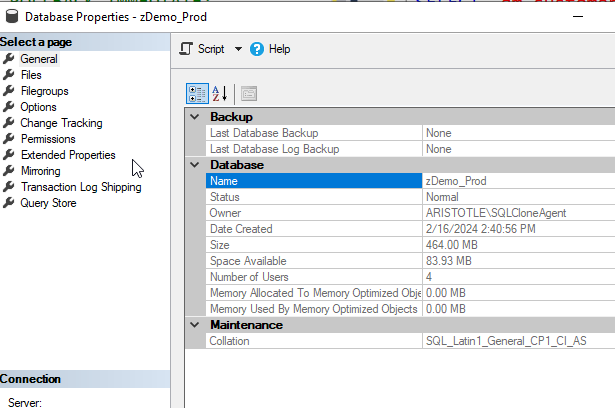
Next I needed a blank copy of this. The worked examples page shows an easy way to do this, but essentially you need a copy of the schema in another database. I ran this to get the db.
DBCC CLONEDATABASE(zDemo_Prod, zDemo_Dev) WITH VERIFY_CLONEDB;
go
ALTER DATABASE [zDemo_Dev] SET READ_WRITE WITH ROLLBACK IMMEDIATE;
GO
Once that was done, I was ready to subset.
I used a batch file because this is a CLI and there are a number of parameters. I like editing those in a file and then just calling one thing from the CLI. Here’s my file:

The required parameters are the engine, the source, and the target. Everything else is optional. As I was experimenting, I decided to add a target size.
Once this was saved, I just ran the batch file. As you can see, there is a lot of output.

Essentially this analyzed my database, talked the PK/FK structures, and then decided to grab a limited set of data. This isn’t all the output, but the bottom portion is shown below and it lists the tables that were “shrunk” by this process.
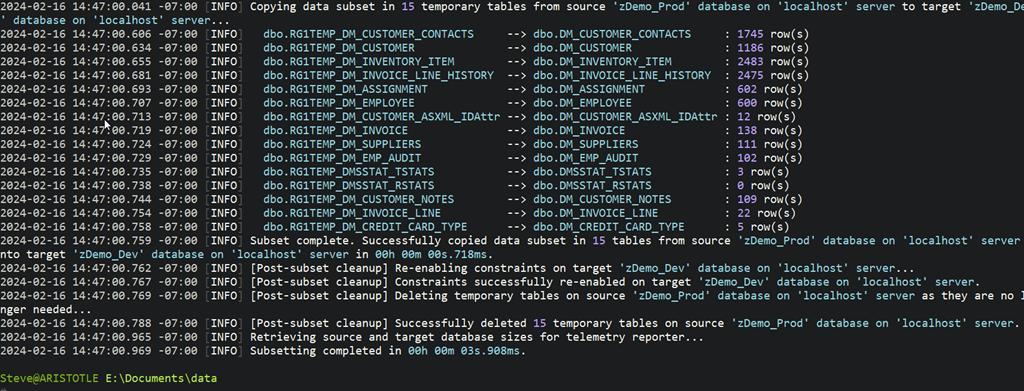
I also set up a few queries to check the row counts before and after. You can see how much was moved above, but below you see the two queries from different databases. zDemo_Dev is on the left and zDemo_Prod is on the right. Same queries on both sides.

My DM_Customer table started with 15005 rows, but only 1745 were moved over The DM_Customer_Notes had 1025, but only 109 moved. I’m sure this is because the rows in here have a FK to DM_Customer.
Overall pretty cool, and on a 300MB database, 10% of that took me a few seconds to get moved to a second database.
Summary
This worked pretty well. It took me very little time to get this set up, as it’s a CLI, but getting it configured took a little learning. However, I’m pleased so far with how it works.
I’ll be experimenting more and passing back feedback to our devs. If you have thoughts or ideas, let me know.
If you want to try Test Data Manager out for yourself, contact your Account Executive at Redgate, or ping sales@red-gate.com for a demo and a Proof of Concept eval.