I love Chicago. I went to visit three times in 2023: a Redgate event, a volleyball tournament, and a wedding. Each time was a lot of fun and I look forward to coming back at the end of this month.
The Redgate Summit is coming to Chicago on May 29. Three weeks from today! Register today and save your spot. If you get on the wait list, reach out to your account executive as they have their own tickets to give away.
We’ve had two amazing Summits in Atlanta and London and we’re bringing the show to the Windy City. We’ll be covering a wide variety of topics related to databases, across three tracks.
New and Future Tech – leveling up skills about database DevOps and teams
Deep Dive Solutions – technical talks on innovative strategies for delivering software
Leadership – focused on strategic initiatives
We have something for everyone. Technical people, managers, senior leadership, and others. Tell your colleagues and come as a group, taking in different tracks and then discussing them alter.
Chocolatey Solutions Engineer Stephen Valdinger said, “DevOps isn’t something you do, but rather, it’s a way of doing things. What works for us here, may not work for you there, so you adjust.” He then went on to say that DevOps is a way of working that reduces time to introduce changes, while at the same time making changes traceable, accountable, and revertable.
I’ve seen many companies try to copy what another company has done, especially with regards to DevOps and software development. I see companies copy the organization of teams from Amazon, Spotify, or others. Often quite a bit of time and effort is spent changing the way your development team works, and often without a lot of success.
DevOps is a lot like my studies of martial arts, where you learn some techniques, but it is up to you to implement and use those techniques in your own way. While we may practice in patterns, the actual use of the skill is up to the user. That’s what DevOps really is, a goal and set of ideals you aim for, but the actual implementation varies from company to company.
Most of us want to build better software, and most managers want better quality applications, but often we can’t get out of our own way because either too many people are resistant to change, or there isn’t any incentive to work in a better way. This might be from individual contributors or from management, but without both groups making an effort to improve the software development process and quality of code, we won’t achieve much.
To get better at software development, whether C# or SQL, you need to read and learn about how to write better code. You need to learn how to automate the testing, compilation, and deployment of your code to downstream systems. And then you need to discuss and debate what works well, what doesn’t, and adjust how the team writes code. Not just you, but the team. We might also need to adjust how we store, package, test, and run code on other systems. We have to experiment in small ways, testing out new ideas, algorithms, designs, and more.
In short, we need to be a team. I like the quote above, but I also hope most of you realize the “you” in that quote is not singular, but plural.
I had a customer question whether Flyway Desktop (FWD) would cause problems if developers were adding columns into the middle of tables. It’s a valid concern, and this post shows that FWD doesn’t cause you issues, even if your developers do silly things.
Unless they want to do silly things.
I’ve been working with Flyway Desktop for work more and more as we transition from older SSMS plugins to the standalone tool. This series looks at some tips I’ve gotten along the way.
The Scenario
Imagine that you have a table with a few columns, like this one.
CREATE TABLE Product
( ProductID INT NOT NULL CONSTRAINT ProductPK PRIMARY KEY
, ProductName VARCHAR(50)
, ProductDesc VARCHAR(1000)
, ProductSize CHAR(1)
, ProductWeight INT
, ProductColor VARCHAR(20)
, StatusID int
)
GO
This table has the same structure in dev and prod, and I need to add a new column. We need a quantity per package as we have new products where there are multiple items in a box, so there is a need to add ProductQtyPerUnit to the table.
I decide that this needs to be before StatusID since it’s related to the other product description items, and I want them to be together. This is a good concept when designing entities, but it’s not worth doing when we have millions of rows in this table in production.
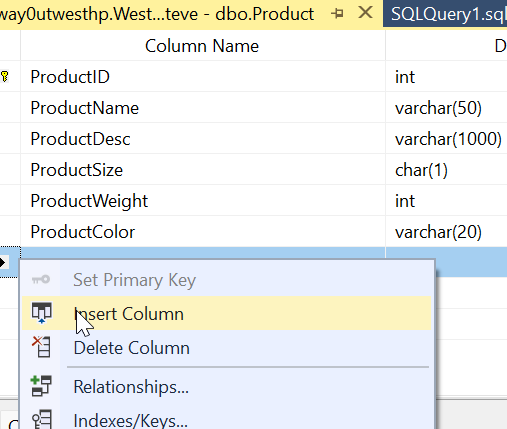
In the SSMS designer, I do this. I right click my table, click Design, the right click before StatusID and select Insert Column:
I then design my new column. Things look good.
Most developers would just save this change. However, if I were to click the Generate Change Script button, I’d see this (I leave out the SET stuff at the top).
BEGIN TRANSACTION
GO
CREATE TABLE dbo.Tmp_Product
     (
     ProductID int NOT NULL,
     ProductName varchar(50) NULL,
     ProductDesc varchar(1000) NULL,
     ProductSize char(1) NULL,
     ProductWeight int NULL,
     ProductColor varchar(20) NULL,
     ProductQtyPerUnit smallint NULL,
     StatusID int NULL
     )  ON [PRIMARY]
GO
ALTER TABLE dbo.Tmp_Product SET (LOCK_ESCALATION = TABLE)
GO
IF EXISTS(SELECT * FROM dbo.Product)
      EXEC('INSERT INTO dbo.Tmp_Product (ProductID, ProductName, ProductDesc, ProductSize, ProductWeight, ProductColor, StatusID)
         SELECT ProductID, ProductName, ProductDesc, ProductSize, ProductWeight, ProductColor, StatusID FROM dbo.Product WITH (HOLDLOCK TABLOCKX)')
GO
DROP TABLE dbo.Product
GO
EXECUTE sp_rename N'dbo.Tmp_Product', N'Product', 'OBJECT'
GO
ALTER TABLE dbo.Product ADD CONSTRAINT
     ProductPK PRIMARY KEY CLUSTERED
     (
     ProductID
     ) WITH( STATISTICS_NORECOMPUTE = OFF, IGNORE_DUP_KEY = OFF, ALLOW_ROW_LOCKS = ON, ALLOW_PAGE_LOCKS = ON) ON [PRIMARY]
GO
COMMIT
This script essentially creates a new table, copies over data, then drops the old table before a rename. On a large table, this could acquire a number of locks and potentially cause errors or disruptions for clients. If I want deployments at any time, without causing downtime, this isn’t the script I want to run.
Flyway and Column Changes
If I do this in dev, assuming I don’t have millions of rows of data, I might not notice this. What about detecting this change in Flyway? Let’s see.
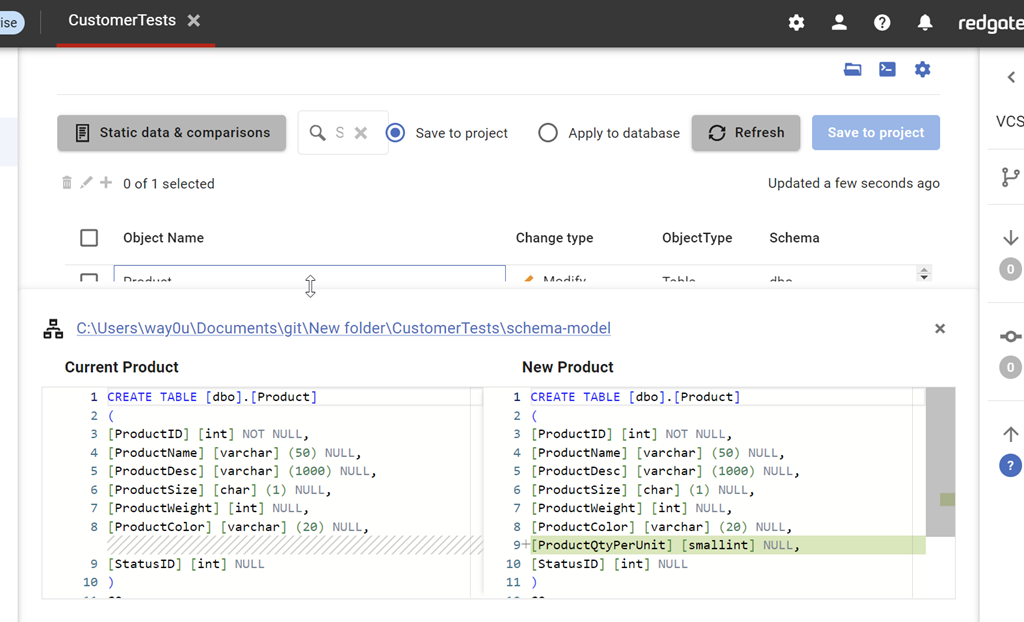
I have a Flyway project open in Flyway desktop and I’ll refresh the changes. As you can see, we detect this new column. As you can see, we detect the change, showing the insertion of the column into the middle of the table.
I can save this and then generate a migration script for this change. When I do this, I see this script. Notice that this script is unlike the SSMS script and just adds a column to the table.
This is the same behavior in SQL Compare. By default, we don’t want to rebuild tables and move data. We want to just add the new change to the system.
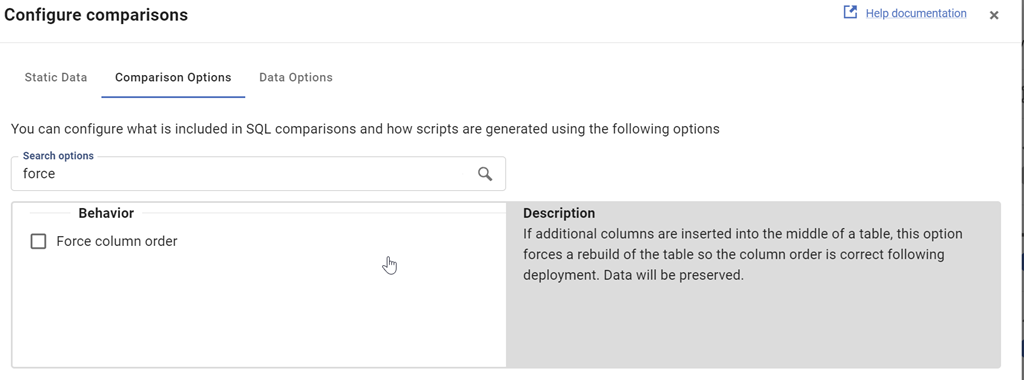
This is controlled by the Force Column Order option, which is off by default. We can see this when I look at the comparison options for the project.
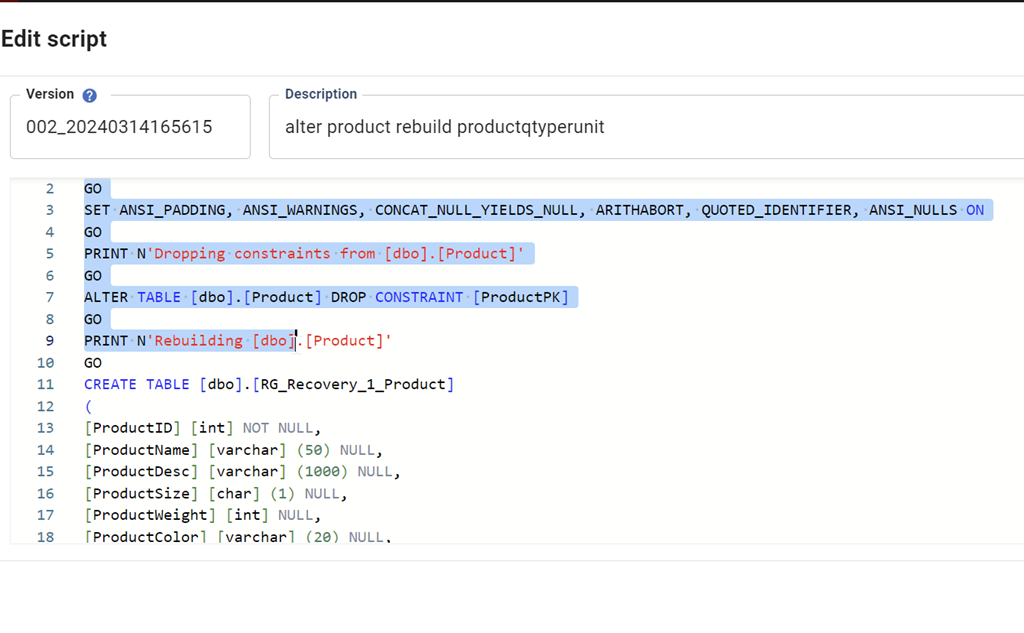
I can check this and then re-generate the migration script. When I do that, we see this script. This one
The entire script is here:
PRINT N'Dropping constraints from [dbo].[Product]'
GO

ALTER TABLE [dbo].[Product] DROP CONSTRAINT [ProductPK]

GO

PRINT N'Rebuilding [dbo].[Product]'

GO

CREATE TABLE [dbo].[RG_Recovery_1_Product]

(

[ProductID] [int] NOT NULL,

[ProductName] [varchar] (50) NULL,

[ProductDesc] [varchar] (1000) NULL,

[ProductSize] [char] (1) NULL,

[ProductWeight] [int] NULL,

[ProductColor] [varchar] (20) NULL,

[ProductQtyPerUnit] [smallint] NULL,

[StatusID] [int] NULL

)

GO

INSERT INTO [dbo].[RG_Recovery_1_Product]([ProductID], [ProductName], [ProductDesc], [ProductSize], [ProductWeight], [ProductColor], [StatusID]) SELECT [ProductID], [ProductName], [ProductDesc], [ProductSize], [ProductWeight], [ProductColor], [StatusID] FROM [dbo].[Product]

GO

DROP TABLE [dbo].[Product]

GO

EXEC sp_rename N'[dbo].[RG_Recovery_1_Product]', N'Product', N'OBJECT'

GO

PRINT N'Creating primary key [ProductPK] on [dbo].[Product]'

GO

ALTER TABLE [dbo].[Product] ADD CONSTRAINT [ProductPK] PRIMARY KEY CLUSTERED ([ProductID])

GO
By default, Flyway isn’t going to try and rebuild your tables if developers add columns into the middle of a table. This is the recommended and preferred way of dealing with these changes. If your developers complain, then discuss the fact that we don’t need to worry about the physical order of columns in a table. If you want columns returned in a different order, do that in a query (and don’t use SELECT *).
If you really need tables rebuilt, you can check the option, but you shouldn’t do that.
Try Flyway Enterprise out today. If you haven’t worked with Flyway Desktop, download it today. There is a free version that organizes migrations and paid versions with many more features.
If you use Flyway Community, download Flyway Desktop and get a GUI for your migration scripts.
This week is the first Redgate Summit of 2024. It’s Wednesday, in Atlanta and you can register and join me if you’re in the area.
These are full day conferences, with multiple tracks, similar to the SQL in the City conferences we used to run. With our move to supporting database professionals on any platform, anywhere, we’ve rebranded these as Redgate Summits. Come join me at one of the following dates, if you are anywhere in the area:
I’m not sure if we’ll be doing Redgate Summits in AUS this year, but I’ll be in Brisbane, Sydney, and Melbourne in May.
The Atlanta schedule is packed, with especially for Grant and me, but we’ve got engineers, Friends of Redgate, and other experts coming. We’ve got some AI experts as well, and with three tracks, there will be plenty for you to learn. Ask us questions, get inspired, find out how you can better build and manage database software.
Hopefully I’ll see you are one of these events this year.
Now, back to holiday today for me, as I’m coaching the final day of Colorado Crossroads for my 13s team, as well as helping with an 18s team.