Tag: disaster recovery

  • RTO in Disaster Recovery

    When you have a disaster, the time that you have to restore service is usually referred to as the RTO time. This stands for the Recovery Time Objective and it can is defined like this in Wikipedia:

    The Recovery Time Objective (RTO) is the duration of time and a service level within which a business process must be restored after a disaster (or disruption) in order to avoid unacceptable consequences associated with a break in business continuity.

    That’s a great definition, covering the term with a great set of large, geeky words. However I came up with a simpler one that conveys the same information:

    The time it takes for you to get things running to the point where someone can use them after someone notices that they aren’t.

    You can also view the RTO as the downtime or uptime level of your system. I prefer looking at the RTO as the intervals between uptime, since I think that’s a glass half full view.

    That’s the basic definition and it’s important that you determine what the RTO is for your systems in order to begin planning for the resources that you devote to disaster recovery preparation.

    This post is based on the information in my Preparation for Disaster talk.

  • Recovery Models

    In SQL Server we have three basic recovery models: full, bulk-logged, and simple. By default we find that most databases use the defaults, which mean that they are in the full recovery model.

    In that case, you need to be sure that you are performing log backups, otherwise the log will grow until it reaches it’s limits, or you run out of disk space on that drive. If the log cannot record SQL Server transactions, the database cannot accept any more transactions.

    The basics of recovery models are covered nicely in this article from Gail Shaw, which includes some common myths and misconceptions out there. However for the average person, the important thing is that you understand which recovery model to pick.

    You Need Point in Time Recovery

    Point in time recovery means recovery in between the full or differential backups. Quite a few DBAs will ask customers if they really need to recover to a point in time, and get the answer that they don’t, but that’s not often the right question to ask.

    Ask your clients if the database failed at 5:00pm today, and all the work done today was lost because you restored to last night’s backup at midnight, how would they feel?

    Sometimes they’re fine with the data loss, most times they aren’t. If you need to get back to a point in time between backups, make sure you use the full recovery model.

    You Can Reload the Database

    There are some databases, usually data warehouses, that can be rebuilt from other sources. If you take a backup of your database and then load data every day that rarely changes during the day, you might not need point in time recovery. In fact, many ETL processes are not designed for this anyway, and could not restart themselves in the middle of a load if you restored to the point in time when the database had an issue.

    In this case, use the Simple recovery model.

    You are space constrained with the log

    If you run index rebuilds, or large data loads and find yourself with a transaction log that grows very large, you might want to investigate the Bulk-logged recovery model. This model is more confusing, so I don’t want to give you a general rule here. If you think you might benefit from less logging, investigate the bulk-logged recovery model, practice restores with it and make sure you fully understand the implications of using it before you set a database in this mode.

  • Probabilities and Disaster Recovery

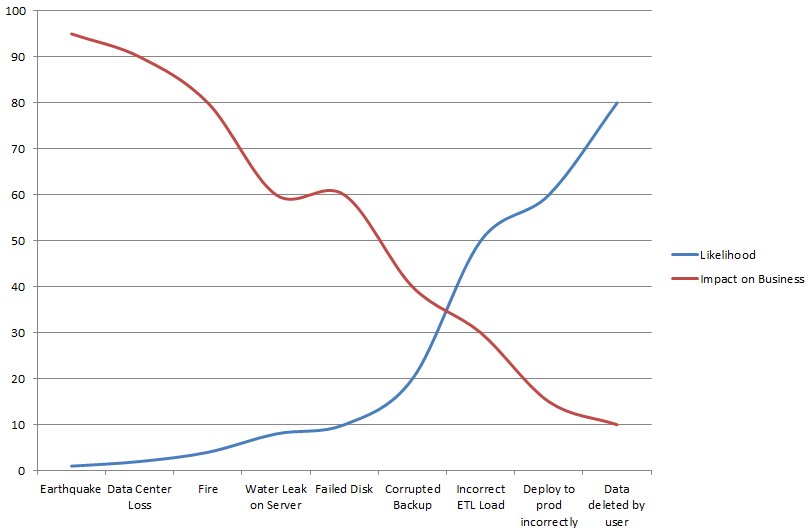
    The risk of an event is sometimes inversely proportional to its impact.

    When I talk about disaster recovery, one of the key things that I try to stress is the idea that the amount of effort and resources you devote to the problem is often scaled to the risk of loss. It doesn’t help the company if you decide to spend $1mm to ensure extremely high availability and zero data loss for a system that generates $20k in revenue a year. It might not be worth spending $100k to protect a system from more than a day of downtime if your daily revenue is less than $5,000, but it might be. You have to decide this in your environment.

    However when we talk about disaster recovery is seems that the vast majority of people plan for a data center failure, or a hurricane, or a major disaster. Those are possibilities, but the risk of them happening is low. It’s rare that a major disaster will hit any particular part of the world and therefore the risk is often very low. With a low risk, it might not be worth spending a lot of money on extra hardware to handle a situation that may never occur. I know that most of the time the management I’ve worked for haven’t felt it was worth spending a lot of money to prepare for a major disaster. There are systems that are worth duplicating to ensure high availability, and in many cases it does seem that management is willing to pay for spare systems when downtime is an issue.

    The most common disaster that I seem to hear about is the “whoops” disaster. A disaster that’s human error, a situation where someone makes a mistake in data entry. The most common “whoops” for DBAs seems to be the UPDATE or DELETE without a WHERE clause, but it seems these days there’s no shortage of issues occurring from applications that allow users to manipulate large batches of information.Yet it seems that too often I don’t see management making the preparation for this type of disaster a priority.

    There are numerous ways to handle these types of disasters. You can set up log shipping on a delay, even to a secure workstation (remember to secure production data), to give you time to respond to a situation and recover data. There are numerous tools, such as Red Gate’s Virtual Restore and SQL Backup Pro, that allow you to mount a backup file or recovery a single object from a backup file without impacting the full database. There are log reader tools that allow you to recover data or undo transactions from the transaction log whenever issues arise. Many of these tools have a price, but the cost of downtime is usually higher. Even the cost of losing other work when highly paid professionals are spending time recovering data across hours instead of minutes would justify the cost of purchasing one of these tools instead of the cost of time spent building a data recovery solution.

    Whether you build or buy a tool to help you deal with a “whoops” disaster, you ought to ensure that you make some preparations here. The risk of you losing revenue from this type of disaster is much higher than spending weeks building a plan that provides for recovery in the event of a catastrophic disaster.


    The Voice of the DBA Podcasts

  • Quick Recovery Techniques Webinar

    The slides for the SQLServerCentral webinar #13 are available here on the blog. Download them from the link below

    Quick Recovery Techniques PPT

    There aren’t notes in there, but if you have questions, let me know. The recording of the webinar will be up in the Training section of SQLServerCentral next week.