Tag: ETL

  • An SSIS Upgrade

    I came across a post recently on the Microsoft Fabric blog about the evolution of SSIS 2025..I hadn’t heard much about SSIS in SQL Server 2025, so I thought this might provide some info on the investments that Microsoft is still making in Integration Services. I’ve run into a few people in the past year who are still heavily invested in SSIS and run packages daily. SSIS seems to be a technology that isn’t even close to dying for many organizations.

    The blog starts well, delving into the security investments with the change to the SqlClient and TLS 1.3, as well as supporting Strict Encryption. I don’t know many people using this level of security, but it’s good to have SSIS support stronger security. There is also an upgrade for SSIS packages targeting Fabric Data Warehouses if they modify their approach.

    There is also a mention of lift and shift into Fabric Data Factory as an early access program. I wonder how many organizations are looking to still run SSIS packages, but upgrade to Fabric. I’m sure there must be some, and I’m interested if any of you are in this situation. Many of us buy SQL Server licenses, so I would hope Microsoft could invest in a few new SSIS tasks, like SFTP at the least.

    The rest of the post covers Fabric and Azure Data Factory, not SSIS. I understand that Microsoft would prefer everyone abandon SSIS and move to ADF/Fabric, but that’s not what a lot of customers want to do. Many of us have no real need for complexity beyond what SSIS does. What I’d really like to see is a local version of ADF. Many of us still run our own systems and plan to do so for years. If there isn’t going to be an investment in SSIS, which I do understand, then invest in a local version of ADF.

    I doubt Microsoft has much interest in doing work here, especially as the trend towards lakehouses and Parquet files seems to drift further from the idea of SSIS moving data between systems. However, there is still a need for many organizations that might want to build packages to export their data to a data lake on-premises. They might prefer to host their own storage, use Polybase to query those files, and maybe grow into Fabric and Power BI over time.

    Giving options is something Microsoft has often done in the past. Their successes often open the door wider for others to build on their platforms. Their failures are often in places where they try to force everyone to work in a particular way with a particular technology. Expecting everyone to move to ADF/Fabric feels like one of the latter decisions.

    Steve Jones

    Listen to the podcast at Libsyn, Spotify, or iTunes.

    Note, podcasts are only available for a limited time online.
  • Data Manipulation with Word and Excel

    Recently I had to go through some training that asked me to evaluate some text. I needed to tally some data up, and decided Word and Excel were quick and dirty ways to do this.

    The Task

    The instructions were:

    • Read the text
    • Put a check by the sentences you agree with
    • Put a question mark by those you are unsure about
    • Leave others blank
    • Determine how much in agreement you are with the text

    The challenge was this was 5-6 paragraphs, each with 3-5 sentences, so trying to mark these on the screen and then tally them wasn’t easy. Being a data person, I wanted to calculate something more accurate and easy.

    So, I thought about getting this data into a better format and wanting to use math to calculate percentages. While there are lots of ways to split text in T-SQL, Python, etc. I decided for a one-off, Word and Excel worked well.

    Word Formatting

    I started in Word because, well, this is text and Word is for text. I’ve also pasted lots of text into Excel and it often keeps enough formatting that things are combined into one cell.

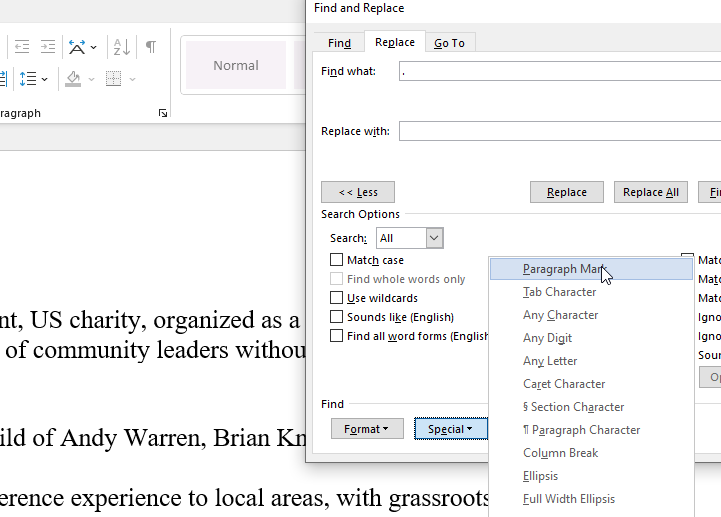
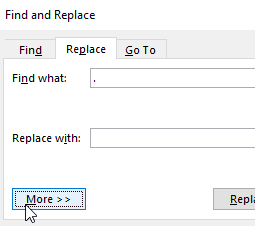
    Since I needed sentences, I pasted text and did a search and replace for a period and a space, as shown inbrackets [. ]. The replacement was more complex. I tried \n and /n and a few things, then I noticed the “More” button at the bottom.

    2022-10-31 08_26_56-Find and Replace

    When I expanded this, I saw a number of options, and I used the paragraph mark, since I wanted each sentence on a separate line.

    2022-10-31 08_26_32-Document1 - Word

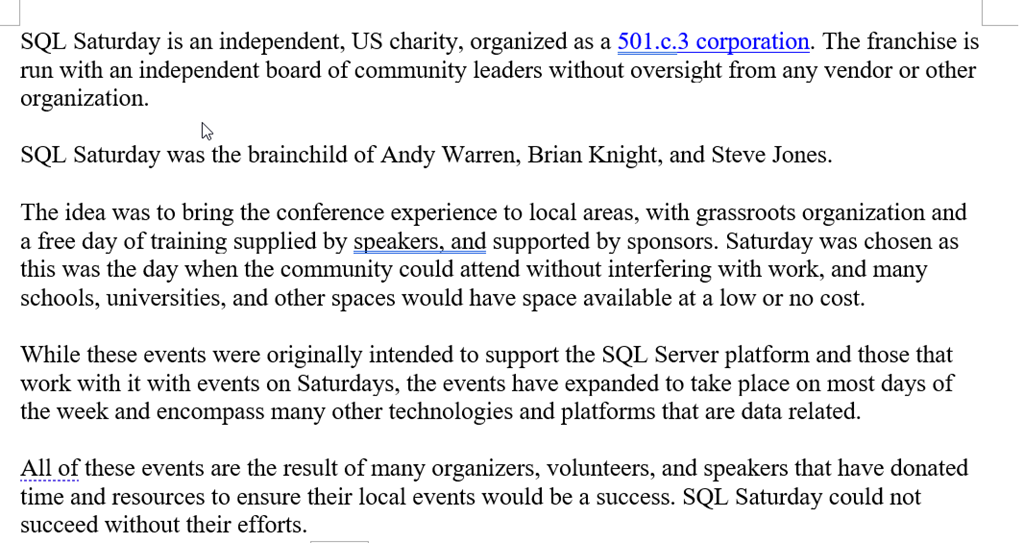
    This isn’t the text I was using, but I grabbed this from sqlsaturday.com for this post. Here’s the before:

    2022-10-31 08_28_07-Document1 - Word

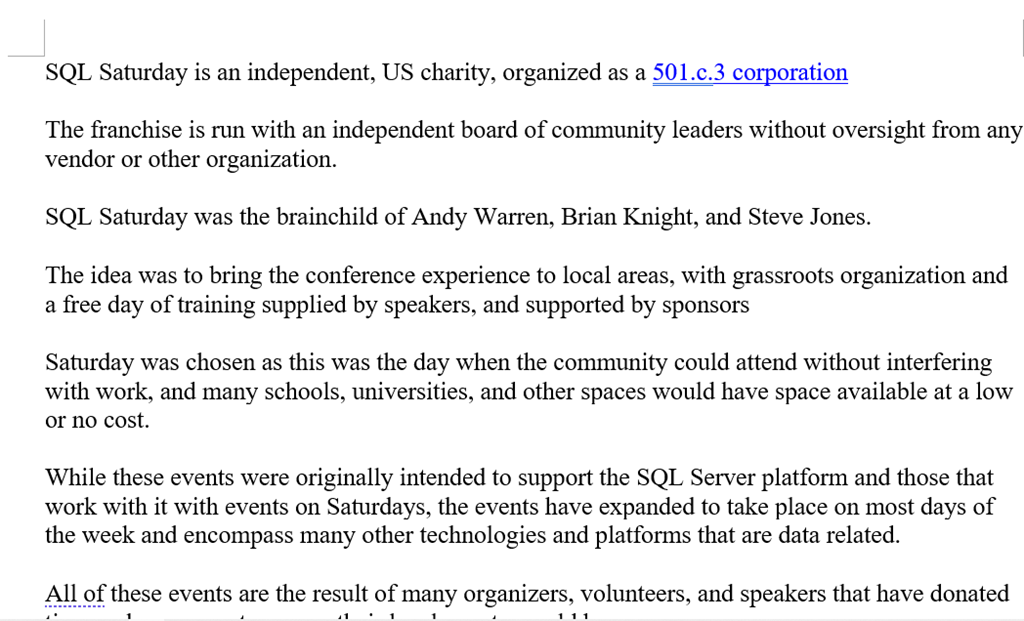
    Here’s the after:

    2022-10-31 08_28_27-

    It was well formatted text, so this gave me the split of data into sentences.

    Excel for the Math

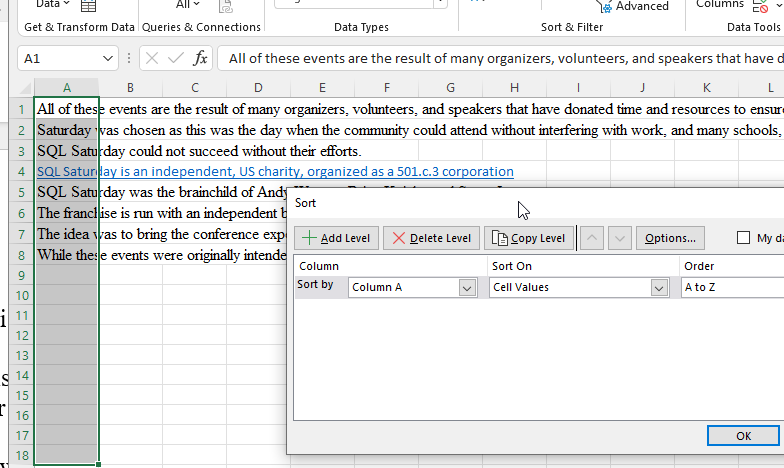
    I then copy/pasted this into Excel, which put each sentence into a separate cell in a column. I had a few blanks, but easy to sort the data (ordering didn’t matter here) and get all my data at the top.

    2022-10-31 08_33_09-Book1 - Excel

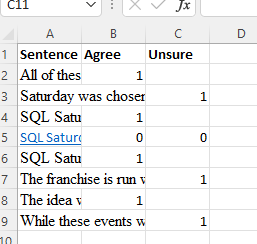
    From here, I just added my marks to the columns at the end. I also added a title row, just for me. I then used a “1” for agreement in the columns. For those where I wasn’t marking either column, I used two zeros, just to make things look better. I had something like this:

    2022-10-31 08_51_26-Book1 - Excel

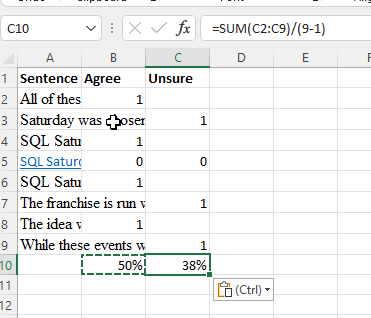
    The formula I used was a sum, divided by the count. For the count, I just used the final row number (9), subtracting the title row. This way I could copy this across each column.

    2022-10-31 09_07_39-Book1 - Excel

    Easy way to calculate some one-off totals from data that I need to evaluate for text data with a little Office ELT.

  • Import a CSV with a Header Row using BCP–#SQLNewBlogger

    Another post for me that is simple and hopefully serves as an example for people trying to get blogging as #SQLNewBloggers. Here are some hints to get started.

    I was demoing something recently and needed to show someone how to grab some data from a CSV text file. Since this was a task the person needed to do regularly, but with different files, they wanted to ensure this was programmatic from a command line call outside of SQL Server. They knew the basics of bcp, but weren’t sure how to deal with a header row.

    This is actually fairly simple as you will see.

    BCP Basics

    I have a simple file that looks like this:

    Time,System Production (Wh)
    08/01/2022,"58875"
    08/02/2022,"61260"
    08/03/2022,"60866"
    08/04/2022,"66395"

    I have a basic table of this structure:

    CREATE TABLE [dbo].[Stage](
         [ProdTime] [varchar](20) NULL,
         [ProdValue] [varchar](100) NULL
    ) ON [PRIMARY]
    GO

    This is just a demo import from this sample file. If I run a basic bcp command, I’d typically run this:

    bcp dbo.stage in export.csv -S Aristotle\SQL2017 -d way0utwest -T -t "," –c

    This runs easily, as you see below:

    2022-08-17 12_56_58-D__Downloads

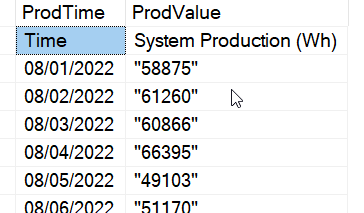
    However, this is my data:

    2022-08-17 12_56_51-solarloading.sql - ARISTOTLE_SQL2017.way0utwest (ARISTOTLE_Steve (69))_ - Micros

    That’s not right. The first row is a header row, and while I can quickly and easily fix this, it’s better not to have to process this. Easier to fix this on the import.

    To do this, I need to look at the bcp documentation and include a flag. The –F flag is for the first row, which I want to set to 2. If I truncate the table and run this command:

    bcp dbo.stage in export.csv -S Aristotle\SQL2017 -d way0utwest -T -t "," -c -F 2

    I see these results:

    2022-08-17 13_02_04-solarloading.sql - ARISTOTLE_SQL2017.way0utwest (ARISTOTLE_Steve (69))_ - Micros

    No header row. There are still issues with this import, but this solves one problem, which is what the SQL New Blogger post is for.

    SQLNewBlogger

    This is a quick example of a post that is part of my daily work. I was showing a customer this, and I had to mock something up, so I grabbed a little sample data and did that.

    I spent about 15 minutes around other work getting this post written and screenshots taken. You could do this as well and show how you import data in a cleaner fashion.

  • ETL v ELT

    This is part of a series on my preparation for the DP-900 exam. This is the Microsoft Azure Data Fundamentals, part of a number of certification paths. You can read various posts I’ve created as part of this learning experience.

    I don’t have an ELT tag, and I’m not likely to make one. I tend to think of ETL as loading data somewhere, even though I know it means more.

    The important concepts for DP-900 here are that ELT is becoming more important and you need to understand what this means. I’ll cover these concepts, but also give a little overlap with where the different Azure services fit in with this.

    ETL

    For most of my career, the pattern for loading data was Extract-Transform-Load. In this pattern we:

    • grab data from a source
    • make changes to clean/change/etc.
    • write to a target (or sink)

    It’s how tools like SSIS work. They connect a source to a target and have a bunch of tasks or transforms in the middle that change the data in some way.

    This is a good pattern for getting the work done when the target system is just built for querying data, such as a data warehouse. It is also good when you need to scrub some data, perhaps for privacy reasons.

    This isn’t a good pattern when you are trying to load data quickly as the transform process takes time.

    ELT

    This is the new way of doing things. I this patter we Extract-Load-Transform, though really, it’s not a pattern that quite makes sense in that the process of moving the data just moves it.

    Here we:

    • grab data from a source
    • write it to a target

    Where’s the transform? Well, that happens on the target, often when someone queries the data. Modern analytic systems, like Snowflake and Synapse, can work with vast quantities of data, often stored in a data lake or blob system, and consume that with powerful computational capabilities. There could be some minor re-shaping of the data on write, but that’s not the idea.

    This is good when you might not read all the data. Why process (transform) what isn’t being read. Before you complain that you should know what is used, none of us know if all our data is being used. Unless we write crappy SELECT * code with no WHERE clauses.

    This is also good when we need to work at speed and privacy isn’t a concern. It’s great for the known formats of files sent to us, as the target system can project a table on top of a ser of files.

    ELT seems to be the current future direction of many analytical and warehouse systems.