Tag: Filestream

  • Create a Filestream Filegroup for Filetables – SQL Server 2012

    Once you’ve enabled filestream, the next step is to add a filegroup to your database to hold the filestream data. This is pretty easy to do, and I’ll show you the SSMS and code versions.

    If you want to know more about these Filestream containers, you can read BOL. Let’s create a simple database:

    -- create a new database
    create database UnstructuredData
    go


    This is a simple database with my instance defaults in place. It has a single mdf, a single ldf, and the default Primary filegroup. Let’s not add a new filegroup:

    -- add a filestream FG
    ALTER DATABASE [UnstructuredData]
      ADD FILEGROUP [FS] CONTAINS FILESTREAM 
    GO

    Here I am adding the filegroup (empty) and specifying this as a filestream container. You cannot mix Filestream data and non-Filestream data in the same filegroup in SQL Server 2012.

    To add a file, we can use the ALTER DATABASE command:

    -- Add a file to the Filestream FG
    ALTER DATABASE [UnstructuredData] 
      ADD FILE ( NAME = N'UnstructuredFS', 
                 FILENAME = N'c:\fs\UnstructuredFS' ) 
         TO FILEGROUP [FS]
    go
    

    Here I am adding a file, which is actually a folder in this case. According to the documentation, the path up to the last folder (c:\fs in this case) must exist, but the last folder (UnstructuredFS) must not.

    You could do all of this in one statement, as shown here:

    CREATE DATABASE [UnstructuredData]
     CONTAINMENT = NONE
     ON  PRIMARY 
    ( NAME = N'UnstructuredData', FILENAME = N'C:\Program Files\Microsoft SQL Server\MSSQL11.MSSQLSERVER\MSSQL\DATA\UnstructuredData.mdf' , SIZE = 3136KB , MAXSIZE = UNLIMITED, FILEGROWTH = 1024KB ), 
     FILEGROUP [FS] CONTAINS FILESTREAM  DEFAULT 
    ( NAME = N'UnstructuredFS', FILENAME = N'c:\fs\UnstructuredFS' , MAXSIZE = UNLIMITED)
     LOG ON 
    ( NAME = N'UnstructuredData_log', FILENAME = N'C:\Program Files\Microsoft SQL Server\MSSQL11.MSSQLSERVER\MSSQL\DATA\UnstructuredData_log.ldf' , SIZE = 784KB , MAXSIZE = 2048GB , FILEGROWTH = 10%)
    GO
    

    This gets you a space for holding your Filestream data. In 2012, you can now have more than one file for Filestream data, so you can separate out your filegroup across different physical locations if you have a need to do so for performance or scalability.

    In the next post, I’ll build a FileTable and store some documents in it.
  • Unstructured Data in SQL Server

    Abstract:

    More and more of our data does not fit neatly into a structured, relational model of rows and columns of data. In this session, you will learn about how SQL Server stores unstructured data, with a special emphasis on how to use Filestream, which integrates SQL Server with the NTFS file system by storing varbinary(max) binary large object data as files stored within the file system. You will also learn about the new SQL Server 2012 filetable feature, which builds on Filestream and provides the ability to read, write, and update Filestream objects directly through the file system. This session is designed for DBAs and developers who need to learn how to manage large quantities of unstructured data.

    This covers SQL Server 2008, R2, and 2012. The basic Agenda:

    • What is unstructured data
    • Filestream
    • FileTable

    There are demos that look at how Filestream works and how FileTable can be used in SQL Server 2012.

    Level: 200

    Length: 60 Minutes

    Demo code: UnstructuredData.zip

    Slides: UnstructuredData.ppt

    Related Posts:

    Presentations:

    You can view my speaking schedule here: http://wp.me/P14wgJ-1tV

  • Enabling Filestream in SQL Server 2012

    Filestream is a cool feature, albeit one that’s cumbersome to use in SQL Server 2008 and R2. However the FileTable feature in SQL Server 2012 builds on Filestream and you must enable this feature for FileTable to work.

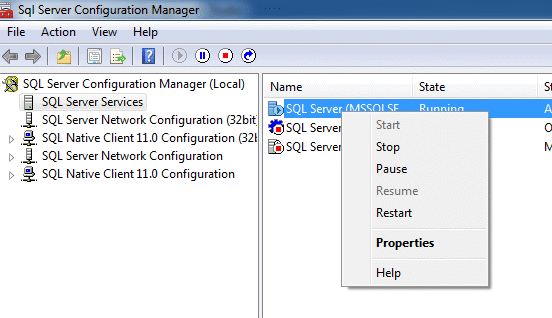
    There is a good document in BOL about this. It basically has you doing a few different things. The first step is to enable the filestream access from outside SQL Server using the SQL Server Configuration Manager. When you start the manager, right click the database service and select properties.

    fs_1

    The database engine has to allow for the access to the file system, so this allows that integration. Typically a Windows administrator is required to dot his.

    Once that is complete, you will see the account properties for the service. What we want to do is change to the FILESTREAM tab, shown on the bottom row to the right.

    fs_2

    On this tab, we can enable Filestream only for SQL Server, for I/O access as well, and specify a share. For Filetable we need to enable both levels of access and create a share name. I chose “SQLFS” for my share name.

    fs_3

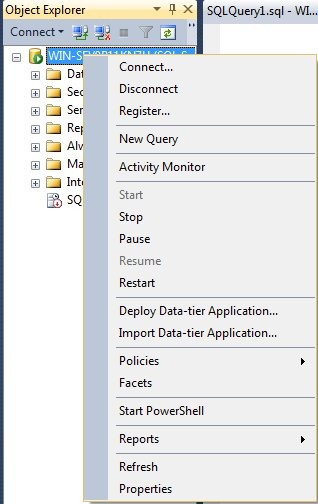
    Once this is done, you need to switch to Management Studio and then right clicking the instance and selecting properties.

    fs_4

    This will bring up a series of selections. If you choose the “Advanced” item on the left, you will get a list of properties for the instance. Near the top, there is the FILESTREAM section. Below I have dropped down the choices. By default, this is disabled, and for FILESTREAM you can select either of the other options, but FileTable needs the full access.

    fs_5

    Once this is done, you need to restart the instance to enable the Filestream for the SQL Server. This doesn’t set up FILESTREAM in any of your databases; this merely enables it for the instance. You need to still create the FILESTREAM filegroups in any database that will use FILESTREAM data.