Tag: goals

  • Pro SQL Server Linux–Moving to Linux

    As part of my learning goals for 2018, I wanted to work through various books. This is part of my series on Pro SQL Server on Linux from Bob Ward.

    It’s not until Chapter 10 that we get back to Linux specifics. Most of the chapters in the middle are general SQL Server items that are good to know, but not are useful for experienced SQL Serve professionals. They’re worth skimming as you might learn some things you didn’t about the features.

    In Chapter 10, the focus is migrating to Linux. Bob presents a number of options, including one I hadn’t heard of: the DEA. This is the Database Experimentation Assistant, and I hadn’t heard of it. I don’t do a lot of migrations as I start and stop on SQL Server, but this allows you to do some A/B testing of upgrades. I’m sure it’s not perfect, but that’s something that is definitely needed.

    Most of the chapter is about versions, from Oracle, or from PostgreSQL. The Oracle parts walks through the migration, while the PostgreSQL part tries to show where features in SQL Server exist or don’t in PostgreSQL. In a number of places, Bob found projects that provide some functionality in PostgreSQL that is in SQL Server, but didn’t test things.

    The last chapter of the book deals with containers, and that was one of the more interesting things for me to read. I’ve been on a bit of a container kick, digging in more and more, so I was curious to see how Bob described and talked about the technology. I think he did a good job, but I still think a couple courses I’ve watched on Pluralsight from Nigel Poulton really covered this well, so perhaps I glossed over this a bit.

    I liked that Bob includes lots of code and links to help you get started, so if you read this book, spend time on containers. They’re the future, and for now, Linux containers rule.

    Overall Review

    I learned a few things about SQL Server from the book, but far too much of it was basics and beginning SQL Server stuff, not Linux stuff. It was a good refresher, and I’m not disappointed in the time I spent, but I was hoping for more stories and more Linux.

    The lesson really is that SQL Server is SQL Server, with few differences on the platform. As Bob mentions, you shouldn’t care about the platform and just pick what works.

    The basics of SQL Server did make this hard to read, and as a result, I started strong at the end of December and hit a lull for almost two weeks where I wasn’t motivated to skim through basic T-SQL, security, etc. I realized around the 20th that I was running out of time and crammed a bit in.

    If you don’t have a lot of experience with SQL Server, this is good. If you know SQL Server, but want to know Linux differences, I might recommend digging into some of the more specific Linux blogs, or the SQLServerCentral Stairway series.

  • Learning for Feb

    By the time you read this, I’ll have decided, but I just finished the first book and need to pick another. This post is more for me than anyone else, helping me to sit down and think for a minute.

    I don’t have any pressing need to work on any of the other books for work or career. It’s more that I’m interested in various topics, so I need to pick a direction. I’m also cognizant of the future and which books I want to go through.

    Recap

    Here are the books I purchased and plan to read this year:

    The question is, what’s next?

    I’m really not sure, but I do know that I’ll be relatively less busy in February, really busy in March, and April will likely be like January. As a result, I want an easier book in March.

    The challenge for me is understanding what’s easy and hard. I think the Azure/Xamarin one will be hard as I’ll need to practice skills that aren’t useful or tangential to work. The Power BI stuff is likely the opposite. The Python stuff is probably in the middle.

    The Plan

    My thoughts right now are that I need to research for a couple days. It’s Jan 31 as I write this, and I’m on vacation for a couple days. That’s both good and bad. Bad because I want to get away, good because I can find some spare time to just read and no do.

    With that in mind, I’m going to read a chapter of 3-4 books and then decide in which direction to go. By the time this publishes Monday, I should have made a choice, but I’ll be busy working on other stuff, so I won’t get to update this post.

    The four to get through a chapter on are:

    Wish me luck.

  • Pro SQL Server Linux–Connecting and Building an App

    As part of my learning goals for 2018, I wanted to work through various books. This is part of my series on Pro SQL Server on Linux from Bob Ward.

    I set up my Red Hat server as a command line only instance, so installing VSCode or Azure Data Studio aren’t options. I could add a graphical manager, but I decided not to for now. Instead, I want to use some of the tools from my local Windows machine.

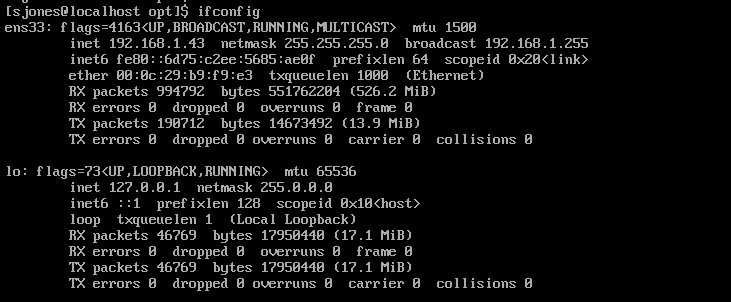
    If you’ve tried some networking with VMs recently, you’ll realize that this isn’t always simple. First, you need to figure out where your VM is. On Linux, ifconfig will do this.

    2019-01-16 18_30_32-RHEL74 Bob - VMware Workstation

    However, when I go to SSMS and try to connect to 192.168.1.43, I get the network error that the SQL Server isn’t found. I know this is because of the firewall because my SQL Server is running locally on Linux and sqlcmd.exe works.

    To open the firewall, on Red Hat you use the firewall-cmd command. This wasn’t in the book, so I had to search for the process. Once I did, this is a simple thing to do.

    2019-01-16 18_29_17-RHEL74 Bob - VMware Workstation

    Now that this is open, let’s connect from SSMS. I can see that worked.

    2019-01-16 18_32_59-SQLQuery3.sql - 192.168.1.43.master (sa (52)) - Microsoft SQL Server Management

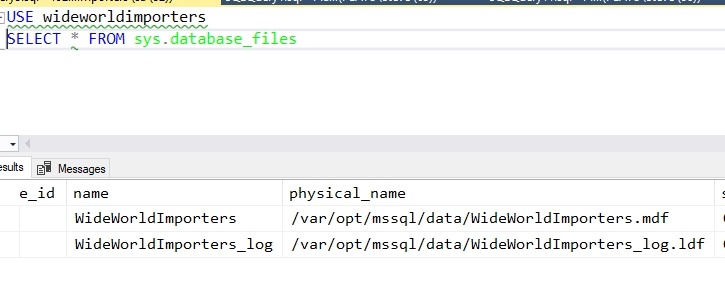
    My first step is to create a database. The standard CREATE DATABASE works, but I can see when I query metadata that this isn’t Windows anymore.

    2019-01-16 18_35_22-SQLQuery3.sql - 192.168.1.43.WideWorldImporters (sa (52))_ - Microsoft SQL Serve

    From here I used scripts to create the objects in the sample database. That’s a first step to getting an application working.  To get the scripts, I used:

    git clone https://github.com/Apress/pro-sql-server-on-linux.git

    This is the repo where Bob has his scripts. If you don’t know how to use git, start learning. I’ve got some posts, but there are lots of tutorials out there.

    Once the database is created, with some tables and data, I can now work on an application. Bob is using a node app, which I’ve never written, so this is a chance to learn a little something new.

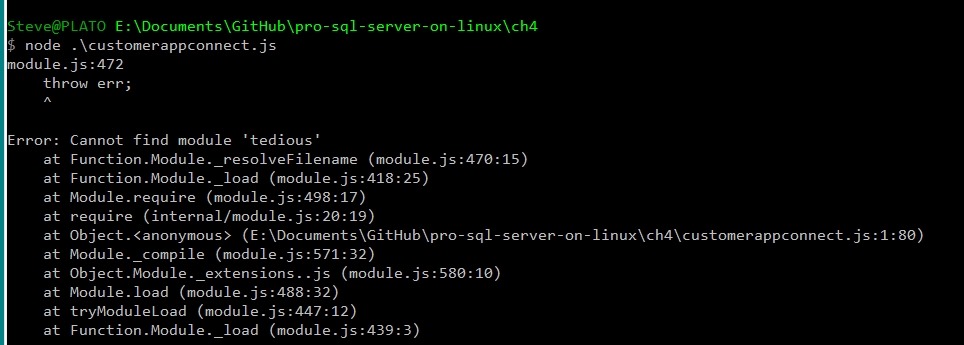
    I tried the npm installs, but had issues. I kept getting errors from installing tedious. I had to change to use http: instead of https, and I was able to instally async, but I kept getting errors.  I know this because:

    2019-01-24 17_40_59-cmd (Admin)

    Let’s try something else. I want to just connect, to see if my system is working. I could use SQLCMD, but let’s be creative.

    2019-01-24 17_46_48-cmd - python (Admin)

    I’m more comfortable in Python and this works. SQL Server 2019 here.

    There is a good tutorial with some sample code at https://www.microsoft.com/en-us/sql-server/developer-get-started/python/windows/. I took some of the code from there to get this working.

    In chapter 4, Bob shows how to use T-SQL and an application to read and write data. This is essentially sending SQL batches to the server, like I did with SELECT @@version above. I can do this stuff, and I know how to send batches. Executing code, including stored procedures, isn’t something I want to do here.

    A number of the parts of chapters 3, 4, 5, 6, 7 are normal stuff that really are a part of working with any SQL Server version. There was little I saw in here that I hadn’t learned as a part of my work on Windows with SQL Server 2012/2014/2016/2017. Not that it’s not good content, but it’s more basic.

    I read it anyway to get an idea of how Bob presents these things and there were good reminders of how things like Temporal tables or how bcp work. It’s worth reading if you aren’t familiar with the various concepts of working with SQL Server, getting performance information, and what tools are available. It certainly was a nice refresher for me.

    From here, it’s moving on to more features, hoping that I see more Linux specific things.

  • Pro SQL Server on Linux- More Installs

    As part of my learning goals for 2018, I wanted to work through various books. This is part of my series on Pro SQL Server on Linux from Bob Ward.

    After my last post, I decided to try and install the SQL Server 2019 preview version and see how that worked. I followed the instructions from Books Online.

    Adding a new Repo

    At first, I used curl to get the new repo file and then run the install. When looking at the install (sudo yum install –y mssql-server), I wondered if this would know I wanted 2019 instead of 2017. At this point,  my system has two repos, so how does it know?

    No idea, but it worked.

    2018-12-20 14_32_09-RHEL74 Bob - VMware Workstation

    Or did it?

    2018-12-20 14_35_41-RHEL74 Bob - VMware Workstation

    I think I upgraded my instance, which is fine. This is testing, so it works fine for me.