Tag: hardware

  • The Gadget Itch

    Many of the people that work in technology are interested in gadgets and hardware as much as software. Not all of us, but many of us have had side projects where we’ve melded hardware and software together. For those of us that are older, and started working with computers decades ago, that might have been the only way that we could get a computer system to work.

    I’m glad that I still find people interested in hardware. My son recently built his own gaming computer from parts, and I’m hoping to distract him from some games and get him to help me build some robots with a Raspberry Pi computer and BrickPi add-on board. However it’s not just kids as I’ve seen a number of people at Red Gate working with hardware to build a variety of interesting projects.

    This week I’m wondering if any of you are interested in creating your own devices. If you had the chance to build a device or gadget for work, what would it be? A panic button when there’s a problem that you can press and instantly set of Star Trek “red alert” sirens? A status display based on your continuous integration builds? The question this week is:

    What would you build if you had a parts list like this one?

    Whether you’ve started actually assembling things or you’re just dreaming of something, or perhaps even just seen something that’s intrigued you, let us know. I actually think this might be a fun competition of some sort for an event, perhaps a hacking competition across a couple hours at a SQL Saturday or conference.

    Steve Jones

    The Voice of the DBA Podcast

    Listen to the MP3 Audio ( 1.8MB) podcast or subscribe to the feed at iTunes and LibSyn. feed

    The Voice of the DBA podcast features music by Everyday Jones. No relation, but I stumbled on to them and really like the music. Support this great duo at www.everydayjones.com.

  • The Internet of Things

    The Internet of Things is upon us. I’ve heard this term quite a bit recently, and certainly there’s been no shortage of new hardware items that are being onnected to the Internet. The last ten years have seen all sorts of products get IP addresses: mobile phones and cars, along with washing machines and refrigerators. Some have been silly attempts to make a connection to the Internet without a practical problem being solved, but some have been very interesting.

    However I think we will truly start to see more and more devices created in the next decade. The advent of cheap hardware (Raspberry Pis and Arduinos as two examples) and the ability to construct new cases and programs (with 3D printing) will lead to many individuals, as well as companies, starting to build their own devices to capture data as sensors, or perform small tasks that we find handy.

    Should we care? Yes. Many of these items will produce logs or other status information. Much of this data will be stored in databases. Perhaps in relational platforms like SQL Server, perhaps sampled and queried as a stream with much of the data discarded (using StreamInsight and SQL Server), perhaps stored in some NoSQL type platform (HDInsight/Hadoop, anyone?). For many of us that means more data to manage, new information to develop software against, new patterns to discover with creative queries.

    It should also mean more work, probably more employment, and hopefully, more money.

    Steve Jones


    The Voice of the DBA Podcast
    Listen to the MP3 Audio ( 1.9MB) podcast or subscribe to the feed at iTunes and Mevio . feed

    The Voice of the DBA podcast features music by Everyday Jones. No relation, but I stumbled on to them and really like the music. Support this great duo at http://www.everydayjones.com.

  • VMs for Development

    Here’s the scenario: you have gotten a few consulting jobs and have a couple clients. This could be your full time employment, or a side job that you perform away from another employer. You want to watch your budget, ensure you can work efficiently, and handle whatever requirements your clients may send your way. This week’s question is:

    How do you set up your virtual environment at home?

    I think the idea of using Virtual Machines (VM) is a given these days, but do you have one VM with all your tools in it? Do you use separate VMs for each client? What about licensing? Those can be complex questions for many people, especially if your employer does not provide you with multiple license keys.

    I hope that you are using VMs as having multiple computers isn’t practical these days, especially as the cost of power rises. A relatively small, inexpensive desktop computer can run 5, or even 10, VMs to simulate a variety of environments. I’ve seen some creative uses of hypervisors and other software to simulate clusters, SANs, and even multiple domains on one host.

    Let us know this week if you have some good tricks that can help someone get started with virtual machines, building a lab, choosing hardware, or easily configuring networking for their own learning efforts. Tell us what software you use, and if you don’t mind sharing cost data, I’m sure others would appreciate the information.

    Steve Jones

    The Voice of the DBA Podcast

    Listen to the MP3 Audio ( 1.9MB) podcast or subscribe to the feed at iTunes and Mevio . feed

    The Voice of the DBA podcast features music by Everyday Jones. No relation, but I stumbled on to them and really like the music. Support this great duo at www.everydayjones.com.

  • The Desktop

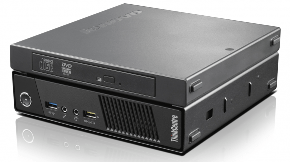
    eweweew-580x323Lots of IT professionals I know have moved to laptops for their daily work. This allows them to keep their work handy, no matter where they are. If they need to work from home, or on a trip, they have their tools with them. It’s a good move for many people, but I wonder if it’s what the majority of professionals want. As a side note, if you have a work laptop, with work data, you ought to be using whole disk encryption.

    When I worked as a production DBA, it was handy to have a laptop to connect to work from home and check on things. However I felt this was a double edged sword, with the responsibility of carrying the laptop with me, and the expectations of management that I would be “more available” than if I didn’t have a portable work machine.

    Recently I thought about this when I saw a release for a new desktop PC that is “no wider than a golf ball“, the new ThinkCentre M93 from  Lenovo. It’s small, and powerful, with enough power for many developers and administrators that might work in the technology area. It’s also one of those machines that I might consider portable.

    To me this might be the best of both worlds. Something that’s a desktop, removing me from the responsibility and obligation to take it home with me every night. However small enough that if I did need to work at home, to monitor a process, or get something done away from the office, I could pack it up and use it at home.

    I wonder how many of you have laptops from work, or desktops, and if you prefer one or the other. I used to appreciate an employer picking up the expense of a laptop, but these days I’d prefer to buy my own and let the employer keep their equipment in the office, and out of the rest of my life.

    Steve Jones

    The Voice of the DBA Podcasts

    We publish three versions of the podcast each day for you to enjoy.