Tag: Redgate

  • The Book of Redgate: Get the right stuff done

    Another of our values:

    2025-10_line0108

    The facing page has this quote: “We admire people who get stuff done. While there’s a place for planning, thinking and process it is better to try – and try well – and fail than not to try at all.”

    This is an approach I use in lots of my life. Not always, but I do try to get things done, and make a strong effort in doing so. I ask the kids I coach to do the same. The effort is what matters; it’s more important than the outcome. The outcomes matter, but we can accept mistakes.

    This is one of those values I think ought to be more prominently displayed and discussed, in most organizations.

    I have a copy of the Book of Redgate from 2010. This was a book we produced internally about the company after 10 years in existence. At that time, I’d been there for about 3 years, and it was interesting to learn a some things about the company. This series of posts looks back at the Book of Redgate 15 years later.

  • Setting PK Names in Redgate Data Modeler

    A customer was testing Redgate Data Modeler and complained that it auto-generated PK names. I had to test and discover if I could make things better, and I could. This post shows how.

    This is part of a series on Redgate Data Modeler.

    Adding a New Entity

    I can easily add a new Table to my diagram. I’ll click the New Table icon in the menu.

    2025-12_0310

    When I click in the design surface, I get a new table.

    2025-12_0311

    On the right, I see the table properties. I’ll need to fill these in.

    2025-12_0312

    Let’s change the name and add a few columns to this design. Note that for the first column I checked the PK box. This will be my primary key.

    2025-12_0313

    These are fine for now. Let’s now add adjust the PK.

    Setting the Primary Key Constraint Name

    If I click the three dots next to the PK check, I get a lot of properties for the column, not the PK.

    2025-12_0317

    I need to go below the columns. Notice the sections below the column area. One of these is for the Primary Key.

    2025-12_0318

    If I expand this, I can see the name field and columns. This was blank, but I typed in a name that makes sense to me. I could add columns as well here.

    2025-12_0314

    Checking the SQL

    If I click the Generate SQL button from the top menu, I get a dialog.

    2025-12_0315

    I click the Save button, which will save this to the file specified. I’ve set this in my project before (which is another post), but I am trying to save to a single file for my code that updates.

    When I open this code, here is the relevant part of the file. Note that my PK is named appropriately.

    2025-12_0316

    What happens if I don’t do that? I added another table, marked a PK, and this is what I see. First, my table (there is nothing set under the PK tab):

    2025-12_0319

    The SQL code shows a standard similar to mine, but different. I think a lot of people use the underscores, so I’m not surprised this is the setting.

    2025-12_0320

    Not bad, but not what I want.

    Summary

    The Redgate Data Modeler is a basic tool for now, but it does let you set a specific PK name if you want to enforce a standard. This can’t be set as a default, but I’ve submitted a feature request to change this.

    At least I can customize what I want as I build something.

    Give Redgate Data Modeler a try and see if it helps you and your team get a handle on your database.

  • Flyway Tips: AI Deployment Script Descriptions

    With the AI push being everywhere, Redgate is no exception. We’ve been getting requests, demands, suggestions, and more about how to add AI into our products and help developers and DBAs be more productive.

    One of the areas we’ve started to add some AI is in Flyway Desktop (FWD), with a few features designed to help reduce the cognitive load and context switches needed while developing code, and help users better understand what changes they’re making in their systems. This post looks at one of those changes, which is in preview (as of Jan, 2026).

    I’ve been working with Flyway and Flyway Desktop for work more and more as we transition from older SSMS plugins to the standalone tool. This series looks at some tips I’ve gotten along the way.

    Understanding Deployment Scripts

    In Flyway, we call the deployment scripts “migration scripts”, but they are the same thing. These are scripts that are changing, altering, or evolving our database schema in some way. New or altered objects, various schema items, and more.

    When a developer creates a migration script, they often do this close to the time they are making the changes in development. Not always, but I find a lot of customers change something, test it, and then make the migration script. Guidance for a lot of customers is to keep the migration scripts simple and easy. For example, here’s one I have that creates a simple table. If you look in the image on v23, which says “Create Product Table” in the description, that is what it does.

    2026-01_0161

    If I click on this line, I see the script shown below the name (V23__Create Product Table.sql). The new thing just below in this image is that an AI summary is being generated.

    2026-01_0162

    In a few seconds, this changes. I get the summary of the table. In this case, it says I have a new table with some columns.

    2026-01_0163

    If I expand this with the drop-down on the right, I see the full summary. This includes telling me a PK is being created, which is good info. I could look through the code, but the settings, the PRINT statements and more make this harder than it should be.

    2026-01_0170

    What about a more complex script? If I pick a different one, such as V24__Removed Territories and Region tables and related constraints and procedures, I get an OK description that lets me know a few things are being changed. I wish this had a little more detail in it, such as the tables on which FKs are being dropped, and maybe a list.

    2026-01_0164

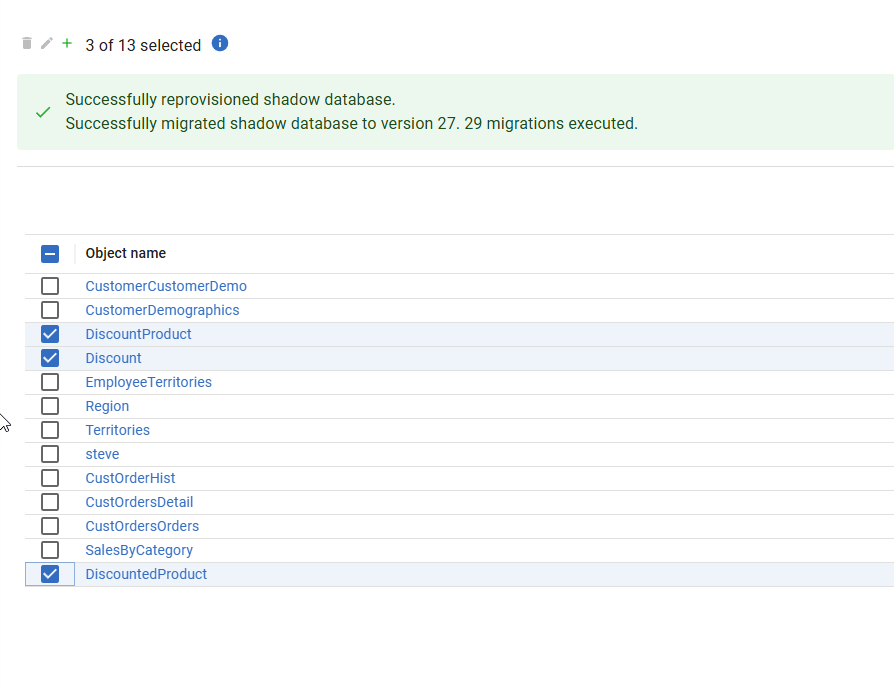
    Let me create a whole new set of objects. In this case, I’ve added some discount features in a bunch of tables. Here is the list of objects I added to the migration script.

    2026-01_0168

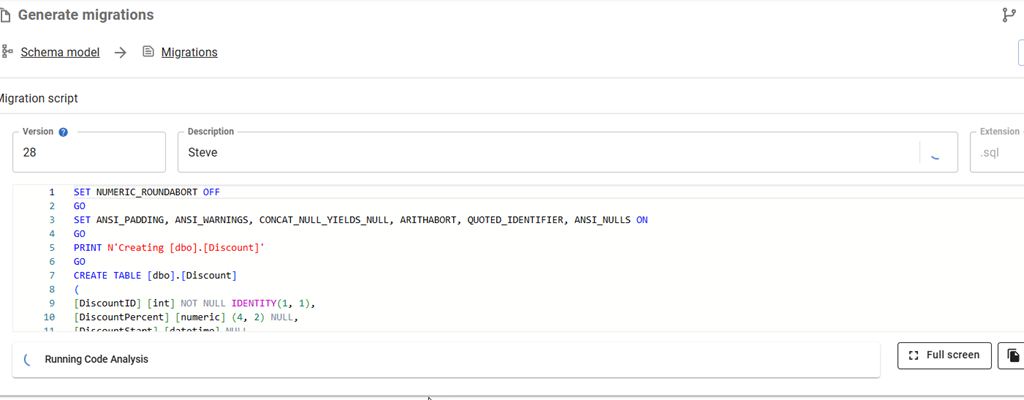
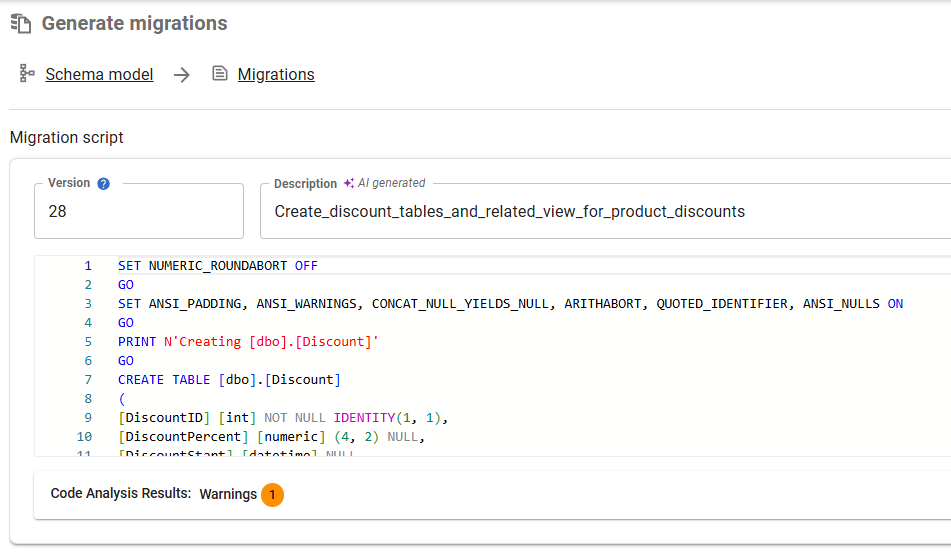
    When I generate the migration script and then click on it in the Migration Scripts tab, I see this description.

    2026-01_0169

    That’s an interesting description, as I see that there are territory and customer tables, which I’d forgotten I added. I was working on them and added them, but hadn’t committed them. I added the discount stuff (3 tables and a view) in a dev session today, and then selected everything to save and include in a migration script.

    This is one of those areas where the summary helps me remember what’s in here, and in this case, I’d want to delete this script and re-generate it with a different set of object changes. Then a second migration script with other changes.

    Enabling AI Features in Flyway

    This is a preview feature as of Jan 5, 2026 as I write this. To get this in your FWD, your organization needs to have enabled AI features in your portal. I’m just a member, but whoever is an admin for your Redgate products would find it here.

    2026-01_0173

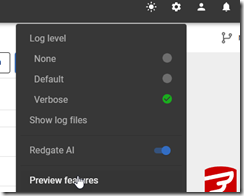
    In FWD, you need to look at the Preview Features item under the config menu.

    2026-01_0171

    In this area, you can enable or disable features as needed. I see these marked as Red-gate only, but I think they are supposed to be released to some customers by this time. It’s likely I need to upgrade my FWD, which I’ll do when I have time.

    2026-01_0172

    Once you do this, you should start seeing some AI stuff with the purple/pink shaded area and the sparkle icon that we’re all seeing everywhere.

    2026-01_0174

    Summary

    This post shows one of the Flyway AI features that we’re adding to help you deal with the chaos and complexity of database development in your environment. This features tries to summarize the details in your migration script and provide you a summary.

    This isn’t perfect, but as you look at scripts, it fairly quickly gives you a look at what’s included without you having to read all the code. You should double check the code and be sure it’s what you expect, but if you’re looking through a few scripts for a particular change or impact, this might help save you time.

    There is a limit to the amount of stuff we send to the LLM to summarize. I can’t remember (or find) the limit, but very large scripts aren’t summarized, and you’ll see a message to that effect.

    This feature is documented, but we are likely to enhance and change it a bit, so all feedback is welcome. If your organization doesn’t want you using AI, and you could share some schema from a migration script, I’d be happy to test it for you and see what summary is produced and send it back to you. Ping me on X/LinkedIn/BlueSky if you want.

    Flyway is an incredible way of deploying changes from one database to another, and now includes both migration-based and state-based deployments. You get the flexibility you need to control database changes in your environment. If you’ve never used it, give it a try today. It works for SQL Server, Oracle, PostgreSQL and nearly 50 other platforms.

    Video Walkthrough

    See a video of me looking at this feature below.

  • Another Change

    Today Redgate announced that we are partnering with Bregal Sagemount, a growth-focused private equity firm. There are no details of terms, and you can read the press release. It’s an opportunity for us to use this investment to drive growth forward in our products and solutions in the future.

    I’ve been with Redgate since 2006, when they acquired SQL Server Central. At the time, a lot of people expressed concerns and worry about the acquisition. We announced it at the PASS Summit to a very mixed reaction from people who used the site. I tried to reassure people as best I could, noting that Redgate hadn’t expressed any plans to make major changes other than reduce external advertising.

    They didn’t, and I’ve continued to run SQL Server Central for the last 18 years as a part of Redgate. While my job has changed in many ways, that has remained consistent, and I think we’ve delivered on helping the community learn, ask and answer questions, becoming better data professionals along the way.

    The same types of assurances I gave are being given from various leaders at Redgate now, and I am taking them at face value. I know the founders of Redgate want to company to succeed and the fact that they didn’t sell outright is encouraging.

    That being said, I’m nervous. I’ve been a part of restructurings, investments, sales, and more in the past, with mixed success. Whenever the foundations shift, I usually start looking for a new position. I’m not doing that today, but I am nervous because I don’t like big change.

    I am hopeful this will mean that Redgate can tackle a few things that we’ve struggled to do and that we’ll invest in growing our company in ways that we struggled to do in the last decade. One of my hopes (selfishly)  is an investment in SQL Server Central, which has languished a bit the last few years. We made a platform change in 2019 (not my choice) and we’ve had some lingering issues since then. Most things work, but some don’t work well. Some are broken, and there are lingering issues that are either annoying or I’d like to change.

    I also think this investment may help spur some changes in products and solutions that help customers solve more database issues. We are a for-profit company and revenue will certainly matter, but more investment in staff is always needed and wanted. If there’s one thing I’ve seen in the last 18 years is that there is always a backlog of things to work on, and I’m hopeful we’ll be able to not only tackle some of those things, but continue to deliver more value every week.

    I’m optimistic about the future at Redgate, and nervous, all at the same time, but for now, I’m not looking to make a change.