Tag: Redgate

  • Testing Sum By Month

    I’ve been on a testing kick, trying to formalize the ad hoc queries I’ve run into something that’s easier to track. As a result, when I look to solve a problem, I’ve written a test to verify that what I think will happen, actually happens.

    The Problem

    I saw a post recently where someone wasn’t sure how to get the sum of a series of data items by month, so I decided to help them. They asked for a year number, a month number, and a total, so something like this:

    Year   Month   Sales

    2012       1   1500.23

    2012       2   1480.00

    2012       3   1945.00

    …

    2015       7   8933.11

    They mentioned, however, that the had sales data stored as an integer. Not as 201201, but as 1, 2, 3, with a base date being Jan 1, 2012. That’s strange, but it’s a good place to write a test.

    I like to start with the results, since if I don’t know the results, how can I tell if my query works? Let’s get a test going. I’ll start by created my expected results. I’ve come to like using temporary tables, and limited data. I also like to test some boundaries, so Iet’s cross a year.

    CREATE PROCEDURE [tArticles].[test sum of sales by month for multiple months]
    AS
    BEGIN
    -- Assemble
    CREATE TABLE #Expected (
    yearnum INT
    , monthnum TINYINT
    , salestotal NUMERIC(10,2)
    )


    SELECT *
    INTO #actual
    FROM #Expected AS e


    INSERT INTO #Expected
    ( yearnum
    , monthnum
    , salestotal
    )
    VALUES
    ( 2012, 11, 2500.23 )
    , ( 2012, 12, 2200.15 )
    , ( 2013, 1, 2656.75 )

    I like to create the actual results table here as well, which allows me to then easily insert into this table from a procedure as well as a query. In this case, I’ll use a query, but I could use insert..exec.

    Once I have results, I need to setup my test data. In this case, I’d probably go grab the rows from a specific period and put them in a temp table and use Data Compare to get them. Or make them up. It doesn’t matter. I just need the data that allows me to test my query.


    EXEC tsqlt.FakeTable @TableName = N'MonthlySales';

    INSERT MothlySales
    VALUES
    ( 11, 1000.00)
    , ( 11, 1500.23)
    , ( 12, 2200.15)
    , ( 13, 1000.00)
    , ( 13, 1656.00)
    , ( 13, 0000.75);

    I don’t try to make this hard. I use easy math, giving myself a few cases. One, two, three rows of data for the months. If I think this isn’t representative, I can add a few more. I don’t try to be difficult, I’m testing a query. If I had rows that might not matter, or I wanted to test if 0 rows are ignored, I could do that.

    Now I need a query. Something simple, a SUM() with a GROUP by is needed. However I need to also change 11 into 2012 11, so that’s an algorithm.

    An easy way to do this is start with a base date. I’d prefer this is in a table, but I can do it inline.

    INSERT #actual

    SELECT
    yearnum = DATEPART( YEAR, DATEADD( MONTH, datenum, '20120101'))
    , MONTHNUM = DATEPART(MONTH, DATEADD( MONTH, DATENUM, '20120101'))
    , SALESTOTAL = SUM(ms.salesamount)
    FROM dbo.MonthlySales AS ms
    GROUP BY
    DATEPART( YEAR, DATEADD( MONTH, datenum, '20120101'))
    , DATEPART(MONTH, DATEADD( MONTH, DATENUM, '20120101'))
    ORDER BY
    DATEPART( YEAR, DATEADD( MONTH, datenum, '20120101'))
    , DATEPART(MONTH, DATEADD( MONTH, DATENUM, '20120101'))
    ;
    GO

    I’ll insert this data into #actual, which tests my query.

    The final step is to assert my tables are equal.

    -- Assert
    EXEC tsqlt.AssertEqualsTable
    @Expected = N'#EXPECTED',
    @Actual = N'#actual',
    @FailMsg = N'The calculations are incorrect';

    The Test

    What happens when I execute this test? I can use tsqlt.run, or my SQL Test plugin.
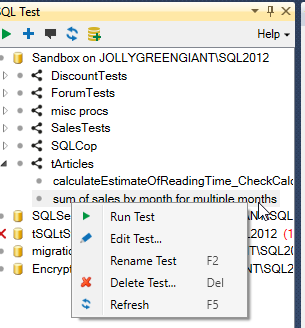
    2015-09-28 16_07_49-Photos

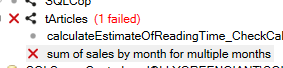
    In either case, I’ll get a failure.

    2015-09-28 16_08_11-Photos

    When I check the messages, I see the output from tSQLt. In this case, none of my totals seem to match.
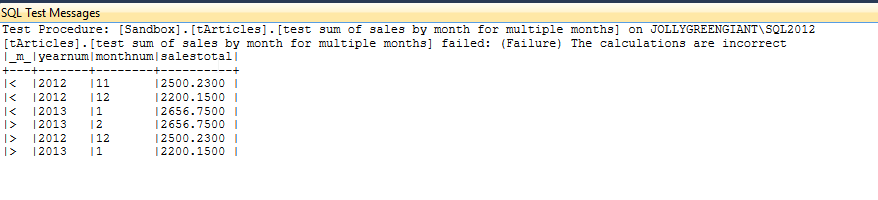
    2015-09-28 16_15_23-Photos

    What’s wrong? In my case, I’m adding the integer to the base month, but that means a 1 means 2012 02, not 2012 01. I’m a month off. Let’s adjust the query.

    -- Act
    INSERT #actual
    SELECT

    yearnum = DATEPART( YEAR, DATEADD( MONTH, datenum, '20111201'))
    , MONTHNUM = DATEPART(MONTH, DATEADD( MONTH, DATENUM, '20111201'))
    , SALESTOTAL = SUM(ms.salesamount)
    FROM dbo.MonthlySales AS ms
    GROUP BY
    DATEPART( YEAR, DATEADD( MONTH, datenum, '20111201'))
    , DATEPART(MONTH, DATEADD( MONTH, DATENUM, '20111201'))
    ORDER BY
    DATEPART( YEAR, DATEADD( MONTH, datenum, '20111201'))
    , DATEPART(MONTH, DATEADD( MONTH, DATENUM, '20111201'))

    Now when I run my test, it passes.
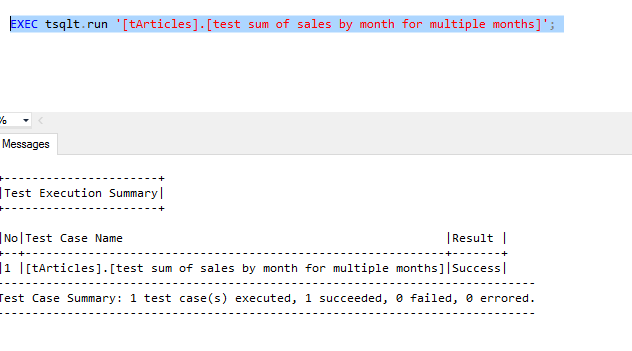
    2015-09-28 16_18_09-Photos

    Why Bother?

    This seems trivial, right? What’s the point of this test? After all, I can easily check this with a couple quick queries.

    Well, let’s imagine that we decide to move this base date into a table, or that we alter it. We want our queries to continue to work. I can have this test as part of an automated routine that ensures this test will run each time the CI process runs. Or each time a developer executes a tsqlt.runall in this database (shared or populated from a VCS). I prevent refactoring queries.

    More importantly, I can take results and alter them first, say if someone decides to change this to a windowing query. I could plug a new query in the test (or better yet, use a proc and put that call in the test) , and if I change code, I can verify it still works.

    Write tests. You need them anyway, so why not formalize them? The code around this query, mocking test data, is something I do anyway, so this gets me a few more minutes to verify that the code works. I can tune the query, alter indexes, perf test, and be sure that code is still running cleanly.

    http://www.sqwhere lservercentral.com/Forums/Topic1716471-1292-1.aspx#bm1716535

  • SQL Source Control and Git–Getting Started

    It seems as though Git is taking the world by storm as the Version Control System (VCS) of choice. TFS is widely used in the MS world, but Git is growing, Subversion is shrinking, as are most of the other platforms.

    As a result, I wanted to do a quick setup using SQL Source Control (SOC) and Git, showing you how this works. SOC supports Git in a few ways, so this is the primary way I’d see most people getting started.

    Update: Since this was published, the SQL Source Control team released an updated version (v4.1) with support for Git that allows push/pull within the client. I’ve got an updated post here.

    Scenario

    Here’s the scenario that I’ll use. I’ve got a database, WindowDemo, that has a few tables, some data, and a few procs. As you can see below this isn’t linked to a VCS.

    2015-09-24 16_34_56-Cortana

    I want to store my DDL code in c:\git\WindowDemo\trunk. I’ve got that folder created, but it’s empty. I’ll keep related database stuff (docs, scripts, etc) in c:\git\WindowDemo if I need it.

    2015-09-24 16_37_36-Photos

    Git Setup

    The first thing you need to do is get your Git repository setup. There are many ways to do this, but I’ll use the command line because I like doing that. The commands in the various client GUIs will be very similar.

    I’m going to set the git repository here at c:\windowdemo to keep all my database stuff in one place. To setup the repository, I run a git init in the command prompt. This initializes my repository.

    2015-09-24 16_41_02-Photos

    Now I have a git VCS, I need to get code in there.

    SQL Source Control Setup

    Now I move to SSMS to link my database to the repository. In SSMS, I right click my database and select “link database to source control”.

    2015-09-24 16_42_27-Start

    This will open the SOC plugin on the setup tab. I’ve filled in the path to the place in the repository I want the code to go. This is the trunk folder. I’ve also selected Git, using the “Custom” selection on the left and Git in the dropdown.

    2015-09-24 16_43_54-Link to source control

    Once I click the link button, I’ll get a dialog showing progress and then return to the setup tab.

    2015-09-24 16_44_15-Start

    Notice the balloon near the top. This lets me know the link is active and I have changes in my database that aren’t in the VCS. There’s a pointer to the “Commit changes” tab, so I’ll click that.

    2015-09-24 16_48_00-New notification

    In the image above, I see I have a number of “new” objects from the perspective of the VCS. I can see the name, and the type of object in the middle. At the bottom, I see the version in my database (highlighted code) on the left and the version in my VCS (blank) on the right.

    This is where I commit my changes. I enter a comment at the top and click the “commit” button on the right (not shown). When I do that, I’ll get a clean “commit tab” that shows that my VCS is in sync with my database DDL.

    2015-09-24 16_50_18-SQL Source Control - Microsoft SQL Server Management Studio

    Inside Git

    What’s happened in my VCS? Let’s look in the file system. Here I see my trunk folder.

    2015-09-24 16_51_49-Photos

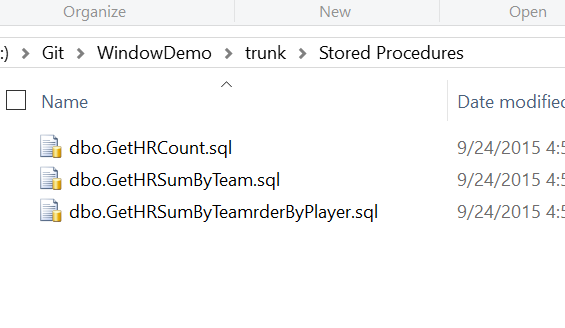
    SOC has created a structure for my DDL code and included some meta data. If I look in one of these folders, such as Stored Procedures, I see

    2015-09-24 16_58_56-Photos

    This is the .SQL code that matches what’s compiled in my database. SOC stores the current CREATE statement for all my objects so that they can easily be examined.

    Inside Git, I see a clean status with all my files as committed objects.

    2015-09-24 17_02_57-Start

    This is what I want. Now I can continue on with database development, tracking all my changes. I’ll look at the flow and tracking changes in another post.

  • SQL Data Generator–Masking Production Data

    This is a series on SQL Data Generator, covering some interesting scenarios I’ve run into. If you’ve never tried it, SQL Data Generator is a part of the SQL Toolbelt. Give it a try today with an evaluation today.

    I learned a new trick with SQL Data Generator that I wasn’t aware of previously. I think this is a good idea for masking some of that production data that you might not want developers to have.

    Let’s start with a production table. In my case, I’ve created a Sandbox_Prod database with a table in it for employees. I’ve added a few records that contain some sensitive information.

    CREATE TABLE Employees
    (
    empid INT IDENTITY(1,1)
    , EmployeeName VARCHAR(250)
    , EmpployeeEmail VARCHAR(250)
    , active TINYINT
    , salary money
    , pwd VARBINARY(max)    
    )
    ;
    GO
    INSERT INTO Employees
    VALUES  ( 'sjones', 'sjones@sqlservercentral.com', 1, 10000, ENCRYPTBYPASSPHRASE('The User Sample', 'MyS%83ongPa44#word')) 
         ,  ( 'awarren', 'awarren@sqlservercentral.com', 1, 20000, ENCRYPTBYPASSPHRASE('The User Sample', 'Ano$2therS%83ongPa44#word') )
         ,  ( 'rsmith', 'rsmith@sqlservercentral.com', 1, 5000, ENCRYPTBYPASSPHRASE('The User Sample', 'Kedj93m@@83ongPa44#word'));
    
    GO


    I’ve got a second database, called Sandbox, that simulates my development environment. I’ve got the same table, but without any data in it.

    What I want to do is move some of the production data to my development area, but not all of it. Some of the production data needs to be masked.

    SQL Data Generator Sources

    I can use SQL Data Generator from Redgate to do this, by using a data source that actually exists. In this case, I’ll create a new project and point it at my Sandbox database. I’ve deselected all of the tables except my Employees table.

    2015-09-22 16_31_57-Cortana

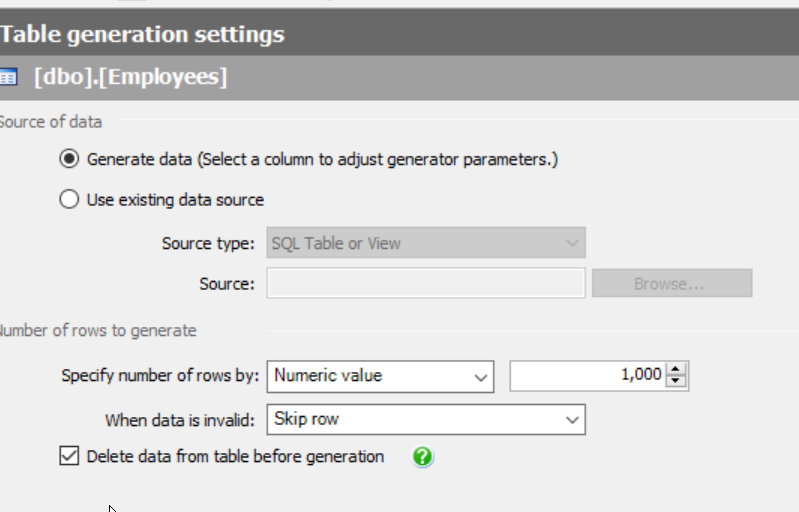
    When I pick my Employees table, I see the familiar generation screen on the right. Most of you are like me and notice the number of rows and the option to delete data.

    2015-09-22 16_32_54-SQL Data Generator - New Project _

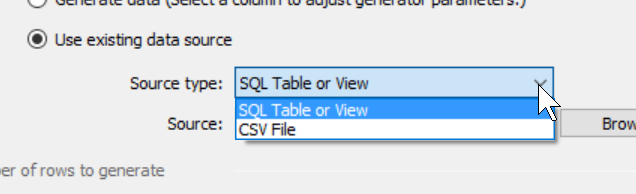
    However there’s another option. I can select the “Use existing data source” radio button instead. When I do this, I have a few choices for data. I can use an existing table or a CSV file. Both of those can be good choices, especially if I have sets of data I want to load into the table. Either one can help me to build known, specific data sets for development (or testing).

    2015-09-22 16_35_19-SQL Data Generator - New Project _

    In my case I will choose an existing table. When I do this, I click the “Browse” button and I get a connection dialog for SQL Server. I pick my instance and the production database.

    2015-09-22 16_35_26-SQL Data Generator - New Project _

    I click “Next” and then get the chance to select the table to use. In this case, I’ll pick the Employees table.

    2015-09-22 16_39_03-Select SQL Table or View

    When I return to the main SDG screen, I see the table listed as the source, but my preview shows the actual production data. This is because I’ve mapped the production table as a source, and it will be used as it currently exists.

    2015-09-22 16_40_12-New notification

    That’s not what I want. I want to mask the email address and the salary. However, now I can change things like I might do for any random data generation.

    Let’s first click in the EmployeeEmail column. When I do that, I see the following, the column with its source set as the existing column in the production table.

    2015-09-22 16_59_52-SQL Data Generator - New Project _

    However the drop down gives me lots of choices, including an Internet email generator.

    2015-09-22 17_00_07-

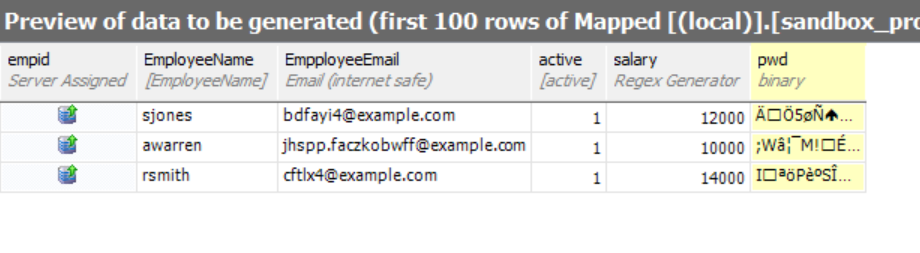
    If I select, then my preview changes. Now the image below shows production data for all columns other than the email.

    2015-09-22 17_01_23-New notification

    I can repeat this for the salary (and password to be safe). When I do that, I’ll see random data for those columns and production data for others.

    2015-09-22 17_03_26-New notification

    I can repeat this for all tables in my project, mapping through data that isn’t sensitive, and masking data that is. It’s a tedious process, but it’s a one time process for specific data. Once this is done, every restore can have the project run and the data masked. If production DBAs do this refresh, then developers never see sensitive information

  • Simple Merges KDiff3 at SQL in the City

    One of the hassles of working in a development team is that you will have conflicts between your code and another developer’s. That’s fine, and it’s a natural effect of allowing each person to work on parts of a database independently.

    However resolving conflicts can be a pain. Fortunately there are some nice utilities that can help make the process easier. 

    If you want to see this live, come to SQL in the City 2015 in London or Seattle this October.

    Here’s a quick example. I was simulating two developers, each with their own database, but linked to a common Git VCS repository. I went to commit a change and got this:

    2015-08-19 16_36_42-New notification

    SQL Source Control detects a conflict before committing the stored procedure on the left. As you can see, it has more fields in it, while the version in my VCS has a TOP clause. I can keep my version or update mine with what’s in VCS.

    Or, if you look to the right, you can see I have the option to “Merge” code. If I click Merge, then I’ll open KDiff3, which is installed on my system. SQL Source Control has detected this and given me the chance to resolve the issue.

    kdiff3_a

    I get a message that there are 3 conflicts, and none of them could be resolved. If there are places where the code can be merged automatically, KDiff3 will do that.

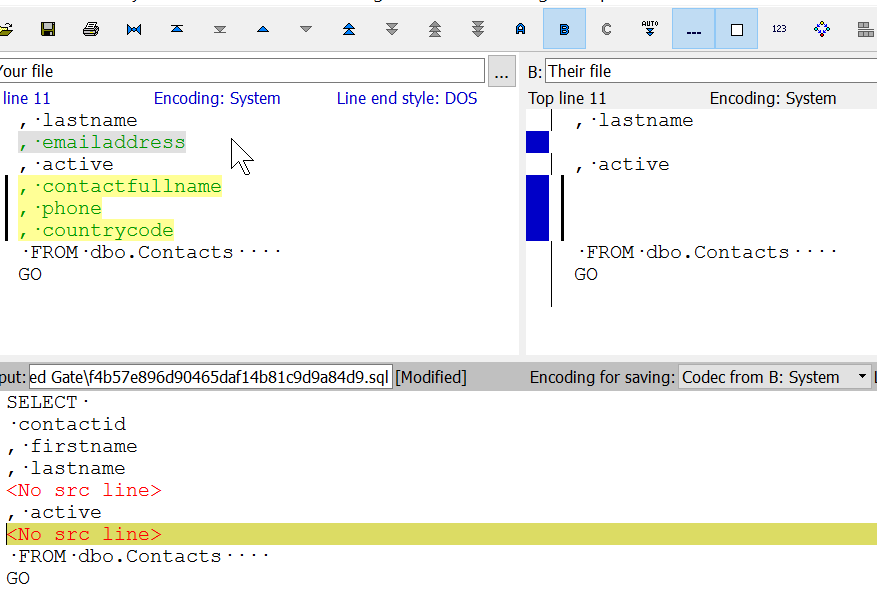
    Once I acknowledge this, I see my code. This looks like what I saw in SQL Source Control. My code is on the left, and the version from VCS is on the right. Below is the merged code, which has some placeholders where the code conflicts.

    2015-08-19 16_37_28-Your file _-_ Their file - KDiff3

    If I right click the first conflict, I get some choices. In this case, I’ll take the line from the left, which has no TOP clause.

    2015-08-19 16_37_38-Cortana

    This gets inserted into my code and I can move on to the second conflict. In this case, I’ll take the version on the right, which has nothing.

    2015-08-19 16_37_58-Your file _-_ Their file - KDiff3

    For the last conflict, I’ll also take the missing fields from the right.

    2015-08-19 16_38_19-Your file _-_ Their file - KDiff3

    If I now save and close KDiff3, I’ll get the merged code in SSMS and SQL Source Control.

    2015-08-19 16_38_32-New notification

    Not the “Keep mine” is selected. I’ll commit this, which will be the most up to date version in our VCS. Other developers can update their code with this version, and if they have conflicts, SQL Source Control and KDiff3 make them easy (ier) to resolve.

    I’ll be showing you some basics of using a VCS with your database at SQL in the City 2015 this October. You can see this and more in London on October 16 or Seattle on October 26. If you can come to either event, register today and come pick up a few tips and tricks.