Tag: Redgate

  • Git Pull in SQL Source Control

    I wrote recently on Git Push in SQL Source Control (SOC), and now wanted to add the other side of the story, pull. This process is even simpler.

    I’ll be working with a new database, one that has two client systems set up already with Git support. I know I haven’t tackled that part of SOC and Git, but I’ll do that in a new post.

    In this case, I’ve got a repository on Github for my Redgate and SQL in the City demos. It’s a sample database, but I’ve been making multiple changes to the database across time, using Version Control as a way of continuity, and then being able to rollback changes or see history.

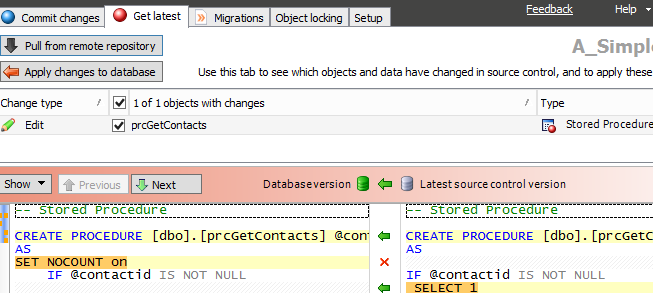
    I’ve got a connection in a VM to a second development machine. When I launch my VM, and SSMS, I go to the second SOC tab, the one that is labled “Get Latest.” You can see the image below, and notice that there are two buttons in the upper left. There is the familiar “Apply changes to database,” which has been the way that we pull changes from TFS and SVN, but now there is a new “Pull from remote respository.” This is the one specific to Git.

    2015-10-22 23_19_54-OneNote

    In this case, I’ve refreshed my database previously in sync with the local Git repo. Therefore the button is grayed out. However, I don’t know if there are remote changes until I click the other button.

    I do that and get the familiar four step dialog from SOC that checks for changes and then compares them to the local database. However what you don’t see is that a “git pull” is issued first, pulling changes from the remote repo. In my case, I had one change I’d made in London, actually, and hadn’t synced with my VM.
    2015-10-22 23_20_15-salesdemo-2015-02-25-1422-export-i-fgg5cstb - VMware Workstation

    This is the familiar SOC actions now where I see the changes and can use the “Apply changes to database” to compile this code in my local database.

    In some sense, this is less exciting then push, but it’s nice to be able to do this in the client.

    I’ll write some more on the workflow as I develop changes in the coming posts, which are going to be aimed at building a small database in Azure SQL database and moving changes from my local system to Git for tracking, and then to Azure for production use.
  • What is the DLM Maturity Model?

    I’ve written a few posts on the Redgate Software blog to try and show how I see the DLM model, and how we see things at Redgate. We have a lot of developers that work in a similar way when building application software in C#, Java, Python, or other languages, and much of the company is trying to bring more engineering to database development.

    Part of what the DLM maturity model aims to do is help us classify how we progress to a more engineered, repeatable, and reliable way of managing database development. You can read my overview, and then dive into each of the various levels we’ve built. The levels are:

    Some of this is based on the CMMI model from the SEI, and some is based on what application developers are doing with their own continuous delivery mode. Simple Talk has written a What is DLM? article as well, and includes a different view of a maturity mode.

    I think this process becomes more important over time as we depend more on software and the databases behind them, with fewer and fewer tolerances for downtime or human mistakes in the deployment process.

    I’d like to get feedback from people on what they think of this model, and of the idea of engineering better database development. I know many people have built their own process, but far too many of the processes rely on custom scripts that are built and edited for each deployment, sometimes in the middle of the deployment. I think we could actually make database development better if we applied some better structure to our deployment.

    Redgate is working on tools to support this, in a few ways, but this isn’t about Redgate. Rather, it’s about building better software for everyone, whether you use Redgate tools, another vendor’s tools, or build your own. Follow a better engineering process.

    If you’d like to know more about the CMMI model, Alex Nordeen built a fools guide to the framework. It’s easier to read and understand than the CMMI site.

  • The SQL Source Control Frequent Updates Channel

    One of the things we do at Redgate is release software often. It’s not just that we want you to release your software often (and develop better), but we do it ourselves. Different teams release at different cadences, which is both cool, and hard to keep track of. The SQL Prompt team is really amazing, releasing hundreds of times in the last year. A pace of almost 4 times a week!

    SQL Source Control is a product I’ve been using fairly often lately. There is a team working on updating the code regularly, and I recently found out that they had two different streams of software releases. This is so the development team can get early feedback on some new features, but also so you can get access to the new features, performance improvements, and bug fixes as soon as they’re available.

    As a result, we have a normal, mainstream channel for releases, and a frequent release channel. The frequent channel offers new updates every Wednesday whereas the normal channel releases are less regular. The releases tend to be every few months, depending on the feature set being worked on. The regular channel also rolls multiple frequent releases into one larger update.

    Enabling Frequent Release

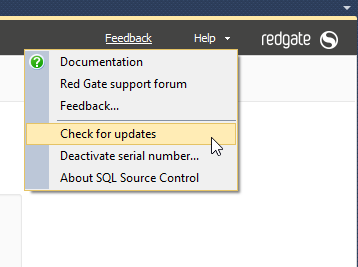
    If you’re interested in getting frequent releases, then open SQL Source Control (SOC) and then click the help item. The “Check for updates” item is there, which is what you want to select.

    2015-10-22 11_15_18-SQL Source Control - Microsoft SQL Server Management Studio

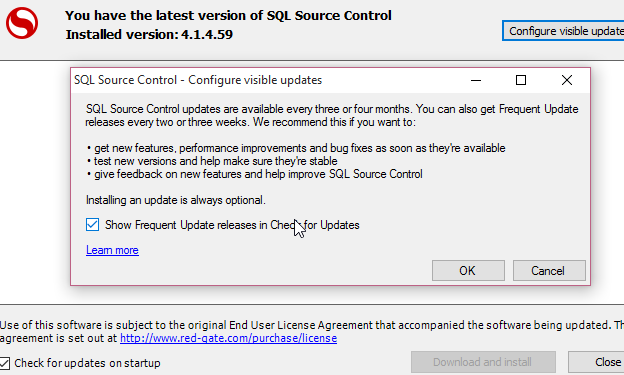
    The update screen appears, and you may or may not have updates available. I don’t, as I updated this morning. However in the upper right corner is a “Configure visible updates” button. Click that.

    2015-10-22 11_15_28-SQL Source Control - Microsoft SQL Server Management Studio

    Once you do that, you’ll get a dialog that tells you that you might get more updates, every few weeks and get new versions. If you check the box, as I have, you get updates quicker.

    2015-10-22 11_15_36-OneNote

    One note. This isn’t for beta versions. This is for code we are sure is ready, but we’re hoping to refine how it works and this gives us a chance to essentially have a additional test audience view the code and let us know. This is over and above the automated CI process we use and rigorous testing already completed by the development team.

    My experience is that I turned this on in early September to get the new Git support. I got the release with push/pull about three weeks before others (this has since been released to the regular channel). Since then, I’ve gotten two other releases that changed minor items, the same ones available to everyone else on the frequent release channel. The next regular channel release isn’t due until early 2016.

    If you want to see more frequent changes, enable the updates. If not, you’ll get updates on the normal schedule you do now. If you’re trying to understand what version you’re on, or what the features are, we have release notes:

    And if you want to shape the product, please vote on UserVoice for the things that you’d like to see in the future.

  • DLM Dashboard moves to 50 Databases – For FREE

    I love DLM Dashboard. It’s the product that I’ve written myself, in various ways since SQL Server 6.5. My versions weren’t as pretty, often scripts that ran queries, returning loads of data in text format, from queries, trace, or Extended Events.

    However there’s been a limitation that affected even me. When DLM Dashboard was released, it allowed you to monitor 5 databases. That increased to 10 if you registered, but that still wasn’t enough. I have 4-5 databases, many in a few environments, that I’m trying to monitor.

    I had a meeting with the DLM Dashboard team a few weeks ago, and we discussed a number of items, including the limitations. We debated the topic, and I got word recently that the limitation has been raised.

    DLM Dashboard now allows you to monitor 50 databases, which covers quite a few of your environments, and quite a few complete pipelines. I’d urge you to give it a try and download the product today.

    We understand some of you might need more, or that there are other features you’ll want. The team wants to hear from you on UserVoice, which you can also get to by clicking the "Give Feedback" link in the app.

    2015-10-23 09_22_34-Photos

    This is one of the best free products I’ve seen in a long time, and I’m excited that Redgate built it.

    Now I don’t have to at any other job in the future.