Tag: Redgate

  • Quick Tips – SQL Prompt with SSF

    I love SQL Prompt, and think it’s a great productivity tool. Even before I worked at Red Gate, I love the tool and had a copy before Red Gate bought the technology from the original developer. Recently I’ve run into a few people that weren’t aware of some of the ways in which it can help you. This is a quick look at one of the ways I use SQL Prompt.

    SSF

    I probably type SSF more than any other character combination in SMSS. With SQL Prompt installed, I usually quickly type “SSF” and hit “tab” and get this:

    ssf1


    SQL Prompt has expanded my “SSF” into “Select * From” and then popped up a list of tables in this database. I could down arrow to select one, or use the cursor, or start typing.

    This is a quick way to get data from a table back to your SSMS client without worrying about the columns or rows you need from a table. I use this constantly, though I’ve edited this command to return the top 10 rows only. Here’s how I do that:

    Snippet Manager

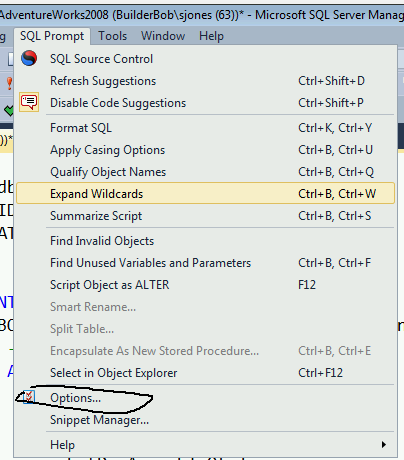
    There’s a dialog for managing these snippets of code, called the Snippet Manager. You can access that from the SQL Prompt menu

    ssf2

    Once you select this, you get a dialog that shows all the snippets installed on your system. I scrolled down to the “SSF” snippet that I often use.


    ssf3

    If I click the Edit button, then I get a small editor where I can paste in code or edit what’s there. In this case, I add the “TOP 10” keywords, and I also reformat the code slightly. I like my code formatted, so I ensure it’s formatted here.


    ssf4

    Once that’s done, I click “Save” and then “close” for the Snippet Manager. Then the next time I type “SSF” and tab, I get this:


    ssf5


    Note that there is an st100 snippet that does the same thing I edited with 100 rows, but I find ssf easier to type, so I just edit this snippet.

    I’d encourage you to play around with snippets, and also adopt this in your daily work. If you don’t have a copy of SQL Prompt, download the evaluation and I’m sure you’ll realize it’s worth the cost of the tool in time savings quickly.

  • 2013 Tribal Awards

    We’re the #sqlfamily on Twitter, and often in person where we often get together for a #sqlrun in the morning and a bit of #sqlkaraoke at night. In some sense, we are a tribe within the larger technology community, focused on our common work with SQL Server. I thought the title for  was fantastic, bringing together new authors to share their knowledge, and raise money for a charity.

    At SQLServerCentral and Simple Talk, with the sponsorship of Red Gate Software, we decided to create some end of year awards in various categories, based on the community, not companies or products. We kick off our nominations today in a number of categories, including Advice that saved my bacon in 2013, Best Speaker, Best Outfit, and more. You can read more about the categories in today’s announcement.

    The idea is that the community can recognize others in the community with a nomination, and some supporting material that encourages others to nominate the same individual, and vote for the winner. The top five with the most nominations will get voted on over the holidays with awards presented in January.

    I hope you have fun with this, and think back to those people and events that stand out in your mind in 2013.  Nominate them, give a few reasons, and celebrate the help that each of us gives each other as a part of the SQL Server tribe.

    PS: we had a great #sqlski last year for SQL Saturday in Albuquerque and we’re doing it again this year. Feel free to join us at Taos on Friday, January 24th, right before SQL Saturday #271 in Albuquerque on Jan 25, 2014.

    Steve Jones

    Video and Audio versions

    Today’s podcast features music by Everyday Jones. No relation, but I stumbled on to them and really like the music. Support this great duo at www.everydayjones.com.

    Follow Steve Jones on Twitter to find links and database related items and announcements.
    Steve Jones Windows Media Video ( 15.2MB) feedMP4 iPod Video ( 18.5MB) feed

    MP3 Audio ( 3.7MB) feed

    Feeds are available at iTunes and Mevio

    To submit an article, rant or editorial,
    log in to the Contribution Center

  • Learn about Encryption at SQL Saturday #265

    You can learn about encryption at SQL Satuday #265 is Portland, Oregon in a couple weeks. I’ll be heading out to the event on November 16, 2013, my first visit to Portland in 15 years.  In addition to my session on the various encryption options in SQL Server, I’ll be talking about your career with my branding talk, plus there are many other amazing sessions.

    A few quick links:

    Register for SQL Saturday #233

    Register for the FRIDAY, November 15, 2013, FREE Red Gate Seminar

    With the MVP Summit in Redmond the following week, you have the chance to learn about:

    Check the schedule for the details and to pick the best sessions for you. It’s a tough choice, but no matter what you choose, I’m sure you’ll learn a lot.

    It’s a busy day for me, as I’ll also have a lunchtime session where I’m looking to talk about Red Gate Software’s vision and experience with database deployment. We’ve been working hard to find ways to deliver our software faster, and we’ve put that knowledge into a few products. Our goal is to try and make it easier for you to deploy changes to your databases, so come let me know what challenges you face and what holes are in our solutions.

    It should be a great event, and if you’re in the area on Friday, November 15, 2013, and you want to learn about better database development and deployment strategies, Red Gate has a free SQL in the City Seminar that you can register for. Grant Fritchey and I will be talking about version control, continuous integration, and deployment in this FREE, half day seminar. It’s aimed at beginner to intermediate level people, so register today if you can attend.

  • Getting Started with CI and Databases

    It’s fairly easy. At least, I think it is if a salesperson can do it.

    Alex Yates, salesman extraordinaire at Red Gate Software, spent a lunch hour recently setting up a CI system so he could better understand how hard, or easy, it can be for customers. He wrote about his experiences using the Jenkins CI server.

    Check it out. If Alex can do it, I bet most of you developers and DBAs can as well.