Tag: Redgate

  • The Bite-Sized Redgate Summit comes back this week

    This week we have another edition of the Redgate Summit taking place on May 13, 14, and 15. We have different times each day to cover the world. The dates and times are:

    Europe, the Middle East, and Africa – May 13 3:00pm to 4:00pm BST Register

    Americas – May 14 3:00pm to 4:00pm CDT Register

    Asia-Pacific – May 15 11:00am to 12:00pm AEST Register

    The content is the same each day, with two topics being covered:

    • Using Local and Hosted Agents for Build with Azure DevOps
    • Working From Home Necessitates Communication Changes

    Each of these sessions is 20 minutes, with about 10 minutes for questions. Since the Advocates are spread out, and the sessions are short, each of us is handling a different day and time.

    Wednesday (Europe) – Kendra Little

    Thursday (Americas) – Grant Fritchey

    Friday (ANZ) – Steve Jones (me)

    I’ll actually be doing the broadcast Thursday evening my time, which works out to Friday morning in Australia. Hopefully this also means I get to go back and give live talks in Australia and New Zealand at some point.

    Register today and join us later this week.

  • A Day in the Life of an Advocate

    I have one of the best jobs in the world. I get to work from home, travel to lots of events, set much of my own schedule, and I work for an amazing, supportive company. I’m incredibly proud of the way Redgate Software has handled this pandemic crisis. From strong leadership, a commitment to employees, the Community Circle, and the very strong work by our Core services team to ensure technology has helped us continue to operate as a business.

    We maintain an internal company blog where lots of information is shared by individuals and groups. Each week we compile a list of important posts that are sent to all employees on Friday. It’s a way to understand different things that are happening inside the company, since many of us are focused on our own jobs and might not know what others are doing. Recently, I was asked to write a post for the blog on a day in the life of an Advocate. I was happy to tackle it, but included Kathi, Kendra, and Grant as well, since we all share that title, but have very different jobs.

    What do we do? For the most part, we do what the title says: we advocate. We advocate among the public for Redgate, and, as Microsoft Data Platform MVPs, we advocate for people to use the Microsoft data platform. At the same time, we advocate for customer needs inside of Redgate, liaising with developers and others to influence what and how they build software. We advocate at Microsoft on behalf of all the customers that want new features and struggle with existing ones.

    For all of us, this might be through meetings, presentations, written content, emails, and more. In some sense, we are communicators that move information and knowledge around. All of us have done that throughout our careers, and it’s what many of you do as well. In fact, I think some of the most successful technical professionals I know are great communicators. They many have great technical skills, but they also have the ability to communicate well with others.

    I saw a famous software developer once recommend that anyone really wanting to be a developer ought to major in a subject like English (or your language of choice) to learn how to analyze writing and communicate your thoughts back to others. Certainly you need technical skills, but most of us really need to learn how to work well with others. A soft skill, but a vitally important one.

    That’s most of my day as an advocate. Communicating. Hopefully many of you find that I do it well and have learned something, been inspired, or even entertained by my work. I look forward to continuing it for many years.

    Steve Jones

    Listen to the podcast at Libsyn, Stitcher or iTunes.
  • TSQL for Beginners–#RGCommunityCircle

    As a part of the Redgate Community Circle, giving back in this strange time, each of the advocates for Redgate is teaching a free course. We’re doing this live each week, according to this schedule:

    I decided to watch a class of each of the others’ work and write about it. This post looks at the first class from Kendra Little on basic T-SQL.

    Basic T-SQL

    I know a lot of T-SQL, but I also don’t know a lot. I’m good, maybe above average, but not a great query writer. I learn all the time from others, and often find something interesting in basic presentations. I’m also always looking to see how others teach basic topics to improve my own skills.

    Kendra has done an interesting thing with putting her course on GitHub. That’s a great idea, though for mine, I am following articles on SQLServerCentral. Having a good outline and resources for students is a good idea, and everyone ought to be able to use a VCS, including GitHub, so I like putting pages here and code in a repo.

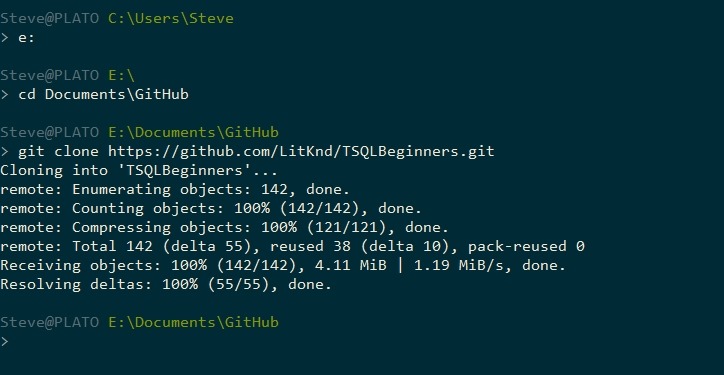
    Why is that good? This is what I did to start following Kendra’s class:

    2020-05-01 10_15_26-cmd

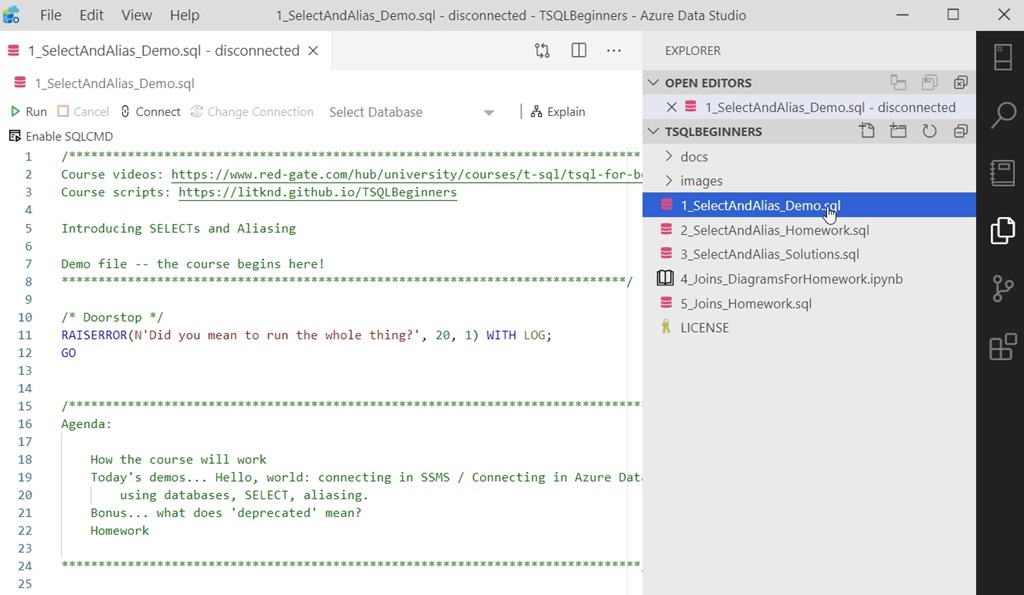
    Now I can open the first script in ADS. On top of seeing how Kendra teaches, I get to practice some ADS stuff.

    2020-05-01 10_17_28-1_SelectAndAlias_Demo.sql - disconnected - TSQLBeginners - Azure Data Studio

    I like the doorstop at the end, and I’ll have to think about that for my demo scripts. I’ve accidentally run the entire script too many times.

    Kendra walks through a number of query concepts with a series of basic SELECT statements, including an emoji for a column alias. I’m glad she lets you know which items are not recommended.

    The first course is helping you understand some of the ways in which you can get data from tables. You do need to have a slight understanding of what a table is, but Kendra helps you learn some of the strange ways that you can put together a statement. There is a lot to cover, but this should help someone that wants to learn some basics get started.

    There is also homework, included as part of the scripts in the course. The questions are at the bottom, and called out. A good way to get you to practice. I should do this for my work in places as well.

    2020-05-01 11_09_20-1_SelectAndAlias_Demo.sql - Plato_SQL2017.sandbox (Integrated) - TSQLBeginners -

    Pass this course along to someone that needs to get better at T-SQL. It’s not too fast or hard, and will let them be sure they have a grounding in good ways to write queries.

  • SQL Prompt Fixes Always Have an Else

    SQL Prompt is a fantastic coding aid, but it does more than format your code and provide intellisense. Over time, the team has enhanced SQL Prompt to also guide you along and fix some bad code that your team might write out of habit.

    SQL Prompt 10.1 released recently, and one of the recent fixes is for an issue that we’ve denoted as BP012. This is an issue where there is a CASE statement in code, but no ELSE has been defined. An example of this is shown below:

    SELECT 
      oli.OrderLineItemKey
    , oli.OrderID
    , oli.qty
    , CASE WHEN oli.qty < 10
             THEN oli.unitcost
         WHEN  oli.qty >= 10 AND oli.qty < 20
             THEN oli.unitcost * .05
         WHEN  oli.qty >= 20 AND oli.qty < 100
             THEN oli.unitcost * .1
         END AS UnitCost
    , oli.linetotal
      FROM dbo.OrderLineItem AS oli

    This is a problem because we often find some weird data being entered. You might think there will never be more than 100 ordered, but who knows. We should always have an ELSE clause, just in case.

    Why? Here is why.

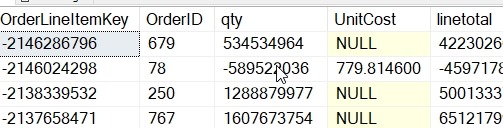
    2020-04-02 12_03_42-SQLQuery7.sql - Plato_SQL2017.sandbox (PLATO_Steve (57))_ - Microsoft SQL Server

    NULL is returned if you haven’t accounted for something.

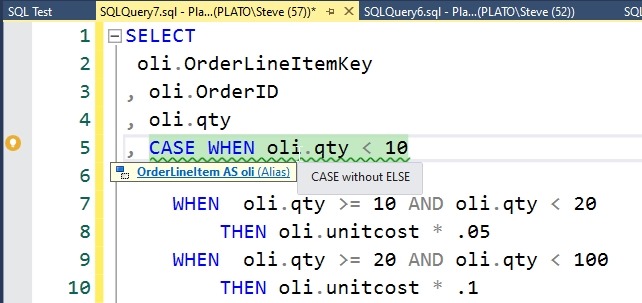
    If you hover over, you get the issue in a tip. If you put the cursor on the line, you get the lightbulb with the fixes on the side.

    2020-04-02 12_04_22-SQLQuery7.sql - Plato_SQL2017.sandbox (PLATO_Steve (57))_ - Microsoft SQL Server

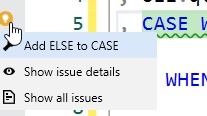
    As with other fixes, you can click the light bulb and see the fixes.

    2020-04-02 12_05_54-SQLQuery7.sql - Plato_SQL2017.sandbox (PLATO_Steve (57))_ - Microsoft SQL Server

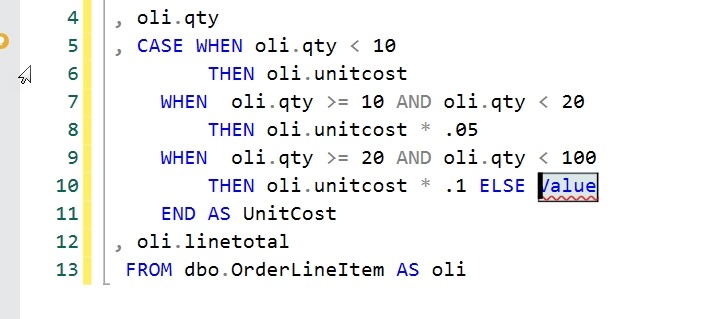
    When we click the top item, SQL Prompt will add an ELSE clause, with a placeholder and the cursor is here. You can start typing, and enter the expression or value that is appropriate.

    2020-04-02 12_06_03-SQLQuery7.sql - Plato_SQL2017.sandbox (PLATO_Steve (57))_ - Microsoft SQL Server

    This is another place where junior (or overloaded) developers may make a mistake. Having this in SQL Prompt allows this to be caught by the individual developer. Having this in SQL Code Guard (part of SQL Prompt and our automated build/deploy tools)  and an automated build also means the code is evaluated automatically and this certainly doesn’t go to QA.

    If you haven’t tried SQL Prompt, download an eval and see what you think. If you have it, upgrade and ensure you have all the code fixes.