Tag: Redgate

  • Save the Dates for Redgate Streamed

    We’ve got three days of online content coming your way from Redgate on Apr 1-3. There is a great lineup, and you can register for each day here:

    This is a tough time for many of us, being stuck at home, out of our routine, adapting to a new world. At the same time, companies are still trying to get work done, and they are recognizing the need for better software development, especially in remote scenarios.

    We’ve got a lineup of talented speakers, both inside Redgate and from our Friends and partners, that can help you break up your day, and learn about how you might build a more efficient process.

    Check out our schedule and join us when you want to learn a bit more or even just touch base with some other live humans in a similar situation as you.

  • Schema Filtering in SQL Prompt

    I love SQL Prompt, and I’m regularly impressed by the enhancements our teams continue to make in the product. One item that I found interesting recently was schema filtering. This post takes a quick look at this feature.

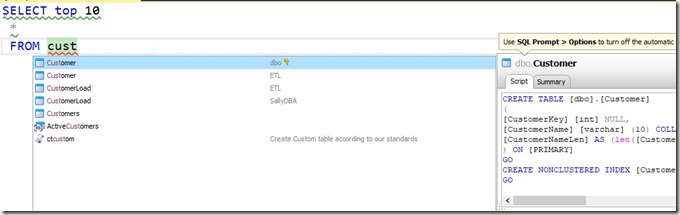
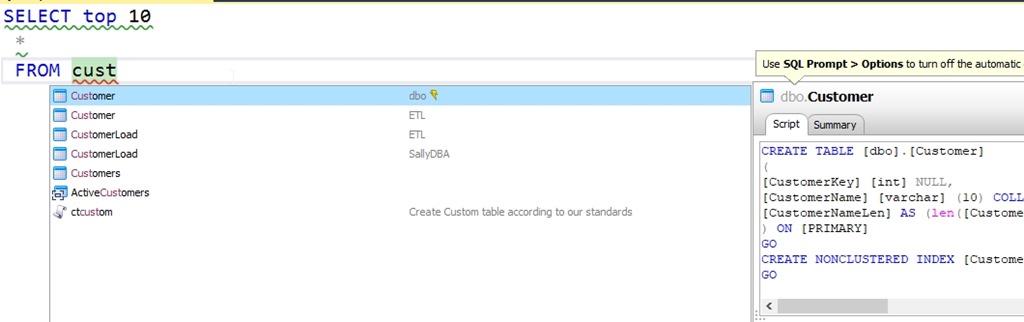
    If I go to look for an object, intellisense is amazing. In this case, I’ll type “SSF <tab> cust”. I’ll see this:
    2020-02-27 15_03_37-ObjectDefinitionBox

    There is the customer table first, and as we see on the right, this is the dbo.customer table. Below this, we see there is a Customer table in the ETL schema and two CustomerLoad tables, which are in two different schemas.

    I might actually be working in one of those schemas. Let’s say I’m an ETL developer. I don’t want to accidentally be coding against dbo.Customer when I want to use ETL.Customer. Certainly I might need each one, but in this case, I might just care about loading stuff into the ETL schema and want to work there.

    I can add filtering in SQL Prompt by going to the Options and then the Connections section. As you can see below, I have a drop down for schemas.

    2020-02-27 15_05_03-SQL Prompt – Options

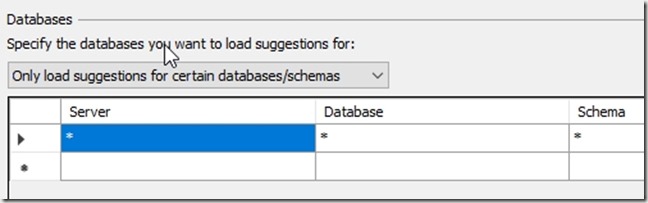
    The default is all schemas, in all databases, but I can change this. I can set a filter. In this case, I’ll choose the “Only load…” option. When I do this, I see a generic wildcard here.
    2020-02-27 15_06_45-SQL Prompt – Options

    I see schemas for all servers and databases. However, I can set filtering for a specific server and database. Or a database on all servers, or certain servers, but all databases. Here I’ll just edit the schema.

    2020-02-27 15_06_05-SQL Prompt – Options

    This will change behavior to only show the ETL schema in all databases on all servers. Now when I type the same thing, I see the ETL schema objects only.

    2020-02-27 15_08_32-ObjectDefinitionBox

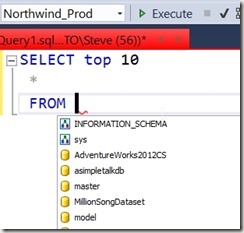
    Good, right? Plus, the refreshes and loads are faster. The downside here is that in another database, I see no tables.
    2020-02-27 15_09_14-CandidateList

    I can fix this, and just look in that one database by entering the database name. I’d suggest you set this by server and database, just so you are clear what behavior is happening, but it’s up to you.

    This was a request from developers that do work in some large schemas, and only want to see those objects. It’s been added to SQL Prompt, so update today, upgrade, or download a trial and give it a try.
  • Get the 2020 State of Database DevOps Report

    It’s live and available. You can download the report now and see how your software development might compare with others, and even get a few hints on what your organization might try to produce better software today.

  • Using Parameters in #SQLPrompt

    I am a big fan of snippets in SQL Prompt, often using them in demos to quickly get code written. However, I’ve liked the idea of snippets and templates for a long time. These are great time savers, and they can dramatically improve productivity and code quality.

    How? If you have certain constructs in your environment that developers struggle to remember or implement, make a snippet. This makes things very easy and consistent. It’s a great way to help younger developers learn as well.

    Here’s an example.

    Create Primary Keys

    I have worked with no shortage of developers that build tables like this:

    CREATE TABLE Shipper
    ( ShipperKey INT NOT NULL
    , ShipperName VARCHAR(100)
    , ShipperAddress VARCHAR(100)
    , ShipperCity VARCHAR(100)
    , ShipperRegion VARCHAR(20)
    , CountryCode CHAR(3)
    )
    GO

    This isn’t a great design, but more importantly, deploying this results in a heap. Perhaps another issue is that there are no indexes, which isn’t usually a good idea.

    A better idea might be a table like this:

    CREATE TABLE dbo.Shipper
    ( ShipperKey INT NOT NULL CONSTRAINT ShipperPK PRIMARY KEY
    , ShipperName VARCHAR(100)
    , ShipperAddress VARCHAR(100)
    , ShipperCity VARCHAR(100)
    , ShipperRegion VARCHAR(20)
    , CountryCode CHAR(3)
    )
    GO
    CREATE INDEX Shipper_Region ON dbo.Shipper (ShipperRegion)

    Now we can’t template all of this, but we can do a few things. I’ll show you how Prompt facilitates this.

    A Customized Snippet

    Let’s start with the basic code. I know I need a table name, I’ll want a PK, and I want to help someone add at least one index. With that in mind, I’ll build this snippet code. Note that I’ve replaced the table name with a parameter. I did this with a search and replace in the script.

    CREATE TABLE dbo.$TableName$
    ( $TableName$Key INT NOT NULL CONSTRAINT $TableName$PK PRIMARY KEY
       $CURSOR$
    )
    GO
    CREATE INDEX $TableName$_ ON dbo.$TableName$ ()

    You can see this in the SQL Prompt Snippet Manager. Note that the parameter (or placeholder) has been inserted in the bottom by Prompt.

    2019-12-10 21_07_39-SQL Prompt - Create New Snippet

    One other thing I might do is add a schema placeholder like this:

    2019-12-10 21_08_35-SQL Prompt - Create New Snippet

    Note that I’ve added a default for schema, as this is usually dbo. I’ll also click the up arrow to the right to ensure schema is entered first.

    Now, let’s use this. I’ll save this and close the options. Then in a new query window, I’ll type my snippet beginning as “crt”. I see this:

    2019-12-10 21_09_41-CandidateList

    My snippet is listed. I can select it and I’ll then see this code. See how Prompt has inserted my snippet, but already highlighted the schemaname parameter and given me the intellisense of the schemas in my database.

    2019-12-10 21_11_28-SQLQuery4.sql - Plato_SQL2017.sandbox (PLATO_Steve (64))_ - Microsoft SQL Server

    I’ll type dbo and Enter. Prompt moves to the next placeholder parameter. Here I see TableName highlighted all over.

    2019-12-10 21_12_31-SQLQuery4.sql - Plato_SQL2017.sandbox (PLATO_Steve (64))_ - Microsoft SQL Server

    If I type “Shipper”, I see this.

    2019-12-10 21_12_40-SQLQuery4.sql - Plato_SQL2017.sandbox (PLATO_Steve (64))_ - Microsoft SQL Server

    Now I’ll hit Enter again. This time Prompt puts the cursor where I need it to start entering other columns.

    2019-12-10 21_13_45-SQLQuery4.sql - Plato_SQL2017.sandbox (PLATO_Steve (64))_ - Microsoft SQL Server

    I can easily enter my columns, and now my table has a PK. What’s more, if I enter a few columns and run this, I’ll see an error.

    2019-12-10 21_14_33-SQLQuery4.sql - Plato_SQL2017.sandbox (PLATO_Steve (64))_ - Microsoft SQL Server

    The table was created, but the index statement isn’t correct. While this doesn’t necessarily ensure developers follow naming standards or create an index, at least this will get them to think about it. They can correct the statement by adding a column to the index statement between parenthesis, and hopefully change the name.

    If you haven’t seen how Prompt can really improve your coding, download an eval today and give it a try. If you have it, take advantage of snippets.