Tag: security

  • Testing as another user–#SQLNewBlogger

    Another post for me that is simple and hopefully serves as an example for people trying to get blogging as #SQLNewBloggers.

    This is one of those things I do often and thought I should write a short blog on the topic. Often I want to check how another user can interact with some object. I could certainly open a new window or change my connection string, but that can be disruptive. Not to mention I sometimes get confused about which user is in which window in SSMS or ADS.

    There’s a better way. I can use the EXECUTE AS USER statement.

    Testing Access

    Here’s a quick example. I create a new table with Dynamic Data Masking. I want to see if another user sees masked content. Here’s my table:

    CREATE TABLE dbo.Subscriptions (
        UserID int,
        SubscriptionName VARCHAR(200),
        SubscriptionValue MONEY MASKED WITH (FUNCTION ='random(100,1000)')
    );
    GO
    INSERT dbo.Subscriptions
         (
             UserID
           , SubscriptionName
           , SubscriptionValue
         )
    VALUES
         (1, 'My first sub', 50.99),
         (1, 'Time', 24.99),
         (1, 'ESPN Mag', 19.99),
         (1, 'Popular Mechanics', 19.99),
         (1, 'The Guardian', 24.99)
    GO

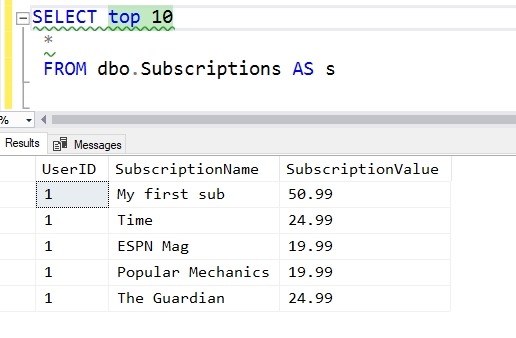
    When I access this, I see this data:
    2019-04-08 11_23_41-Window

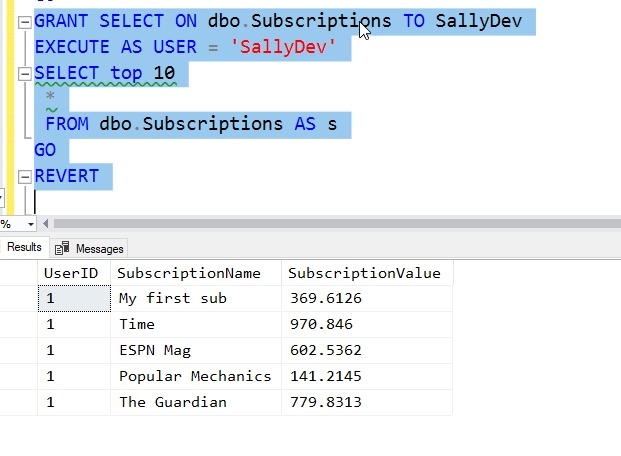
    What does SallyDev see? I could log in as this user, but this is easier:

    GRANT SELECT ON dbo.Subscriptions TO SallyDev
    EXECUTE AS USER = 'SallyDev'
    SELECT top 10
      *
      FROM dbo.Subscriptions AS s
    GO
    REVERT

    Now I see this:
    2019-04-08 11_24_49-Window

    The EXECUTE AS USER allows me to simulate another user. The REVERT brings me back to my context.

    Use this to make testing easier.

    SQLNewBlogger

    I was using this technique recently and realized the I hadn’t blogged about it. I spent about 5 minutes creating a scenario and 5 minutes putting this together. You could do this, show some knowledge, and explain how this helps your scenario.

  • What’s Worse than Announcing a Data Breach?

    What’s Worse than Announcing a Data Breach? You might think that’s the worst thing that you could tell your boss these days. Imagine discovering that sensitive data has been exposed and you need to go inform an executive. Hopefully no one is looking to punish the messenger, but it will still be a very uncomfortable conversation.

    Now imagine that you need to go back and have a second discussion a day or two later. Why? More data was exposed, and potentially lost. I’m not sure which conversation is worse, though if you don’t have a list of things you’ve checked, changed, or fixed between the two meetings, I would argue the second one is worse.

    That happened to a mortgage loan company. The data breach was already bad, with an Elastisearch server out there without any security. Data had been converted from paper documents through an OCR process, which resulted in no shortage of mistakes, but there was still plenty of sensitive information out there. Things got worse when security researchers discovered the source of the OCR process was an Amazon S3 bucket that container the original images, also without a password.

    Before I comment on anything else, there should be NO shares, buckets, containers, databases, or any sort of server without a password. None, nada, zip, zilch, no excuses. At least protect everything with a password that meets your organizations password requirements. No “12345” or “asdf” or default passwords. Before you do anything else, go set passwords. If you have S3 buckets or Azure storage, write a script to check them all. Set. A. Password. On. Everything.

    We will all make mistakes in configuration, and there might be security issues at times. These ought to be rare, with today’s vulnerabilities scanners, static code analysis, configuration as code, global policies, etc. There really isn’t any excuse why we don’t set things up at the beginning, but if things change and mistakes are made, we ought to detect them quickly. And then fix them. That’s why we should use automation, configuration as code, and regular evaluation of our systems.

    One of the greatest strengths of the DevOps philosophies is that we can deploy changes quickly to fix things. We’ll make mistakes, we’ll have issues, but when we find them, there is no long waiting period to get the fix into our client’s hands. That ought to be true for both software and infrastructure.

    Steve Jones

    The Voice of the DBA Podcast

    Listen to the MP3 Audio ( 3.3MB) podcast or subscribe to the feed at iTunes and Libsyn.

  • Who Are Your Authenticated Users?

    I ran across a data breach at Dow Jones, the parent company of the Wall Street Journal newspaper. Apparently there was a database export that was stored on an Amazon S3 bucket. A security researcher discovered this and notified the company. Once the issue was corrected, the article linked above was published.

    The details note that the security on the bucket was set to authenticated users, which is good. So, some security was set up. To me, if I were operating in an Azure or AWS environment, I would assume this meant authenticated users in my subscription/account/etc. In other words, my business partners and employees.

    That’s not the case. This means anyone with an AWS account, which means anyone bothering to register for an account because they’re free. This meant that anyone, from security researchers to criminals to any of you that do work in AWS, could have downloaded the data. The report was released after security was changed, which is a responsible approach. We, as an industry, need to know about these things, but we also don’t want to unnecessarily expand a data breach.

    Since this has been published, however, it’s likely that plenty of people are scanning S3 buckets, looking for data that has “Authenticated Users” as a security setting. If you have any doubts, check and change your security now. This setting amounts to “public” since anyone can get an AWS account in a couple minutes. Double check your account and ensure security is set to meet the requirements of your organization.

    Steve Jones

    The Voice of the DBA Podcast

    Listen to the MP3 Audio ( 2.5MB) podcast or subscribe to the feed at iTunes and Libsyn.

  • Republish: Serious Hacking

    I’m off today, attending the MVP Summit in Washington. Enjoy Serious Hacking.