Tag: security

  • Changing the Default DB for a Login–#SQLNewBlogger

    Another post for me that is simple and hopefully serves as an example for people trying to get blogging as #SQLNewBloggers.

    Recently I got into a bit of a pickle. I was detaching some databases for a demo, which is something I do periodically to make it easier for someone to see what’s doing on. The database detached fine, and I ran my demo.

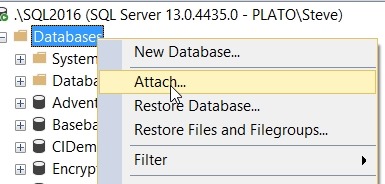
    Then, as a sysadmin, I right clicked to attach a database back.

    2017-10-23 15_59_17-SQLQuery6.sql - (local)_SQL2014.SimpleTalk_1_Development (PLATO_Steve (57))_ - M

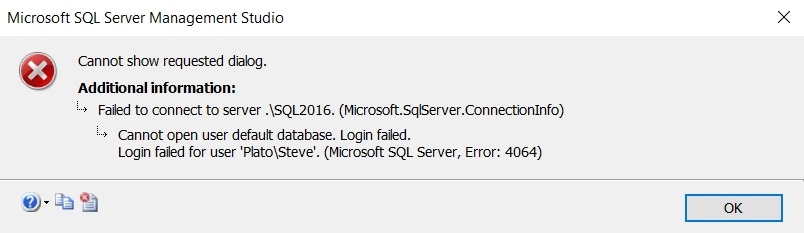
    and all of a sudden I get this error:

    2017-10-23 15_59_08-Microsoft SQL Server Management Studio

    Interesting. I could have attached the database back from the command line, or with dbatools, but I thought this was interesting. As I go to the attach dialog, a new connection is made. However, in this case, the default database for my sysadmin account was the one I’d detached.

    Fortunately, this is easy to fix. First, I opened a query window with master as the specific database:

    2017-10-23 16_01_20-Connect to Database Engine

    Then, I have a couple options to reset my default database. For old SQL Servers, many of you might have used sp_defaultdb. That’s marked as a deprecated procedure, so ALTER LOGIN is the new way. The syntax uses the WITH to include various options. In my case, I needed the DEFAULT_DATABASE item. This was my code:

    ALTER LOGIN [PLATO\Steve] WITH DEFAULT_DATABASE = MASTER

    If you are on an older version, something like this will work:

    exec sp_defaultdb @login = ‘Steve’, @defaultdb = ‘master’

    Once that was done, the GUI dialog worked. A quick and easy fix in this case.

    SQLNewBlogger

    As soon as I found the error, I knew what was happening. Resetting the default database took less than a minute, but I decided to spend 10  grabbing a few screenshots and putting this post together.

    You could do the same thing. Show that you can recover from errors.

  • A Tour of SQL Server Security Features

    Abstract

    Protecting data from unauthorized access becomes more important all the time. SQL Server includes a number of features that make data protection and security easier for developers and DBAs with a framework for protecting data. Come learn how Always Encrypted, TDE, Row Level Security, Dynamic Data Masking, and column level encryption can protect your systems.

    You will learn:

    • About the different encryption and security features in SQL Server
    • Understand the code changes required for encryption mechanisms
    • Gain a basic understanding of RLS and DDM, which do not require code changes to help protect data

    Level: 100

    Demos

    This talk includes the following demos

    • Always Encrypted setup and data access
    • Row Level Security setup and use
    • Dynamic Data Masking for users
    • Column Level Encryption implementation
    • TDE setup and verification
  • The Blame Game

    Make no mistake, this is going to be something that happens again. The former CEO of Equifax blames their massive data breach on a bad scanner and a person. I’m not talking about a data breach, of course those are going to happen, and when they do, assume that every piece of data in the system is compromised. I know some digital forensic scientists are really talented, but is a company that didn’t necessarily pay attention to security in the first place going to ensure the analysis is done right? Not likely. Assume every record is compromised.

    In this case, the former CEO calls out a person that made a mistake, and then says technology failed. I don’t think that’s true, and I’d agree with Patrick McKenzie, who has a good thread on Twitter. A bad engineering decision, or even a process, is the result of multiple people making mistakes. Certainly there are people that must back up the Apache Struts patch person when they’re on vacation. Or there should be. If there isn’t, then that’s a management failure at multiple levels.

    The thing that concerns me is that we, as tech workers, are going to be blamed going forward. The individual isn’t named here, but I bet at some point they will be. And some, or many, tech workers will get sacrificed for a company that wants to show contrition and action for security mistakes. It’s common for someone to take the blame, but I haven’t seen a specific person be identified (or their inaction be called out) in the past. I’m sure some tech people were probably fired after previous incidents at large companies, but not publicly.

    While the person wasn’t named, there was a report that this individual was no longer employed. Fired? Quit? Who knows. Certainly it’s likely that once this breach became public, anyone who might have been responsible for watching CERT lists, applying patches, or anything to do with Apache Struts might be blamed. In fact, I don’t know I’d want to continue working at a company that might publicly blame my role for a massive breach. My career might be dead with that management, so I might as well move on. Much easier for everyone to blame me than accept responsibility.

    This is the first time I’ve seen an IT employee blamed. BA said an IT systems failure with their major issues. Yahoo and Target were hacked, but no one in IT was blamed. Sony didn’t blame their IT staff after their emails and films were released. Yet Equifax did. I hope this isn’t a sign of things to come.

    Steve Jones

    The Voice of the DBA Podcast

    Listen to the MP3 Audio ( 4.5MB) podcast or subscribe to the feed at iTunes and Libsyn.
  • Enabling Database Containment for an Instance – #SQLNewBlogger

    Another post for me that is simple and hopefully serves as an example for people trying to get blogging as #SQLNewBloggers. This is also a part of a basic series on git and how to use it.

    I wanted to test a contained database feature the other day and ran this:

    ALTER DATABASE [sandbox2] SET CONTAINMENT = PARTIAL WITH NO_WAIT
    GO

    However, this didn’t work. I ended up with an error:

    Msg 12824, Level 16, State 1, Line 3

    The sp_configure value 'contained database authentication' must be set to 1 in order to alter a contained database.  You may need to use RECONFIGURE to set the value_in_use.

    The issue is that the server instance needs to have contained authentication enabled in order to pass any authentication requests to the database

    EXEC sys.sp_configure N'contained database authentication', N'1'
    GO
    RECONFIGURE WITH OVERRIDE
    GO

    Now I can run the code again to alter the database for containment.

    SQLNewBlogger

    The issue was obvious to me since I’d dealt with it in the past, but this is something you could solve and write up in 10-15 minutes.