Tag: security

  • Classifying Data with SSMS 17.5

    I upgraded SSMS to 17.5 recently and found an interesting addition. This version has incorporated the ability to classify data. With the GDPR coming for many of us, this is a welcome addition.

    This is a quick look at this feature.

    Classify a Database

    If I select a database and right click it in SSMS, I get a few new items in the Tasks menu (as shown).

    2018-02-16 13_15_58-SQLQuery1.sql - Atlas.master (sa (51))_ - Microsoft SQL Server Management Studio

    I’ll select “Classify Data”, and I get a new tab opened. I see there are some recommendations and also a list of classifications of data.

    2018-02-16 13_16_28-Data Classification - NBA - Microsoft SQL Server Management Studio

    There’s a getting started link, which takes me to the SQL Server Security Blog. I suspect that’s an incorrect link. I think it should go here: SQL Data Discovery and Classification.

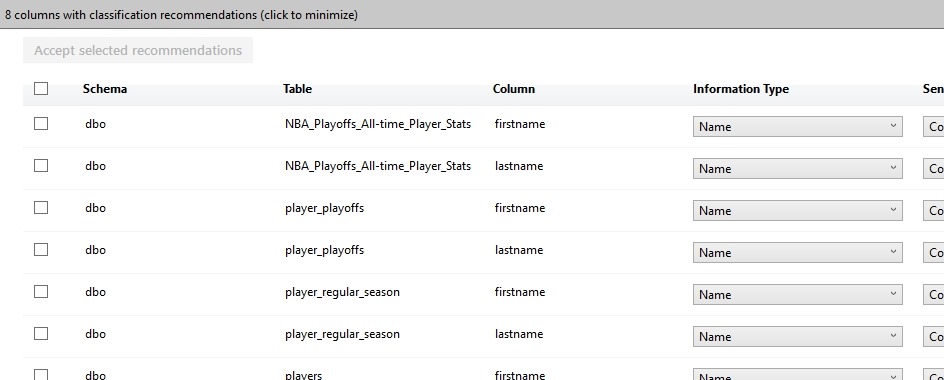
    Below this, I see a list of the recommendations. This has grabbed tables that appear to continue to contain some data that might be sensitive and require classification. One of the tenets of the GDPR  is that you know your data. You aren’t allowed to figure this out later, but rather you must proactively know what data you are collecting and processing.

    2018-02-16 13_17_47-Data Classification - NBA - Microsoft SQL Server Management Studio

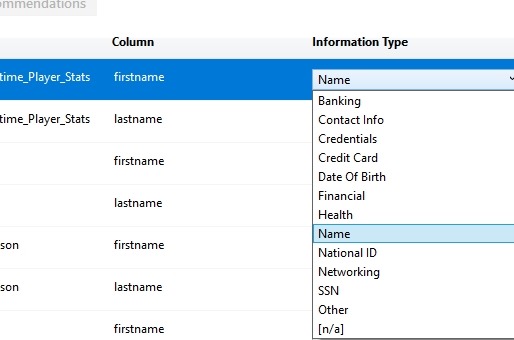
    Here we can see a few drop downs to the right. I’ll scroll and look at these. First is the Information Type. This is listed as a name, but I have other options I can set. The list is the types of that that might be sensitive information about a data subject (a human or entity) that I need to classify.

    2018-02-16 13_19_36-

    Beside this is the sensitivity label. My choices here are shown below. These range from public information, which removes some of my responsibility to highly confidential and applying to the GDPR.

    2018-02-16 13_21_14-Data Classification - NBA - Microsoft SQL Server Management Studio

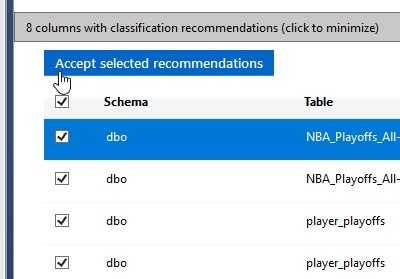
    If I’m happy with these recommendations, I can select them all (or a subset) on the left. I can click the “Accept” button to add them to the classifications I have for this database.

    2018-02-16 13_22_07-Data Classification - NBA - Microsoft SQL Server Management Studio

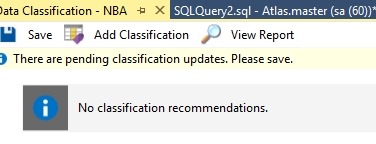
    This doesn’t save them, but adds them to the list. At the top of this tab I can see the need to “Save” my changes.

    2018-02-16 13_22_13-Data Classification - NBA - Microsoft SQL Server Management Studio

    Once I’ve done this, I could add more, or view a report. The report shows me this:

    2018-02-16 13_22_26-Data Classification - 2_16_2018 1_22 PM - PLATO_SQL2016 - Microsoft SQL Server M

    Implementation

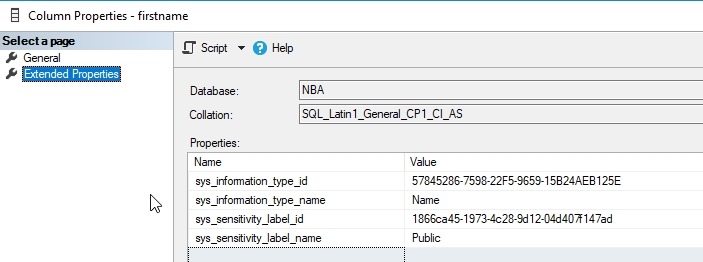
    My guess was that these are implemented as extended properties, which makes sense. That’s how many things could make SQL Server better, and I’m right. If I examine the EP for the firstname column in one table, I see this:

    2018-02-16 13_26_46-Column Properties - firstname

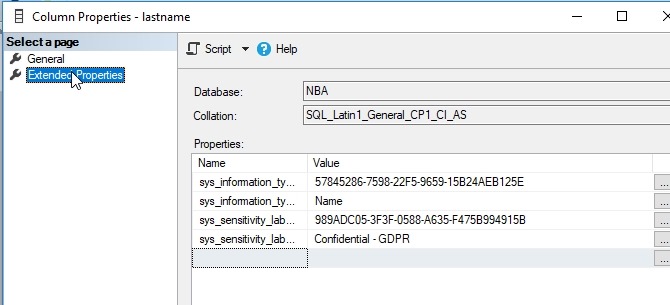
    This was the column I changed to public information. The lastname column in the same table is marked as confidential.

    2018-02-16 13_26_55-Column Properties - lastname

    Helpful?

    Ultimately is this useful? Yes. I can see other products taking advantage of this, such as the new Data Masker from Redgate, which could let you know which columns are sensitive and not masked. I’d also expect that this is useful and important for ETL and other operations to carry this metadata to new columns that might contain transformations or movement of this data.

  • Enabling Guest in a Database–#SQLNewBlogger

    Another post for me that is simple and hopefully serves as an example for people trying to get blogging as #SQLNewBloggers.

    The guest account exists in all your databases. This is installed by default, and guest is used to map a login that doesn’t otherwise have access to a database.

    Sound scary?

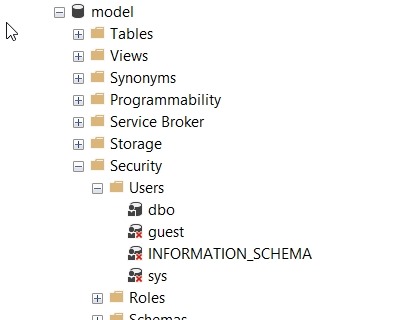
    It should. This would be bad if any login could connect to any database, potentially reading data using the guest account. Fortunately Microsoft has done two things. First, guest is disabled in all user databases. This is because it’s disabled in model, which is our template.

    2018-02-08 08_51_24-SQLQuery8.sql - (local)_SQL2016.AdventureWorks2014 (PLATO_Steve (74))_ - Microso

    Second, guest is typically assigned no rights. It’s a member of the public role, which also has no rights by default.

    Enabling Guest

    If you want to allow anonymous access for logins through the guest account, it’s easy. Be wary and careful of doing this and be sure you understand what rights have been granted to public if you do this. In general, I’d expect auditors and any compliance/security officers to be against this, but you should check.

    The user exists already, and just needs the CONNECT permission to get enabled. You can do this with this code:

    GRANT CONNECT TO guest

    If you want to remove permission, use

    REVOKE CONNECT FROM guest

    That’s it. Remember, by default this user can’t access any objects. I would recommend you not grant rights to guest, but use roles. Either one of the built in ones, or better yet, create your own role and choose limited permissions.

    SQLNewBlogger

    One of the ways you can showcase your knowledge, show you’re learning, and show you’re motivated to enhance your career is blogging. This post is an example of what you could write, in your own words, about something you’ve learned.

    This one took my about 5 minutes after I’d spent a little time getting guest enabled for a test project.

  • We Do Need To Upgrade

    I advocate that we should get a long life from our database platforms. In fact, I like to think about a 7-10 year lifetime for many of my database instances. That means I’ll get beyond the 5 year lifetime that Microsoft provides and move into the extended support. Actually, for most of my career, I’ve run instances without support and haven’t had issues. We invest a lot in databases, and I want companies to invest a lot because they are important. That means I need a good payback.

    Microsoft should provide security patches for products throughout the Extended Support period, which means that I should be able to run SQL Server and Windows securely for 10 years. that probably stretches the lifetime, but certainly that gives me time after five years to begin planning and prepping for an upgrade.

    The problems for many customers come when other vendors don’t bother to keep supporting older software and providing patches. Even if Microsoft releases a security fix for your OS, the vendor that makes software you run on top of Windows or SQL Server might not. That’s an issue, and it’s one that will become more of an issue as companies become reluctant to change software that works well.

    This article shows that older ATM machines running XP and Windows 7 are having issues. Some of this is physical access, but some is related to issues in the OS. While Windows 7 should be getting patches, Windows XP is not and needs to be upgraded. In fact, I’d argue that any losses here should be born by ATM owners and not covered by insurance for not having upgraded their systems.

    While I like to get as much time as I can from a system, it’s irresponsible to expect software to run without security patches being actively applied, which includes any upgrades from vendors. In some cases, this might be negligent by the companies doing so, especially for embedded systems. I don’t know that I want governments to force vendors to provide patches, but I’d like companies to write contracts that ensure that patches will exist for come lifetime of the products. In the event the company can’t provide patches (or certification), then they’d need to release their code as open source so that someone can provide a patch.

    The world becomes more intertwined and dependent on computing, from things like convenience services or core systems. We can’t have those systems becoming more vulnerable because companies are unwilling to upgrade and vendors abandon older software. Some sort of compromise is needed to ensure that computer systems are protected from known vulnerabilities.

    Steve Jones

  • Are You Patched?

    It’s been a few weeks since the Spectre/Meltdown bugs were announced for most CPUs. Microsoft has been working hard to build patches, and they’ve provided fixes for Windows and SQL Server. Other manufacturers have released fixes for other platforms, though I wouldn’t be surprised if more patches are coming. We put together a page at SQLServerCentral with information and links, and if you haven’t checked it out, you should.

    If you haven’t patched systems, patch them ASAP.

    This is a bad bug, affecting many CPUs, across multiple architectures, and includes potential issues with virtual machines. The guidance and conversations I’ve heard from various vendors is that many of them aren’t completely sure of all the potential risks or attack vectors, but they are worried that customers will leave this vulnerabilities open in the future. Since this affects hardware, it’s entirely possible that an exploit could read memory from other applications and processes.

    Again, if you haven’t patched systems, patch them.

    There are reports of potential issues, so everyone certainly needs to test systems. Perform a P->V (Physical to virtual conversion) and patch a VM. Make sure the server still runs. If you’re on VMs, snap a copy and patch it as a test. Older processors might see a performance penalty with the patch, but worse performance is better than having a security hole in your CPU available to operating systems.

    This is the type of fundamental architectural bug that’s is very worrisome. The race to be efficient, to copy what works from others, this leads to less innovation not more. I hope that this is a bit of a lesson that we do need separate architectures and approaches to computing problems, both in hardware and software. I love relational databases, but I’m glad that there are other types of systems being used for data storage. I think Windows works really well, but I like competition and think it’s good that we have MacOS, Linux, and more.

    It’s good to have standards and interoperability, but I do think that a heterogeneous environment is good for security, and I hope the world continues to try new architectures as we advance computing ever further.

    Steve Jones

    The Voice of the DBA Podcast

    Listen to the MP3 Audio ( 3.1MB) podcast or subscribe to the feed at iTunes and Libsyn.