Tag: security

  • Getting Started with Encryption in SQL Server 2016

    The release of SQL Server 2016 gives developers a number of ways in which they can securely encrypt and protect their data. In this introductory session, you will learn about the encryption options in SQL Server 2016, watching Always Encrypted, TDE, Row Level Security, Dynamic Data Masking, and server side column encryption can secure and protect your data from unauthorized users.

    Length: 60-75 minutes

    Code: Github

    Powerpoint deck: Getting Started with Encryption in SQL 2016.pptx

  • Changing the sa Password with SSMS–#SQLNewBlogger

    Another post for me that is simple and hopefully serves as an example for people trying to get blogging as #SQLNewBloggers.

    I wanted to make a quick note on changing the sa password, as this is a sensitive account, and the password should be changed if you ever suspect it is compromised. I’d also recommend you change this if anyone that knows the password leaves your group.

    Changing sa with SSMS is really simple. Follow these steps:

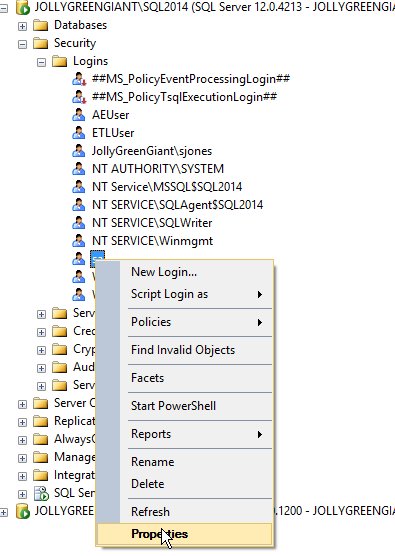
    Connect to SSMS as a sysadmin. You can check this for your login. Then expand the Security folder and the Logins folder. Right click the “sa” account and choose properties.

    2016-04-06 12_40_31-Photos

    Once you do this, you’ll get the login properties dialog, and see the Password text field at the top in the General tab.

    2016-04-06 12_42_22-Photos

    You can type a new password in the Password box, and confirm this in the Confirm Password box. Password policies checks are up to you, though I’d recommend you use them.

    Click OK and the password is changed. You can then connect a new query window as “sa” and verify your password.

    SQLNewBlogger

    Make sure you know how to do this. It’s a basic skill, so learn it, blog about it, and use it where appropriate. Maybe write about why you’d do this in your own post.

  • MDF File Password Confusion

    I had never seen this, but I ran across a blog that mentioned an MDF File password here. The post really looks at ways to reset the administrator password for the “sa” account in SQL Server. However it has some mistakes and issues. I tried leaving a comment, but comments are disabled.

    With that in mind, I decided to respond to a few things and clear up confusions.

    With regards to the post, I think it’s confusing in that the text notes an MDF file password, but all the instructions are really about resetting the “sa” account password. sa is the built in sysadmin account in SQL Server, which isn’t related to the MDF file. The MDF file is the extension of the main data file for a database. You can change this, but there isn’t a good reason to do so. Note, the .ndf files are the same format, though by convention, these are the 2nd, 3rd, and other files added to a database.

    There also isn’t a password on these files. I can open them in notepad (not recommended) or xvi32, and there isn’t any requirement if I have read access in NTFS to the file. It doesn’t matter if this is the master database or any user database. If you have NTFS permissions, you can read the file.

    Now interpreting is different. SQL Server interprets this, and it requires permissions itself to access the server process, either sysadmin, or normal login. However, you can use ORCAMDF or MDF Viewer, or some other tool to read the files. The information contained in an mdf/ndf file is just formatted in a certain way. If you spend a lot of time, you will understand how to interpret the format.

    Changing the sa password requires that the SQL Server service be running and you connect in some way. The post gets the methods right, but says that you must stop the service, which is only needed if you access the file some other way (ORCAMDF, xvi32, etc.). If you want to change the sa password, there are a few choices:

    1. USE SSMS
    2. Use SQLCMD
    3. Use osql
    4. Use one of the above methods with SQL Server restarted in single user mode
    5. Use a third party utility.

    Any of these first four will work, and feel free to use whichever fits your situation. The last one is one I do not recommend as I can’t be sure any third party products will work correctly here.

    Ultimately I’m a little embarrassed by this post, as it appeared through our syndication process on SQLServerCentral. We don’t review these posts, so there is no quality control. Most of the posts on this blog are good ones, but this one appears to be by a guest author and it’s one I’d ignore.

  • Track Your Consultants

    If you pay attention to security issues in software, you’ve probably heard about man-in-the-middle attacks. These can occur more frequently than you expect, though inside of a company, it’s more unlikely that you’ll experience one if you have some fairly basic security controls on your network.

    However, if you invite someone inside of your network, such as a consultant of some sort, you should be more vigilent. There’s a great post showing how someone can execute a MITM attack against SQL Server. It’s in depth, showing exactly how packet captures lead to the ability to hijack a session and create a new login.

    If this seems like a lot of work, it is. However once the attack is built, this could easily be run by anyone inside of your network. I could see consultants running this type of attack and storing credentials they’ve created for use many months later. These could be sold later to someone that might use them in a website or other application to gather data from outside of your network.

    Defending against these types of attacks is hard. Certainly not allowing free access for consultants is key, though a quick command line execution of a script might not be something that’s easily noticed. At the very least, sysadmin logins should be monitored, and any changes to this list investigated immediately. However, I’d also say any built in server role changes should be checked and verified as being valid alterations. Even your SQL logins shouldn’t change without administrators being aware.

    Monitoring your systems is a big part of security. You might not prevent many of the attacks, but knowing they’ve taken place allows you to respond and potentially protect sensitive data.

    Steve Jones

    The Voice of the DBA Podcast

    Listen to the MP3 Audio ( 2.6MB) podcast or subscribe to the feed at iTunes and LibSyn.