Tag: security

  • Forcing Strong Passwords

    It seems that every week we have some sort of data breach that results in emails and passwords for users being released. That alone is a good reason why you should not have passwords shared across sites or systems. I can’t stress this enough, and if you do this, please go get a password manager today and stop. Really, I mean it.

    However is it just the users that create poor passwords? In many cases, sure. However as the people that develop software, we can help. In fact, we should. Security should be on the mind of everyone that writes software.

    I ran across a piece on The Hacker News that says far too many sites don’t require users to choose strong passwords. I think this is changing, but far, far too many sites don’t check a user’s password for strength, or reuse. Some even force users to choose less than ideal passwords. I’ve run into plenty of sites that don’t accept the characters in my strong passwords for some reason. Often the length or addition of any special characters if prohibited.

    I’ve said it before, but I’ll note it here. Most of us aren’t competent at writing authentication routines and should just use one that’s already written and been vetted. More importantly, we should be sure the code, application and database, is modular enough and can be replaced if we find that our application needs stronger security. Because it will. We are constantly racing Moore’s law to implement better security.

    Steve Jones

    The Voice of the DBA Podcast

    Listen to the MP3 Audio ( 1.9MB) podcast or subscribe to the feed at iTunes and LibSyn.
  • Limiting Database Permissions for DLM Dashboard

    I was talking with some of our support people recently about permissions on DLM Dashboard. A client was having issues, and we weren’t sure what was wrong. As a result, I decided to dig in a bit and see how limited I could be with permissions for the login/user that is used to track changes.

    My first step was to create a new login in SQL Server, giving the public server role and then granting very limited permissions in master and the Redgate database. Those permissions were:

    • master – VIEW ANY DEFINITION
    • master – execute on dbo.RG_SQLLighthouse_ReadEvents
    • RedGate – SELECT ON SQLLighthouse.DDL_Events

    That’s a nice, limited set of permissions. You do need sysadmin for setup, but after that, you can set these permissions for the user that you’ve configured in DLM Dashboard. The permissins are documented on the DLM Dashboard documentation site.

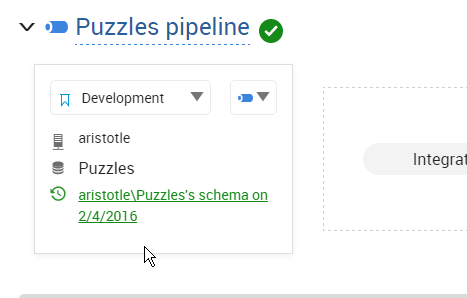
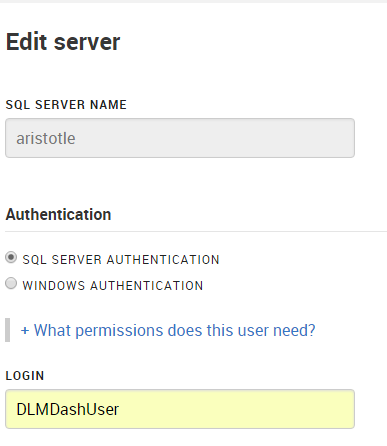
    In my case, I have a login/user, DLMDashUser, configured in the tool.

    2016-02-04 17_32_21-New notification

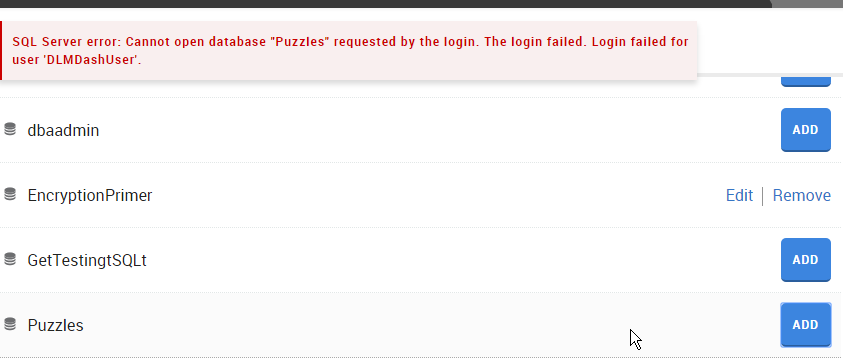
    I then went to add a new database on my local instance.  However since this login isn’t mapped to a user, nor has any high server privileges, I got an error.

    2016-02-04 17_08_18-Movies & TV

    To fix this, I connected to my instance and modified the user. Scripting is a better way to do this, and in my case, I used this script:

    USE Puzzles
    GO
    CREATE USER DLMDashUser FROM LOGIN DLMDashUser;
    GO
    GRANT SELECT ON sys.sql_expression_dependencies TO DLMDashUser
    GO

    This grants the necessary permissions to a new user in this database. You can save this script, which is especially handy for production systems where we don’t want monitoring tools to have elevated permissions.

    Now when I go to add the database, I click add and it works.

    2016-02-04 17_09_02-Movies & TV

    And I can then see the database in my monitoring dashboard.

    2016-02-04 17_09_23-Start

    The principle of least privilege should apply everywhere, certainly in production, but also in development. If you limit permissions in development, you might cause a few headaches, but you’ll understand the issues and solve them early on. More importantly, if you have security flaws, they aren’t in production systems where data is exposed.

    SQL Server security isn’t that hard, but it can be cumbersome. Set it up properly in development, keep your scripts (even from the GUI), and then use those scripts for your production systems.

    NOTE: Typically I’d create a role for this system, which is perhaps what I should do. Having a role like this would make switching users in DLM Dashboard at some point much easier.

    CREATE ROLE Monitoring
    GO

    GRANT SELECT ON sys.sql_expression_dependencies TO Monitoring

    GO
    ALTER ROLE Monitoring ADD MEMBER DLMDashUser

    In fact, I just changed to use this role, and added the role to the other databases so that my dev system is propery set up.

  • The Digital Woes of Public Records

    Researcher Chris Vickery, discovered that 191 million voter records are available to the public. The information was in a database on the Internet, which seemed to be a collection of voter records and information compiled from public sources in various US states. While no Social Security numbers were present, names and dates of birth, as well as address and voting scores were in the database.

    That’s scary, though potentially not a problem. A number of states publish voter data as public records. A few might have restrictions on the use of that data, but the fact that the data is available means it could be used maliciously, with overburdened authorities unlikely to prosecute anyone even if they’re caught.

    This is one of those areas where our understanding and control of data hasn’t caught up to the digital age. It is one thing when public data is available to those that must physically search for it, or even query for singleton records. However data can reveal much more information, or even be used in new ways when large volumes of it is available. Now the ability to access every voter’s name, address, and date of birth could potentially be a problem.

    I see so much data that we might have taken for granted in the past, thinking nothing of it’s visibility, being a problem in the future. When someone can gather large amounts of data, and store is cheaply, even accessible in something like a data lake, we may find that public data is problematic. When anyone can start to gather and combine lots of data from different sources, we might find that capability quite scary as potentially lots of information about individuals can be determined. We’ve seen anonymous data sets de-anonymized with the application merge of data from different sources.

    I truly hope that we find ways to better protect and ensure privacy in the future, as all the capabilities and power that computing brings to data analysis truly has a dark side.

    Steve Jones

    The Voice of the DBA Podcast

    Listen to the MP3 Audio ( 2.4MB) podcast or subscribe to the feed at iTunes and LibSyn.
  • Creating a User Without a Login

    Another post for me that is simple and hopefully serves as an example for people trying to get blogging as #SQLNewBloggers.

    This is one of those simple things that many people should be able to do in order to build in better security for their database code. However I’m sure many people haven’t ever built one. I ran into this recently, and thought it would be a great SQLNewBlogger post.

    Creating the User

    It’s a bit anticlimactic, but creating a user in a database without a login is simple:

    CREATE USER UpdateStatsUser
    WITHOUT LOGIN WITH DEFAULT_SCHEMA = [dbo];
    GO

    This creates a new user in my database,

    2016-01-25 13_38_56-Start

    that is not associated wtih a login.

    2016-01-25 13_39_13-Netflix

    I can assign this user permissions, like any other user.

    GRANT CONTROL ON dbo.Authors TO UpdateStatsUser;

    I could then use these permissions any other way.

    Why would you do this?

    A short summary from Pinal Dave, which is pretty good. Essentially you want to give different permissions to a user, without using something like an Application Role, which has a name and password that must be managed. Here, you can allow a user to execute a routine as another, more privileged user, without giving the original user additional permissions.

    SQLNewBlogger

    This is a really simple post that took my longer to write than create the user. About 10 minutes. I wouldn’t expect most of you to stop here. I’d want a post that shows you understand something about how this user can be used, show me an example of reading or writing a table as a user with this impersonation in action.

    References

    CREATE USER – https://msdn.microsoft.com/en-us/library/ms173463.aspx