Tag: security

  • Data Loss

    This piece was originally published in Database Weekly.
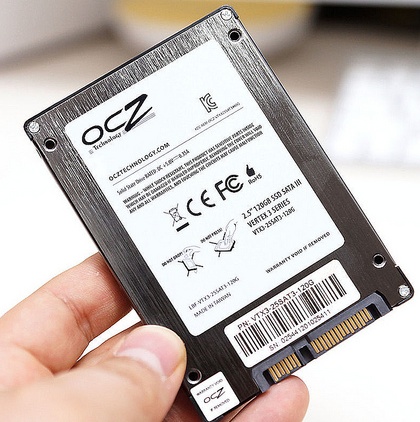
    Are SSDs less reliable?
    Are SSDs less reliable?

    Two words that no database administrator ever wants to put together are “data” and loss”. We go to great efforts to ensure that our SQL Server data is protected, backed up, available on alternate systems, even replicated to remote machines. Our goal is always to have zero data loss in all situations, even in those situations where we cannot prevent downtime from occurring.

    This past week an article at InfoWorld caught me eye with the phrase “solid-state drives suffer data loss” in the subtitle. The article is written about a study from HP Labs and Ohio State University that studied the effects of power loss on various SSDs. Using a number of “enterprise quality” SSDs from various manufacturers, the authors of the study cut power to the drives while they were in use, a scenario that I’d expect would happen periodically to systems. We reboot all kinds of systems at times without shutting them down at times, for a variety of reasons. I’d expect that file systems and low level software would properly handle these situations in a manner similar to SQL Server, with some sort of recovery running when power was reapplied.

    In the study, there were six potential failure types, and of the fifteen manufacturers whose drives were used, five of these failures occurred. The susceptibility of various kinds of corruption to power faults led the authors to conclude that systems with critical data should not use SSDs, test them thoroughly since they were not aware of ways to design a storage system to account for these potential issues. They did not say that SSDs were more unreliable than hard drives, but in this specific type of disaster, unexpected power loss, there could be problems.

    We can design around these issues somewhat with redundant UPSes, battery backing of SSD cards and more, but disasters in the form of an accident can occur. I’ve seen two occasions where large data centers lost power because of maintenance work on power distribution units resulted in improper fail overs. The more complex our system design becomes, and the more we use SSDs in databases, the more likely for some failure or corruption to occur.

    I wouldn’t panic and remove SSDs from systems, but I would ensure that any disaster recovery processes and procedures I had were up to date and working. You never know when you will need to recover from hardware issues on a primary system and have to restore on completely separate hardware. Advance preparations and practice are the only way to ensure you can successfully recover when the need arises.

    Steve Jones

  • The Group Account

    We want to avoid anonymity as well as too rigid security. Delegation is something we need in all our systems.
    We want to avoid anonymity as well as too rigid security. Delegation is something we need in all our systems.

    Managing security for groups, allowing access is selective ways to different individuals is hard. However it’s also something that many DBAs do on a regular basis. We deal with the challenges of row level security and tying particular pieces of data to particular individuals, groups, or other pieces of data. We work to ensure security and systems are flexible, allowing for disparate requirements to be managed with rights, schemas, and other mechanisms. And many of us do it well.

    I was reminded of the hard work we do with security when I read this piece on family accounts and the lack of support from Amazon and Apple. There are any number of comments and criticisms of the idea from people that ecosystems are bad ideas, or supporters of this idea have trust issues. Those are valid criticisms of the process, but that doesn’t change the fact that as our digital world has grown more closely linked, and many of us do want ways to share some of our digital assets with others, while retaining our privacy.

    This isn’t just a family concern, as many vendors don’t manage customer accounts well with all kinds of software. I’ve encountered many situations where an employee registers software under their email account and subsequently leaves for a new job. Finding licenses or being notified of patches becomes a problem, especially when the new administrator is often searching for information in some sort of disaster situation.

    I don’t have a great solution, but I do know that we want the ability to share assets, in much the same we could lend a book or wrench, or car to someone else in the physical world. At some point our cars, other secure application software, maybe even our databases will be authenticated in more secure ways. The future digital software that doesn’t allow for the re-assignment or information or rights to other individuals in an easy and secure manner will fail us.

    Steve Jones


    The Voice of the DBA Podcasts

    We publish three versions of the podcast each day for you to enjoy.

  • Data Freedom and Regulation

    HIPAA creates a floor, not a ceiling.
    HIPAA creates a floor, not a ceiling.

    The HIPAA laws passed in the US to provide for better privacy an security of medical information seem to be a joke in many of the situations in which I’ve dealt with medical providers. It almost seems like signing a HIPAA acknowledgment form is a formality and as patients, we should understand that HIPAA provides for standard requirements and protections for our data. However I’m not sure that’s the case.

    This article talks about the HIPAA laws being a floor, not a ceiling, and a patchwork of laws in various states superceed what HIPAA requires. However in doing so, they create inconsistent regulations and rules that people struggle to understand, and with which technology cannot keep up. I’d take issue with the comment that “Digital systems to move information need simplicity”. It’s not true. Our digital systems are very adept at handling exceptions and variable routing and security when they are programmed to do so. The problem is ensuring the people writing the code understand all of the rules for the exceptions.

    The article talks about the approach Hawaii has taken, in scrapping older laws and simplifying them to comply and expand the HIPAA requirements so that providers and patients can understand how to handle data. I suspect that few governments will take this approach, but it’s precisely what’s needed, in all fields, for those of us working with data to build systems that can not only comply with the laws, but also protect data in a secure manner.

    Steve Jones


    The Voice of the DBA Podcasts

    We publish three versions of the podcast each day for you to enjoy.

  • Granting Permission to Grant Permissions

    I’ve never felt the need to allow this, but I saw someone ask the questions recently. Suppose you had a view and you wanted to allow a user to grant permissions to this view to other users.

    It’s not a weird edge case, but it’s just not one I’ve normally bothered with. I manage by groups, always, and never want a user to be granting permissions to a specific view. I inherently see users as fragile in the lifetime of an application (administrators as well)  and don’t like the idea of allowing them permissions.

    If you need to do this, however, there is a way. Let’s examine a basic scenario. I want to allow Bill to grant permissions on the view “MonthlySales”, which I’ve created in AdventureWorks. If I want to allow Bill to use this view, I need to do this:

    GRANT SELECT ON MonthlySales TO Bill

    If I log into the server as Bill and execute

    SELECT * FROM MonthlySales

    I get this:

    grant1

    Simple stuff.

    However if I want Bill to be able to allow other people in his department to see this view, what can I do?

    If I examine the BOL page for GRANT, I see there is an option that can help here. The WITH GRANT option allows the person specified in the statement to grant the existing permissions to others.

    Let’s assume I have another user Sue. If I log in as Sue, and I execute the same SELECT that Bill ran above, I get this:

    Msg 229, Level 14, State 5, Line 1

    The SELECT permission was denied on the object ‘MONTHLYSALES’, database ‘AdventureWorks’, schema ‘dbo’.

    I could easily manage permissions as the DBA, and I prefer this, but for when you have some data that a user can manage, and you are in an environment where things change quickly, perhaps you want to delegate some permissions to users.

    Now, let’s change the initial permission I set up for Bill to this:

    GRANT SELECT ON MonthlySales TO Bill
     WITH GRANT OPTION
    

    Bill can still see the view and the data. However Bill can now run this:

    GRANT SELECT ON MonthlySales TO Sue

    Once he does this, Sue can see the view.