Tag: security

  • Trust

    An interesting piece I found on Bruce Schneier’s blog that talks about security and trust, specifically with regards to the security of your passwords and hopefully, a password manager. There certainly are problems and potential issues with regards to security and passwords, no matter how you choose to manage those.
    However the part of the article that caught my eye was the opening, where it says “All these other industries we rely on have evolved codes of conduct, regulations, and ultimately laws to ensure minimum quality, reliability and trust. In this light, I find the modern technosphere’s complete disdain for obtaining and retaining trust baffling, arrogant and at times enraging.”
    Is that true? I know we find that there are more systems in place in pharmaceutical, construction, and other professions. These independent groups can provide some certification, evaluation, and standards for their members and practitioners.  I’m not sure how much more trust there is in these fields, and sometimes I think it’s just an illusion of more standards and practices. We find all sorts of moral, and professional failures in these businesses, though perhaps more accountability in the legal sense.
    Is it because these professions are more mature? Perhaps. In some sense, I think many of these fields benefit from the reality of their products and services. We can see, hear, feel, and touch the effects of decisions and actions in most fields. We can interact with our technological systems, but in many cases the complexity behind simple interactions is more like magic to most people that we’d care to admit.
    Plus we seem to be quite willing to build things that don’t work well, and then quickly change them to respond to issues. In some cases we might be more like the people that build quasi-useful products hawked on late night television than the engineers that construct bridges.
    Steve Jones

  • Honeywords in SQL Server

    honeypotAs we become more and more security conscious, it becomes more important not only to configure systems for better security, but also to add more monitoring and auditing to detect when problems occur. We know that at some point someone will attempt to hack our systems. Many of us have auditing set up to detect failed logins, but is that good enough?

    If a hacker manages to gain access to your password hashes, and it’s not a stretch these days to think that they might, wouldn’t you like to know if they manage to find the plain text that corresponds to the hash? There’s an idea that systems could be written to store multiple passwords for user accounts, but only one of which is valid. A separate system detects attempts to log in with the false passwords and alerts administrators to a hacking attempt.

    This is an interesting idea, and while it won’t solve all our problems, it will solve some. If a brute force attack occurs on an account, and multiple passwords are being tried, all of which are known to be false (the honeyword passwords), administrators can be notified, and warnings passed on to users. It doesn’t help if the hacker chooses the correct password to enter first, but with enough honeywords, you reduce the chances that they will.

    I don’t know that I’d like to see this for SQL Server, but I certainly would like to see additional security features. Two factor authentication would be nice, perhaps even some sort of  approval process enabled that required multiple approvals for some changes. The latter would help us prevent the cowboy DBA from making changes without anyone else being aware of them.

    Detection of breaches, using something like honeywords, provide another layer of security. They don’t prevent hacks, but they can help us deal with them.

    Steve Jones


    The Voice of the DBA Podcasts

    We publish three versions of the podcast each day for you to enjoy.

  • Does TDE really work on MDF files?

    Yes, it does. However, let’s prove it. First let’s create a database, a table, and enter some data:

    -- create a database
    CREATE DATABASE TDE_Primer
    ;
    GO
    -- create and populate a table
    USE TDE_Primer
    go
    CREATE TABLE MyTable
    ( myid INT
    , myname VARCHAR(20)
    , mychar VARCHAR(200)  
    )
    ;
    go
    DECLARE @i INT = 65;
    WHILE @i < 92
     begin
      INSERT mytable SELECT @i, 'Steve Jones', REPLICATE(CHAR(@i), 200);
      SELECT @i = @i + 1;
     END
    ;
    GO
    SELECT * FROM Mytable;
    go

    If I look at the table, I see my name with lots of data:

    Capture_030

    Now let’s detach the database and examine the results with a hex editor:

    -- detach database
    USE [master]
    GO
    EXEC master.dbo.sp_detach_db @dbname = N'TDE_Primer'
    ;
    
    GO

    I use XVI32 as an editor. It’s free, and you can download it. If I open up my MDF in this utility, here’s what I see:

    Capture_031

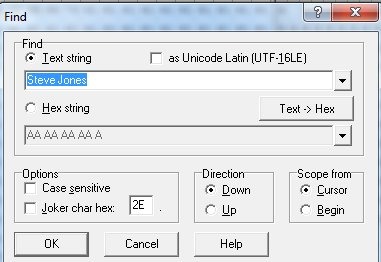
    If I search for my name:

    Capture_032

    I find it:

    Capture_033

    This is what I expect, and you should as well. Even without SQL Server, your data files are readable, which is why you must protect them.

    Now let’s attach the file and enable TDE.

    USE [master]
    GO
    CREATE DATABASE [TDE_Primer] ON 
    ( FILENAME = N'C:\Program Files\Microsoft SQL Server\MSSQL11.MSSQLSERVER\MSSQL\DATA\TDE_Primer.mdf' ),
    ( FILENAME = N'C:\Program Files\Microsoft SQL Server\MSSQL11.MSSQLSERVER\MSSQL\DATA\TDE_Primer_log.ldf' )
     FOR ATTACH
    GO
    
    USE TDE_Primer
    go
    SELECT * FROM mytable
    ;
    go
    
    -- begin encryption setup
    -- from http://msdn.microsoft.com/en-us/library/bb934049.aspx
    USE master;
    GO
    -- create master key for master
    CREATE MASTER KEY ENCRYPTION BY PASSWORD = 'AlwaysU$eaStr0ngP@ssword4This'
    ;
    go
    
    -- create certificate to secure TDE
    CREATE CERTIFICATE TDEPRimer_CertSecurity WITH SUBJECT = 'TDE_Primer DEK Certificate';
    go
    
    USE TDE_Primer;
    GO
    -- Create DEK
    CREATE DATABASE ENCRYPTION KEY
    WITH ALGORITHM = AES_128
    ENCRYPTION BY SERVER CERTIFICATE TDEPRimer_CertSecurity;
    GO
    
    -- backup TDE cert
    USE master
    ;
    go
    BACKUP CERTIFICATE TDEPRimer_CertSecurity
     TO FILE = 'tdeprimer_cert'
      WITH PRIVATE KEY (
                   FILE = 'tdeprimer_cert.pvk',
                   ENCRYPTION BY PASSWORD = 'AStr0ngB@ckUpP@ssw0rd4TDEcERT%')
    ;
    go
    
    -- check encryption status
    SELECT
        db.name,
        db.is_encrypted,
        dm.encryption_state,
        dm.percent_complete,
        dm.key_algorithm,
        dm.key_length
    FROM
        sys.databases db
        LEFT OUTER JOIN sys.dm_database_encryption_keys dm
            ON db.database_id = dm.database_id;
    GO
    
    -- enable encryption
    USE TDE_Primer
    ;
    GO
    ALTER DATABASE TDE_Primer
      SET ENCRYPTION ON;
    GO
    -- check encryption status
    SELECT
        db.name,
        db.is_encrypted,
        dm.encryption_state,
        dm.percent_complete,
        dm.key_algorithm,
        dm.key_length
    FROM
        sys.databases db
        LEFT OUTER JOIN sys.dm_database_encryption_keys dm
            ON db.database_id = dm.database_id;
    GO
    -- TDE_PRimer and tempdb encrypted
    
    -- detach database again.
    -- detach database
    USE [master]
    GO
    EXEC master.dbo.sp_detach_db @dbname = N'TDE_Primer'
    ;
    
    GO

    I won’t go into all the code, but this encrypts the database, backs up the certificate and then detaches it again. There are a few other things, but I cover them in another post.

    Now let’s open up the file in the hex editor again.

    Capture_034

    It looks the same. It’s not in the image, but just below this you can see the database name. There is a header, which is not encrypted. However when I search for my name, it fails.

    Capture_035

    If you scroll further around, you’ll see that most of the file is now encrypted.

    Capture_036

    Play with this and prove to yourself that TDE does really encrypt things.

  • Development, Operations, or Accounting

    These kinds of problems should not happen in the cloud.
    These kinds of problems should not happen in the cloud.

    I think the idea of a platform of services, such as Windows Azure provides, is a great idea. I’d love to be able to stop worrying about hardware in many cases, and even skip some of the infrastructure of networking and managing specific machines. Just having services that I could deploy to that run my database and code, would smooth out some of the hassles of Information Technology in many companies.

    However the services have to work and work well.

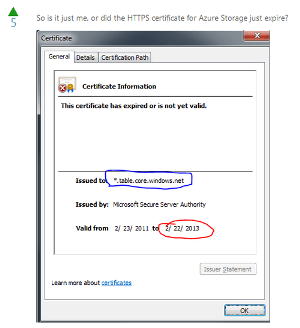
    I’ve had concerns with AWS and their outages, though Netflix has run a thriving business on that platform and learned to work within that service. I think the Azure platform is similar, and they’ve had a few outages, I do have concerns over where their outages have occurred. There was an expired certificate, then supposedly maintenance, later revealed to be heat issues.

    These issues bother me. Some are unavoidable, but some aren’t. I’m particularly concerned about the expiration of security certificates. This happened again recently to Azure, and it shouldn’t. I don’t know if this was a problem with the development groups that build applications using certificates, the operations groups that administer systems, or the accounting groups that might need to purchase new certificates, but part of what the “cloud” should bring is expertise and better qualities of service from the people doing the work.

    I can hire semi-competent people that don’t pay attention to details and suffer my own outages. At least then I know I’m to blame and I can replace them. However moving to a service like Azure or AWS means giving up a lot of control. If I can’t count on better services than I get in-house, I’m not sure there are many advantages to moving.

    Steve Jones


    The Voice of the DBA Podcasts

    We publish three versions of the podcast each day for you to enjoy.