Tag: sql server

  • Regulators, Mount Up

    Warren G - Regulate
    More auditing of regulation compliance is coming for data professionals working in health care.

    I have an encryption talk that I give and usually find a few people in the audience that have implemented encryption. In almost every case this has been because of PCI or HIPAA regulations that dramatically reduce penalties if data is encrypted. Whether you agree with the regulations or not isn’t important. There are rules that some of us have to follow because of our data and my guess is that the number and scope of those rules will increase in the future, not just in these industries, but others as well.

    If you are covered by HIPAA law, you may have gotten some increased scrutiny this year. There are audits underway from the Office of Civil Rights (OCR) for 115 organizations that will help them to ensure they comply with regulations. Penalties aren’t supposed to be assessed unless there are serious violations, but starting in 2013, the  Health Information Technology for Economic and Clinical Health (HITECH) Act requires that the auditing program will be enforced with surprise audits.

    For those managing health care data, you should be sure that you are complying with HIPAA regulations. If you’re not, you ought to make sure your boss is aware that next year you could have a surprise audit and should be ensuring that you meet the laws regulations. The OCR has released their audit protocol, and you should be sure that you understand what is being evaluated.

    If you aren’t regulated by PCI or HIPAA, you might still check over the protocol as much of it is good practice for securing any data. It can be general, but if you abide by the spirit of the criteria, I’d bet that will pass an audit by your security group.

    Steve Jones


    The Voice of the DBA Podcasts

    We publish three versions of the podcast each day for you to enjoy.

  • The Last DBCC CHECKDB Date and Restores

    I ran across a question on Twitter recently where someone asked about the DBCC CHECKDB date after a restore. For those of you that don’t know this, you can run this command on your instance (in a database)

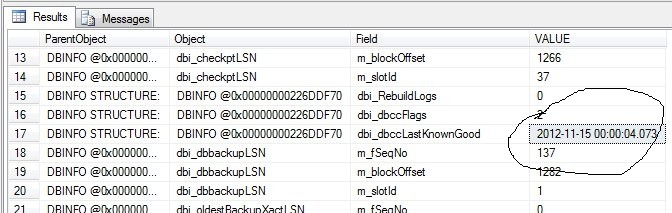
    DBCC DBINFO WITH tableresults;

    This returns a lot of information, but I’ve circled one value below:

    dbcc1

    This is the last known good DBCC date that exists for this database. It’s also the value in the error log from the execution of DBCC CHECKDB on my instance early this morning (Arrow marks the entry).

    dbcc2

    If I were to restore this database, what happens to this value? I’d expect that it would be restored to the last value that was contained in the backup file. That would make sense to me, but let’s test it.

    First I run a backup:

    BACKUP DATABASE [db1] TO  DISK = N'C:\SQLBackup\db1_20121115.bak' WITH NOFORMAT, NOINIT,  NAME = N'db1-Full Database Backup', SKIP, NOREWIND, NOUNLOAD,  STATS = 10
    GO
    

    This should have the last DBCC date inside the file. I know run a CHECKDB and note the time in the error log.

    dbcc3

    This returns successfully (whew, didn’t want to test corruption restores). If I then run DBINFO again, I get the current date from the error log returned. Now let’s restore from my backup.

    This completes and when I run DBCC DBINFO again I find the dbccLastKnownGood date is reset back to the 12:04am value instead of the 9:11am value.

    That’s what I expect, and that was what a few other people confirmed on Twitter. It’s logical that this should be the behavior, but you never know until you’ve tested it.

  • How Application Roles Work in SQL Server

    One very interesting security technique available in SQL Server is the application role. It’s an interesting way of applying security to a user, and perhaps a way of preventing users from accessing data with unauthorized applications.

    An application role is a role just like any other role. It has a default schema, and it can contain specific rights on securables. Below you can see I have an application role that has rights to a specific table in my database. In this case, at the bottom you can see this table has SELECT rights.

    approle2

    I could grant other rights, but in this case I haven’t.

    How is this different than a normal role? On the “General” page of this dialog, you can see something different.

    approle1

    In a normal (database) role, there are members on this page. Here we just have schemas and a password. This password is what gives you the power of this security feature.

    If I connect as a normal user to my database and issue a SELECT, I get this:

    approle3

    This user has no rights in this database for this table. However if I invoke the application role, I can select from the table.

    approle4

    Application roles are assigned to a user when the user executes sp_setapprole, with the role name and the appropriate password. Previous permissions are removed, and these permissions are granted.

    This can be very handy, as assigning a user rights to connect to an instance, but no rights in a database allows them to connect, but not perform any data manipulation. This means a user connecting from Access, Excel, etc. cannot work with data.

    If the user connects with an application that is configured to execute sp_setapprole after the connection, if there are rights for DML assigned to that application role, the user can perform the data manipulation needed for users.

    It’s not a perfect security mechanism, and it requires the password to be kept secret along with application programming, but it can be a good way to prevent users from working with your data outside of an application.

  • Review Your Indexing

    index cards
    How often do you re-examine your indexes?

    In the latest versions of SQL Server, there are some amazing new features. Many of them allow us to expand the capabilities of SQL Server, but some are added to allow us to dive more deeply into how the system works. A couple of the newer DMVs are fantastic tools to allow us to find indexes that are unused, duplicate, or unneeded. If you’re not using sys.dm_db_index_usage_stats or sys.dm_db_missing_index_details, you should dig into a little and learn how these work. However running a diagnostic query to find unused indexes and then dropping those indexes is a bad idea. You need to ensure that those indexes aren’t rarely, or lightly used.

    I thought about this recently while giving a talk on maintenance. Indexes require routine maintenance, and many of us schedule rebuilds or reorganizes in our databases to ensure that fragmentation doesn’t become an issue. That’s a good start, but there’s more you can do.

    Every month or two you should schedule time to analyze your indexes. Capture a workload from a Trace and analyze it with the Database Tuning Advisor. Take the results and compare them to your current indexing schema. Make a judgement or two on which indexes are used by different queries and spend a few hours testing changes to your systems. You might need new indexes, you might want to remove old indexes that aren’t being used, or you might decide to add a column or include to an existing index.

    There are lots of articles on SQLServerCentral and blogs on indexing that can help you learn more about what changes might improve performance, but ultimately you will really need to test any changes on your own systems. With a little practice, you can build a short routine that allows you to take a few hours every month and analyze a few indexing changes, perform a little testing, and perhaps greatly improve the performance of your applications.

    Steve Jones


    The Voice of the DBA Podcasts

    We publish three versions of the podcast each day for you to enjoy.