Tag: sql server

  • Finding DDL Triggers

    Triggers are the types of objects in SQL Server that are easy to lose track of. There isn’t an obvious way to tell that a table has a trigger on it and since most tables don’t have triggers, this is one of the things people often miss when troubleshooting unexpected results.

    DDL triggers are worse, since they aren’t tied to particular tables, but rather events. How can you find DDL triggers in your environment?

    There are a few ways. I’ll show you visually and in code.

    The GUI

    I like the Management Studio GUI to find information, and to quickly get code written. With SQL Prompt installed, I can get great intellisense that makes it easy to find parameters, names, objects, etc. I don’t like to run the actions from SSMS, but rather use the Script button and save the code, and execute it in a query window.

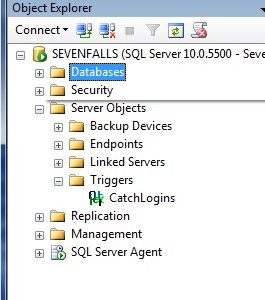
    In looking for server-side triggers, there is a “Server Objects” folder in the tree.
    ddl3

    Here is where you find your backup devices, endpoints, linked servers, and server level triggers. In this case, I can expand the folder (shown above) and find the trigger I created recently.

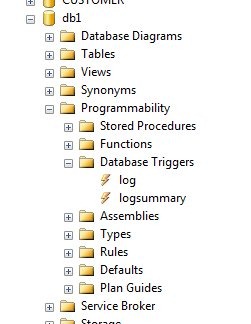
    At the database level, there’s a similar structure. Inside of a database, we find there is a programmability folder, which contains all the code items I can create in a database.
    ddl4

    In here we can see there is a Database Triggers item, and inside there are two triggers that I setup inside this database.

    You have to go look for these triggers, but if you’re wondering if they exist, you can find them here.

    Code

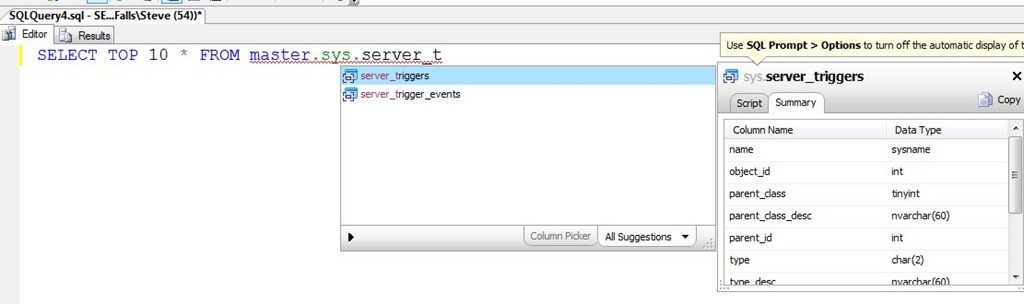
    The best way to look for triggers quickly is with code. Without resorting to BOL, I suspected there was some DMV that contained trigger code. As you can see below, I was right as typing SSF (a shortcut in Prompt), followed by “master.sys.server_t” got me this result:
    ddl5

    If I then examine the results from the server_triggers table, I get my one trigger at the server level.

    ddl6

    This is only part of the information needed as the server_trigger_events table has the events that will fire this trigger. I can query that to see I only have one event here:

    ddl7

    If I join in the events, then I can clean this up and get this:

    select
      t.name
    , t.object_id
    , t.is_disabled
    , te.type_desc
     FROM master.sys.server_triggers t
       INNER JOIN master.sys.server_trigger_events te
         ON t.object_id = te.object_id

    Which shows me the trigger, its ID, and the event’s.

    ddl8

  • Enable Transparent Data Encryption

    This is one of the things in my Encryption Primer presentation that I don’t demo. It’s really easy to do, and it’s rather mechanical, so I just show the image that has the steps from MSDN and leave it at that.

    However there are a few things I wanted to change, and test, so I thought I’d show my procedure on a local database. I roughly follow the MSDN article, but a few slight items.

    First, use master and create your keys and certificates.

    CREATE DATABASE TDETest
    ;
    GO
    USE master
    ;
    GO
    CREATE MASTER KEY
     ENCRYPTION BY PASSWORD = 'AReallyStr0ngP@ssword'
    ;
    go
    CREATE CERTIFICATE SteveCert
     WITH SUBJECT = 'My DEK Certificate'
    ;
    go
    USE TDETest
    ;
    GO
    CREATE DATABASE ENCRYPTION KEY
     WITH ALGORITHM = AES_128
     ENCRYPTION BY SERVER CERTIFICATE SteveCert
    ;
    GO

    I created a test database here for another process, and this is roughly the setup. However before I enable the encryption, here’s what I recommend you do:

    USE master
    ;
    go
    BACKUP CERTIFICATE SteveCert
    TO FILE = 'c:\SQLBackup\SteveCert'
    WITH PRIVATE KEY 
    (
        FILE = 'c:\SQLBackup\SteveCertPrivateKeyFile',
        ENCRYPTION BY PASSWORD = 'R@ndomP3ssW0rd'
    );
    go

    Encryption is serious stuff. If you lose this certificate from a server crash, you are definitely not going to be able to open your database or recover your data. Gone is gone, and data loss means data loss here.

    Back up your certificate.

    Quick question: do you know where your backup of the certificate is?

    Once this is done, you can continue on:

    USE TDETest
    ;
    go
    ALTER DATABASE TDETest
    SET ENCRYPTION ON;
    GO
    

    The encryption is quick on this new, small database.

    Now let’s see if this worked. We’ll add data and make a backup.

    CREATE TABLE MyTable( LogData VARCHAR(MAX))
    ;
    INSERT MyTable SELECT 'This is an encrypted database'
    ;
    GO
    BACKUP DATABASE TDETest
     TO DISK='tdetest.bak'
    ;

    If I go to my backup location and look for this backup, I can open it in an editor.

    encrypt2

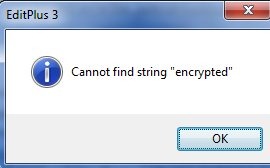
    It’s random gibberish. If I run a search for data in my table:

    encrypt1

    I get no results

    encrypt3

    Don’t think this is valid? Run this below and re-search this backup for the string. You’ll find it. This is one thing encryption protects you from.

    CREATE DATABASE NoTDE
    ;
    GO
    USE NoTDE
    ;
    GO
    CREATE TABLE MyTable( LogData VARCHAR(MAX))
    ;
    INSERT MyTable SELECT 'This is an encrypted database'
    ;
    GO
    BACKUP DATABASE NoTDE
     TO DISK='notde.bak'
    ;

    The database is encrypted, but anything I do with the database doesn’t require code changes, hence the “transparent” nomenclature.

    The value of this is debatable, but I think it’s not a bad feature to implement if you have Enterprise Edition and you need this protection for PCI, HIPAA, or some other regulation.

  • Where’s My Certificate Backup?

    If you’re like me, you take advantage of the default backup paths in SQL Server. It makes my code cleaner, and if I need to move the instance somewhere else, all my code works. No pathing issues.

    A certificate backup might look like this for me:

    USE master
    ;
    go
    BACKUP CERTIFICATE SteveCert
    TO FILE = 'SteveCert'
    WITH PRIVATE KEY 
    (
        FILE = 'SteveCertPrivateKeyFile',
        ENCRYPTION BY PASSWORD = 'R@ndomP3ssW0rd'
    );
    GO
    

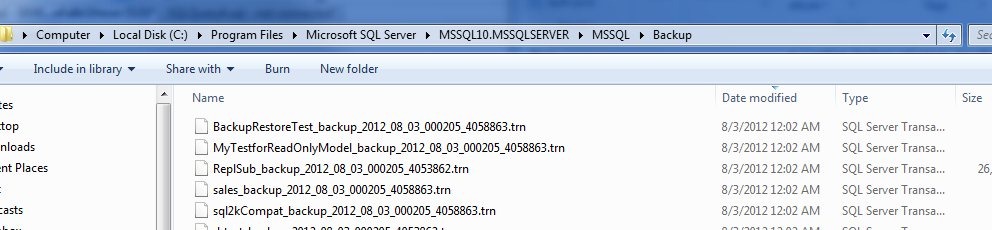
    If I run this, and immediately go to my backup folder, sorting by the last modified date for files, I see this:

    backupcert1

    No certificate backup file. What happened?

    The answer is actually documented, and you should be aware of this. In the BACKUP CERTIFICATE page, it says this: “The default is the path of the SQL Server DATA folder. “

    That’s interesting, and it makes sense to me. This folder is more likely to be secured than the backup folder, where developers and who knows who else may have access to the folder. By limiting it in the data folder, you provide a little obfuscation, perhaps more protection, and you force the administrator, the DBA, to get the files.

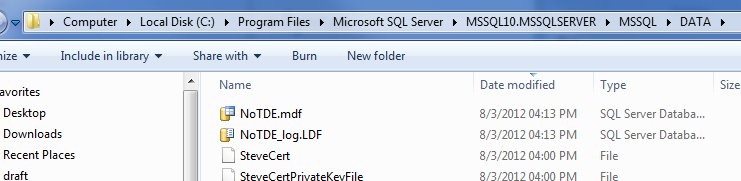
    However the files are also ACL protected. If I go to my data folder, I see the files.

    backupcert2

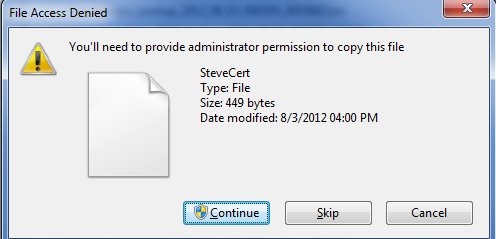
    If I select the certificate and CTRL+C (copy) it, and then go to the backup folder and try a CTRL+V (paste), I get this:

    backupcert3

    The service account has permissions to this file, not administrators by default. This action invokes the UAC command to require me to make a conscious decision to make this copy.

    Of course, I can just provide a path to make sure I can find the file.

    BACKUP CERTIFICATE SteveCert
    TO FILE = 'c:\SQLBackup\SteveCert'
    WITH PRIVATE KEY 
    (
        FILE = 'c:\SQLBackup\SteveCertPrivateKeyFile',
        ENCRYPTION BY PASSWORD = 'R@ndomP3ssW0rd'
    );
    go

    Whatever you do, make sure you backup your certificate files and keep them safe. If they go, you do lose data.

  • T-SQL Tuesday #33 – Trick Shot

    tsqltuesdayIt’s T-SQL Tuesday time again, and this is my post for #33. The host is Mike Fal and his topic is Trick Shots, which is an interesting one. I’m not a tricky guy, and I tend to lean towards common, practical approaches to problems. I’m not sure this post will be great, but I like participating, and so I will.

    The T-SQL Tuesday blog party takes place every month, and if you’d like to host, contact the originator, Adam Machanic(b|t) .

    Tricks Shots

    Once upon a time, I was a DBA. I worked with a number of developers who were, how can I say this politely, not terribly careful about which objects they changed or added. It was understandable since they had jobs and work to get done. However I was responsible for deploying their changes to our QA, and ultimately production, servers.

    Not knowing what to deploy is a pain. It leads to mistakes, broken features, and more importantly, long hours from me trying to determine what changed objects went with which features. Since I also want to deploy the same code to production as QA, I want to smooth out this deployment process as much as possible.

    Back in 2000/2001, we didn’t have SQL Source Control tracking changes by individuals. We had to manually check in and out of our VCS for all database changes, which was not a habit most developers had built. As a result, we would constantly have new objects appear, and old ones changed as developers needed to meet new requirements. I tried to handle all the database development work, but there were times I couldn’t keep up.

    As you might expect, when deployment time came, we had a lot of objects in the development database that weren’t in the production database. SQL Compare made it easy to find out which objects were different, but the problem we faced was that not all changes would be deployed at once. We needed specific code changes linked to specific objects, which wasn’t a simple task with 10-12 developers.

    A few months of mad scrambles to track down objects and try to meet our weekly QA and deployment goals had me working on a better solution. There had to be a way in the SQL Server metadata to track changes to objects. I dug around the SQL Server 2000 sysobjects views and found a creation date, but not an alteration date. However I did find a version number that was undocumented, but incremented on ever ALTER of an object.

    Using this information, I build a process that would capture the state of all objects in a table, and then compare this to the current state of sysobjects, returning differences to me. I built this as an hourly report, and had it send changes to me. This didn’t prevent changes, but it allowed me to quickly track down what had changed, and send a note to the developer to link this to a particular item in our project plan. A few minutes an hour (with no changes many hours), let me break out the database changes into a deployment project for the next week.

    The Trick

    The trick in this case was finding information I needed from SQL Server that wasn’t documented. It doesn’t apply any more and the metadata in SQL Server 2005 and later has grown so much that you can more easily find changes.

    What I Learned

    I learned a few things here. First, I could build my own systems on the SQL Server platform to help me out. I didn’t need to depend on what Microsoft provided, if I needed something different. This led me to view the management and administration of the instance as just another application. One I built on top of the platform the same as my developers.

    This also taught me that I needed to be like the reed, flexing and bending to survive in situations. My developers were willing to work with me, but they were human, and they had other priorities. I needed to work with them and get along, adapting some of my ideas and needs to work with them. I did get them to work on manual check ins and outs, but they slipped up, and my system helped both catch those mistakes, and remind them in a gentle way. My emails asking to link an object change to the project never complained they missed something, but they realized the reason I sent it and it helped reinforce the habit of checking objects out of VCS before editing them.