Tag: sql server

  • The Danger of Custom Software

    The Movie Vanishes
    My kids enjoyed this DR tale from Pixar.

    There’s been a great little movie short making the rounds of the Internet from Pixar. It’s called “The Movie Vanishes” and it’s worth a few minutes of your time. Toy Story 2 was almost lost because of a mistake and some bad luck at Pixar.  This was at a time when the company was successful, and certainly should have been able to better prepare for a disaster. If you want a touch more background, there’s a few other notes at Quora.

    A lot of the software that Pixar uses was written in house. That’s a double edged sword because there isn’t anyone that can stand behind the software, other than the people that wrote it. There might not be adequate testing and there are certainly bugs in the software that may lie dormant for years. I have no idea of any of the bugs inside Pixar’s software caused this disaster, and I’m not implying it did.

    The positive side of building your own software is that you know how it works. You have the source code, and if you have a developer that can understand it, you can fix problems, patch issues, and customize it to suit your needs. As long as you have the time and resources to do so.

    I saw someone write recently that building their own monitoring solution for a set of SQL Servers was easy, but that was the smallest part of the job. Maintaining and enhancing it over time were much larger jobs than setting up monitoring. This person said they’d rather buy a package in the future than build their own again.

    If you have a system set up, it probably makes sense to use it, but as you look to develop new software, whether for monitoring servers or handling sales, it might be worth spending a bit of time trying to determine if there is something out there you can buy, which might be well tested, vouched for by other customers, and be easier to integrate than your own system.

    Steve Jones

    SQL Monitor from Red Gate SoftwareIf you don’t have monitoring set up, you should. SQL Monitor from Red Gate software is an easy way to get notified when something in your environment needs to be looked at further.

    If you want to get monitoring setup without minimal effort and immediately, think about downloading a trialof SQL Monitor and testing it with your servers.

    If you’d like to see SQL Monitor working on the live SQLServerCentral database server, go over to monitor.red-gate.com.


    The Voice of the DBA Podcasts

    We publish three versions of the podcast each day for you to enjoy.

  • Contained Databases – Preventing Collation Conflicts

    One of the demos from my Contained Databases talk looks at the issues you can have when your database collation does not match your server collation. I’ll walk through the issue here. I’ll show the issue, and then the fix with contained databases.

    First, let’s create a database and a table:

    -- create db without containment
    CREATE DATABASE ucdb2
     COLLATE Japanese_CS_AS
    ;
    go
    USE ucdb2
    ;
    go
    
    
    -- Create Unicode Table, add a row
    CREATE TABLE MyTable
    ( mychar NVARCHAR(200)
    );
    go
    INSERT MyTable SELECT 'This is a Japanese Row'
    go


    My server collation is shown here (SQL_Latin1_General_CP1_CI_AS:

    containeddb1

    Now let’s create the exact same table in tempdb.

    -- create temp unicode table
    CREATE TABLE #MyTable
    ( mychar NVARCHAR(200)
    );
    go
    INSERT #MyTable SELECT 'This is a Japanese Row'
    go


    If I try to work with these two tables together, I will have problems. As an example, let’s just union query these two items together.

    SELECT 
      'udcb2'
    ,  mychar
     FROM MyTable
    UNION ALL
    SELECT 
      'tempdb'
    , mychar
     FROM #MyTable
    ;
    go


    I get an error, as shown here:

    containeddb2

    The collation error occurs because the query optimizer can’t decide which collation to use. You can easily fix this, as I’ve blogged about before with a collation clause.

    However contained databases mean you don’t have to change code. Let’s do the same thing, this time with a contained database.

    -- create db with containment
    CREATE DATABASE cdb2
     CONTAINMENT = PARTIAL
     COLLATE Japanese_CS_AS
    ;
    go
    USE cdb2
    ;
    go
    
    -- Create Unicode Table, add a row
    CREATE TABLE MyTable
    ( mychar NVARCHAR(200)
    );
    go
    INSERT MyTable SELECT 'This is a Japanese Row'
    go
    
    -- create temp unicode table
    CREATE TABLE #MyTable
    ( mychar NVARCHAR(200)
    );
    go
    INSERT #MyTable SELECT 'This is a Japanese Row'
    go


    Now if I run the same statement, I see:

    containeddb3

    The contained database has correctly resolved the collation issues.

    You can check the collations with sp_help with the two table names.

  • The Platform as Code

    data center
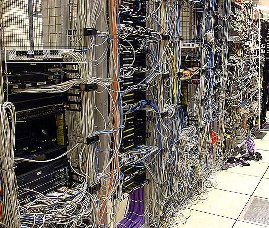
    Trying to manage all your servers individually is like tracing cables in this kind of setup.

    SQL Server has grown more and more complicated over the two decades that I have worked with the product. At the same time anyone can install it and set up a database with almost no training. There are more and more features and functions to learn, yet it’s become a much easier product to use. It seems as though one person may view the platform as very difficult to use while the next sees is as requiring almost no management. Both of these views can be true, but as we say often about SQL Server: it depends.

    When I started working with SQL Server, it was a cumbersome platform, the network configuration could be tricky and it wasn’t easy for developers to master the named pipe connections that were required. Since then it has become a very easy to set up and use platform, with many system administrators managing servers that almost manage themselves. “Almost” being the key word there.

    Just as with other Microsoft platforms, the days of having a set of procedures that handle your daily tasks and lead you through the solution are gone. The platform handles the simple stuff, the routine issues, but it is almost a requirement that a good system administrator be able to write T-SQL queries and string together segments of code.

    I was reading an interview with Jesse Robbins, the founder of OpsCode, a company focused on infrastructure automation. In the interview, he had a few quotes that struck me as very true. “What has happened over a period of time is that sysadmin skill set has been expanding more and more to include more and more basic infrastructure software development.” The second quote deals with managing more and more servers: ” That is not being built on your back every day, when you’re logging into the same 50 boxes and typing in the same 50 commands. ”

    Those quotes were similar to some of the presentations I saw on System Center 2012 at DevConnections. There is a focus on automation, on scripting, on working with groups of machines at scale, not as individual systems. The administrators, whether on Windows, Exchange, SQL Server, or some other platform need to learn how to better administer their systems with code, not with the GUI.Steve Jones

    SQL Server ConnectionsIf you want to learn more about Systems Center and SQL Server, come to DevConnections in the fall. It’s the best conference to learn about all parts of the Microsoft technology stack. Grant Fritchey and Steve Jones will be there speaking along with lots of other great Microsoft technology specialists.


    The Voice of the DBA Podcasts

    We publish three versions of the podcast each day for you to enjoy.

  • Creating a Filetable

    How do you create a filetable? I assume you’ve enabled Filestream and created a filegroup for your filestream and filetable data. Then you just do this:

    -- Create a filetable
    CREATE TABLE AuthorDrafts 
      AS FileTable
    GO


    The only optional part of this statement is the table name. No other options, no columns, no schema needed. The FileTable has a fixed schema, which is mostly metadata about the files that you put in it.

    If I were to select from this table, I’d use this statement. I’m not showing all the columns in the results since there are a lot, but they are in the select.

    -- check the table.
    select 
       stream_id ,
              file_stream ,
              name ,
              path_locator ,
              parent_path_locator ,
              file_type ,
              cached_file_size ,
              creation_time ,
              last_write_time ,
              last_access_time ,
              is_directory ,
              is_offline ,
              is_hidden ,
              is_readonly ,
              is_archive ,
              is_system ,
              is_temporary
     from AuthorDrafts;
    go


    Most of these are really meta data about the file. If I were to drop a table in the share, I’d see results like this:

    filetable1

    Putting files inside the table is really a drag and drop from Windows. I can get the share name for my filetable from :

    -- check the share
    select  FileTableRootPath('dbo.AuthorDrafts');
    go
    

    If I paste this in Explorer, I see my file:

    filetable2

    I can drag and drop, or use any scripting commands (Powershell, VBScript, etc) to move files in and out of this share, and they will appear in my table.

    It’s that easy to start working with FileTables. How you use them in your application? That’s a whole other series of posts. I’ll work on a few examples you can use over time.