Tag: sql server

  • Detecting Database Option Changes with DDL Triggers

    One of the keys to managing a large production SQL Server environment is being aware of changes that are taking place in the environment, and preventing potentially harmful changes. There are any number of ways to do this: triggers, auditing, PMB, third party monitoring, and more.

    In this post, I want to look at a quick way to detect issues with databases using DDL triggers. Specifically, I will build a quick trigger that responds to the ALTER DATABASE event.

    Tracking Changes

    In general, I try to avoid those options that severely limit my flexibility. I dislike trying to enforce every possible rule I create since I understand that IT environments often evolve and change, and the hard rules you have today may not apply tomorrow. I also realize that most of the time the hard rules have exceptions to them for various reasons and it’s much easier to manage a set of instances if you expect that the might not have the same requirements.

    I do want to be informed of changes, and one option is a DDL trigger that responds to a particular event. DDL triggers have a large list of events that will trigger them, of which the ALTER DATABASE is one.

    We build the trigger by giving it a name, scope and an event. In this case, we’ll start with this template

    CREATE TRIGGER [name]

    ON ALL [scope]

    FOR [event]

    You can change the scope and events as needed. For me, I need the Server level scope (database changes are a server instance event) and then the ALTER_DATABASE event. From there, it’s pretty much normal T-SQL coding.

    The data comes back from the EventData() function as an XML fragment, so in the trigger, I need to parse out the particulars that I care about.

    The code I’ll use is this:

    CREATE TRIGGER DBAAudit_ALTER_Database
    ON ALL Server
    FOR ALTER_Database  -- Captures a Create Database Event
    AS
         
    DECLARE
      @EventTime datetime
    , @ServerName varchar(200)
    , @LoginName varchar(200)
    , @DatabaseName varchar(200)
    , @TSQL varchar(2000)
    , @event XML
    
    select @event = EVENTDATA()
    
    SELECT @ServerName = @event.value('(/EVENT_INSTANCE/ServerName)[1]', 'varchar(200)')
    SELECT @EventTime = @event.value('(/EVENT_INSTANCE/PostTime)[1]','datetime' )
    SELECT @LoginName = @event.value('(/EVENT_INSTANCE/LoginName)[1]','varchar(200)' )
    SELECT @DatabaseName = @event.value('(/EVENT_INSTANCE/DatabaseName)[1]','varchar(200)' )
    SELECT @TSQL = @event.value('(/EVENT_INSTANCE/TSQLCommand)[1]','varchar(2000)' )
    
    Print 'Database ' + @Servername + '.' + @DatabaseName + ' was altered by ' + @LoginName
    Print 'Command: ' + @TSQL


    When I create this on my instance, it is stored in the Server Objects \ Triggers area on my server. Just like any other object, I can right click and perform all kinds of actions in SSMS.

    ddltrigger_a

    When I execute a change on a database, such as setting a database to read only with this:

    alter database dba_admin set READ_ONLY
    

    I get this in the messages tab (from the Print statement)

    Database DKRSQL2012.dba_admin was altered by DKRSQL2012\Steve

    Command: alter database dba_admin set READ_ONLY

    If I set the database back to read_write, I get this:

    Database DKRSQL2012.dba_admin was altered by DKRSQL2012\Steve

    Command: alter database dba_admin set READ_Write

    This is a nice example, but in a real system, I’d use a database for tracking these changes and store the information from the event in a table. Instead of a PRINT, I’d insert data into a table that tracks changes.
  • Always restore with NORECOVERY

    Always, always, ALWAYS restore a SQL Server database with the NORECOVERY option.

    It’s trivial to switch the database online.

    Not trivial to recover from an accidental restore with RECOVERY (the default)

    ‘nuff said.

  • Password Handling

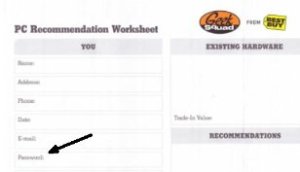
    Best Buy Password form
    Bad form design or bad idea?

    I thought this article on Best Buy PC setup was amusing. Here’s a company that’s trying to provide a service. They’re offering to set up most of your new machine for you. To make sure that things work right away for you, they ask you to provide your password, so they can set a login password to your Windows/Mac. However the form has password below email, which might imply they will set up your email as well. That’s something I know many non-technical people might appreciate.

    Consumers probably think this is a good idea. Computer gets set up for them, and they pick a password. Technical people cringe. Password written down, given to stranger, stored by large company. What could go wrong? You can guess, or read the comments in the article.

    As DBAs, I am sure many of us have to deal with SQL authenticated user accounts. The recommendation is for Windows authentication, but there have been exceptions for various reasons at almost every company where I have worked. This Friday, I’m curious how you deal with a similar situation.

    How do you decide on a SQL login password for a user and get it to them?

    This is a process question, asking how you pick a password, and how you send it to the user. I assume most of you check the “user must change password” box, but if not, let us know.

    For systems where a password must be coded, I’d pick a long, hard to remember password, keep it in a safe location with other administrator passwords (something like Password Safe) and either type it in for an application or give it on paper to the developer/admin long enough to type it in before taking the paper back and destroying it. If it’s a user, I’ve often built separate passphrases for each user, customized to something I know about them, and forced them to change their password.

    Password security is hard, and complex, but so many administrators make it worse with constant, easy passwords they give to users. The password you choose sets an example, and “12345” or “asdf” are bad examples.

    Steve Jones


    The Voice of the DBA Podcasts

    We publish three versions of the podcast each day for you to enjoy.

  • Create a Filestream Filegroup for Filetables – SQL Server 2012

    Once you’ve enabled filestream, the next step is to add a filegroup to your database to hold the filestream data. This is pretty easy to do, and I’ll show you the SSMS and code versions.

    If you want to know more about these Filestream containers, you can read BOL. Let’s create a simple database:

    -- create a new database
    create database UnstructuredData
    go


    This is a simple database with my instance defaults in place. It has a single mdf, a single ldf, and the default Primary filegroup. Let’s not add a new filegroup:

    -- add a filestream FG
    ALTER DATABASE [UnstructuredData]
      ADD FILEGROUP [FS] CONTAINS FILESTREAM 
    GO

    Here I am adding the filegroup (empty) and specifying this as a filestream container. You cannot mix Filestream data and non-Filestream data in the same filegroup in SQL Server 2012.

    To add a file, we can use the ALTER DATABASE command:

    -- Add a file to the Filestream FG
    ALTER DATABASE [UnstructuredData] 
      ADD FILE ( NAME = N'UnstructuredFS', 
                 FILENAME = N'c:\fs\UnstructuredFS' ) 
         TO FILEGROUP [FS]
    go
    

    Here I am adding a file, which is actually a folder in this case. According to the documentation, the path up to the last folder (c:\fs in this case) must exist, but the last folder (UnstructuredFS) must not.

    You could do all of this in one statement, as shown here:

    CREATE DATABASE [UnstructuredData]
     CONTAINMENT = NONE
     ON  PRIMARY 
    ( NAME = N'UnstructuredData', FILENAME = N'C:\Program Files\Microsoft SQL Server\MSSQL11.MSSQLSERVER\MSSQL\DATA\UnstructuredData.mdf' , SIZE = 3136KB , MAXSIZE = UNLIMITED, FILEGROWTH = 1024KB ), 
     FILEGROUP [FS] CONTAINS FILESTREAM  DEFAULT 
    ( NAME = N'UnstructuredFS', FILENAME = N'c:\fs\UnstructuredFS' , MAXSIZE = UNLIMITED)
     LOG ON 
    ( NAME = N'UnstructuredData_log', FILENAME = N'C:\Program Files\Microsoft SQL Server\MSSQL11.MSSQLSERVER\MSSQL\DATA\UnstructuredData_log.ldf' , SIZE = 784KB , MAXSIZE = 2048GB , FILEGROWTH = 10%)
    GO
    

    This gets you a space for holding your Filestream data. In 2012, you can now have more than one file for Filestream data, so you can separate out your filegroup across different physical locations if you have a need to do so for performance or scalability.

    In the next post, I’ll build a FileTable and store some documents in it.