Tag: sql server

  • Using 2008 Features in a 2000 Compatibility Database

    I saw a note recently from someone asking if they could use CROSS APPLY on a SQL Server 2008 instance with an older database in SQL 2000 compatibility mode. You can.

    CREATE DATABASE sql2kCompat
    ;
    go
    ALTER DATABASE SQL2KCompat 
      SET COMPATIBILITY_LEVEL = 80
    ;
    go

    Once I have a database, I can access any of the newer views and DMVs. For example:

    USE SQL2KCompat
    ;
    go
    SELECT 
     * 
      FROM sys.dm_database_encryption_keys
    ;
    go
    

    This doesn’t return anything because I don’t have keys, but I do get the headers. Now let’s add some data.

    CREATE TABLE [Department](
       [DepartmentID] [int] NOT NULL PRIMARY KEY,
       [Name] VARCHAR(250) NOT NULL,
    )
    ;
    GO
    INSERT [Department] ([DepartmentID], [Name]) 
     VALUES (1, N'Engineering')
    ;
    INSERT [Department] ([DepartmentID], [Name]) 
     VALUES (2, N'Administration')
    ;
    INSERT [Department] ([DepartmentID], [Name]) 
     VALUES (3, N'Sales')
    , (4, N'Marketing')
    , (5, N'Finance')
    ;
    GO
    CREATE TABLE [Employee](
       [EmployeeID] [int] NOT NULL PRIMARY KEY,
       [FirstName] VARCHAR(250) NOT NULL,
       [LastName] VARCHAR(250) NOT NULL,
       [DepartmentID] [int] NOT NULL REFERENCES [Department](DepartmentID),
    )
    ;
    GO
    INSERT [Employee] ([EmployeeID], [FirstName], [LastName], [DepartmentID])
     VALUES (1, N'Orlando', N'Gee', 1 )
    ;
    INSERT [Employee] ([EmployeeID], [FirstName], [LastName], [DepartmentID])
     VALUES (2, N'Keith', N'Harris', 2 )
    ;
    INSERT [Employee] ([EmployeeID], [FirstName], [LastName], [DepartmentID])
     VALUES (3, N'Donna', N'Carreras', 3 )
    ;
    INSERT [Employee] ([EmployeeID], [FirstName], [LastName], [DepartmentID])
     VALUES (4, N'Janet', N'Gates', 3 ) 
    ;
    go

    I create a few objects, which are standard, but notice the third insert statement for the Department table. It uses the new insert syntax for multiple rows in one statement. That’s not legal in SQL Server 2000, but it works here.

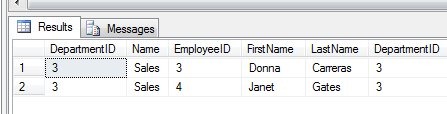
    Now I can use CROSS APPLY

    SELECT * FROM Department D
     CROSS APPLY
       (
       SELECT * FROM Employee E
       WHERE E.DepartmentID = D.DepartmentID
       ) A
    ;
    GO

    This returns me results, just as it does in a SQL Server 2008 database.
    compat1

    It appears that SQL 2008 functions work, which is what I’d hope would happen. However for the purposes of backwards compatibility, the functions that are from SQL Server 2000, should work as expected in SQL Server 2000.

    The thing to be aware of is something that wasn’t legal in SQL Server 2000

    SELECT
      q.sql_handle 
    , t.text 
     FROM sys.dm_exec_query_stats AS q
      CROSS APPLY sys.dm_exec_sql_text(qs.sql_handle) AS t

    you get an error. Passing a column into a function wasn’t allowed in SQL Server 2000, so this is a problem.

    And a little cleanup

    USE MASTER
    ;
    GO
    DROP DATABASE SQL2KCompat
    ;
    go
  • My Little Friend

    Say hello to my little friend:

    script button
    I love this button!

    This button is my favorite part of Management Studio. It’s on every dialog that I’ve seen in the 2012 version of the tool and I’ve begun using it quite liberally. At a recent talk, I told the audience that they should never click “OK” in SSMS again, and should instead click script and then cancel whenever they were making changes.

    Someone asked me why, and I had a few reasons, all of which seem to me good reasons to make use of my little friend. First it’s easy, Apple/iOS easy. When things aren’t easy, we tend not to do them, but clicking “script” is painless, it doesn’t interrupt you, and it produces the script you need in a new query window. That alone ought to be a good reason to use it.

    However there are other reasons as well. It’s a chance to see the exact code being run and making sure it’s what you want. If you aren’t sure, and you shouldn’t be running code without understanding it, this is a good way to learn. It’s also a great logging tool. One of the things that has made me successful as a DBA over the years is documenting what I do. Many of my colleagues haven’t done this and then spent hours trying to determine what changed on a particular system. If I script out the code I run, I have something I can easily drop into a log for future reference.

    To me, this is one of the tools that should improve the knowledge of SQL Server professionals everywhere, by increasing their awareness and knowledge of what’s happening on their instances. I’d be happier if the “OK” button would just produce the script and never run it, but I’m not sure we’ll get Microsoft to agree to that change.

    Now if I only had a “Powershell script” button right next to it…..

    Steve Jones


    The Voice of the DBA Podcasts

    We publish three versions of the podcast each day for you to enjoy.

  • Contained Databases in SQL Server 2012

    Abstract:

    One of the problems with databases in SQL Server is the dependency of the database on various parts of the host instance. In SQL Server 2012 there is an enhancement to the database format that allows for partial containment of your database, and will make the movement, migration, and management of the databases much simpler. This session introduces the new database structure and explains how it can be used in your environment.

    This talk looks at the new partially contained databases in SQL Server 2012.

    Agenda:

    • What is a contained database
    • Contained databases in SQL Server 2012
    • The Future

    The talk will demonstrate the issues with uncontained databases, provide demos on how to create and alter contained databases, look at security and collation issues in SQL Server and speculate on the future.

    Level: 200

    Length: 60 minutes

    Slides:

    Demo Code: ContainedDB.zip

    Related Posts

    You can read all the posts I’ve written on contained databases by examining that tag

    Presentations

    You can view my complete speaking schedule here: http://wp.me/P14wgJ-1tV

  • The Encryption Primer

    This talk deals with SQL Server encryption options. I have given a few variations, and you can get the different decks below.

    SQL Server has a number of encryption features that allow you to better secure your data. This session will examine the basics of encryption and cover the various ways in which you can encode and decode your data to protect it from unauthorized access. Cell level encryption, Transparent Data Encryption, and backup encryption will all be discussed. This session is designed for those who want to learn the basics of how to protect their data.

    This talk looks at the encryption options in SQL Server that are available, including the changes in SQL Server 2012. The agenda is:

    • What is Encryption
    • Encryption in SQL Server
    • Transparent Data Encryption
    • Hashing
    • Symmetric Keys
    • Asymmetric Keys
    • Certificates
    • SSL Communications

    The presentation features basic demos of how these features are implemented in SQL Server.

    Level: 200

    Length: 60-75 minutes

    Demo code:

    Slides:

    Presentation Schedule

    You can view the my speaking schedule here. The upcoming and past deliveries of this session are:

    1. Apr 27, 2013 – SQL Saturday #175 – Fargo
    2. Apr 10-12, 2013 – SQL Intersection, Las Vegas, NV
    3. Apr 9, 2013 – SQL Saturday #197
    4. Mar 9, 2013 – SQL Saturday #187
    5. Mar 7, 2013 – Richmond SQL Server User Group
    6. Nov 15, 2012 – Denver SQL Server Users Group
    7. Nov 13, 2012 – Boulder SQL Server Users Group
    8. Nov 5, 2012 – SQL in the City Seattle, WA 2012
    9. July 28, 2012 – SQL Saturday #144 Sacramento, CA
    10. June 9, 2012 – SQL Saturday #132 – Pensacola
    11. Apr 28, 2012 – SQL Saturday #131 – Phoenix
    12. Mar 26-29 – SQL Connections, Spring 2012

    Related Blog Posts