Tag: sql server

  • How to change the SQL Server service account

    It’s easy. First you click here:

    serviceaccount1

    Then you find the SQL Server 2008 or 2008 R2 program group

    serviceaccount2

    Open those and then pick the SQL Server Configuration Manager.

    serviceaccount3

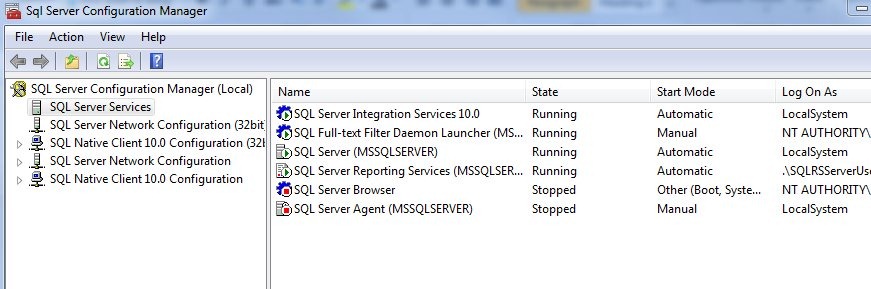
    You might get a UAC message asking if you want to make changes to the system, and say yes. This application can change service accounts, which is a sysadmin function. The screen basically looks like this:

    serviceaccount4

    If you right click the SQL Server entry, the database engine, you can select the properties, and you’ll get this screen:

    serviceaccount6

    On this screen, you can change the service account, and this is where you should change it. There are the three built in accounts in the top drop down (Local System, Local Service, and Network Service). I don’t recommend these. Instead, I recommend you create a new Active Directory Domain account (or local user account), assign it no rights, and then use the lower radio button to select the account.

    serviceaccount7

    Note that you do can search for it, and also you need to enter the user account. The password, while conforming to your domain policy, shouldn’t be one you use elsewhere. Make it a long, impossible to guess combination of stuff. You don’t need to recover this or log on as the user after you’ve assigned it to SQL Server. If you need to recover the password, just change it.

    A couple quick notes, on the Service Tab you can set the startup mode (Manual, automatic) for the database engine.

    serviceaccount8

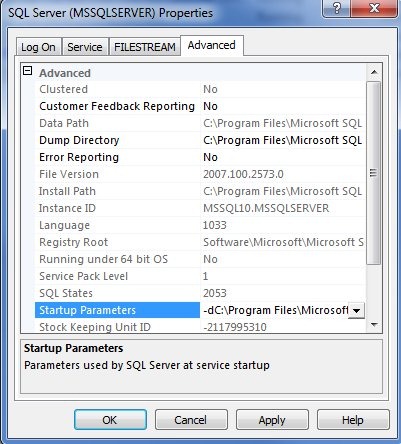
    You can also change startup parameters here, on the Advanced tab.

    serviceaccount9

    That’s it, it’s easy, and it’s how you should change the service account for SQL Server.

  • Working with SQL Server Third Party Vendors

    I ran across Denny Cherry’s (@MrDenny) blog on Fixing Vendor Performance Problems in which he outlines three methods of dealing with the. His list is basically

    1. Work with the vendor
    2. Do nothing
    3. Fix it yourself

    Denny recommends that you do #3, and add indexes, statistics, etc., and script them so that you can drop them if the vendor needs to access the database, and add them back afterwards. This is done to avoid voiding a service contract.

    I’ve done that in the past, but I try to avoid it. My first inclination is always to choose #1. I have had great success with this in the past, with a number of vendors, and it’s the item I recommend. Try to work within the system and make change, rather than just go "cowboy” right away and make the changes you think need to be made. I’ll give you the how and why I recommend this.

    How

    How do you get the vendor to make changes? The same way you get the best support you can from a vendor: you have a logical and rational discussion, explaining your thoughts with backing documentation.

    I have had vendors insist that the “sa” login was needed, and avoided it. I have fixed performance problems by getting vendors to add and drop indexes. I have convinced vendors that they application could run, and be supported, on an instance with other databases.

    All of this has been done with tracing the calls, analyzing performance, and then explaining where I saw issues with the vendor’s application. lt wasn’t done to prove I’m right, it wasn’t done to tell the vendor their code was sh*t, It was always done with me in the middle, along with the support person, between my boss, and their boss.

    Talk to the vendor like he’s a friend coding in the next office, and he’s doing his best, but perhaps doesn’t understand why something isn’t working well. Give them supporting documentation, show them execution plans, show them before and after views on test systems, give them reasons why a chance is needed. Even offer to be a guinea pig for the tests. I’ve done that before, and we convinced a vendor that they didn’t need to index every column in a few tables based on six months of evidence from our system.

    If they argue with them, perhaps they have good reasons. Get them to prove to you that they have logic and evidence on their side. They might, but if they don’t, then you ask to talk to their manager, or their development lead, and work through the argument there. Most vendors don’t want crappy performance, but as Denny mentioned, they often just don’t have expertise.

    Work with them, not against them.

    Why

    Why should you spend time educating and teaching the vendor about SQL Server performance? Obviously you want to maintain your support contract status. There’s nothing worse than violating this and then having a problem that doesn’t get supported. That’s an ugly conversation to have with your boss.

    You also don’t want issues with upgrades. I have seen more than a few problems with upgrades because someone “touched” the system. Make sure that you not only document the changes, but get the vendor to document them in your account. They might even work with you on upgrade scripts.

    Lastly, you want to be right. There are plenty of people out there that make mistakes, or make a decision based on an incomplete picture. You might be sure that an index is needed for this query that runs every day, but maybe the vendor tested it and found a better index, or they found it caused worse performance for some other queries. Maybe you’re misreading the evidence yourself.

    If you are forced to explain yourself, and can do so in a way to convince someone else, you should have more confidence that you are making the correct decision.

    Plus it gives you something to blog about and put on your resume. Winking smile

  • Not So Unbreakable

    Nothing is unbreakable

    There’s a report on Dark Reading that says some researchers think Oracle is not working on security as hard as they should. The proportion of security fixes has diminished, which some people think implies that they are not taking security as seriously as they should. The window of time between the disclosure and the patch has grown wider, which is troubling, especially when newer software displays vulnerabilities.

    I’ve been proud to work on SQL Server over the last 6 years from a security perspective as there have been very few security patches issued, and correspondingly, few vulnerabilities disclosed. It’s possible Microsoft has muzzled some researchers, but I doubt it. I would guess that if any serious security issues existed in SLQ Server 2005, 2008, or R2, we’d have heard about them. I think the security engineering process that is used for SQL Server has truly resulted in more secure software.

    It’s possible that Oracle faces a resource issue with all their acquisitions, but for a billion dollar company that employs over 100,000 people, they shouldn’t be having resource issues with their development process. It’s a question of accepting greater development costs in order to ensure their software is secure.

    This is one area where we ought to have independent security researchers that can discuss, debate, and disclose vulnerabilities, after a limited amount of time. That would help us at least understand the security risks we face, and perhaps pressure companies to build better software.

    Steve Jones


    The Voice of the DBA Podcasts

  • Sharing Your Database Server

    Is it time for a little more sharing in the database world?

    Some of the details for SQL Server 2012 are out now, and as expected, we have feature limitations in various editions. I was hoping for a change, and maybe it will come at some point in the future. I did expect there to be scale limitations and there are. As noted here, the Standard edition is limited to 64GB of RAM. It wasn’t too long ago that I would have considered that high a RAM limit to mean I’d never need Enterprise Edition, but these days I am finding more and more database servers with 32GB, 64GB, and more RAM inside them.

    The post notes that the buffer pool will not grow beyond 64GB, though it doesn’t mention limits in any of the other memory spaces that SQL Server uses. However assuming that the memory outside of the buffer pools scales, it might be time to think about installing extra instances of SQL Server on a single host if you are licensing by the core. With a commodity server costing under $10k with 6 cores and 96GB of RAM (no HDDs), one could easily consider placing 2-3 SQL Server instances on this hardware with each getting 24+GB of RAM.

    I think that virtualization is the best way to share physical resources, but the changing licenses for SQL Server 2012 might have a few of us rethinking that, especially as we consolidate legacy systems that might happily co-exist on a larger physical server, with smaller data sets, lower hardware requirements, and a cheaper edition of SQL Server.

    Steve Jones


    The Voice of the DBA Podcasts