Tag: sql server

  • Common SQL Server Mistakes – Functions in the WHERE Clause

    This continues my series on Common SQL Server mistakes, looking at more T-SQL mistakes.

    What’s Wrong?

    If you saw a query like this, would you see a problem?

    select
      o.OrderID
      , o.CustomerID
      , o.Qty
    from Orders o
    where datepart( yyyy, o.OrderDate) = '2010'

    If there are 1,000 orders in this table, there probably isn’t an issue. But if there are 1,000,000, then this is an issue.

    Why? Let’s examine the execution plan:

    This table has 1000 rows in it, but it doesn’t use indexing to find those orders that were placed in 2010. Instead it scans all rows. The reason is that the function being used in the WHERE clause means that the index cannot be used.

    Instead, what you would want to do is write the query like this:

    select
      o.OrderID
      , o.*
      , o.Qty
    from [OrderItems] o
    where o.OrderDate >= '20100101'

    In this way, we eliminate the function from the WHERE clause and allow the query optimizer to take advantage of the indexes on the column OrderDate.

    You see similar issues with queries like:

    select
    lastname
    from Person.Contact
    where left(Lastname, 1) = 'S'

    This can be fixed as:

    select
    lastname
    from Person.Contact
    where Lastname like 'S%'

    Basically you want to move the function away from the column and put it on the other side of the comparison so that indexes can be used.

    Too often we have developers writing queries like this, assuming that the functions are efficient. They are, but when they are executed against every row in a table, an index can’t be used for seek operations, which are always quicker than scans for any significant data set.

    When you are writing queries, do your best to avoid functions against columns in your tables. Instead try to rework the query to move the function. An alternative that I’ll blog about another time is computed columns.
  • The SQL Rally Pre Conference Seminars

    There’s a change in how pre-conference seminars are being picked for the SQL Rally event next year in Orlando, FL. You, as the people that may attend, are getting the chance to vote on which sessions you’d like to see.
    Vote Here
    You get to pick from seminars in various categories, voting once for each session. The descriptions of the sessions are here:
    BI Sessions: http://www.sqlpass.org/sqlrally/2011/PreConsforVotingBI.aspx
    DBA Sessions: http://www.sqlpass.org/sqlrally/2011/PreConsforVotingDba.aspx
    Developer Sessions: http://www.sqlpass.org/sqlrally/2011/PreConsforVotingDev.aspx
    Misc Sessions: http://www.sqlpass.org/sqlrally/2011/PreConsforVotingMisc.aspx

    I have a session submitted for the Misc area, which is Finding Your Dream Job, a combination of my Modern Resume work and Chris Shaw’s various presentations on getting a new job. We decided that a half day would be a good way for us to give you practical advice on ways to get a better job, or just a job.

    Whether you vote for us or not, I think this is a great way to get community feedback. I’ve been suspect that PASS has any idea what people want to see, relying on previous year’s limited data. This at least allows the community to have a say in what gets picked.

    I would prefer that voting results were tabulated immediately so we could see what the response is. Based on my experiences, I’m slightly concerned that the community will be over-ridden if PASS thinks something will sell better.

    Also, consider attending the SQL Rally in Orlando next May, especially if you find that the price of the Summit is too high. At an estimated $300 to attend, even with a hotel and some travel, you could get a tremendous amount of SQL training and networking for around $1000. And to me, this is way more valuable than sitting in a classroom for 5 days. Think about it, this could be a great investment in your career.

  • SQL Server 2008 – CDC Retention

    I had done a little work with CDC last year, experimenting with the way that it handles changes in your database. Someone had asked me the question about the retention period since the default of 3 days was not sufficient for their environment.

    BOL lists the default retention period as three days, and this is based on a cleanup job that goes through and removes data from the tables. However you can alter that with a stored procedure: sys.sp_cdc_change_job.

    There are a number of parameters for this procedure, most dealing with managing the load of the cdc jobs. You can alter the cleanup or capture jobs with this, but for the retention period, you want to change the cleanup job.

    @retention is the parameter that indicates the number of minutes that change rows are going to be retained in the CDC tables. If you pass in a NULL, the old retention period is retained. You can include the number of minutes you’d like, up to 52494800 (100 years). I would recommend you choose something less.

    The other thing to be aware of is that you have various intervals that are set, and also a @threshold, which determines how many rows are deleted on each scan. If you limit the cleanup to something less than continuously operating, then be aware that if @threshold is too low, it might not delete all the rows. If you are changing these values to manage the load of deletions, be sure that you are monitoring how many rows are changing as it might grow over time.

  • SQL Slammer

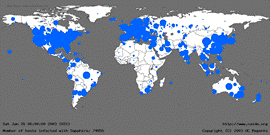
    Seven years ago I was in the mountains of Colorado, taking advantage of the a school break to get away for a long weekend. There wasn’t good cell phone coverage up there, and I was surprised as we drove back Sunday evening with a voice mail indicator on my phone. I dialed in and found a message from work to call ASAP. SQL Slammer had struck.

    I wasn’t expecting to get back to work so soon, but as soon as I got kids out of the car and into bed, I headed into work to deal with the issues. A crisis team was assembled, with the other production DBA already having spent much of Sunday at work. We worked late into the night, patching servers and trying to eradicate the worm.

    However we had literally thousands of infected MSDE instances that had been installed with custom paths and the patch Microsoft had released would not fix them. We had an engineer fly out from Seattle and help work through the issues, finding workarounds and understanding our environment. A combination of creativity and scripting allowed us to finally develop a solution late Monday night that we deployed into the wee hours of Tuesday morning.

    That was seven years ago and it was a memorable time for me. I had thought that the Slammer worm was dead, but apparently that’s not the case. Traces are still detected at times and this month the SANS Institute is trying to work with ISPs and companies to eradicate the worm once and for all. They are asking system administrators to spread the word and help them try and remove SQL Slammer as a threat. They are not confident that they’ll succeed, but I think it’s worth a try.

    I’m sure many of you encountered the Slammer worm if you were working with SQL Server at that time. Any great memories? Any stories to share? Let us know in the discussion below and if you can help eradicate the worm, make sure you pass the word to the administrators of SQL Server 2000 instances.